Time Series (multi-snapshot analysis)
This page is also an executable Jupyter notebook: open / download timeseries.ipynb. The notebooks run end-to-end and double as part of Mera's test suite.
Most post-processing is not about one snapshot, it is about evolution: how a mass, a peak density, a star-formation rate, or a profile changes across the outputs of a run. Writing that loop by hand (find the outputs, load each one, handle a missing snapshot, collect the numbers, keep memory under control) is boilerplate everyone re-implements.
timeseries turns it into a single call: you give it a reducer, a function that maps one loaded snapshot to a scalar or a NamedTuple, and it returns one tidy table with a row per output.
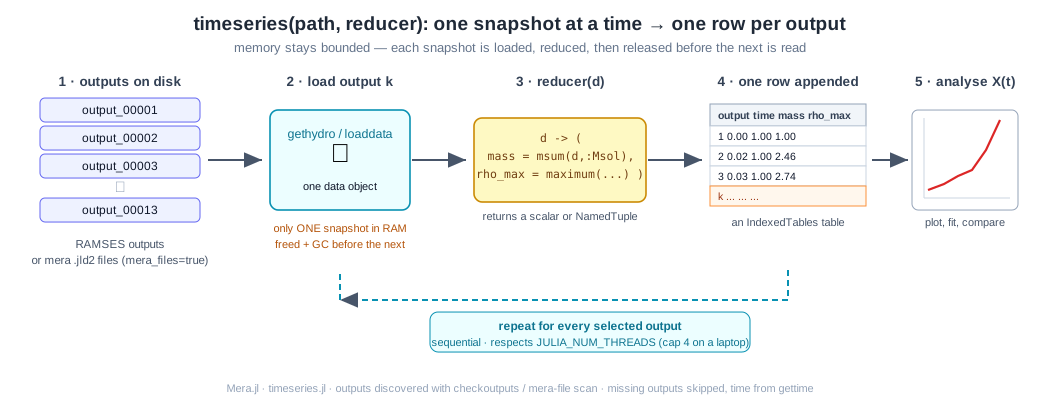
It works identically on raw RAMSES outputs and on mera (.jld2) files, and it loads one snapshot at a time, each is reduced and released before the next is read, so peak memory stays bounded on a laptop.
The idea, step by step
- Discover the outputs in
path(viacheckoutputsfor RAMSES, or a scan ofoutput_*.jld2for mera files). Select all of them, a range, or an explicit list. - Load output k,
gethydrofor RAMSES,loaddatafor mera files. Only this one snapshot is in memory. - Reduce it: your
reducer(d)returns the quantities you care about. - Append a row
(output, time, …your fields…)to the result table; free the snapshot. - Analyse the resulting table, plot, fit, compare.
# Example-data root. Point this at your own simulation folder, or set the
# MERA_EXAMPLES environment variable; every path below is built from it.
MERA_EXAMPLES = get(ENV, "MERA_EXAMPLES", "/Volumes/FASTStorage/Simulations/Mera-Tests");

using Mera
run  = joinpath(MERA_EXAMPLES, "RAMSES/timeseries_sedov3d")

# discover the outputs available in the run
co = checkoutputs(run)
println("outputs found : ", co.outputs)
*__ __ _______ ______ _______
| |_| | | _ | | _ |
| | ___| | || | |_| |
| | |___| |_||_| |
| | ___| __ | |
| ||_|| | |___| | | | _ |
|_| |_|_______|___| |_|__| |__|
Mera v1.8.0 | Julia 1.12.7 | 4 threads
Outputs - existing: 13 betw. 1:13 - missing: 0
outputs found : [1, 2, 3, 4, 5, 6, 7, 8, 9, 10, 11, 12, 13]A real example: a 3-D Sedov blast
The fixture is a small Sedov point explosion (levelmin=5, levelmax=6, 13 outputs). One call gives the total mass, the peak density, and the AMR cell count at every output:
ts = timeseries(run, d -> (
        mass    = msum(d, :Msol),
        rho_max = maximum(getvar(d, :rho)),
        ncells  = length(d.data),
     ); time_unit = :standard)

println(ts)
timeseries: 13 snapshot(s) from "/Volumes/FASTStorage/Simulations/Mera-Tests/RAMSES/timeseries_sedov3d" (ramses outputs, :hydro)
[1/13] output 00001 t=0.0
[2/13] output 00002 t=0.0168274109063273
[3/13] output 00003 t=0.0334922695630072
[4/13] output 00004 t=0.0502054026812579
[5/13] output 00005 t=0.067001415409705
[6/13] output 00006 t=0.0835998926373125
[7/13] output 00007 t=0.100237444220885
[8/13] output 00008 t=0.117016237218468
[9/13] output 00009 t=0.133806270459172
[10/13] output 00010 t=0.150500035380911
[11/13] output 00011 t=0.167316266875268
[12/13] output 00012 t=0.183733818129636
[13/13] output 00013 t=0.20044896107714
Table with 13 rows, 5 columns:
output time mass rho_max ncells
───────────────────────────────────────────────
1 0.0 6.28425e-35 1.0 32768
2 0.0168274 6.28425e-35 2.46208 81789
3 0.0334923 6.28425e-35 2.73502 125371
4 0.0502054 6.28425e-35 2.89539 169254
5 0.0670014 6.28425e-35 3.03729 200306
6 0.0835999 6.28425e-35 4.53239 223203
7 0.100237 6.28425e-35 5.16768 238827
8 0.117016 6.28425e-35 5.67461 249635
9 0.133806 6.28425e-35 6.15751 255718
10 0.1505 6.28425e-35 6.58408 258070
11 0.167316 6.28425e-35 6.95533 260520
12 0.183734 6.28425e-35 7.26834 261234
13 0.200449 6.28425e-35 18.3208 261969The result is an IndexedTables table, one row per output, with output and time columns added automatically (see Physical time, the default time is in Myr; the dimensionless Sedov sim is shown here in code units).
Plotting those columns against time tells the whole story of the run at a glance:
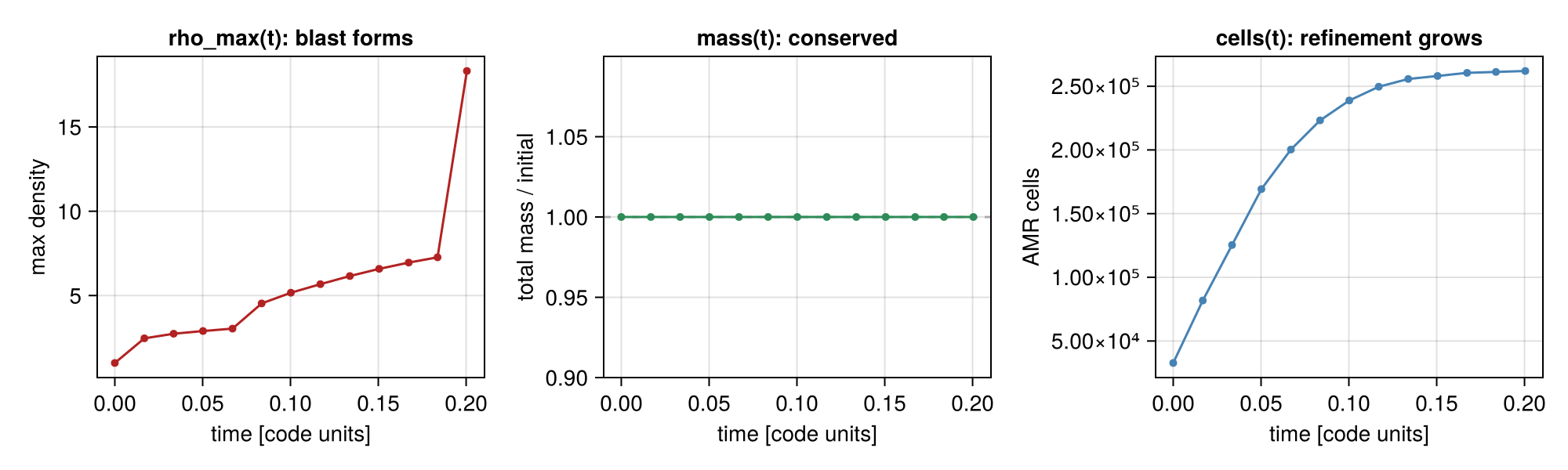
rho_max(t)climbs as the shock steepens, the blast forms.mass(t)is flat: mass is conserved to round-off (the panel shows mass relative to its initial value, pinned at 1.0).ncells(t)grows from 32 768 to ~262 000 as the AMR mesh refines onto the expanding shock, a free diagnostic of how the grid is working.
Each column is a plain vector you can pull out with IndexedTables.columns:
using Mera.IndexedTables: columns

t   = columns(ts).time
rho = columns(ts).rho_max
m   = columns(ts).mass
nc  = columns(ts).ncells

@show t
@show rho
@show extrema(m)            # mass is conserved → flat
@show nc[1], nc[end]        # AMR cell count grows as the shock refines
t = [0.0, 0.0168274109063273, 0.0334922695630072, 0.0502054026812579, 0.067001415409705, 0.0835998926373125, 0.100237444220885, 0.117016237218468, 0.133806270459172, 0.150500035380911, 0.167316266875268, 0.183733818129636, 0.20044896107714]
rho = [1.0, 2.4620841187532374, 2.7350213089012847, 2.8953918239760763, 3.037285921194034, 4.532394520680104, 5.1676847422567995, 5.674611306033254, 6.15750882977664, 6.584083574556392, 6.955331402702706, 7.268339045626411, 18.320822161297333]
extrema(m) = (6.284249157910609e-35, 6.284249157910612e-35)
(nc[1], nc[end]) = (32768, 261969)(32768, 261969)Masking and other Mera functions
The reducer receives the full data object for the snapshot, so anything that operates on a Mera data object composes inside it, there is nothing extra to wire up. That includes getvar, reductions like msum / center_of_mass / bulk_velocity, spatial selections like subregion / shellregion, projection (see below), and masking via the mask= keyword that most reductions accept.
For example, the mass of the dense gas (and its fraction) at every output, a boolean mask built from the snapshot and fed straight to msum:
tsm = timeseries(run, d -> begin
        mask = getvar(d, :rho) .> 3.0
        (m_total = msum(d, :Msol),
         m_dense = msum(d, :Msol, mask = mask),
         f_dense = msum(d, :Msol, mask = mask) / msum(d, :Msol))
     end; time_unit = :standard)

@show columns(tsm).f_dense        # climbs as the shock sweeps up gas
timeseries: 13 snapshot(s) from "/Volumes/FASTStorage/Simulations/Mera-Tests/RAMSES/timeseries_sedov3d" (ramses outputs, :hydro)
[1/13] output 00001 t=0.0
[2/13] output 00002 t=0.0168274109063273
[3/13] output 00003 t=0.0334922695630072
[4/13] output 00004 t=0.0502054026812579
[5/13] output 00005 t=0.067001415409705
[6/13] output 00006 t=0.0835998926373125
[7/13] output 00007 t=0.100237444220885
[8/13] output 00008 t=0.117016237218468
[9/13] output 00009 t=0.133806270459172
[10/13] output 00010 t=0.150500035380911
[11/13] output 00011 t=0.167316266875268
[12/13] output 00012 t=0.183733818129636
[13/13] output 00013 t=0.20044896107714
(columns(tsm)).f_dense = [0.0, 0.0, 0.0, 0.0, 0.0024885796552046873, 0.04568311531952604, 0.140885107600832, 0.27492312592427803, 0.32419613075023884, 0.33554232939318124, 0.34071834186383704, 0.3411209721585522, 0.36393986186171234]13-element Vector{Float64}:
0.0
0.0
0.0
0.0
0.0024885796552046873
0.04568311531952604
0.140885107600832
0.27492312592427803
0.32419613075023884
0.33554232939318124
0.34071834186383704
0.3411209721585522
0.36393986186171234The same pattern covers "mass inside a sphere over time" (subregion(d, :sphere, …) then msum), "centre-of-mass drift" (center_of_mass), kinematics (bulk_velocity), and so on, each is just a one-line reducer.
Watching the blast evolve: projections over time
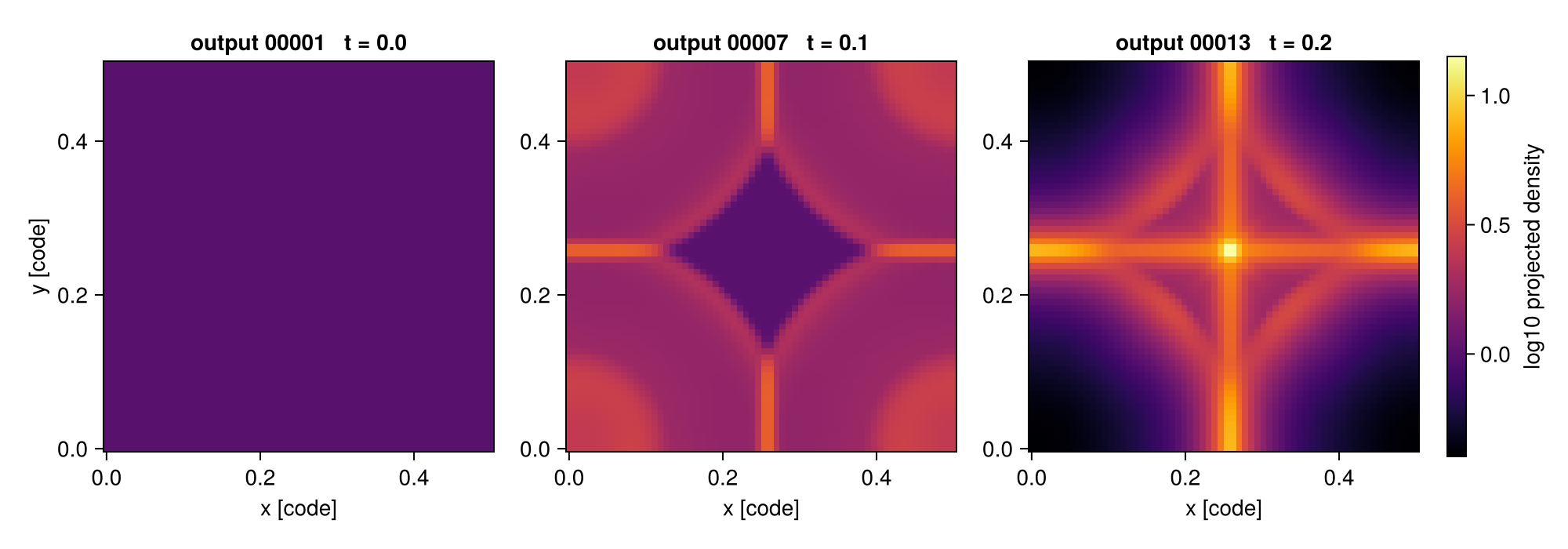
The reducer can return anything, so it can return a projection. This makes a projection a natural per-snapshot reduction: the small 2-D map is kept while the heavy AMR data of that snapshot is freed before the next is read. Reducing each output to its column-density map gives a time-series of maps, the frames of a movie:
movie = timeseries(run,
                   d -> projection(d, :sd, verbose=false).maps[:sd];
                   outputs = [1, 7, 13], time_unit = :standard)

frames = columns(movie).value      # a vector of 2-D maps, one per output
println("number of frames : ", length(frames))
println("frame size       : ", size(frames[1]))
println("peak Sigma/frame : ", round.(maximum.(frames), sigdigits=4))
timeseries: 3 snapshot(s) from "/Volumes/FASTStorage/Simulations/Mera-Tests/RAMSES/timeseries_sedov3d" (ramses outputs, :hydro)
[1/3] output 00001 t=0.0
[2/3] output 00007 t=0.100237444220885
[3/3] output 00013 t=0.20044896107714
number of frames : 3
frame size : (64, 64)
peak Sigma/frame : [0.5, 1.413, 3.343]That stack of maps is what a movie is made of. Two ways to go from here:
- hand it to a
MeraMovieand thensavemovie, which writes the GIF - or skip the loop entirely:
getmoviedoes exactly this reduction for you, with the frame bookkeeping already wired up, and adds camera motion across the series (anglesfor a turn at each snapshot,sweepfor turning as time passes)
timeseries remains the escape hatch for a frame getmovie cannot produce, because the reducer can return anything: a slice, a profile, a scalar. getmovie only makes projections.
Laid side by side, the maps show the shell sweeping outward through the box:
Return a scalar instead when you only need a number per snapshot, for example the peak column density over time, d -> maximum(projection(d, :sd, verbose=false).maps[:sd]).
Physical time and cosmological runs
The time column is physical by default, Myr (from gettime), not code units, so a time-series plots against a meaningful axis straight away. Choose another unit with time_unit (:Gyr, :yr, …), or time_unit = :standard for code units (as the dimensionless Sedov fixture above).
A cosmological run is detected automatically (iscosmological) and gets two extra columns, redshift (z = 1/aexp − 1) and aexp, so you can plot any quantity against redshift directly. The time column then holds the age of the universe in Myr.
Selecting which outputs
outputs takes :all (the default), a range (1:5), or an explicit list ([1, 7, 13]). Numbers that are not present on disk are silently skipped, so a half-finished run or a gap in the output sequence is handled without special-casing.
Keeping memory bounded
timeseries already loads one snapshot at a time and frees it before the next. Two more levers cut the memory of each load, the main thing to reach for on a RAM-limited machine or with large outputs:
tssel = timeseries(run, d -> length(d.data);
                   outputs = 1:5,
                   lmax = 5,
                   xrange = [0.4, 0.6], yrange = [0.4, 0.6], zrange = [0.4, 0.6],
                   time_unit = :standard, verbose = false)

println(tssel)
Table with 5 rows, 3 columns:
output time value
────────────────────────
1 0.0 512
2 0.0168274 512
3 0.0334923 512
4 0.0502054 512
5 0.0670014 512Snapshots are processed sequentially, so the loop never multiplies memory across outputs; the loaders themselves respect JULIA_NUM_THREADS (cap it at 4 on a laptop).
Visualise the evolution
Peak density rises as the blast forms; total mass is conserved (shown relative to its initial value); the AMR cell count grows as refinement tracks the shock.
using CairoMakie

fig = Figure(size = (900, 320))
ax1 = Axis(fig[1,1]; title = "peak density",  xlabel = "time [code]", ylabel = "rho_max")
ax2 = Axis(fig[1,2]; title = "mass / mass[1]", xlabel = "time [code]", ylabel = "M/M0")
ax3 = Axis(fig[1,3]; title = "AMR cells",      xlabel = "time [code]", ylabel = "ncells")
lines!(ax1, t, rho); scatter!(ax1, t, rho)
lines!(ax2, t, m ./ m[1])
lines!(ax3, t, Float64.(nc)); scatter!(ax3, t, Float64.(nc))
fig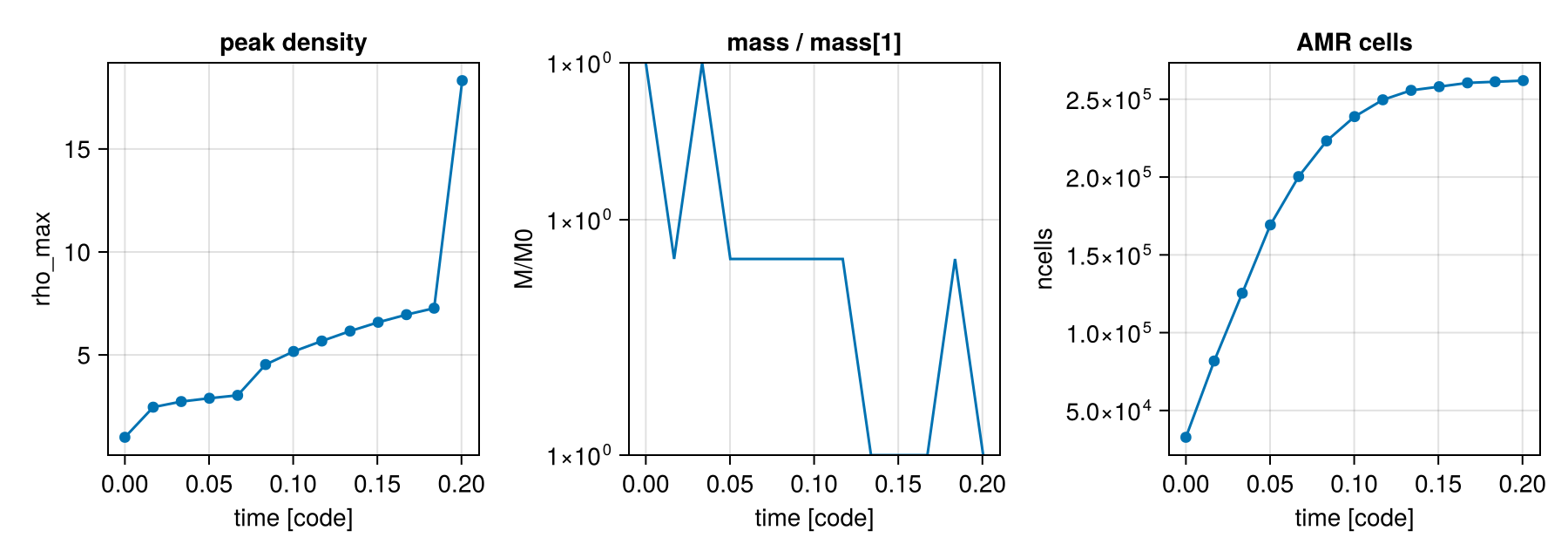
From mera files
If you have converted a run to mera files with savedata, point timeseries at the folder of output_*.jld2 files and set mera_files=true. The reducer and the resulting table are identical, mera files are typically several times smaller and faster to read.
Other data types, gravity, particles, clumps, RT
Set datatype to pick the loader. Radiative-transfer data (:rt) is a first-class type; mera files round-trip RT too (savedata/loaddata support it), so the mera path works the same way. On the Strömgren-sphere test run, the total photon density grows as the source ionizes its surroundings.
For particles or clumps, use datatype=:particles / :clumps and reduce the relevant fields (e.g. d -> length(d.data) for a clump count, or a particle-mass sum).
A custom loader
For full control over how each snapshot is read, specific variables, a different data type, special keywords, pass a loader (info -> data). It overrides the built-in loading, e.g. loader = info -> gethydro(info, [:rho]; lmax = 6).
Options
| keyword | default | meaning |
|---|---|---|
datatype | :hydro | :hydro, :gravity, :particles, :clumps, or :rt |
outputs | :all | :all, a range, or a vector of output numbers |
mera_files | false | read output_*.jld2 mera files instead of RAMSES outputs |
loader | nothing | custom info -> data (overrides datatype/ranges/lmax) |
lmax | info.levelmax | max AMR level to read (hydro/gravity) |
xrange,yrange,zrange,center,range_unit | full box | spatial selection → less RAM |
time_unit | :Myr | unit of the time column, physical by default; :standard for code units (see gettime). Cosmological runs also get redshift/aexp columns |
verbose | true | per-snapshot progress |
notify | false | call notifyme when finished |
See also
checkoutputs, list the outputs available in a run.gethydro,loaddata, the per-snapshot loaders.savedata, convert RAMSES outputs to mera files.gettime, the value in thetimecolumn.