This page is also an executable Jupyter notebook: open / download 01_gravity_First_Inspection.ipynb. The notebooks run end-to-end and double as part of Mera's test suite.
You can assign into info.descriptor.gravity, but nothing reads it: usegravity is set to false when the simulation is read, and the branch that would honour custom names is not active. Use the canonical names; descriptor-driven naming is reserved for a future release.
Package Import and Initial Setup
Let's start by importing Mera.jl and loading simulation information for output 300:
# Example-data root. Point this at your own simulation folder, or set the
# MERA_EXAMPLES environment variable; every path below is built from it.
MERA_EXAMPLES = get(ENV, "MERA_EXAMPLES", "/Volumes/FASTStorage/Simulations/Mera-Tests");

using Mera
info = getinfo(300, "$MERA_EXAMPLES/RAMSES/mw_L10");
*__ __ _______ ______ _______
| |_| | | _ | | _ |
| | ___| | || | |_| |
| | |___| |_||_| |
| | ___| __ | |
| ||_|| | |___| | | | _ |
|_| |_|_______|___| |_|__| |__|
Mera v1.8.0 | Julia 1.12.7 | 8 threads
[Mera]: 2026-10-11T18:52:49.011
Code: RAMSES
output [300] summary:
mtime: 2023-04-09T05:34:09
ctime: 2025-06-21T18:31:24.020
=======================================================
simulation time: 445.89 [Myr]
boxlen: 48.0 [kpc]
ncpu: 640
ndim: 3
cosmological: false
-------------------------------------------------------
amr: true
level(s): 6 - 10 --> cellsize(s): 750.0 [pc] - 46.88 [pc]
-------------------------------------------------------
hydro: true
hydro-variables: 7 --> (:rho, :vx, :vy, :vz, :p, :scalar_00, :scalar_01)
hydro-descriptor: (:density, :velocity_x, :velocity_y, :velocity_z, :pressure, :scalar_00, :scalar_01)
γ: 1.6667
-------------------------------------------------------
gravity: true
gravity-variables: (:epot, :ax, :ay, :az)
-------------------------------------------------------
particles: true
- Nstars: 5.445150e+05
particle-variables: 7 --> (:vx, :vy, :vz, :mass, :family, :tag, :birth)
particle-descriptor: (:position_x, :position_y, :position_z, :velocity_x, :velocity_y, :velocity_z, :mass, :identity, :levelp, :family, :tag, :birth_time)
-------------------------------------------------------
rt: false
clumps: false
-------------------------------------------------------
namelist-file: ("&COOLING_PARAMS", "&SF_PARAMS", "&AMR_PARAMS", "&BOUNDARY_PARAMS", "&OUTPUT_PARAMS", "&POISSON_PARAMS", "&RUN_PARAMS", "&FEEDBACK_PARAMS", "&HYDRO_PARAMS", "&INIT_PARAMS", "&REFINE_PARAMS")
-------------------------------------------------------
boundaries: not periodic (&BOUNDARY_PARAMS closes x, y, z)
timer-file: true
compilation-file: false
makefile: true
patchfile: true
=======================================================Understanding Gravity Properties
The output above provides a comprehensive overview of the loaded gravity data properties:
- Gravity files status - Confirms existence and accessibility of gravity data files
- Variable count - Shows the number of predefined and available gravity variables
- Variable names - Lists the gravity variable names from the RAMSES descriptor file
- Data organization - Reveals how the gravity data is structured and stored
Variable Names and Descriptors
Predefined Variable Names: Mera.jl recognizes standard gravity variable names such as :epot, :ax, :ay, :az. These provide a consistent interface for accessing gravitational field quantities across different simulations.
Core Variables:
:epot- Gravitational potential field (φ):ax,:ay,:az- Gravitational acceleration components
Custom Variable Descriptors: In future versions, you will be able to use variable names directly from the gravity descriptor by setting info.descriptor.usegravity = true. Currently, you can customize variable names by modifying the descriptor array manually.
Let's examine the current gravity descriptor configuration:
info.descriptor.gravity4-element Vector{Symbol}:
:epot
:ax
:ay
:azCustomizing Variable Names
You can modify variable names in the descriptor to better match your simulation setup or personal preferences. For example, changing the second gravity variable to a more descriptive name:
info.descriptor.gravity4-element Vector{Symbol}:
:epot
:ax
:ay
:azExploring Descriptor Properties
Let's examine the complete structure of the descriptor object to understand all available configuration options:
viewfields(info.descriptor)[Mera]: Descriptor overview
=================================
hversion = 1
hydro = [:density, :velocity_x, :velocity_y, :velocity_z, :pressure, :scalar_00, :scalar_01]
htypes = ["d", "d", "d", "d", "d", "d", "d"]
usehydro = false
hydrofile = true
pversion = 1
particles = [:position_x, :position_y, :position_z, :velocity_x, :velocity_y, :velocity_z, :mass, :identity, :levelp, :family, :tag, :birth_time]
ptypes = ["d", "d", "d", "d", "d", "d", "d", "i", "i", "b", "b", "d"]
useparticles = false
particlesfile = true
gravity = [:epot, :ax, :ay, :az]
usegravity = false
gravityfile = false
rtversion = 0
rt = Dict{Any, Any}()
rtPhotonGroups = Dict{Any, Any}()
usert = false
rtfile = false
clumps = Symbol[]
useclumps = false
clumpsfile = false
sinks = Symbol[]
usesinks = false
sinksfile = falseFor a simple list of all available descriptor fields:
propertynames(info.descriptor)(:hversion, :hydro, :htypes, :usehydro, :hydrofile, :pversion, :particles, :ptypes, :useparticles, :particlesfile, :gravity, :usegravity, :gravityfile, :rtversion, :rt, :rtPhotonGroups, :usert, :rtfile, :clumps, :useclumps, :clumpsfile, :sinks, :usesinks, :sinksfile)Loading Gravity Data
Now that we understand our simulation's structure and variable organization, let's load the actual gravitational field data. We'll use Mera's powerful data loading capabilities to read both the gravity field components and their associated AMR grid structure.
Data Loading Overview
The getgravity() function is the primary tool for loading gravitational field data from RAMSES simulations. It provides extensive options for:
- Variable selection - Choose specific gravity quantities (potential, acceleration components)
- Spatial filtering - Focus on regions of interest
- AMR level control - Select refinement levels
- Physical constraints - Set minimum values for AMR cells
Resetting Simulation Information
First, let's reload the simulation information to reset any changes we made to the descriptor:
info = getinfo(300, "$MERA_EXAMPLES/RAMSES/mw_L10", verbose=false); # here, used to overwrite the previous changesLoading Complete Gravity Dataset
Now let's load the AMR and gravity data from all files. This will read:
- Full simulation box - All spatial regions
- All gravity variables - Gravitational potential and acceleration components
- All AMR levels - Complete refinement hierarchy
- Cell positions - Only leaf cells (actual data cells, not parent cells)
grav = getgravity(info);[Mera]: Get gravity data: 2026-10-11T18:52:53.532
Key vars=(:level, :cx, :cy, :cz)
Using var(s)=(1, 2, 3, 4) = (:epot, :ax, :ay, :az)
domain:
xmin::xmax: 0.0 :: 1.0 ==> 0.0 [kpc] :: 48.0 [kpc]
ymin::ymax: 0.0 :: 1.0 ==> 0.0 [kpc] :: 48.0 [kpc]
zmin::zmax: 0.0 :: 1.0 ==> 0.0 [kpc] :: 48.0 [kpc]
📊 Processing Configuration:
Total CPU files available: 640
Files to be processed: 640
Compute threads: 8
GC threads: 8
Processing files: 100%|██████████████████████████████████████████████████| Time: 0:00:14 (22.72 ms/it)
✓ File processing complete! Combining results...
✓ Data combination complete!
Final data size: 28320979 cells, 4 variables
Creating Table from 28320979 cells with max 8 threads...
Threading: 8 threads for 8 columns
Max threads requested: 8
Available threads: 8
Using parallel processing with 8 threads
Creating IndexedTable with 8 columns...
✓ Table created in 4.3 seconds
Memory used for data table :1.6880627572536469 GB
-------------------------------------------------------Memory Usage Analysis
The memory consumption of the loaded data is displayed automatically. For detailed memory analysis of any object, Mera.jl provides the usedmemory() function:
usedmemory(grav);Memory used: 1.688 GBUnderstanding Data Types
The loaded data object is now of type GravDataType, which is specifically designed for gravitational field simulation data:
typeof(grav)GravDataTypeType Hierarchy
GravDataType is part of a well-organized type hierarchy. It's a sub-type of DataSetType:
# Which in turn is a subtype of the general `DataSetType`.
supertype( GravDataType )
DataSetType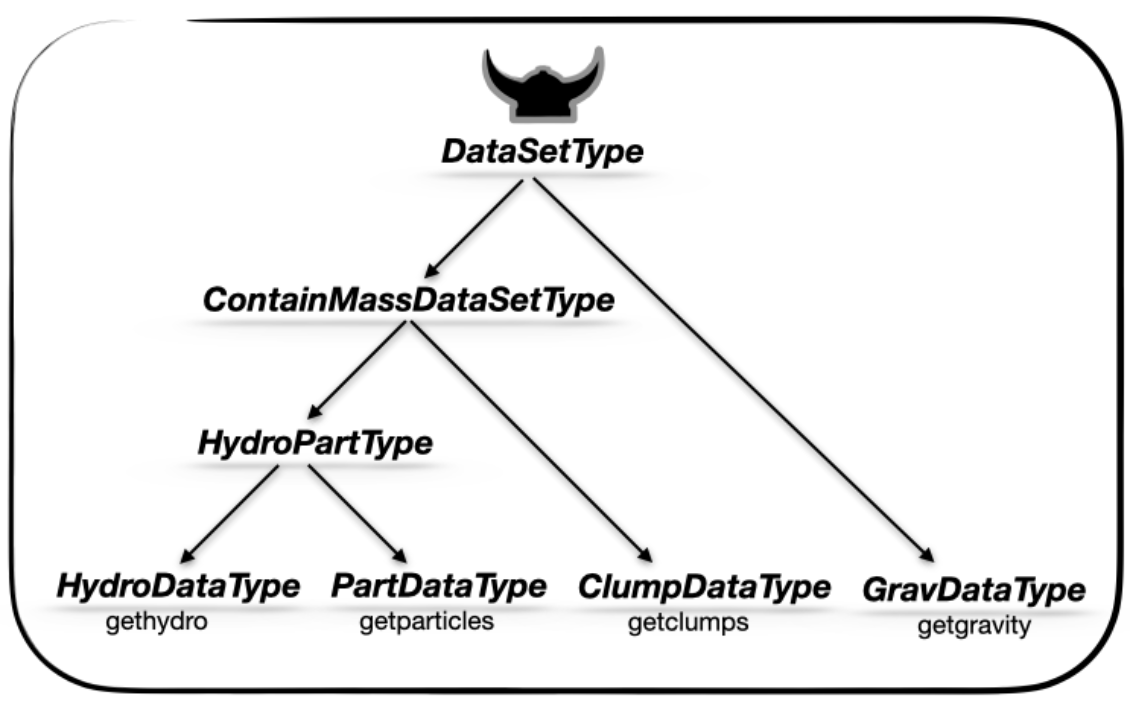
Data Organization and Structure
The gravity data is stored in an IndexedTables table format, with user-selected variables and parameters organized into accessible fields. Let's explore the structure:
viewfields(grav)data ==> IndexedTables: (:level, :cx, :cy, :cz, :epot, :ax, :ay, :az)
info ==> subfields: (:output, :path, :fnames, :simcode, :mtime, :ctime, :ncpu, :ndim, :levelmin, :levelmax, :boxlen, :time, :aexp, :H0, :omega_m, :omega_l, :omega_k, :omega_b, :unit_l, :unit_d, :unit_m, :unit_v, :unit_t, :gamma, :hydro, :nvarh, :nvarp, :nvarrt, :variable_list, :gravity_variable_list, :particles_variable_list, :rt_variable_list, :clumps_variable_list, :sinks_variable_list, :descriptor, :amr, :gravity, :particles, :rt, :clumps, :sinks, :namelist, :namelist_content, :boundaries, :headerfile, :makefile, :files_content, :timerfile, :compilationfile, :patchfile, :Narraysize, :scale, :grid_info, :part_info, :compilation, :constants)
lmin = 6
lmax = 10
boxlen = 48.0
ranges = [0.0, 1.0, 0.0, 1.0, 0.0, 1.0]
selected_gravvars = [1, 2, 3, 4]
scale ==> subfields: (:Mpc, :kpc, :pc, :mpc, :ly, :Au, :km, :m, :cm, :mm, :μm, :Mpc3, :kpc3, :pc3, :mpc3, :ly3, :Au3, :km3, :m3, :cm3, :mm3, :μm3, :Msol_pc3, :Msun_pc3, :g_cm3, :Msol_pc2, :Msun_pc2, :g_cm2, :Gyr, :Myr, :yr, :s, :ms, :Msol, :Msun, :Mearth, :Mjupiter, :g, :km_s, :m_s, :cm_s, :nH, :erg, :g_cms2, :T_mu, :K_mu, :T, :K, :Ba, :g_cm_s2, :p_kB, :K_cm3, :erg_g_K, :keV_cm2, :erg_K, :J_K, :erg_cm3_K, :J_m3_K, :kB_per_particle, :J_s, :g_cm2_s, :kg_m2_s, :Gauss, :muG, :microG, :nG, :Tesla, :eV, :keV, :MeV, :erg_s, :Lsol, :Lsun, :cm_3, :pc_3, :n_e, :erg_g_s, :erg_cm3_s, :erg_cm2_s, :Jy, :mJy, :microJy, :atoms_cm2, :NH_cm2, :cm_s2, :m_s2, :km_s2, :pc_Myr2, :erg_g, :J_kg, :km2_s2, :u_grav, :erg_cell, :dyne, :s_2, :lambda_J, :M_J, :t_ff, :alpha_vir, :delta_rho, :a_mag, :v_esc, :ax, :ay, :az, :epot, :a_magnitude, :escape_speed, :gravitational_redshift, :gravitational_energy_density, :gravitational_binding_energy, :total_binding_energy, :specific_gravitational_energy, :gravitational_work, :jeans_length_gravity, :jeans_mass_gravity, :jeansmass, :freefall_time_gravity, :ekin, :etherm, :virial_parameter_local, :Fg, :poisson_source, :ar_cylinder, :aϕ_cylinder, :ar_sphere, :aθ_sphere, :aϕ_sphere, :r_cylinder, :r_sphere, :ϕ, :dimensionless, :rad, :deg)Convenient Data Access
For convenience, all fields from the original InfoType object are now accessible through:
grav.info- All simulation metadata and parametersgrav.scale- Scaling relations for converting from code units to physical units
The data object also retains important structural information:
- Minimum and maximum AMR levels of the loaded data
- Box dimensions and coordinate ranges
- Selected spatial regions and filtering parameters
- Number and properties of loaded gravity variables
Quick Field Reference
For a simple list of all available fields in the gravity data object:
propertynames(grav)(:data, :info, :lmin, :lmax, :boxlen, :ranges, :selected_gravvars, :used_descriptors, :scale)Data Analysis and Exploration
Now that we have loaded our gravity data, let's explore its structure and properties in detail. This section demonstrates the key analysis functions available in Mera.jl.
Analysis Overview
We'll cover two main types of analysis:
AMR Structure Analysis - Understanding the adaptive mesh refinement hierarchy and how gravitational fields are organized across refinement levels, analyzing spatial distribution of field data
Statistical Data Overview - Computing basic statistical properties of gravity variables, understanding potential and acceleration field distributions, ranges, and assessing data quality
AMR Grid Structure Analysis
The amroverview() function provides detailed information about the adaptive mesh refinement structure associated with our gravity data. The analysis includes:
- Level distribution - Number of cells at each refinement level
The results are returned as an IndexedTables table in code units, ready for further analysis:
overview_amr = amroverview(grav)Counting...Table with 5 rows, 3 columns:
level cells cellsize
─────────────────────────
6 66568 0.75
7 374908 0.375
8 7806793 0.1875
9 12774134 0.09375
10 7298576 0.046875Statistical Data Analysis
The dataoverview() function computes comprehensive statistics for all gravity variables in our dataset. This analysis provides:
- Variable ranges - Minimum and maximum values for gravitational potential and acceleration components
The calculated information is stored in code units and can be accessed for further analysis:
data_overview = dataoverview(grav)Calculating...
100%|███████████████████████████████████████████████████| Time: 0:00:01Table with 5 rows, 10 columns:
Columns:
# colname type
──────────────────
1 level Any
2 epot_tot Any
3 epot_min Any
4 epot_max Any
5 ax_min Any
6 ax_max Any
7 ay_min Any
8 ay_max Any
9 az_min Any
10 az_max AnyWorking with IndexedTables
When dealing with tables containing many columns, only a summary view is typically displayed. To access specific columns, use the select() function.
Important Notes:
- Column names are specified as quoted Symbols (
:column_name) - For more details, see the Julia documentation on Symbols
- The
select()function maintains data order and relationships
Let's select specific columns to examine level-wise potential statistics:
using Mera.IndexedTables # to import the IndexedTables package, which is a dependency of Meraselect(data_overview, (:level,:epot_tot, :epot_min, :epot_max ) )Table with 5 rows, 4 columns:
level epot_tot epot_min epot_max
─────────────────────────────────────
6 -4.46879e5 -7.5772 -5.06198
7 -2.97079e6 -8.43633 -7.27503
8 -7.9972e7 -14.0409 -8.30247
9 -2.09078e8 -27.8305 -10.8174
10 -1.71589e8 -47.3515 -13.0157Single column Extraction Example
Extract total potential data from a specific column. The column() function retrieves data from a specific table column, maintaining the order consistent with the table structure:
column(data_overview, :epot_tot)5-element Vector{Any}:
-446879.07703611196
-2.9707858909494937e6
-7.997204741184205e7
-2.0907775559476885e8
-1.715889512824658e8Data Structure Deep Dive
Now let's examine the detailed structure of our gravity data. Understanding this organization is crucial for effective data manipulation and analysis.
IndexedTables Storage Format
The gravity data is stored in grav.data as an IndexedTables table (in code units), which provides several key advantages:
- Row-based organization: Each row represents a single cell in the simulation
- Column-based access: Each column represents a specific gravitational field property
- Efficient operations: Built-in support for filtering, mapping, and aggregation
- Memory efficiency: Optimized storage and access patterns for gravitational field data
- Functional interface: Clean, composable operations for data manipulation
For comprehensive information on working with this data structure:
- Mera.jl documentation and tutorials
- JuliaDB API Reference
- IndexedTables.jl documentation
Understanding the Data Layout
The table structure reflects the AMR grid organization:
Spatial Coordinates
- Integer cell positions (cx, cy, cz) form a uniform 3D array within each refinement level
- Level-specific ranges: Each refinement level has its own coordinate system
- Level 8: coordinates range from 1-256
- Level 14: coordinates range from 1-16384
- Sparse occupancy: Not all coordinate positions exist due to adaptive refinement
Critical Data Integrity Notes
- Coordinate preservation: The integers cx, cy, cz are essential for grid reconstruction
- Do not modify: These coordinates maintain the AMR spatial relationships
- Unique identifiers: Each (level, cx, cy, cz) combination uniquely identifies a cell
Let's examine the complete data table:
grav.dataTable with 28320979 rows, 8 columns:
level cx cy cz epot ax ay az
───────────────────────────────────────────────────────────────────
6 1 1 1 -0.105458 0.0713717 0.0713739 0.0714421
6 1 1 2 -0.106574 0.0736603 0.0736626 0.071396
6 1 1 3 -0.107689 0.0759945 0.0759969 0.0712471
6 1 1 4 -0.1088 0.0783709 0.0783733 0.0709879
6 1 1 5 -0.109906 0.0807857 0.0807883 0.0706111
6 1 1 6 -0.111006 0.0832346 0.0832372 0.0701094
6 1 1 7 -0.112097 0.0857126 0.0857152 0.0694754
6 1 1 8 -0.113176 0.0882139 0.0882167 0.068702
6 1 1 9 -0.114243 0.0907326 0.0907354 0.0677824
6 1 1 10 -0.115294 0.0932614 0.0932643 0.0667098
6 1 1 11 -0.116327 0.095793 0.095796 0.0654782
6 1 1 12 -0.117339 0.0983188 0.0983218 0.064082
⋮
10 814 493 514 -0.28418 -0.734355 0.0468811 -0.00847598
10 814 494 509 -0.284171 -0.733368 0.0443188 0.0287892
10 814 494 510 -0.284196 -0.73424 0.0441712 0.0222774
10 814 494 511 -0.284214 -0.734832 0.0441283 0.0151562
10 814 494 512 -0.284225 -0.735242 0.0440921 0.00732157
10 814 494 513 -0.284228 -0.73512 0.0441534 -0.000562456
10 814 494 514 -0.284224 -0.734709 0.0442907 -0.00837105
10 814 495 511 -0.284256 -0.735055 0.0415764 0.0151266
10 814 495 512 -0.284267 -0.73541 0.0415465 0.00732422
10 814 496 511 -0.284295 -0.735248 0.0390693 0.0150688
10 814 496 512 -0.284306 -0.735572 0.0390361 0.00736339Focused Data Examination
For a more detailed view of specific columns, we can select key fields to understand the gravity data organization better:
select(grav.data, (:level,:cx, :cy, :cz, :epot) )Table with 28320979 rows, 5 columns:
level cx cy cz epot
───────────────────────────────
6 1 1 1 -0.105458
6 1 1 2 -0.106574
6 1 1 3 -0.107689
6 1 1 4 -0.1088
6 1 1 5 -0.109906
6 1 1 6 -0.111006
6 1 1 7 -0.112097
6 1 1 8 -0.113176
6 1 1 9 -0.114243
6 1 1 10 -0.115294
6 1 1 11 -0.116327
6 1 1 12 -0.117339
⋮
10 814 493 514 -0.28418
10 814 494 509 -0.284171
10 814 494 510 -0.284196
10 814 494 511 -0.284214
10 814 494 512 -0.284225
10 814 494 513 -0.284228
10 814 494 514 -0.284224
10 814 495 511 -0.284256
10 814 495 512 -0.284267
10 814 496 511 -0.284295
10 814 496 512 -0.284306Derived quantities: what gravity alone can tell you
The stored columns are the potential and the three acceleration components. From those, getvar derives the acceleration in cylindrical and spherical components, and their magnitudes.
Everything measured about an axis or a centre depends on center, exactly as the velocity components do. Pass the same centre you use elsewhere in the analysis.
ctr = :bc                       # a bare symbol works; [:bc] does too                     # box centre; use the object's centre for a real galaxy

using Printf
for q in (:a_magnitude, :a_magnitude_cylinder,
          :ar_cylinder, :aphi_cylinder,
          :ar_sphere, :atheta_sphere, :aphi_sphere)
    v = getvar(grav, q, :cm_s2, center=ctr)
    @printf("%-24s %10.3e .. %10.3e  cm/s^2\n", q, minimum(v), maximum(v))
end
a_magnitude 1.723e-09 .. 1.251e-07 cm/s^2
a_magnitude_cylinder 2.757e-11 .. 9.097e-08 cm/s^2
ar_cylinder -9.097e-08 .. -2.757e-11 cm/s^2
aphi_cylinder -3.811e-09 .. 4.831e-09 cm/s^2
ar_sphere -1.251e-07 .. -1.723e-09 cm/s^2
atheta_sphere -4.505e-08 .. 4.000e-08 cm/s^2
aphi_sphere -3.811e-09 .. 4.831e-09 cm/s^2Energy and force: these need the hydro object
A potential is energy per unit mass and an acceleration is force per unit mass. To get an energy or a force you need the mass of the cell, and the mass lives on the hydro object, not the gravity one.
One thing to be clear about before using the numbers: :epot is the total potential. RAMSES solves Poisson once, for all the mass on the grid, so it contains the gas, the particles and the sinks. This run has gravity_type = -3: self-gravity plus an analytic density for the external halo, added to the Poisson source. So the halo is part of the potential too:
info.namelist_content["&POISSON_PARAMS"]["gravity_type"]A run with an analytic external force instead (gravity_type > 0) adds that force to the acceleration only, so the potential does not contain it. The Computation Reference lists every case.
So m * phi is the energy of that cell's gas in the total field. Summing it over cells does not give the system's gravitational self-energy. That is W = (1/2) * integral of rho * phi. The factor 1/2 is needed because each pair of mass elements would otherwise be counted twice, and the sum here also leaves out the particles' own binding.
So these quantities take both objects. Either order works, gravity first or hydro first:
getvar(grav, gas, :Fg, :dyne) # `grav` and `gas` are the objects this page loadsCalled on gravity alone they raise an error that names the fix, rather than guessing a mass.
If you work on a subregion, cut both objects with the same region. The mass comes from the hydro object, so the boundary cells that count are the hydro ones:
gas = gethydro(info, verbose=false, show_progress=false)   # loaded in the cell below too
R   = sphere(10.)
gs  = subregion(grav, R)
hs  = subregion(gas,  R)         # the same region, so the same boundary cells
getvar(gs, hs, :total_binding_energy, :erg)
Mera compares the cells of the two objects, so a mismatched pair is refused rather than pairing a mass with another cell's potential. See Subregions for what the cell fraction is applied to.
gas = gethydro(info, verbose=false, show_progress=false);

for (q, u) in ((:gravitational_energy, :erg), (:total_binding_energy, :erg),
               (:Fg, :dyne), (:Fr_cylinder, :dyne), (:Fr_sphere, :dyne),
               (:Fθ_sphere, :dyne), (:F_magnitude_cylinder, :dyne))
    v = getvar(grav, gas, q, u, center=ctr)
    @printf("%-24s %10.3e .. %10.3e  %s\n", q, minimum(v), maximum(v), u)
end
gravitational_energy -1.377e+54 .. -5.353e+46 erg
total_binding_energy 5.353e+46 .. 1.377e+54 erg
Fg 9.260e+23 .. 4.539e+31 dyne
Fr_cylinder -4.538e+31 .. -2.271e+22 dyne
Fr_sphere -4.538e+31 .. -9.259e+23 dyne
Fθ_sphere -7.828e+30 .. 6.246e+30 dyne
F_magnitude_cylinder 2.271e+22 .. 4.539e+31 dyne:gravitational_energy is $m\,\phi$, negative where the cell is bound. :total_binding_energy is its negative, positive where bound, the sign binding energies are usually quoted in.
Each force component is the mass times the acceleration component of the same name, so the two always share one definition and one treatment of center.
Mera checks that the two objects describe the same cells in the same order. Load them over the same lmax and the same ranges, or the call refuses rather than pairing a mass with another cell's potential.
Projecting a gravity field
Gravity carries no mass and no density, so it cannot weight its own line-of-sight average. There is therefore no single-argument projection(grav, …). Pass hydro alongside, and it supplies the weight:
p = projection(gas, grav, :epot, center=ctr, verbose=false, show_progress=false)
e = getvar(grav, :epot)
@printf("epot map  %10.4f .. %10.4f\n", minimum(p.maps[:epot]), maximum(p.maps[:epot]))
@printf("per cell  %10.4f .. %10.4f\n", minimum(e), maximum(e))
println("\nthe map lies inside the per-cell range: ",
        minimum(p.maps[:epot]) >= minimum(e) && maximum(p.maps[:epot]) <= maximum(e))
epot map -47.2762 .. -5.9722
per cell -47.3515 .. -5.0620
the map lies inside the per-cell range: trueThe map lies inside the range of the cell values, because it is a weighted mean along each ray and not a column integral. That is the right treatment for an intensive field: summing a potential along a sightline would simply scale with the depth of the box.
weighting takes a vector, weighting=[:mass] (the default) or [:volume]. The two answer different questions and give different numbers, so say which one you used.
:escape_speed and :gravitational_redshift were withdrawn. Both treated the potential as if its zero point were fixed at infinity, and RAMSES does not fix it: the offset depends on the boundary conditions and differs between a periodic box, a zoom region and an isolated halo. They returned confident numbers that meant nothing without a stated reference level.
Summary and Next Steps
What You've Learned
In this tutorial, you've mastered the fundamentals of working with gravitational field data in Mera.jl:
- Data Loading: How to load gravity data using
getgravity()with various options - Structure Understanding: The organization of gravitational field data and its relationship to AMR grids
- Variable Management: Working with predefined gravity variable names and field components
- Data Analysis: Using
amroverview()anddataoverview()for comprehensive gravity analysis - Unit Handling: Converting between code units and physical units for gravitational quantities
- Memory Management: Monitoring and optimizing memory usage for gravity field datasets
- Data Manipulation: Using IndexedTables operations for efficient gravity data processing
Key Takeaways
- Gravity data is stored in IndexedTables format for efficient access and manipulation
- AMR coordinates (level, cx, cy, cz) are critical for spatial relationships and should not be modified
- Always be conscious of units - raw data is in code units
- Memory management is crucial for large gravity field datasets
- Gravitational potential and acceleration components provide complementary field information
- Mera.jl provides powerful tools for statistical analysis and gravity data exploration
Continue Your Learning
Now that you understand gravity data fundamentals, you can explore:
- Advanced gravity analysis: Field calculations, force computations, and potential energy analysis
- Multi-component field analysis: Combining potential and acceleration data for comprehensive field studies
- Multi-physics analysis: Combining gravity data with hydro and particle data
- Time series analysis: Working with multiple simulation outputs to study gravitational evolution
- Performance optimization: Advanced techniques for large-scale gravity data processing
The same steps on the other data types: Hydro · Particles · Clumps · Sinks · RT