
MERA.jl's comprehensive API for high-performance astrophysical data analysis and computational workflows
Types
Abstract type hierarchies
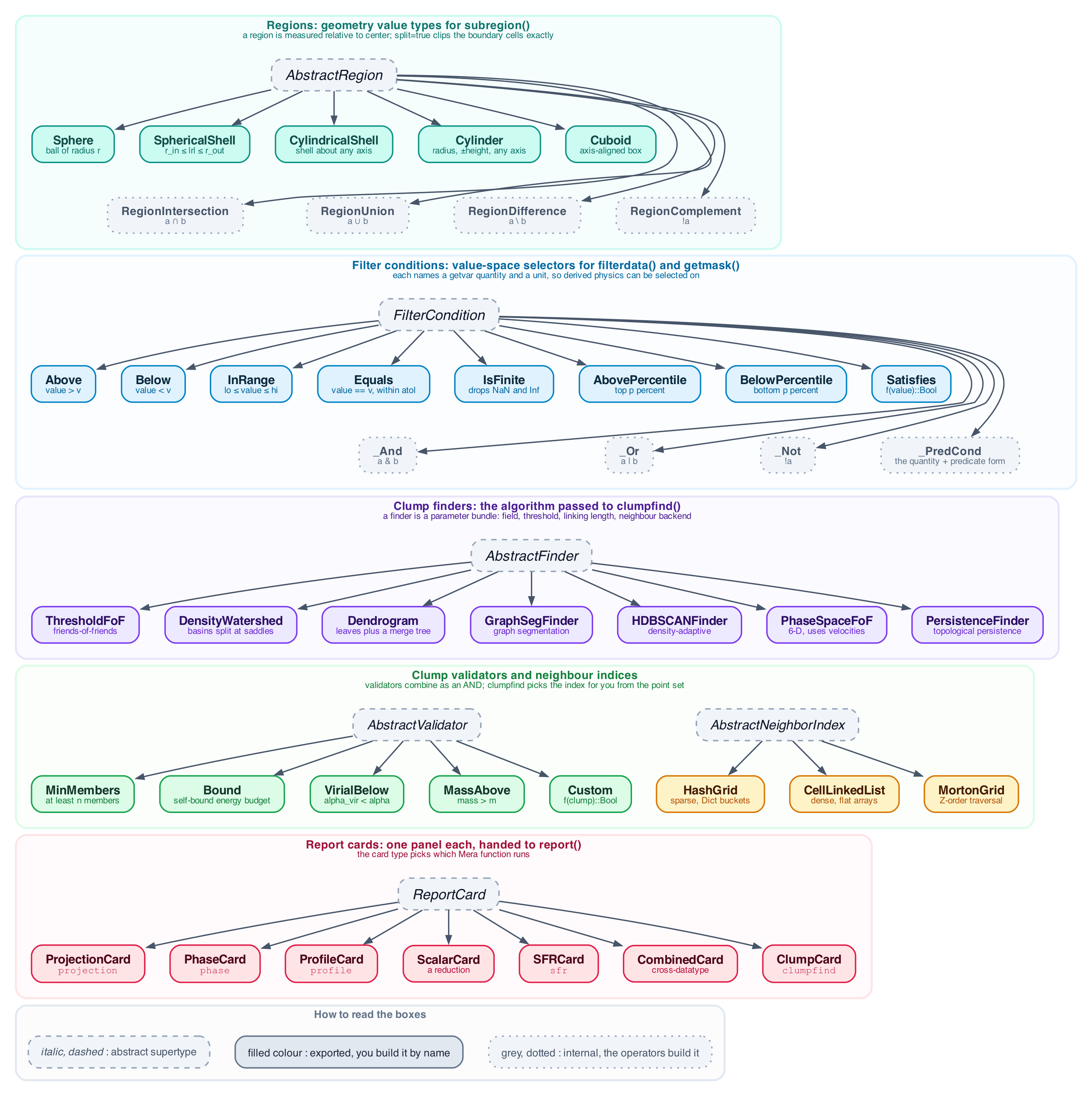
The families you build and hand to a function: regions, filter conditions, clump finders, clump validators, neighbour indices and report cards.
- AMRMapsType <: DataMapsType (
HydroMapsTypeis a kept alias of it) - PartMapsType <: DataMapsType
List of types
Mera.AMRMapsTypeMera.AboveMera.AbovePercentileMera.AbstractFinderMera.AbstractNeighborIndexMera.AbstractRegionMera.AbstractValidatorMera.ArgumentsTypeMera.BelowMera.BelowPercentileMera.BenchmarkReportMera.BoundMera.CellLinkedListMera.CheckOutputNumberTypeMera.ClumpCardMera.ClumpCardMera.ClumpCatalogMera.ClumpDataTypeMera.CombinedCardMera.CompilationInfoTypeMera.ContainMassDataSetTypeMera.CostModelMera.CoveringGridResultMera.CuboidMera.CustomMera.CylinderMera.CylindricalShellMera.DataMapsTypeMera.DataSetTypeMera.DendrogramMera.DensityWatershedMera.DescriptorTypeMera.EqualsMera.FileNamesTypeMera.FilterConditionMera.GalaxyFrameMera.GraphSegFinderMera.GravDataTypeMera.GridInfoTypeMera.HDBSCANFinderMera.HashGridMera.Histogram2DMapTypeMera.HydroDataTypeMera.HydroMapsTypeMera.HydroPartTypeMera.IOBenchmarkMera.InRangeMera.InfoTypeMera.IsFiniteMera.MaskTypeMera.MassAboveMera.MeraMovieMera.MinMembersMera.MortonGridMera.PartDataTypeMera.PartInfoTypeMera.PartMapsTypeMera.PersistenceFinderMera.PhaseCardMera.PhaseSpaceFoFMera.PhysicalUnitsType001Mera.PhysicalUnitsType002Mera.ProfileCardMera.ProjectionCardMera.ProvenanceMera.QuickLookResultMera.QuickReportMera.ReportCardMera.ReportPlanMera.ReportResultCardMera.RtDataTypeMera.SFRCardMera.SatisfiesMera.ScalarCardMera.ScalesType001Mera.ScalesType002Mera.ScalesType003Mera.SinkDataTypeMera.SphereMera.SphericalShellMera.StructureNodeMera.StructureTreeMera.ThreadSafeProgressMera.ThreadSafeProgressMera.ThresholdFoFMera.VirialBelowMera.VolumeLookMera.VolumeRenderTypeMera.WStatType
Functions
Mera.JLD2flagMera.__init__Mera._attach_gravity_parents!Mera._boundary_groupMera._can_select_columnsMera._check_unit_factorMera._cropMera._fitMera._fov_premaskMera._gravity_parentsMera._interpol_varMera._lz4_typemapMera._mask_rowsMera._minimum_imageMera._namelist_floatMera._nml_groupMera._nml_trueMera._nrecordsMera._orderingMera._original_dirMera._pad_colourMera._particle_layoutMera._resolve_unitMera._same_cellsMera._same_orderMera._slab_fractionsMera._subset_tableMera._subset_table_keyedMera._uniformMera._unknown_var_errorMera.add_fieldMera.add_fieldMera.add_unitMera.add_unitMera.age_from_aformMera.age_of_universeMera.allocated_cpusMera.amr_header_ofMera.amroverviewMera.amroverviewMera.amroverviewMera.analyze_amr_structureMera.angmomMera.angmomMera.average_mweightedMera.average_mweighted_metaprogMera.average_velocityMera.baryon_fractionMera.batch_convert_meraMera.batchesMera.bellMera.bellMera.benchmark_buffer_sizesMera.benchmark_conversionMera.benchmark_levelsMera.benchmark_mera_ioMera.benchmark_multi_variable_projectionMera.benchmark_projection_hydroMera.benchmark_reportMera.benchmark_single_variable_projectionMera.benchmarkplotMera.build_camera_basisMera.bulk_velocityMera.bulk_velocity_metaprogMera.calculate_safe_thread_countMera.calibrate!Mera.capabilitiesMera.capabilitiesMera.cell_shiftMera.center_ofMera.center_ofMera.center_of_massMera.center_of_mass_joint_metaprogMera.center_of_mass_metaprogMera.check_available_filesMera.check_safety_margin_violationMera.checkoutputsMera.checksimulationsMera.clear_mera_cache!Mera.clump_mass_fractionMera.clump_massfunctionMera.clump_massfunctionMera.clump_recoveryMera.clump_recoveryMera.clumpfindMera.clumpfindMera.clumpfindMera.clumpfindMera.clumpfindMera.clumpfind_benchmarksMera.clumpfind_benchmarksMera.clumpingMera.clumpplotMera.clumpplotMera.clumptableMera.clumptableMera.collect_levelsMera.comMera.comMera.comoving_to_proper_densityMera.comoving_to_proper_densityMera.comoving_to_proper_lengthMera.comoving_to_proper_lengthMera.compareramsesMera.compareramsesMera.complete_progress!Mera.complete_progress!Mera.configure_adaptive_ioMera.configure_mera_ioMera.construct_datatypeMera.construct_datatypeMera.convert_single_file_safeMera.convertdataMera.cosmic_timeMera.cosmologyMera.cosmologyMera.covering_gridMera.covering_gridMera.covering_grid_memoryMera.covering_grid_memoryMera.create_progress_trackerMera.create_progress_trackerMera.create_ultrafast_tableMera.createconstantsMera.createconstantsMera.createconstants!Mera.createpathMera.createscalesMera.createscalesMera.createscales!Mera.createscales!Mera.critical_densityMera.critical_densityMera.cuboidMera.cuboidMera.cylinderMera.cylinderMera.cylindricalshellMera.cylindricalshellMera.dataoverviewMera.dataoverviewMera.dataoverviewMera.dataoverviewMera.delete_fieldMera.delete_fieldMera.delete_unitMera.delete_unitMera.depletion_timeMera.depletion_timeMera.deposit_rotated_cells_exact!Mera.deposit_rotated_cells_overlap!Mera.deposit_rotated_cells_to_grid!Mera.download_testdataMera.download_testdataMera.downsampleMera.edge_onMera.edge_onMera.enhanced_fortran_readMera.ensure_optimal_io!Mera.estimateMera.export_vtkMera.extract_column_dataMera.face_onMera.face_onMera.field_dependenciesMera.field_dependenciesMera.field_infoMera.field_infoMera.field_treeMera.field_treeMera.filesystem_infoMera.filter_by_rangeMera.filterdataMera.fmt_timeMera.formation_redshiftMera.formation_redshiftMera.formation_timeMera.formation_timeMera.get_available_memory_gbMera.get_disk_info_commandMera.get_far_radius_cylinderMera.get_far_radius_sphereMera.get_filtered_rangesMera.get_filtered_rangesMera.get_filtered_rangesMera.get_height_cylinderMera.get_memory_info_commandMera.get_memory_usage_percentageMera.get_network_info_commandMera.get_process_info_commandMera.get_radius_sphereMera.get_simulation_characteristicsMera.get_system_info_commandMera.get_total_memory_gbMera.get_unit_factor_fastMera.getclumpsMera.getextentMera.getextentMera.getextentMera.getgravityMera.gethydroMera.gethydroMera.getinfoMera.getmaskMera.getmaskMera.getmassMera.getmovieMera.getmovieMera.getparticlemaskMera.getparticlesMera.getpositionsMera.getpositionsMera.getrtMera.getsinksMera.gettimeMera.getunitMera.getunitMera.getvarMera.getvarMera.getvar_optionalMera.getvar_optionalMera.getvar_requirementsMera.getvar_requirementsMera.getvelocitiesMera.getvelocitiesMera.gridoverlayMera.gridoverlay!Mera.hintMera.hint_onceMera.humanizeMera.infer_boundariesMera.infodataMera.interactive_mera_converterMera.iops_testMera.iscosmologicalMera.iscosmologicalMera.levelsplotMera.list_fieldsMera.list_fieldsMera.list_fieldsMera.list_unitsMera.list_unitsMera.load_clumpsMera.load_clumpsMera.load_synthetic_clumpsMera.load_synthetic_clumpsMera.loadallMera.loaddataMera.loadmapMera.loadmovieMera.loadmovieMera.loadreportMera.localdispersionMera.lookback_timeMera.makefileMera.makefileMera.makethumbMera.makethumbMera.map_amr_cells_to_grid!Mera.map_amr_cells_to_grid_adaptive!Mera.map_amr_cells_to_grid_surface_density!Mera.map_amr_cells_to_grid_with_spatial_index!Mera.massfunctionplotMera.mean_baryon_densityMera.mean_baryon_densityMera.mean_matter_densityMera.mean_matter_densityMera.mera_buildMera.mera_buildMera.mera_configMera.mera_configMera.mera_config_exampleMera.mera_config_exampleMera.mera_config_pathMera.mera_config_pathMera.mera_io_statusMera.moviefromframesMera.moviefromframesMera.msumMera.msum_metaprogMera.namelistMera.notifymeMera.notifymeMera.offaxis_sliceMera.openclose_testMera.optimize_image_for_zulipMera.optimize_image_for_zulipMera.optimize_mera_ioMera.output_modeMera.output_modeMera.overviewplotMera.parse_output_numberMera.patchfileMera.patchfileMera.pdfMera.pdfMera.pdfMera.pdfMera.perform_sanity_checksMera.periodic_axesMera.periodic_recenterMera.periodic_recenterMera.phaseMera.phaseMera.plot_resultsMera.plot_resultsMera.prep_cylindrical_shellrangesMera.prep_spherical_shellrangesMera.preprangesMera.preprangesMera.previewMera.printtablememoryMera.printtimeMera.profileMera.profileMera.profile3dMera.profiletimeseriesMera.projectMera.projectMera.projectionMera.projectionMera.projectionMera.projectionMera.proper_to_comoving_densityMera.proper_to_comoving_densityMera.proper_to_comoving_lengthMera.proper_to_comoving_lengthMera.provenanceMera.provenanceMera.provenance_stringMera.provenance_stringMera.quicklookMera.quicklookMera.quicklookplotMera.quicklookplotMera.read_amr_header_restMera.reading_sweepMera.recommend_buffer_sizeMera.redshiftMera.redshiftMera.register_reader!Mera.register_reader!Mera.renderMera.repartitionMera.repartitionMera.reportMera.required_raw_varsMera.reset_auto_optimization!Mera.reset_hintsMera.reset_mera_ioMera.resolve_losMera.restart_completenessMera.restart_completenessMera.restframeMera.rotation_frameMera.rotation_sequenceMera.run_benchmarkMera.run_benchmarkMera.run_merafile_benchmarkMera.run_reading_benchmarkMera.safe_executeMera.safe_executeMera.safe_printlnMera.save_benchmark_resultsMera.save_clumpsMera.save_clumpsMera.save_synthetic_clumpsMera.save_synthetic_clumpsMera.savedataMera.savemapMera.savemovieMera.savemovieMera.send_resultsMera.send_resultsMera.setcomposition!Mera.setcomposition!Mera.sfrMera.sfr_snapshotMera.sfr_snapshotMera.shellregionMera.shellregionMera.show_auto_optimization_statusMera.show_completenessMera.show_mera_cache_statsMera.show_mera_configMera.show_threading_infoMera.showprogressMera.showprogressMera.simple_base64encodeMera.sliceMera.smart_io_setupMera.sphereMera.sphereMera.sphericalshellMera.sphericalshellMera.stellar_ageMera.storageoverviewMera.subregionMera.subregionMera.subregionMera.subregioncuboidMera.subregioncuboidMera.subregioncylinderMera.subregioncylinderMera.subregioncylinderMera.subregionsphereMera.subregionsphereMera.subregionsphereMera.supportsMera.supportsMera.synthetic_clumpsMera.synthetic_clumpsMera.throughput_testMera.timed_notifyMera.timed_notifyMera.timerfileMera.timerfileMera.timeseriesMera.timeseriesMera.update_progress!Mera.update_progress!Mera.update_progress!Mera.upgrade_merafileMera.upgrade_merafileMera.usedmemoryMera.velocitydispersionMera.verboseMera.verboseMera.viewallfieldsMera.viewdataMera.viewfieldsMera.viewmoduleMera.volumelookMera.volumeorbitMera.volumepathMera.volumerenderMera.withargsMera.writeramsesMera.writeramsesMera.wstatMera.wstat_metaprog
Macros
Mera.@apply — Macro
Find examples in the Mera Documentation for: filter data with pipeline macros
Mera.@filter — Macro
@filter(obj, :column op value)Filter by a single comparison. If obj is a Mera data object (hydro/gravity/RT/particles/ clumps) it routes through filterdata: the column may be any getvar quantity (derived physics, code units) and the result is a new object of the same type. If obj is a raw IndexedTable, the classic per-row column filter is used. For units, compound conditions (&/|/!) and percentile/finite selectors, use filterdata with Above etc.
hot = @filter gas :rho >= 1e2     # Mera object → HydroDataType of the matching cells
sub = @filter gas.data :rho >= 1e2  # raw table → filtered table (classic behaviour)
Mera.@loadall — Macro
@loadall path output component...Bind several components of one snapshot to variables of those names, in one line.
@loadall path 300 hydro gravity particles
# hydro, gravity and particles are now bound, and so is info
This is a thin wrapper over loadall; it expands to a destructuring assignment and adds nothing of its own.
That is what makes it short, and also its cost: the variables appear without an assignment a reader can point at, and static tooling cannot follow them. Convenient at the REPL and in a notebook; in a script or a package, prefer the explicit form, which is only a few characters longer and says where each name came from:
(; hydro, gravity, particles) = loadall(path, 300)Keyword arguments are passed through:
@loadall path 300 hydro particles lmax=10 range_unit=:kpcMera.@project — Macro
@project data quantity... [keyword=value...]Project several quantities and bind each map to a variable of that name.
projection returns one object whose maps is a dictionary, so pulling several quantities out of it is a line of lookups:
pj = projection(gas, [:sd, :T], myargs=args)
sd = pj.maps[:sd]; T = pj.maps[:T]
This does the same in one line, and asks for the quantities together, which is also the form that lets the projection use its threads (see Performance):
@project gas sd T myargs=args
# sd and T are now the maps, and proj is the full projection object
Keywords pass straight through, so off-axis works the same way:
@project gas sd inclination=60 azimuth=30 binning=:exactThe full object is bound as proj, so the extent, units and everything else stay reachable:
heatmap(proj.extent[1:2], proj.extent[3:4], sd)Like @loadall, this binds names in your scope. Inside a function or a package, prefer the explicit form above.
See also: projection, @loadall.
Mera.@region — Macro
@region [unit=…] [center=…] begin … endBuild a (composite) region with shared constructor defaults and named parts. Inside the block, every Sphere/Cuboid/Cylinder/SphericalShell/CylindricalShell call that does not set range_unit/center itself receives the block's unit/center; explicit keywords always win. Assignments name intermediate parts; the block's last expression is the returned region — an ordinary AbstractRegion value, identical to writing the constructors out by hand.
capstone = @region unit=:kpc center=[:bc] begin
    disc    = cylinder(12, 2)
    blister = sphere(2.5; center=[30, :bc, 26])   # explicit center wins
    chimney = cylinder(1.2, 5; center=[19, :bc, :bc])
    (disc ∪ blister) \ chimney
end
subregion(gas, capstone)
Mera.@where — Macro
Find examples in the Mera Documentation for: filter data with pipeline macros
Documentation Types
Mera.AMRMapsType — Type
Mutable Struct: Contains the maps/units returned by an AMR cell-based projection (hydro, gravity-with-hydro, and radiative-transfer all return this type; the provenance is preserved in the .info field). smallr/smallc are hydro-only and set to 0 for RT.
Fields
maps::SortedDict{Symbol,Array{Float64,2}}— one 2D map per requested quantity, keyed by variable symbol (e.g.:sd,:rho,:vx,:T). For an intensive variable the map is the weighted average per pixel; for an extensive variable (:sd, and:mass/:ekin/:etherm/:volumeundermode=:sum) it is the per-pixel column/sum. Access asproj.maps[:sd].maps_unit::SortedDict{Symbol,Symbol}— the physical unit of each map (e.g.:Msol_pc2,:g_cm3,:km_s,:standardfor code units), keyed by the same symbols asmaps.maps_lmax::SortedDict— always empty. A leftover field: both projection engines create it and neither ever writes to it. Do not read a level from it.maps_weight::SortedDict{Symbol,Symbol}— the weighting used per map::mass,:volume, or:nothingfor the extensive:sum/:sdaccumulations that carry no weighting.maps_mode::SortedDict{Symbol,Symbol}— how each map was reduced::mass_weighted,:volume_weighted,:standard, or:sum.lmax_projected::Real— the maximum AMR level actually used in the projection.lmin::Int,lmax::Int— the simulation's level range carried over for provenance.ranges::Array{Float64,1}— the 6-element projected sub-box[xmin,xmax,ymin,ymax,zmin,zmax]in box-fraction units[0,1]. (proj.xrange/yrange/zrangeare accessor slices of this.)extent::Array{Float64,1}—[xmin,xmax,ymin,ymax]of the map in code length units (multiply byproj.scale.kpcetc. for physical axes); the data-plane extent for plotting.cextent::Array{Float64,1}— the same extent but centred on the chosen projection centre (so the centre sits at 0); use for axes labelled relative to the centre.ratio::Float64— pixel aspect ratio of the map (xspan/yspan).effres::Int— the effective square resolution (pixels per side);proj.resaliases this.pixsize::Float64— physical size of one pixel in code length units (×scalefor kpc/pc).boxlen::Float64— the simulation box length in code units.smallr::Float64,smallc::Float64— hydro density/sound-speed floors (0 for RT projections).scale::ScalesType003— unit-conversion factors (code↔physical) inherited from the dataset.info::InfoType— the full simulation descriptor (provenance: output, paths, cosmology, …).los,up,cam_right,center::Vector{Float64}— off-axis camera basis and centre; emptyFloat64[]for axis-aligned projections.proj.directionreturns:offaxiswhen populated.
Mera.Above — Type
Above(quantity, value; unit=:standard)Keep rows where getvar(obj, quantity, unit) > value.
Mera.AbovePercentile — Type
AbovePercentile(quantity, p; unit=:standard)
BelowPercentile(quantity, p; unit=:standard)
Keep rows above (below) the p-th percentile of quantity over obj (p ∈ [0,100]) — an adaptive threshold, e.g. the densest 10 % of cells: AbovePercentile(:rho, 90).
Mera.AbstractFinder — Type
AbstractFinderSupertype of the seven 3D structure-finding algorithms passed to clumpfind: ThresholdFoF, DensityWatershed, Dendrogram, GraphSegFinder, HDBSCANFinder, PhaseSpaceFoF and PersistenceFinder. A finder is a typed parameter bundle (field, threshold, linking length, neighbour backend) that implements _label(finder, points); extend it by adding a new subtype and _label method.
Mera.AbstractNeighborIndex — Type
Abstract supertype of the spatial indices used to find neighbours during clump finding.
Concrete subtypes are HashGrid and CellLinkedList; clumpfind picks one automatically from the particle count and density. Both index an arbitrary ids subset of the coordinate arrays, so the same code serves the FoF pass and the per-group watershed.
Mera.AbstractRegion — Type
AbstractRegionSupertype of the composable region value types passed to subregion: Cuboid, Sphere, Cylinder, SphericalShell, CylindricalShell. A region is a geometry-relative-to-center value type; subregion(obj, region) selects the cells it covers and, with split=true, attaches the exact per-cell inside-fraction. Regions compose with the boolean operators ∩ (intersection), ∪ (union), \ (difference) and ! (complement) — e.g. sphere(20) \ cylinder(5, 30) drills a cylindrical hole through a ball.
Mera.AbstractValidator — Type
Abstract supertype of the criteria a candidate clump must satisfy to be kept.
Validators passed to clumpfind combine as an AND: a clump survives only if it passes every one. Concrete subtypes include MinMembers, and membership tests such as unbinding are applied during the analysis while predicates are applied after — that order is enforced regardless of the order you list them in.
Mera.ArgumentsType — Type
Mutable Struct: Contains fields to use as arguments in functions
Mera.Below — Type
Below(quantity, value; unit=:standard)Keep rows where getvar(obj, quantity, unit) < value.
Mera.BelowPercentile — Type
BelowPercentile(quantity, p; unit=:standard)Keep rows below the p-th percentile of quantity over obj (p ∈ [0,100]); the lower counterpart of AbovePercentile.
Mera.BenchmarkReport — Type
BenchmarkReportWhat benchmark_report returns. Fields: info, nfiles_total, bytes, storage_split (bytes per component), filesystem, storage, reading, conversion, sweep, work_threads, reportfile. Stages that were not run are nothing.
Mera.Bound — Type
Bound(egrav=:tree; iterative=true, softening=0.0, direct_max=2000)Self-boundedness validator: builds the per-clump energy budget with potential egrav (:tree Barnes–Hut / :direct exact / :approx 3·GM²/5R), optionally strips unbound members (iterative, SUBFIND), and keeps only self-bound clumps (e_kin+e_therm[+e_mag] < |e_grav|).
Mera.CellLinkedList — Type
Neighbour index storing cell occupancy in flat arrays covering the whole bounding box, which avoids hashing at the cost of memory proportional to that box.
The choice for dense, compact point sets. See HashGrid for the sparse counterpart and AbstractNeighborIndex for how one is selected.
CellLinkedList <: AbstractNeighborIndex
Mera.CheckOutputNumberType — Type
Mutable Struct: Contains the existing simulation snapshots in a folder and a list of the empty output-folders
Mera.ClumpCard — Type
ClumpCard(kind, field=:rho; threshold, linking_length, threshold_unit=:standard, pos_unit=:kpc, mass_unit=:Msol, min_members=1, label="")A report card that runs clumpfind and reports the clump count + total clump mass (the full ClumpCatalog is kept in the result card's data.catalog).
Mera.ClumpCatalog — Type
ClumpCatalogResult of clumpfind. clumps is a vector of per-clump NamedTuples (sorted most-massive first); meta records the search parameters; tree is the StructureTree hierarchy (only when built via hierarchy=true, else nothing). Index/iterate it like a vector (cat[1], length(cat), for c in cat).
Mera.ClumpDataType — Type
Mutable Struct: Contains clump data and information about the selected simulation
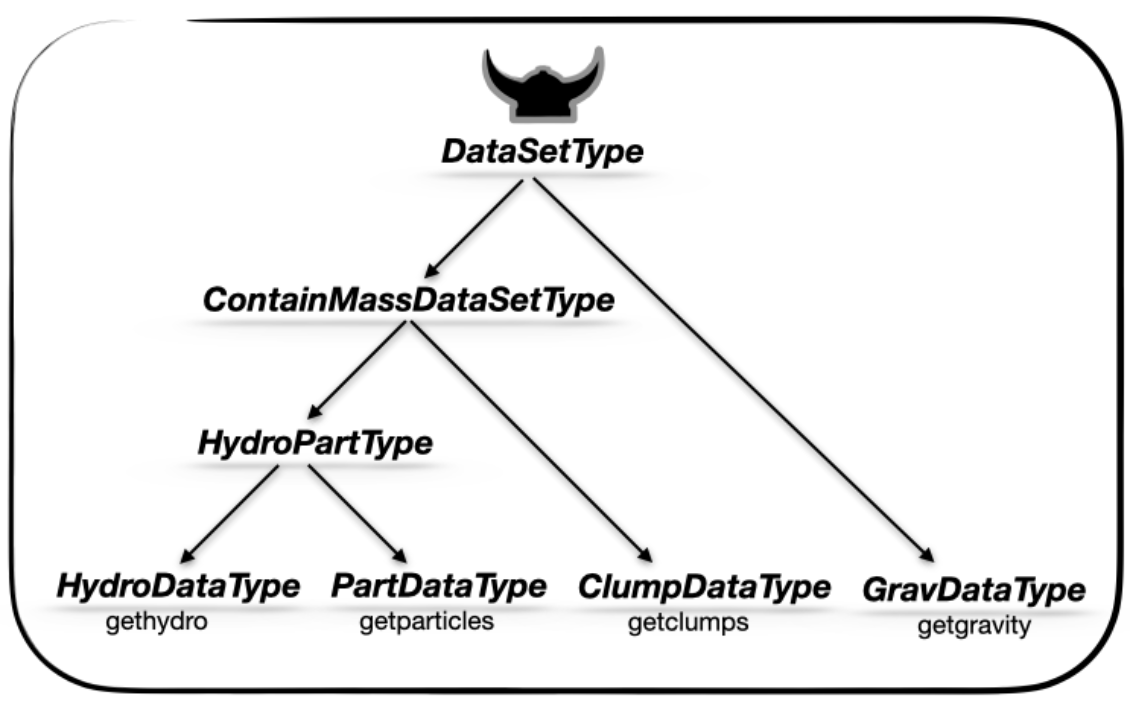
ClumpDataType <: ContainMassDataSetType
Mera.CombinedCard — Method
CombinedCard(datatypes, compute; unit=:fraction, label="combined")
CombinedCard(datatypes; unit=:fraction, label="combined") do datas … end
A cross-datatype scalar card. compute(datas) receives a Dict{Symbol,Any} of the read data objects for datatypes and returns a number. Computed only if all datatypes are present. See the built-ins baryon_fraction and clump_mass_fraction.
Mera.CompilationInfoType — Type
Mutable Struct: Contains the collected information about the compilation of RAMSES
Mera.ContainMassDataSetType — Type
Abstract Supertype of all datasets that contain mass variables
HydroPartType <: ContainMassDataSetType <: DataSetType
Mera.CostModel — Type
Mutable Struct: The runtime cost model behind report's dry-run and budget modes
Holds the per-unit coefficients of the work a report does — per read, per cell, per projection pixel, per deposited cell, per histogram bin, per particle — together with multiplicative corrections learned per cost class, so estimates track this machine rather than a generic one. Corrections are updated passively from every real report run, or actively via calibrate!.
preview prints the resulting dry-run; downsample shrinks a plan to a wall-time target, which is the mechanism behind report(...; budget_s=…).
Mera.CoveringGridResult — Type
CoveringGridResultResult of covering_grid / slice. grid maps each variable to its uniform array (3-D for a covering grid, 2-D for a slice); level is the uniform refinement level, dims the array size, extent the physical bounds [x0,x1,y0,y1,z0,z1] and cellsize the physical cell size (both in pos_unit). Index grid[:rho] for the array.
Mera.Cuboid — Type
cuboid(; xrange, yrange, zrange, center=[:bc], range_unit=:kpc)An axis-aligned box; xrange/yrange/zrange are [lo, hi] offsets from center (in range_unit), as in subregion(:cuboid).
Mera.Custom — Type
Custom(f)Keep clumps for which f(clump)::Bool is true (clump is the per-clump NamedTuple, with fields n_members, mass, com, peak, radius and — when bound — e_kin, e_grav, alpha_vir, bound).
Mera.Cylinder — Type
cylinder(radius, height; axis=[0,0,1], center=[:bc], range_unit=:kpc)A cylinder of cylindrical radius spanning ±height along axis (so height is the half-height, matching the existing subregion(:cylinder) convention). axis is the symmetry direction (any non-zero 3-vector, normalised internally) — e.g. a galaxy's spin vector for a tilted disk; the default [0,0,1] is the classic z-aligned cylinder.
Mera.CylindricalShell — Type
cylindricalshell(r_in, r_out, height; axis=[0,0,1], center=[:bc], range_unit=:kpc)A cylindrical shell r_in ≤ r_cyl ≤ r_out of half-height height along axis (the value-type analogue of shellregion(:cylinder); axis allows a tilted shell).
Mera.DataMapsType — Type
Abstract Supertype of all the different dataset type maps AMRMapsType <: DataMapsType PartMapsType <: DataMapsType
Mera.DataSetType — Type
Abstract Supertype of all the different dataset types
HydroPartType <: ContainMassDataSetType <: DataSetType
Mera.Dendrogram — Type
Dendrogram(field=:rho; threshold, linking_length, threshold_unit=:standard, min_delta=0.0, backend=CellLinkedList)Multi-scale hierarchy finder (Rosolowsky & Leroy 2008): the finest density peaks (local maxima with prominence ≥ min_delta) are the catalog's leaf clumps, and clumpfind(obj, …; hierarchy=true) attaches the full merge StructureTree recording the level at which they join. min_delta (in field units) is the minimum peak-to-saddle contrast for a separate leaf.
Mera.DensityWatershed — Type
DensityWatershed(field=:rho; threshold, linking_length, threshold_unit=:standard, peak_min_distance=2·linking_length, persistence=0.0, backend=CellLinkedList)Watershed finder: friends-of-friends for connectivity, then each connected group is split into density-descending basins (peaks separated by peak_min_distance), so touching cores are resolved along their saddles (DENMAX/SUBFIND-style). persistence (in field units) prunes shallow basins: a basin whose prominence — peak value minus the saddle at which it joins a deeper basin — is below persistence is merged into that deeper basin (topological contrast control, Rosolowsky & Leroy 2008 min_delta). persistence=0 keeps every local maximum (bare watershed).
Mera.DescriptorType — Type
Mutable Struct: Contains the collected information about the descriptors
Mera.Equals — Type
Equals(quantity, value; unit=:standard, atol=0.0)Keep rows where getvar(obj, quantity, unit) == value (within atol). Best for discrete fields such as :level, particle ids or :family.
Mera.FileNamesType — Type
Mutable Struct: Contains the full paths of the files belonging to one simulation output
Reachable as info.fnames. Each field is the resolved path Mera reads for that component, e.g. info.fnames.hydro, which is useful when checking what a reader actually opened.
Mera.FilterCondition — Type
FilterConditionSupertype of the composable value-space selectors passed to getmask / filterdata: Above, Below, InRange. Combine them with & (and), | (or) and ! (not) — e.g. Above(:T, 1e4; unit=:K) & Below(:rho, 100; unit=:nH).
Mera.GalaxyFrame — Type
GalaxyFrameOrientation + centre returned by face_on / edge_on. Splat the fields straight into projection:
fr = face_on(gas)
projection(gas, :sd; los=fr.los, up=fr.up, center=fr.center, range_unit=fr.center_unit)
Fields: center (in center_unit), los (unit vector the camera looks along), up (unit vector for the camera's up direction), angmom (the net angular-momentum vector the frame was derived from), and info (the source snapshot — so provenance(frame) works).
Mera.GraphSegFinder — Type
GraphSegFinder(field=:rho; threshold, linking_length, threshold_unit=:standard, scale=1.0, backend=CellLinkedList)Graph-segmentation finder (Felzenszwalb & Huttenlocher 2004): segments the neighbour graph so that the density variation within a region stays below the contrast between regions. scale k sets the granularity (larger ⇒ fewer, larger segments). Near-linear; good as a fast multi-scale deblender, e.g. deblend=GraphSegFinder(...).
Mera.GravDataType — Type
Mutable Struct: Contains gravity data and information about the selected simulation
Returned by getgravity. Holds the selected leaf cells in data, the originating InfoType in info, and the unit scales in scale.
GravDataType <: DataSetType
Mera.GridInfoType — Type
Mutable Struct: Contains the collected information about grid
Mera.HDBSCANFinder — Type
HDBSCANFinder(field=:rho; threshold, linking_length, threshold_unit=:standard, min_cluster_size=5, min_samples=min_cluster_size, backend=CellLinkedList)Density-adaptive finder — a self-contained HDBSCAN* (Campello+2013; McInnes+2017): core distances from the min_samples-nearest neighbours define a mutual-reachability metric whose minimum spanning tree is condensed into a cluster hierarchy, and the most stable clusters (each with ≥ min_cluster_size members) are extracted. Finds clumps across a wide density range with almost no tuning; points not in any stable cluster are labelled noise (dropped). linking_length only bounds the neighbour search (set it generously).
Mera.HashGrid — Type
Neighbour index storing occupied cells in a Dict, so memory scales with the number of occupied cells rather than the bounding box.
The choice for sparse or widely spread point sets. See CellLinkedList for the dense counterpart and AbstractNeighborIndex for how one is selected.
HashGrid <: AbstractNeighborIndex
Mera.Histogram2DMapType — Type
Mutable Struct: Contains the 2D histogram returned by the function: histogram2 and information about the selected simulation
Mera.HydroDataType — Type
Mutable Struct: Contains hydro data and information about the selected simulation
HydroDataType <: HydroPartType
Mera.HydroMapsType — Type
const HydroMapsType = AMRMapsTypeDeprecated alias for AMRMapsType (renamed because gravity and RT projections return the same AMR-map type, not only hydro). Kept for backward compatibility: existing code using HydroMapsType (construction, isa, dispatch) keeps working unchanged. Prefer AMRMapsType in new code.
Mera.HydroPartType — Type
Abstract Supertype of data-sets that contain hydro and particle data
HydroPartType <: ContainMassDataSetType <: DataSetType
Mera.IOBenchmark — Type
IOBenchmarkResult of run_benchmark: the iops, throughput and openclose sub-results (each with .samples/.stats), the number of runs, the threads levels tested, and total_elapsed seconds. Pass it to plot_results for a figure.
Mera.InRange — Type
InRange(quantity, lo, hi; unit=:standard)Keep rows where lo ≤ getvar(obj, quantity, unit) ≤ hi.
Mera.InfoType — Type
Mutable Struct: Collected information about the selected simulation output
Mera.IsFinite — Type
IsFinite(quantity; unit=:standard)Keep rows where getvar(obj, quantity, unit) is finite (drops NaN/Inf) — data hygiene, e.g. before a statistic. Combine with ! to select the non-finite rows instead.
Mera.MassAbove — Type
MassAbove(m)Keep clumps with mass > m (in the catalog's mass_unit).
Mera.MeraMovie — Type
Mera.MinMembers — Type
MinMembers(n)Keep only clumps with at least n members.
Mera.MortonGrid — Type
MortonGrid <: AbstractNeighborIndexNeighbour-search backend (pass as backend=MortonGrid to any finder). Like CellLinkedList, but the indexed points are visited in Morton (Z-order) order so spatially-near points are also near in the traversal — neighbour lookups then touch cache-resident coordinates and the access pattern is near-sequential (the locality an out-of-core path also needs). Produces exactly the same neighbour pairs as the CellLinkedList/HashGrid backends; only the traversal order, and hence speed on large selections, differs.
Mera.PartDataType — Type
Mutable Struct: Contains particle data and information about the selected simulation
PartDataType <: HydroPartType
Mera.PartInfoType — Type
Mutable Struct: Contains the collected information about particles
Mera.PartMapsType — Type
Mutable Struct: Contains the maps/units returned by a particle projection (projection(::PartDataType, …)). Particle maps are histogram deposits of the selected quantity onto the sky grid; provenance is preserved in the .info field.
Fields
maps::SortedDict{Symbol,Array{Float64,2}}— one 2D map per requested quantity, keyed by variable symbol (e.g.:sdsurface density,:vx,:age).:sdis the column mass per pixel area; intensive variables are mass- or volume-weighted averages per pixel.maps_unit::SortedDict{Symbol,Symbol}— the physical unit of each map (e.g.:Msol_pc2,:km_s,:standardfor code units), keyed by the same symbols asmaps.maps_lmax::SortedDict— always empty. A leftover field that is created and never written, on this path as on the grid one.maps_mode::SortedDict{Symbol,Symbol}— how each map was reduced::mass_weighted,:volume_weighted,:sph,:voronoi, or:sumwhenmode=:sumwas given.weightingpicks the weight,modepicks a weighted mean against a per-pixel total.lmax_projected::Real— the maximum grid level used.lmin::Int,lmax::Int— the simulation's level range carried over for provenance.ref_time::Real— the reference time (code units) used to convert birth times to ages for age-dependent quantities (e.g.:age); taken frominfo.timeunless overridden.ranges::Array{Float64,1}— the 6-element projected sub-box[xmin,…,zmax]in box-fraction units[0,1]. (proj.xrange/yrange/zrangeare accessor slices.)extent::Array{Float64,1}—[xmin,xmax,ymin,ymax]of the map in code length units (×proj.scale.kpcetc. for physical axes).cextent::Array{Float64,1}— the same extent centred on the projection centre.ratio::Float64— pixel aspect ratio of the map (xspan/yspan).effres::Int— effective square resolution (pixels per side);proj.resaliases this.pixsize::Float64— physical size of one pixel in code length units (×scalefor kpc/pc).boxlen::Float64— the simulation box length in code units.scale::ScalesType003— unit-conversion factors (code↔physical) inherited from the dataset.info::InfoType— the full simulation descriptor (provenance).los,up,cam_right,center::Vector{Float64}— off-axis camera basis and centre; emptyFloat64[]for axis-aligned projections.proj.directionreturns:offaxiswhen populated.
Mera.PersistenceFinder — Type
PersistenceFinder(field=:rho; threshold, linking_length, persistence, threshold_unit=:standard, backend=CellLinkedList)Topological persistence clustering (0-dim persistent homology / ToMATo; Chazal+2013): a superlevel-set filtration of the density field where a peak is kept as a separate cluster only if its prominence (peak − merge saddle) reaches persistence. Principled, parameter-light deblending that is robust in crowded fields.
Mera.PhaseCard — Method
PhaseCard(kind, xvar, yvar; weight=:mass, nbins=(80,80), xscale=:log, yscale=:log, xunit=:standard, yunit=:standard, label="")A phase (2-D histogram) card for a ReportPlan.
Mera.PhaseSpaceFoF — Type
PhaseSpaceFoF(field=:rho; threshold, linking_length_pos, linking_length_vel, threshold_unit=:standard, backend=CellLinkedList)6-D phase-space friends-of-friends (Rockstar-style; Behroozi+2013): points link only when within linking_length_pos in space and linking_length_vel (km/s) in velocity, so kinematically distinct populations that overlap spatially — streams, subhaloes, tidal debris — separate. Needs velocities (the finder loads them automatically).
Mera.PhysicalUnitsType001 — Type
Mutable Struct: Legacy physical-constants layout, retained so older mera/JLD2 files still load
Superseded by PhysicalUnitsType002, which is what info.constants carries today. This type exists only so files written by earlier Mera versions can be reconstructed and upgraded on load. Values are in cgs units.
Mera.PhysicalUnitsType002 — Type
Mutable Struct: Contains the physical constants in cgs units
Mera.ProfileCard — Type
ProfileCard(kind, xvar, yvar=nothing; weight=:mass, nbins=40, geometry=:none, unit=:standard, xunit=:standard, range_unit=:standard, center=[:bc], yscale=:auto, label="")A profile (1-D radial/other profile) card for a ReportPlan. For a disk galaxy use xvar=:r_cylinder, geometry=:cylindrical (radius in the disk plane); :r_sphere, geometry=:spherical suits a halo/spheroid. yscale sets the y-axis when plotted: :log/:log10 (log₁₀), :identity (linear), or :auto (log when the profile is positive and spans ≳ 1.5 decades, e.g. density).
Mera.ProjectionCard — Method
ProjectionCard(kind, var; unit=:standard, weight=:mass, res=256, pxsize=nothing, direction=:z, center=[:bc], range_unit=:standard, label="")A projection card (surface-density / mass-weighted map) for a ReportPlan.
Resolution is set either by res (pixels per side) or by pxsize=[value, unit] (physical size of a pixel, e.g. [100., :pc]). pxsize wins when both are given. Because a card is built before the simulation is read, a pxsize cannot be converted to a pixel count until report runs — estimate/preview therefore resolve it against the box at that point.
Mera.Provenance — Type
ProvenanceReproducibility record returned by provenance: mera_version, mera_build (the version, plus the branch and commit when Mera is a git checkout, so a result made on a development version does not claim a release), simulation path, output, simcode, cosmological, the snapshot time_myr (physical time in Myr; the age of the universe for a cosmological run), redshift and aexp, boxlen, ndim, levelmin/levelmax, the serialized scale_type (e.g. :ScalesType003), and the output's file_ctime. Render a one-liner with provenance_string.
Mera.QuickLookResult — Type
QuickLookResultResult of quicklook. Fields: info, levelmin, levelmax, lmax_used (level actually read, nothing for a header-only call), ncells (cells read), sampled (true ⇒ coarse/partial ⇒ estimates are approximate), maps (a NamedTuple of surface-density projections: gas x, y, z, face-on stars/dm when particles are present, plus a face-on magnetic-field map bmag (μG) on an MHD run, or nothing), phase (the ρ–T histogram, or nothing), budget (a NamedTuple global snapshot budget — gas/stellar/DM mass and current SFR — or nothing), and summary (a NamedTuple of facts + estimates).
Mera.QuickReport — Type
QuickReportThe result of report: cards (a vector of [ReportResultCard]), summary (header facts), provenance, cost (timings), and info. Render with render(report, :ascii|:jld2|:file) or reload with loadreport.
Mera.ReportCard — Type
Abstract supertype of the recipe cards you compose into a report.
A card describes one panel — what to compute and how to draw it — and its concrete type selects which Mera function runs. ProjectionCard is the most common; others cover phase diagrams, profiles and scalars. Build a list of cards and hand it to report.
Mera.ReportPlan — Type
ReportPlan(output; path=".", cards=[], lmax=-1, budget=2_000_000)A declarative, inspectable plan of report cards. Build it, preview its cost, then run it with report. cards is a vector of ReportCard. lmax=-1 picks a budgeted level (coarse if the full output exceeds budget cells), mirroring quicklook.
Mera.ReportResultCard — Type
ReportResultCardA computed card inside a [QuickReport]: label, kind (:map/:phase/:profile/:scalar), datatype, func, the plain-data data payload, and a meta NamedTuple (units, ranges, cost_s, sampled, …).
Mera.RtDataType — Type
Mutable Struct: Contains radiative-transfer (RT) data and information about the selected simulation
Returned by getrt. Same AMR leaf-cell structure as hydro, carrying the nvarrt RT variables: per photon group g, the photon number density Np plus the flux components Fx/Fy/Fz. Mirrors GravDataType.
RtDataType <: DataSetType
Mera.SFRCard — Type
SFRCard(kind=:particles; tbinsize=10.0, trange=[0.0,missing], unit=:Msol_yr, mode=:none, mass=:auto, mask=nothing, label="")A star-formation-history card (sfr). mode=:probability gives the normalised SFH (a fraction); mass=:auto prefers a stored initial-mass field; mask=obj->BitVector subselects.
Mera.Satisfies — Type
Satisfies(quantity, f; unit=:standard)Keep rows where f(value)::Bool for each getvar(obj, quantity, unit) value — a composable arbitrary predicate (the value-type form of the filterdata(obj, :q, pred) shorthand).
Mera.ScalarCard — Method
ScalarCard(kind, var; reduce=:sum, unit=:standard, fraction=false, relative_to=nothing, mask=nothing, label="")A scalar reduction card (reduce ∈ :sum,:mean,:extrema,:count). fraction=true divides by the total of relative_to (or var); mask=obj->BitVector restricts the rows.
Mera.ScalesType001 — Type
Mutable Struct: Legacy unit-scale layout, retained so older mera/JLD2 files still load
Superseded by ScalesType003, which is what new data carries. This type exists only so files written by earlier Mera versions can be reconstructed and upgraded on load; it is not what you get from a current getinfo.
Mera.ScalesType002 — Type
Mutable Struct: Contains the created scale factors from code to physical units
Mera.ScalesType003 — Type
Mutable Struct: Contains the unit scales of the loaded simulation
The current scale type, reachable as info.scale and as the scale field of every data object. Each field converts a code-unit value into that physical unit, e.g. scale.kpc.
Identical to ScalesType002 plus the :nG (nanogauss) magnetic unit. Versioned rather than extended in place so pre-existing mera/JLD2 files — which store the 133-field ScalesType002 layout — still reconstruct; the JLD2 typemap upgrades them on load.
Mera.SinkDataType — Type
Mutable Struct: Contains the RAMSES sink-particle catalogue and the simulation metadata
mutable struct SinkDataType <: ContainMassDataSetType
    data
    info::InfoType
    boxlen::Float64
    ranges::Array{Float64,1}
    selected_sinkvars::Array{Symbol,1}
    used_descriptors::Dict{Any,Any}
    scale::ScalesType003
end
Sinks are written by RAMSES as a single CSV per output (sink_NNNNN.csv), not as one file per CPU like the AMR data — the catalogue is small and global. The file carries TWO header lines: the column names, and the dimensional formula of each column in terms of m, l and t (e.g. l t**-1 for a velocity). Mera keeps those formulas in used_descriptors[:units] so the physical meaning of every column survives the read.
Load with getsinks.
Mera.Sphere — Type
sphere(radius; center=[:bc], range_unit=:kpc)A ball of radius (in range_unit) about center.
Mera.SphericalShell — Type
sphericalshell(r_in, r_out; center=[:bc], range_unit=:kpc)The shell r_in ≤ |r| ≤ r_out (in range_unit) about center.
Mera.StructureNode — Type
StructureNodeOne node of a StructureTree: id, parent (0 at a root), children (ids), an is_leaf flag, the peak field value in its subtree, the base level at which it forms (the saddle where it merges into its parent, or the threshold at a root), and member counts n_self (points it owns directly — nonzero only for leaves) and n_subtree (points in the whole subtree).
Mera.StructureTree — Type
StructureTreeThe multi-scale hierarchy produced by a Dendrogram finder (clumpfind(obj, …; hierarchy=true)): nodes (a vector of StructureNode, indexable by node id) and roots (top-level node ids, one per disconnected region). Leaves are the finest structures (density peaks pruned by min_delta); branches are the levels at which they merge. Accessors: roots, leaves, children, parent.
Mera.ThreadSafeProgress — Type
ThreadSafeProgressMutable struct for managing progress bar updates across multiple threads. Prevents race conditions when multiple threads try to update progress simultaneously.
Fields
progress: ProgressMeter.Progress object for displaycurrent_file: Name of file currently being processedcompleted: Number of files completed so fartotal: Total number of files to processlock: ReentrantLock for thread synchronization
Mera.ThreadSafeProgress — Method
ThreadSafeProgress(total::Int) -> ThreadSafeProgressConstructor for thread-safe progress tracker. Initializes progress bar with appropriate settings for file conversion display.
Progress Bar Configuration
- Shows completion ratio [completed/total]
- Updates every 0.5 seconds to avoid excessive output
- 40-character progress bar for good visual feedback
- Shows processing speed (files/second)
Mera.ThresholdFoF — Type
ThresholdFoF(field=:rho; threshold, linking_length, threshold_unit=:standard, backend=CellLinkedList)Friends-of-friends finder: members with field ≥ threshold are linked into a clump when within linking_length of one another. The classic, fast connectivity finder (Davis et al. 1985).
Mera.VirialBelow — Type
VirialBelow(alpha)Keep clumps with virial parameter alpha_vir < alpha. Requires a Bound in the chain (or boundedness=true) so alpha_vir is computed; a non-finite alpha_vir fails the test.
Mera.VolumeLook — Type
VolumeLookHow a quantity is turned into colour and opacity, resolved to numbers by volumelook: quantity, unit, scale, colorrange, colormap, the opacity ramp and its opacity_gamma, the sigma (per cm) that full opacity means, and the background colour.
Reuse one look for every frame of a movie, so the colours and the opacity do not change from frame to frame.
Mera.VolumeRenderType — Type
VolumeRenderTypeThe result of volumerender.
image: the picture,Matrix{RGB{Float64}}indexed[ix, iy]like a projection map. Save it withsave("frame.png", rotl90(m.image)).alpha: how much of each pixel is filled,1 − transmission, between 0 and 1value: the value of the quantity you actually see, averaged along the ray and weighted by what reaches you (NaNwhere nothing is visible)look: theVolumeLookused, so the next frame can share itextent,pixsize: code length, measured from the centre of the view (getextent)los,up,cam_right,center: the camera;lospoints toward the observersupersample,boxlen,scale,info
Mera.WStatType — Type
Mutable Struct: Contains the output statistics returned by wstat
Mera.MaskType — Type
Union Type: Mask-array that is of type Bool or BitArray MaskType = Union{Array{Bool,1},BitArray{1}}
Documentation Functions
Mera.JLD2flag — Method
JLD2flag(first_flag::Bool) -> (Bool, Symbol)Determines the appropriate file mode for JLD2 operations.
- First write operation: creates new file (:write mode)
- Subsequent operations: append to existing file (:append mode)
Returns updated first_flag and corresponding file mode symbol.
Mera.__init__ — Method
__init__()Announce Mera on load. In an interactive session (REPL / Jupyter) print the ASCII banner with the version; otherwise emit a single greppable @info "Mera vX.Y.Z" line (stderr, silenceable, doesn't pollute stdout) so scripts / tests / CI get a clean one-line marker instead of the art. The version comes from pkgversion, so it always tracks Project.toml. (Top-level printlns would only run during precompilation, so this lives in __init__ instead.)
Mera._attach_gravity_parents! — Method
_attach_gravity_parents!(grav; verbose=true)Reads the stored gravity values of every refined cell from the original output and keeps them in grav.used_descriptors[:parents] (Mera cell coordinates, like the leaves), so they travel into a mera file. writeramses then writes them instead of averages of the children.
Mera._boundary_group — Method
_boundary_group(info) -> Dict&BOUNDARY_PARAMS of the run. When Mera's copy of the namelist lacks it (older RAMSES versions leave namelist.txt empty) but the output has walls and still exists, the walls are taken from its amr files and checked there (as repartition does), and returned in namelist form.
Mera._can_select_columns — Method
_can_select_columns(info) -> BoolWhether gethydro(info; vars=…) will actually be honoured for this snapshot's code.
True for native RAMSES, which reads a column subset itself, and for a frontend that declared select_vars=true. False otherwise, where asking for a subset raises rather than quietly returning everything. Callers that request a subset as an OPTIMISATION (quicklook) must check this first and fall back to a full read, or they break on every reader that cannot narrow.
Mera._check_unit_factor — Method
_check_unit_factor(factor, unit)Reject a conversion factor that cannot be real.
A unit is resolved with getfield(scale, unit), so an unknown name raises FieldError immediately — but a field that exists and was never assigned returns whatever memory held, typically a subnormal near 1e-314, and does so SILENTLY. That is the dangerous case: results come out as plausible-looking numbers rather than an error, and they differ between processes. This turns that back into a loud failure.
Mera._crop — Method
Fill the card and cut off the overflow, keeping the part anchor names.
Mera._fit — Method
Scale the whole picture into the card and pad what is left over. Nothing is lost.
Mera._fov_premask — Method
_fov_premask(dataobject, mask) -> (object, mask)Internal. Apply a boolean mask to the object BEFORE the fov sphere is cut out of it.
A mask is one boolean per row of the object the caller holds, and the fov path projects a subregion of that object, so passing the mask on unchanged hands the inner call the wrong length. Cutting the mask to the selection instead is not reliable either: subregion keeps a cell whose volume overlaps the sphere at all, not merely one whose centre is inside, so no open-coded test reproduces its row set. Masking first sidesteps the question, because the sphere is then cut from data that is already filtered.
Mera._gravity_parents — Method
The stored gravity parents of a Mera object as leaf cells for the writer, or nothing.
Mera._interpol_var — Method
&REFINE_PARAMS interpol_var of the run (RAMSES's default 0 when it is not set).
Mera._lz4_typemap — Method
_lz4_typemap()Create a JLD2 typemap entry for handling old LZ4FrameCompressor objects.
Old files have LZ4FrameCompressor with header::TranscodingStreams.Memory field, new code expects header::Vector{UInt8}. We map the old type directly to the current type — JLD2 constructs a fresh default compressor, which works because the compressor is just metadata (the actual compressed data is separate).
Mera._mask_rows — Method
_mask_rows(t, pred) -> Vector{Bool}Evaluate a row predicate over a table WITHOUT materialising a NamedTuple per row.
pred(c, i) receives the table's column NamedTuple c and a row index, so it reads c.cx[i] where the row-wise form read p.cx. The arithmetic is written out identically — this is a loop over columns, not a broadcast rewrite — so results are bit-for-bit what filter(p -> …, t) produced, while skipping the per-row NamedTuple that made the row-wise form cost ~80 allocations per row on a wide table (see _subset_table).
Pair with _subset_table to replace a filter:
sub = _subset_table(t, _mask_rows(t, (c,i) -> c.level[i] > 5))Mera._minimum_image — Method
_minimum_image(d, L)Nearest separation d under periodic boundaries of period L, i.e. wrapped into [-L/2, +L/2].
RAMSES boxes are periodic, so the true distance between two points is the shortest of the direct separation and the ones going around the box. For a point near a face the direct separation is the LONG way round: with L = 0.5, a cell at d = 0.45 is really 0.05 away. Getting this wrong is silent — every distance stays finite and plausible — and it changes answers qualitatively: measuring a Sedov blast at the box origin with direct distances gives a fitted expansion exponent of 1.41 instead of the correct 0.4.
Branchless, and exact for any d (not just |d| < L).
Mera._namelist_float — Method
_namelist_float(v) -> Union{Float64,Nothing}Internal. Parse one RAMSES namelist value. A value routinely carries a trailing Fortran comment (eta_sn=.0 ! Efficiency of the feedback) which parse rejects, and may use a Fortran d exponent (1d2). Returns nothing when the value is not a number, so a malformed entry is skipped rather than making the whole output unreadable.
Mera._nml_group — Method
Namelist group from Mera's namelist_content as key => [values…].
Mera._nml_true — Method
True if key is set to .true. in namelist group group.
Mera._nrecords — Method
Number of records in a Fortran file (a particle file: 8 header records, then one per field).
Mera._ordering — Method
_ordering(info) -> SymbolRAMSES's domain ordering of the run: from the namelist (&RUN_PARAMS ordering), else from the original output, else RAMSES's default :hilbert. A restart needs the files in the ordering its namelist names.
Mera._original_dir — Method
The original RAMSES output directory of a Mera object, if it still exists.
Mera._pad_colour — Method
The colour the padding takes: whichever colour the picture's own corners agree on.
Mera._particle_layout — Method
_particle_layout(info, pc) -> (names, types, legacy)The particle fields of the files, in order, with their descriptor names and types. Legacy files (RAMSES before 2018, no partfiledescriptor.txt) hold x, y, z, vx, vy, vz, mass, id (Int32) and level (Int32), then with stars the birth time and the fields after it (metallicity), all Float64.
Mera._resolve_unit — Method
_resolve_unit(scale, unit) -> Float64Look up unit's conversion factor, raising a USEFUL error when it is not a unit at all.
This was a bare getfield(scale, unit), so a typo surfaced as FieldError: type ScalesType003 has no field :pc_e3 — the symbol and nothing else. getvar's FIELD namespace has said "did you mean…" since the ASCII-alias work; the UNIT namespace should behave the same way, and did not.
Mera._same_cells — Method
_same_cells(a, b, cmin) -> BoolDo two Mera objects hold the same cells? Mera keeps its tables sorted by level and position, so equal position columns answer it without building sets of hundreds of millions of cells; tables in another order are compared as sorted lists.
Mera._same_order — Method
Do two Mera objects list the same cells in the same order (equal level and position columns)?
Mera._slab_fractions — Method
_slab_fractions(z_cam, csize, cam_w, lo, hi) -> Vector{Float64}Internal. What fraction of each cell's VOLUME lies inside the camera-space slab [lo, hi].
The depth cut is a plane pair in camera coordinates, and a cell is an axis-aligned cube in world coordinates, so the cut crosses cubes at an angle. A bare centre test keeps a cell that is 10 percent inside exactly as fully as one that is entirely inside, which puts a half-cell step at each slab face. This returns the real fraction instead.
Cells that lie wholly inside or wholly outside are settled by arithmetic: the cube's half-extent along the line of sight is h·(|w₁|+|w₂|+|w₃|), so a centre further than that from both faces needs no sampling. Only the cells the faces actually cross are sub-sampled, on an nsub³ grid of offsets, the same way subregion(...; split=true) samples a sphere.
Mera._subset_table — Method
_subset_table(t, keep::AbstractVector{Bool})Select the rows of t where keep is true, working on whole columns.
filter(p -> …, t) walks the table row by row, and StructArrays materialises a full NamedTuple for every row it visits — on a 12-column AREPO gas table that is ~80 allocations per particle, which dominated the axis-aligned particle projection (~90 alloc/particle, 4.2 GiB for 800k cells). Selecting each column by index instead is the same result for a constant number of allocations.
The row order, column types and table type are identical to filter's, so this is a drop-in replacement wherever the predicate can be written as a columnwise boolean.
Mera._subset_table_keyed — Method
_subset_table_keyed(t, keep::AbstractVector{Bool})As _subset_table, but carrying the primary key over, and lazily: the columns are views into t, not copies.
t[findall(keep)] preserves the pkey, so the getvar masking paths — which used it — must too, or a masked call would hand back a differently-keyed table than an unmasked one. findall returns ascending indices and the table was already sorted by its key, so the subset is still sorted and this costs no re-sort.
Why views: a mask selects rows, but copying materialises EVERY column, while a getvar call reads two or three of them. That copy is essentially the whole cost of a masked getvar — measured at 83–120 % of it — and it grows with table width, which the caller cannot control. Views make the subset O(kept rows) in the columns actually read. Element access through a SubArray is slower than through a dense Vector, so the downstream arithmetic does pay a little, but the saving dominates: 1.5–4.5x faster end to end on 2M rows, and 206 MB → 8 MB at 20 columns / 50 % kept.
Mutating a column of the result writes through to t, and holding the result keeps the whole parent table alive. Both are fine for the four getvar mask sites this serves: they read, never write, and drop the subset when the call returns — and the unmasked branch right next to them already hands the REAL dataobject.data to the same code, so this makes the two branches behave alike rather than adding a new hazard.
For a subset the caller keeps — subregion, shellregion, the readers — use the copying _subset_table instead, or a 1000-row region would pin a 25M-row table in memory.
If the rows handed to IndexedTables.table(...; pkey=pk) are not already in key order it sorts them IN PLACE, and with view columns that sort writes straight through into t. Fed a deliberately rotated index vector, this corrupted 258 of 500 rows of the caller's data.
Two things keep that from happening, and both must hold: keep is a Bool mask, so findall returns ascending indices; and t was already sorted by its key, so an ascending subset of it is still sorted. Do NOT change this to take an index vector directly, and do not reorder idx — with the copying _subset_table that would merely have been wrong, here it silently damages the source table.
Mera._uniform — Method
A uniform grid: the run never refines beyond levelmin, so Mera stores no :level column.
Mera._unknown_var_error — Method
_unknown_var_error(dataobject, v)Raised when getvar is asked for a name nothing can compute. Replaces a bare KeyError thrown from inside get_data, which named the symbol and nothing else — no indication of what was valid, and no hint that the intended name differs only by a Greek letter.
Mera.add_field — Method
add_field(name::Symbol, compute::Function; depends_on=Symbol[], datatypes=:hydro,
          unit::Symbol=:standard, description::String="")
Register a user-defined derived field that then behaves like any built-in getvar quantity — it works in getvar, and therefore in projection, profile, phase, etc.
compute(dataobject, deps)— your kernel.depsis aDict{Symbol,Vector}holding the arrays ofdepends_on(already centered / masked consistently). Return the field in code units; the requestedunit(or this field's defaultunit) is applied for you.depends_on— the variables your kernel needs (built-in or other user fields). These are also recorded in the dependency graph sogetvar_requirements(and the read-only-what-you-need logic inproject/quicklook) cover your field.datatypes— a kind symbol or collection of them::hydro,:gravity,:rt,:particle,:clump.unit— default unit symbol (must be a field ofinfo.scale, or:standard).
add_field(:vmag2, (o, d) -> d[:vx].^2 .+ d[:vy].^2 .+ d[:vz].^2; depends_on=[:vx,:vy,:vz])
getvar(gas, :vmag2)
projection(gas, :vmag2)
See also delete_field, list_fields.
Mera.add_unit — Method
add_unit(name::Symbol, factor::Real)Register a custom unit: a value in code units is multiplied by factor to convert to this unit. The name then works anywhere a unit symbol is accepted — in add_field (as the field's default unit), and in getvar(obj, var, name).
add_unit(:Msun_per_yr, 1.0)                      # e.g. for an SFR-like custom field
add_field(:mdot, (o,d)->d[:rho]; depends_on=[:rho], unit=:Msun_per_yr)
See also delete_unit, list_units.
Mera.age_from_aform — Method
age_from_aform(info::InfoType, aform; unit::Symbol=:Gyr)Stellar age(s) for data whose formation time is stored as the scale factor a_form (AREPO / IllustrisTNG GFM_StellarFormationTime, exposed by Mera as :aform), rather than as the RAMSES super-conformal :birth used by stellar_age.
Wind particles — which TNG marks with a_form < 0 — return NaN, as does any non-finite entry.
getvar ends with a global NaN→0 sweep (it exists for r = 0 singularities), so getvar(stars, :age) reports 0 for wind particles rather than NaN, which reads as "formed just now". Select real stars on the raw column — getvar(stars, :aform) .> 0 — before building ages or a star-formation history. Calling age_from_aform directly preserves the NaN.
unit accepts :Gyr (default), :Myr, :yr, :s.
stars = getparticles(info; families=[4])
ages  = age_from_aform(info, getvar(stars, :aform))          # [Gyr]
Mera.age_of_universe — Method
age_of_universe(info::InfoType; unit=:Gyr)The age of the universe today (a = 1) for this run's cosmology — cosmic_time(info, 1).
A natural sanity check on a run's cosmological parameters, and one people otherwise compute by hand: a Planck-like ΛCDM gives ≈ 13.8 Gyr, so a value far from it means the parameters read from the header are not what you assumed.
Mera.allocated_cpus — Method
allocated_cpus() -> IntHow many CPUs this process is actually entitled to, rather than how many the machine has. Reads the batch scheduler's own variables first (SLURM_CPUS_PER_TASK, SLURM_JOB_CPUS_PER_NODE, PBS_NP, NSLOTS, OMP_NUM_THREADS), then falls back to Sys.CPU_THREADS.
On a shared node Sys.CPU_THREADS reports the whole machine, so using it to size a benchmark takes cores that belong to other jobs and produces numbers shaped by the contention you caused.
Mera.amr_header_of — Method
amr_header_of(info) -> (Dict, source::Symbol)The amr-header fields needed for a restart: from the Mera object (:mera), else from the original simulation if it still exists (:simulation), else reconstructed from the info (:approximate: time steps unknown).
Mera.amroverview — Method
amroverview(dataobject::GravDataType; verbose::Bool=true)Get the number of cells and CPUs per AMR level for gravity data. Returns an IndexedTable with columns level, cells, cellsize, and optionally cpus.
Mera.amroverview — Method
amroverview(dataobject::HydroDataType; verbose::Bool=true)
amroverview(dataobject::GravDataType; verbose::Bool=true)
amroverview(dataobject::PartDataType; verbose::Bool=true)
Generate an overview table showing the distribution of cells/particles across AMR levels.
Arguments
dataobject: AMR data object (HydroDataType, GravDataType, or PartDataType)verbose::Bool=true: Display progress information during calculation
Returns
IndexedTable: Table with columns::level: AMR refinement level:cells/:particles: Number of cells or particles at each level:cellsize: Physical size of cells at each level (Hydro/Grav only):cpus: Number of CPU domains at each level (if CPU info available)
Examples
```julia
Basic AMR overview for hydro data
gas = gethydro(info, verbose=false) table = amroverview(gas)
Silent processing
table = amroverview(gas, verbose=false)
Mera.amroverview — Method
amroverview(dataobject::PartDataType; verbose::Bool=true)Get the number of particles and CPUs per AMR level for particle data. Returns an IndexedTable with columns level, particles, and optionally cpus.
Mera.analyze_amr_structure — Method
analyze_amr_structure(gas_data) → DictPerform comprehensive analysis of AMR data structure and refinement hierarchy.
Analyzes the adaptive mesh refinement structure to understand data complexity, refinement level distribution, and spatial extent. This information provides essential context for interpreting benchmark performance results.
Returns
Dictionary containing:
total_cells: Total number of AMR cellsdata_size_gb: Memory footprint in gigabyteslevel_range: (minlevel, maxlevel) refinement rangelevel_count: Number of distinct refinement levelslevel_stats: Per-level cell counts and percentagescomplexity_factor: Normalized complexity metric for performance scaling
Analysis Components
- Cell Count Statistics: Total cells and memory usage
- Refinement Level Distribution: Cell counts per refinement level
- Spatial Extent Analysis: Coordinate ranges and effective resolution
- Performance Metrics: Complexity weighting for benchmark interpretation
Example
gas_data = loaddata(300, "/path/to/ramses/", :hydro)
amr_stats = analyze_amr_structure(gas_data)
println("AMR complexity factor: $(amr_stats["complexity_factor"])")
Mera.angmom — Method
angmom(data; center=[:bc], range_unit=:standard, radius=nothing, mask=nothing, unit=:standard,
       vcenter=nothing)
angmom([gas, stars, dm]; ...) -> Vector{Float64}
Net angular momentum L = Σ mᵢ rᵢ × vᵢ about center, as a 3-vector.
This is the vector behind direction=:faceon, direction=:edgeon and axis=:angmom. Those presets compute it from one object; calling angmom yourself lets you decide what defines the orientation, then hand the answer to any view:
L = angmom(gas; center=[:bc], radius=[10, :kpc])
projection(gas, :sd; axis=L, inclination=60, center=[:bc])   # same camera for every dataset
Several components at once
A galaxy's plane is set by gas, stars and dark matter together, and each of the three has its own axis. Pass them as a vector and the momenta are added:
L = angmom([gas, stars, dm]; center=[:bc], radius=[20, :kpc])The objects must share a snapshot; they need not share a resolution or a particle count. The sum is over mass, so a component contributes in proportion to how much of it there is: in most discs the dark matter dominates the total even though the gas defines the visible plane. Decide which tracer you mean, rather than combining out of habit.
Arguments
center,range_unit: the point L is measured about. Change this and the vector changes, because r is measured from it.radius: restrict the sum to a sphere aboutcenter, as[10, :kpc]or a bare number inrange_unit(or inradius_unit, when the centre is expressed in a different unit). Without it the sum runs over everything the object holds, where the outer material has the longest lever arm and can tilt a "face-on galaxy" by the halo.mask: a boolean per row, so the sum can be restricted to, say, cold gas or one particle family (seegetparticlemask). It combines withradius: cold gas inside 10 kpc.unit: unit for the returned components. The direction does not depend on it, and only the direction is used for orientation.vcenter: the velocity frame, as ingetvar::autofor the object's own bulk velocity, or a vector[vx, vy, vz]in the velocity unit you pass (e.g.vunit=:km_s).
Velocity frame
By default velocities are taken as they are stored, in the box frame, and no hint is printed about it. For an object streaming through the box this changes |L|, and tilts it, because r × v picks up r × v_bulk. Measuring about the object's own centre of mass largely cancels it (Σ mᵢ rᵢ = 0 there), which is what face_on does with center=:com. To remove the bulk motion outright, pass vcenter. With several components, give one explicit vector rather than :auto, so that all of them are measured in the same frame.
See also face_on, edge_on, center_of, projection.
Mera.average_mweighted — Method
average_mweighted(dataobject, var::Symbol; mask=[false]) -> Float64Mass-weighted mean of var over the cells or particles in dataobject: $\langle q \rangle_m = \sum m_i q_i / \sum m_i$.
The mass weight is the natural one for intensive quantities — it follows the dense gas, whereas a volume weight follows the diffuse. Use wstat when you also want the median, spread or higher moments, or to weight by something other than mass.
average_mweighted(gas, :T)              # mass-weighted mean temperature, code units
average_mweighted(gas, :T, mask=hot)    # over a subset only
See also wstat, center_of_mass, bulk_velocity.
Mera.average_mweighted_metaprog — Method
Metaprogramming-optimized mass-weighted average with template generation. Fuses mass and variable data access for optimal performance.
Mera.average_velocity — Method
Calculate the average velocity (w/o mass-weight) of any ContainMassDataSetType:
average_velocity(dataobject::ContainMassDataSetType; unit::Symbol=:standard, weighting::Symbol=:mass, mask::MaskType=[false])

return Tuple{Float64, Float64, Float64,}
Arguments
Required:
dataobject: needs to be of type: "ContainMassDataSetType"
Optional Keywords:
unit: the unit of the result (can be used w/o keyword): :standard (code units) :kms, :ms, :cm_s (of typye Symbol) ..etc. ; see for defined velocity-scales viewfields(info.scale)weighting: use different weightings: :mass (default), :volume (hydro), :nomask: needs to be of type MaskType which is a supertype of Array{Bool,1} or BitArray{1} with the length of the database (rows)periodic: treat the box as periodic when averaging positions.false(default) keeps the plain mass-weighted mean.trueapplies it to all three axes; a run that wraps in some directions only takes(x=true, y=true, z=false)or a 3-tuple. Needed whenever the structure touches a face: without it, a clump on the boundary averages to the middle of the box.getinforeports whether the run is periodic (info.boundaries).
Mera.baryon_fraction — Method
baryon_fraction(; label="baryon_fraction")Cross-datatype card: (gas + stars) / (gas + stars + dark matter), reading hydro + particles.
Mera.batch_convert_mera — Method
batch_convert_mera(input_dir::String, output_dir::String,
                           start_output::Int, end_output::Int;
                           requested_threads::Int=Threads.nthreads(),
                           safety_margin::Float64=DEFAULT_SAFETY_MARGIN,
                           min_threads::Int=DEFAULT_MIN_THREADS,
                           max_threads::Int=DEFAULT_MAX_THREADS,
                           skip_existing::Bool=true,
                           show_confirmation::Bool=true,
                           compress=nothing) -> Dict
Main function for safe multithreaded batch conversion with active safety margin monitoring.
This function coordinates the entire conversion process including:
- System resource validation and safety checks
- File discovery and filtering by output number range
- Thread count optimization based on system constraints
- User confirmation and information display
- Multithreaded conversion with real-time monitoring
- Comprehensive results reporting and recommendations
Parameter Details
Required Parameters
input_dir: Source directory containing old JLD2 files with version issuesoutput_dir: Destination directory for converted files (created if doesn't exist)start_output: Starting output number for conversion range (inclusive)end_output: Ending output number for conversion range (inclusive)
Performance Tuning Parameters
requested_threads: Desired number of conversion threads (default: all available)safety_margin: Memory usage threshold as decimal 0.0-1.0 (default: 0.8 = 80%)min_threads: Minimum thread count even under resource constraints (default: 1)max_threads: Maximum thread count regardless of system capacity (default: 64)
Behavior Control Parameters
skip_existing: Skip files that already exist in output directory (default: true)show_confirmation: Display user confirmation prompt before starting (default: true)compress: Compression codec for the output files, matchingsavedata's API (default:nothing→LZ4FrameCompressor()). Passfalseto write uncompressed files, or a specific codec instance (LZ4FrameCompressor(),ZlibCompressor(),Bzip2Compressor()) for finer control.
Safety Margin System
The safety_margin parameter is now actively used throughout the process:
Pre-Conversion Phase
- Validates current system memory usage
- Adjusts thread recommendations based on available memory within safety limits
- Warns user if current usage already exceeds margin
During Conversion Phase
- Monitors memory usage before each file load operation
- Checks memory after data loading (peak usage point)
- Triggers automatic garbage collection on violations
- Counts total violations for reporting
Post-Conversion Phase
- Reports final memory state and violation statistics
- Provides recommendations for future conversions based on violation patterns
Return Value
Returns comprehensive dictionary with conversion statistics:
success: Number of files successfully convertedfailed: Number of files that failed conversionskipped: Number of files skipped (already existed)safety_violations: Number of times memory exceeded safety marginconversion_time: Total time spent in conversion (seconds)threads_used: Actual number of threads usedfinal_memory_usage_percent: Memory usage percentage at completion
Error Handling Strategy
The function handles errors gracefully:
- Individual file failures don't stop the batch
- Out-of-memory errors receive specific guidance
- System resource violations trigger automatic recovery
- All errors are logged with specific context
Example Usage
Basic conversion with default safety settings: results = batchconvertmera("/data/old", "/data/new", 100, 200)
Conservative conversion for large files: results = batchconvertmera("/data/old", "/data/new", 100, 200; requestedthreads=4, safetymargin=0.9)
High-performance conversion with monitoring: results = batchconvertmera("/data/old", "/data/new", 100, 200; requestedthreads=16, safetymargin=0.7, skip_existing=false)
Mera.batches — Method
Split 1:nfiles into chunks of size ≤ chunk.
Mera.bell — Function
bell(sound = nothing)Play a short notification sound — e.g. when a long calculation finishes.
Pick the sound in any of these ways (first match wins):
- by name —
bell(:chime)(aSymbolorString); - by number —
bell(2)(the position shown bybell(:list), also a numeric string likebell("2")); - a configured default —
[bell] sound = "gong"in~/.mera.toml, theMERA_BELL_SOUNDenvironment variable, or the legacy~/bell.txt(seemera_config); - the built-in fallback —
:strum(the original Mera sound).
19 sounds ship with Mera. List them with their numbers using bell(:list): arpeggio, bell, bird, bloop, bongo, chime, coin, coindrop, cosmic, ding, done, door, frog, gong, knock, oscillations, owl, strum, whistle.
You can also drop your own *.wav into the package's src/sounds/ folder and select it by its file name or number.
bell()            # the configured default, else :strum
bell(:gong)       # a deep blooming gong
bell("chime")     # a glassy three-note chime
bell(4)           # the 4th sound in bell(:list)
bell(:list)       # print the numbered catalogue of available sounds
Mera.benchmark_buffer_sizes — Method
benchmark_buffer_sizes(simulation_path::String, output_num::Int;
                      test_sizes=[32768, 65536, 131072, 262144], verbose=true)
Benchmark different buffer sizes to find the optimal setting for this specific simulation.
Mera.benchmark_conversion — Method
benchmark_conversion(path, output; merapath, components, runs=3, verbose=true)Measure what converting a snapshot to a MERA file costs, and how quickly that cost is repaid by faster re-reads.
Reads output from the RAMSES simulation in path, writes it out with savedata, then reads it back runs times. Reports the one-off conversion cost, the warm re-read time, and the break-even: the number of re-reads after which converting was worth it.
The break-even is the number to act on. Below it, read the RAMSES output directly. Above it, convert.
Keywords
merapath: where to write the MERA file. Defaults to a temporary directory, which is left in place so you can inspect or delete it.components: which of:hydro,:gravity,:particlesto include. Defaults to every component the snapshot actually has, so a run without gravity is fine.lmax, and any selection keyword (xrange,center,range_unit), forwarded to the readers. Without them the conversion reads the whole box, which on a large snapshot is slow and not comparable with a sweep that was capped.runs: how many times to read the MERA file back. The first is reported separately because it carries compilation; the warm figure is the minimum of the rest.verbose: print the report. The values are returned either way.
Returns
A NamedTuple with read_time, write_time, convert_total, first_read, warm_read, size_ramses, size_mera, size_ratio, breakeven and components.
# on your own simulation
benchmark_conversion("/path/to/simulation", 300)

# or on a public test simulation, to see what it reports
path = download_testdata("sedov3d_amr")
benchmark_conversion(path, 7)All requested components are held at once, so the peak is roughly the size of the snapshot in memory. On a large output, pass components=[:hydro] first.
See also: run_reading_benchmark, run_merafile_benchmark.
Mera.benchmark_levels — Method
benchmark_levels(path, output; levels, runs=3, components=nothing,
                 max_threads=0, merapath, outdir, stages)
Run benchmark_report once per refinement level and collect the results.
Reading cost, memory and the MERA-file advantage all depend strongly on how much of the AMR hierarchy you read, so a single level is one point on a curve. This measures the whole curve under identical conditions.
Every level runs in its own Julia process, so peak memory is measured cleanly rather than inherited from the previous level. A level that fails does not stop the sweep.
Keywords
levels: which levels to measure. Defaults to6:levelmax.runs: repeats per measurement inside each level.components: passed through; defaults to every component the snapshot has.max_threads: thread ceiling; defaults to the job's allocation.merapath,outdir: written per level intolmaxNNsubdirectories.stages: passed through tobenchmark_report.
Returns
A NamedTuple with levels, outdir, reports (the per-level report file paths that were produced) and failed.
using Mera
benchmark_levels("/path/to/simulation", 250;
                 merapath="/scratch/merafiles", outdir="/scratch/levels")

# a subset, and fewer repeats
benchmark_levels("/path/to/simulation", 250; levels=[6, 10, 13], runs=1)
See also: benchmark_report, collect_levels.
Mera.benchmark_mera_io — Method
benchmark_mera_io(simulation_path::String, output_num::Int;
                 test_sizes=["32KB", "64KB", "128KB", "256KB"])
Benchmark different I/O configurations to find optimal settings for your specific simulation.
This function tests various buffer sizes with your actual data to determine which configuration gives the best performance on your system.
Arguments
simulation_path: Path to your RAMSES simulation directoryoutput_num: Output number to test withtest_sizes: Array of buffer sizes to test (as strings)
Returns
- Dictionary with benchmark results and recommended optimal settings
Example
# Standard benchmark
results = benchmark_mera_io("/path/to/simulation", 300)

# Custom buffer sizes to test
results = benchmark_mera_io("/path/to/simulation", 300,
                           test_sizes=["64KB", "128KB", "256KB", "512KB"])

# Access results
optimal_buffer = results["optimal_buffer_size"]
performance_gain = results["performance_improvement"]
What it does
- Tests each buffer size with your actual simulation data
- Measures getinfo() and gethydro() performance
- Identifies the optimal buffer size for your system
- Automatically applies the best settings
- Returns detailed performance comparison
Mera.benchmark_multi_variable_projection — Function
benchmark_multi_variable_projection(gas_data, n_threads::Int, n_runs::Int=10) → DictExecute multi-variable projection benchmark testing simultaneous computation of 10 hydro variables.
Performs comprehensive timing analysis of multi-variable projections computing 10 simultaneous hydro variables including velocity components, velocity dispersion, and cylindrical coordinates. This benchmark tests the threading efficiency for complex projection scenarios typical in astrophysical analysis workflows.
Variable Set (10 Variables)
- Velocity: :v (3D velocity field analysis)
- Velocity Dispersion: σ:, σx, :σy, :σz (turbulence and kinematic structure)
- Cylindrical Coordinates: :vrcylinder, :vϕcylinder, σrcylinder, σϕcylinder (disk dynamics)
- Thermal Soundspeed: :cs
Methodology
- Projection Type: Simultaneous multi-variable calculation (realistic workflow)
- Threading: Shared memory parallelization across variables and spatial bins
- Statistics: several repetitions with comprehensive error analysis
Performance Characteristics
Multi-variable projections exhibit different scaling behavior than single-variable:
- Memory Scaling: higher memory usage due to multiple output arrays
- Threading Efficiency: May differ due to increased memory bandwidth requirements
- Computational Complexity: Higher arithmetic intensity but better cache reuse
Arguments
gas_data: HydroDataType object containing AMR hydro simulation datan_threads::Int: Number of threads for parallel computationn_runs::Int=10: Statistical repetitions for robust measurement
Returns
Dictionary with detailed performance analysis:
mean_time,std_time: Multi-variable projection timing statisticsmean_memory: Peak memory usagesuccess_rate: Reliability metric (target: >95% for complex operations)coefficient_variation: Precision indicator for multi-variable timing
Performance Comparison
Compare with single-variable results to understand:
- Threading efficiency differences between simple/complex projections
- Memory bandwidth limitations in multi-variable scenarios
- Optimal thread counts for different projection complexities
Example
# Multi-variable benchmark for threading analysis
result = benchmark_multi_variable_projection(gas_data, 8, 10)

# Compare with single-variable efficiency
single_result = benchmark_single_variable_projection(gas_data, 8, 10)
efficiency_ratio = single_result["mean_time"] / result["mean_time"] * 10
println("Multi-variable efficiency: $(efficiency_ratio) variables per single-variable time")
Mera.benchmark_projection_hydro — Function
benchmark_projection_hydro(gas_data, thread_counts::Vector{Int}, n_runs::Int=10, output_file::String="") → DictExecute comprehensive AMR hydro projection benchmark with robust statistical analysis.
This function serves as the main coordinator for hydro projection performance testing. It performs AMR structure analysis, data quality validation, executes both single-variable and multi-variable projection benchmarks across specified thread counts, and exports results in multiple formats with comprehensive statistical analysis.
Benchmark Methodology
- Single-Variable Test: Surface density projection (:sd → Msun/pc²)
- Multi-Variable Test: 10 simultaneous variable projections: vars = [:v, :σ, :σx, :σy, :σz, :vrcylinder, :vϕcylinder, :σrcylinder, :σϕcylinder, :cs]
- Statistical Robustness: several repetitions per configuration with coefficient of variation
- Quality Control: Success rate monitoring (>80% threshold for reliable data)
- Memory Profiling: Peak memory usage and garbage collection analysis
Threading Analysis
Evaluates performance across thread counts with derived metrics:
- Speedup: Performance improvement vs single-threaded execution
- Efficiency: Speedup per thread (percentage of ideal scaling)
- Memory Scaling: Memory usage patterns across thread configurations
Output Files Generated
{output_file}.csv: Structured data for spreadsheet analysis and plotting{output_file}.json: Machine-readable structured data for programmatic access{output_file}_summary.txt: Human-readable performance report with insights
Arguments
gas_data: HydroDataType object from loaddata() or gethydrodata()thread_counts::Vector{Int}: Thread counts to benchmark [1, 2, 4, 8, 16, ...]n_runs::Int=10: Statistical repetitions per configuration (10 for robust analysis)output_file::String="": Output filename base (auto-generated timestamp if empty)
Returns
Dictionary containing complete benchmark results with keys:
n_threads,test_type,mean_time,std_time,speedup,efficiencymean_memory,success_rate,min_time,max_time,n_runs
Example Usage
# Load RAMSES hydro data
gas_data = loaddata(300, "/path/to/ramses/output/", :hydro)

# Run comprehensive benchmark (single + multi-variable)
results = benchmark_projection_hydro(gas_data, [1, 2, 4, 8, 16], 10, "performance_test")

# Results saved as:
# - performance_test.csv (for plotting with plot_results.jl)
# - performance_test.json (for programmatic analysis)
# - performance_test_summary.txt (human-readable report)
Performance Insights
The benchmark automatically analyzes threading efficiency and provides guidance:
- Identifies optimal thread counts for your system and data size
- Detects threading bottlenecks and memory constraints
- Quantifies single vs multi-variable projection performance differences
- Provides statistical confidence intervals for all measurements
Integration Workflow
- Data Loading: Use Mera's loaddata() for your RAMSES simulation
- Benchmarking: Execute this function with desired thread counts
- Visualization: Use plot_results.jl to create performance dashboards
- Analysis: Review summary.txt for optimization recommendations
Mera.benchmark_report — Method
benchmark_report(path, output; merapath, components=[:hydro], lmax=missing,
                 runs=3, nfiles=64, outdir=homedir(), force=false, stages=:all)
Run Mera's performance benchmarks on one snapshot and print a report that can be pasted straight into an issue, a paper, or the documentation.
Measures, in order:
- the snapshot itself, machine, filesystem,
ncpu, file count, size on disk - storage, IOPS and open/close cost across thread counts (
run_benchmark) - reading the RAMSES output, per component with GC share (
run_reading_benchmark) - conversion, what
savedatacosts and after how many re-reads it pays back (benchmark_conversion)
A high ncpu is the interesting case: the per-file parsing that a MERA file avoids is exactly what a snapshot with thousands of files makes expensive, so that is where the format advantage is largest.
Keywords
merapath: where to write the MERA file in step 4. Give it a real filesystem, not a small/tmp.components: which components to convert. Defaults to every component the snapshot has, so the comparison covers the whole dataset. Pass[:hydro]on a snapshot too large to hold all components in memory at once.lmax: cap the refinement level when reading. The honest way to benchmark a box too large to read whole.runs: repetitions per timed measurement.nfiles: how many files the throughput sweep samples. It reads file contents once per thread level per run, so this is deliberately bounded.outdir: where the report and the raw JSON/CSV go.max_threads: thread budget for every stage. When the:sweepstage runs and this is left at its default, the reading and conversion stages use the sweet spot the sweep found rather than the full budget, since that is the configuration the report goes on to recommend. Setting it explicitly pins every stage to your number instead. Defaults tomin(Threads.nthreads(), allocated_cpus()), so on a batch node it follows the scheduler's allocation rather than the machine's core count. Set it lower to leave headroom on a shared node.force: run a full read even when it looks too large for the machine's memory.stages::all, or any of:storage,:reading,:conversion,:sweepto run a subset.:sweepis never part of:all: it runs one full read per thread count per repetition, so it must be asked for by name,stages=[:storage, :sweep].
Returns
A NamedTuple with info, nfiles_total, bytes, filesystem, storage, reading, conversion and reportfile. Stages not run are nothing.
using Mera
benchmark_report("/data/sim/MilkyWay", 250; merapath="/data/merafiles")

# a box too large to read whole
benchmark_report("/data/sim/MilkyWay", 250; lmax=11, merapath="/data/merafiles")Every stage is capped at min(Threads.nthreads(), allocated_cpus()), where allocated_cpus reads SLURM_CPUS_PER_TASK and friends before falling back to Sys.CPU_THREADS. The storage sweep also stops at that number rather than climbing to 64. If Julia was started with more threads than the job owns, the environment log says so and names the right -t value.
Mera.benchmark_single_variable_projection — Function
benchmark_single_variable_projection(gas_data, n_threads::Int, n_runs::Int=10) → DictExecute single-variable surface density projection benchmark with robust statistical analysis.
Performs high-precision timing measurements of surface density (:sd → Msun/pc²) projections using the specified thread count. Implements comprehensive statistical analysis including warm-up runs, outlier detection, and memory profiling for reliable performance data.
Methodology
- Variable: Surface density (:sd) - most common astronomical observable
- Unit: Msun/pc² (solar masses per square parsec) - standard surface density unit
- Resolution: 128×128 projection grid (balanced performance/accuracy)
- Statistics: several repetitions with coefficient of variation analysis
- Quality Control: Success rate monitoring and outlier detection
Performance Monitoring
- Timing: Microsecond-precision measurement with warm-up runs
- Memory: Peak memory usage tracking during projection execution
- GC Analysis: Garbage collection overhead monitoring
- Progress: Real-time statistics with running averages and CV calculation
Arguments
gas_data: HydroDataType object containing AMR simulation datan_threads::Int: Number of threads for projection calculationn_runs::Int=10: Statistical repetitions (10 for robust analysis)
Returns
Dictionary with comprehensive performance metrics:
mean_time,std_time,min_time,max_time: Timing statistics (seconds)coefficient_variation: Measurement precision indicator (target: <5%)mean_memory: Average peak memory usage (GiB)mean_gc_time: Average garbage collection overhead (seconds)success_rate: Fraction of successful runs (1.0 = 100% success)n_runs: Number of statistical repetitions performed
Example
# Single-threaded surface density benchmark
result = benchmark_single_variable_projection(gas_data, 1, 10)
println("Mean execution time: $(result["mean_time"]) seconds")
println("Measurement precision: $(result["coefficient_variation"]*100)%")
Mera.benchmarkplot — Method
benchmarkplot(r; size=(1000, 760)) -> Makie.FigureTurn a benchmark_report result into one figure: the reading thread sweep, the read-time comparison, the memory each path churns through, and storage IOPS against thread count. Panels for stages that were not run are omitted.
Needs a Makie backend, so using CairoMakie first. The Figure is returned; save it with Makie.save("bench.png", fig). benchmark_report saves one automatically when a backend is already loaded.
using Mera, CairoMakie
r = benchmark_report("/data/sim", 250; stages=[:storage, :sweep, :conversion])
Makie.save("bench.png", benchmarkplot(r))
Mera.build_camera_basis — Function
build_camera_basis(los, up=nothing; roll=0.0) -> (right, up, w)Construct a right-handed orthonormal camera basis from a line-of-sight vector los (the viewing direction) and an optional up hint.
Returns three unit 3-vectors (right, up, w) where w = los/‖los‖ is the viewing direction, and right, up span the image plane (image x = right, image y = up). The basis is right-handed with right × up = w.
If up is nothing, or (anti)parallel to los, the camera uses world +z as its up hint (falling back to +y when los is itself the z axis). That is deterministic, and it makes a view down a box axis reproduce the matching direction= preset: los=[0,0,1] gives the same image orientation as direction=:z.
roll (radians) rotates the image plane about the line of sight — i.e. it sets the orientation of the image on the "sky" (the astronomical position angle / camera roll). It leaves w unchanged and rotates (right, up) together, so it composes with any way of choosing los.
Convention check: los=[0,0,1] ⇒ right=[1,0,0], up=[0,1,0], matching the axis-aligned direction=:z mapping (image x→sim x, image y→sim y), with or without an explicit up=[0,1,0].
Mera.bulk_velocity — Method
Calculate the average velocity (w/o mass-weight) of any ContainMassDataSetType:
bulk_velocity(dataobject::ContainMassDataSetType; unit::Symbol=:standard, weighting::Symbol=:mass, mask::MaskType=[false])

return Tuple{Float64, Float64, Float64,}
Arguments
Required:
dataobject: needs to be of type: "ContainMassDataSetType"
Optional Keywords:
unit: the unit of the result (can be used w/o keyword): :standard (code units) :kms, :ms, :cm_s (of typye Symbol) ..etc. ; see for defined velocity-scales viewfields(info.scale)weighting: use different weightings: :mass (default), :volume (hydro), :nomask: needs to be of type MaskType which is a supertype of Array{Bool,1} or BitArray{1} with the length of the database (rows)periodic: treat the box as periodic when averaging positions.false(default) keeps the plain mass-weighted mean.trueapplies it to all three axes; a run that wraps in some directions only takes(x=true, y=true, z=false)or a 3-tuple. Needed whenever the structure touches a face: without it, a clump on the boundary averages to the middle of the box.getinforeports whether the run is periodic (info.boundaries).
Mera.bulk_velocity_metaprog — Method
Metaprogramming-optimized bulk velocity with compile-time weighting dispatch. Generates specialized code for each weighting scheme at compile time.
Mera.calculate_safe_thread_count — Method
calculate_safe_thread_count(requested_threads::Int;
                           safety_margin::Float64=DEFAULT_SAFETY_MARGIN,
                           min_threads::Int=DEFAULT_MIN_THREADS,
                           max_threads::Int=DEFAULT_MAX_THREADS) -> Int
Calculate the maximum safe number of threads based on system constraints and current state. This function now actively uses the safety_margin to provide intelligent recommendations.
Algorithm
- Check current memory usage against safety margin
- Calculate available memory within safety limits
- Apply memory-based adjustment factor if resources are constrained
- Respect system core count and user-defined limits
- Ensure result stays within min/max bounds
Parameters
requested_threads: User's desired thread countsafety_margin: Maximum memory usage threshold (0.0-1.0)min_threads: Minimum allowable threads (safety floor)max_threads: Maximum allowable threads (performance ceiling)
Returns
Integer thread count that balances performance with system safety
Mera.calibrate! — Method
calibrate!(output; path=".", budget=200_000) -> CostModelActively calibrate the cost model for this machine/output by running a tiny report (one coarse level + small projection/phase/profile/scalar) and learning the timing coefficients. ~0.5–3 s, once. (The model also self-calibrates passively after every real report.)
Mera.capabilities — Method
capabilities(info::InfoType) -> Vector{Symbol}The entry points the reader that produced info provides, e.g. [:info, :hydro, :particles] for PLUTO data. See supports.
Mera.cell_shift — Method
cell_shift(level::Int, value::Real, cell::Bool)Legacy compatibility function for shell region functions.
This function provides backward compatibility with older shell region code that used cellshift calls. The newer geometry helper functions (getradius*, getheight_*) handle cell vs point-based selection internally, so this function simply returns the input value unchanged.
Arguments
level::Int: AMR level (unused in current implementation)value::Real: The input value to be returnedcell::Bool: Cell vs point selection flag (unused in current implementation)
Returns
Real: The input value unchanged
Note
This function exists for compatibility with legacy shell region functions. New code should use the geometry helper functions directly.
Mera.center_of — Method
center_of(data; method=:com, unit=:standard, mask=[false])Find the centre of an object and return [x, y, z] in unit.
method=:com— mass-weighted centre of mass (delegates tocenter_of_mass).method=:densest(:peak) — position of the densest hydro cell (needs hydro data).
mask (a Bool/BitArray over the cells/particles) restricts the calculation.
Mera.center_of_mass — Method
Calculate the joint center-of-mass of any HydroPartType:
center_of_mass(dataobject::Array{HydroPartType,1}, unit::Symbol; mask::MaskArrayAbstractType=[[false],[false]])

return Tuple{Float64, Float64, Float64,}
Arguments
Required:
dataobject: needs to be of type: "Array{HydroPartType,1}""
Optional Keywords:
unit: the unit of the result (can be used w/o keyword): :standard (code units), :Mpc, :kpc, :pc, :mpc, :ly, :au , :km, :cm (of typye Symbol) ..etc. ; see for defined length-scales viewfields(info.scale)mask: needs to be of type MaskArrayAbstractType which contains two entries with supertype of Array{Bool,1} or BitArray{1} and the length of the database (rows)
Mera.center_of_mass_joint_metaprog — Method
Metaprogramming-optimized joint center of mass for multiple datasets. Uses template-based loop generation with compile-time optimization.
Mera.center_of_mass_metaprog — Method
Metaprogramming-optimized center of mass with fused mass-weighted operations. Uses compile-time template generation for maximum performance.
Mera.check_available_files — Method
check_available_files(input_dir::String) -> DictAnalyze directory contents and provide comprehensive file information. Used for validation and user feedback about available data.
Returns Dictionary with keys:
- "files": Vector of valid JLD2 filenames
- "range": Tuple of (minoutput, maxoutput) or nothing if no files
- "gaps": Vector of missing output numbers within the range
- "total": Total count of valid files
Gap Detection Algorithm
Identifies missing files in the sequence, which can indicate:
- Incomplete simulation runs
- File transfer errors
- Storage problems
This helps users identify data integrity issues before conversion
Mera.check_safety_margin_violation — Method
check_safety_margin_violation(safety_margin::Float64) -> BoolDetermine if current system memory usage exceeds the configured safety margin. This is the core safety check function that prevents system overload.
Arguments
safety_margin: Decimal value (0.0-1.0) representing maximum allowed memory usage
Returns
trueif memory usage exceeds safety margin (dangerous situation)falseif memory usage is within safe limits
Example
- safety_margin = 0.8 means allow up to 80% memory usage
- If current usage is 85%, this returns true (violation)
Mera.checkoutputs — Function
Get the existing simulation snapshots in a given folder
- returns field
outputswith Array{Int,1} containing the output-numbers of the existing simulations - returns field
misswith Array{Int,1} containing the output-numbers of empty simulation folders - returns field
pathas String
checkoutputs(path::String="./"; verbose::Bool=true)
return CheckOutputNumberType
Examples
# Example 1:
# look in current folder
julia> N = checkoutputs();
julia> N.outputs
julia> N.miss
julia> N.path

# Example 2:
# look in given path
# without any keyword
julia>N = checkoutputs("simulation001");
Mera.checksimulations — Function
checksimulations(path="."; verbose=true, filternames=String[]) -> DictScan path for simulation folders and report which outputs each one holds.
Where checkoutputs inspects a single simulation, this walks a directory of them — the view you want when a project directory holds many runs and you need to know what is on disk before loading anything. filternames restricts the scan to named subfolders.
checksimulations("/data/simulations")               # every run under the folder
checksimulations("/data", filternames=["mw_L10"])   # just one
See also checkoutputs, storageoverview.
Mera.clear_mera_cache! — Method
clear_mera_cache!()Empty the cache of simulation metadata that Mera keeps between getinfo calls, and report how many entries were dropped.
Useful when a simulation folder changed on disk during a session and you want the next getinfo to re-read it rather than reuse what it saw earlier. See show_mera_cache_stats to inspect the cache first.
Mera.clump_mass_fraction — Method
clump_mass_fraction(; label="clump_mass_fraction")Cross-datatype card: total clump mass / total gas mass, reading clumps + hydro.
Mera.clump_massfunction — Method
clump_massfunction(cat::ClumpCatalog; nbins=20, scale=:log, cumulative=false)
    -> (mass, N)
The clump mass function. Differential (default): histogram of clump masses into nbins (scale=:log ⇒ log-spaced bins) — returns (bin_centres, counts). Cumulative (cumulative=true): returns (sorted_mass, N(≥M)).
Mera.clump_recovery — Method
clump_recovery(found_labels, true_labels; background=0) -> NamedTupleCompare a found clump segmentation against a known ground truth, label-for-label over the same points. Returns (; ari, completeness, purity, merit, n_found, n_true, n_points):
ari— Adjusted Rand Index (Hubert & Arabie 1985): 1 = perfect agreement, 0 = chance-level, can be slightly negative. The standard clustering-quality metric.completeness— mass/count-weighted fraction of each true clump captured by its best-matching found clump, averaged over true clumps (1 = every true clump is fully contained in one found clump).purity— the same from the found side (1 = no found clump mixes two true clumps).merit— mean bijective meritΣ max_i n_ij²/(|found_i|·|true_j|)(Srisawat+2013 "SUSSING"), rewarding one-to-one matches.
background (default 0) is the label for unassigned points; those points are excluded from completeness/purity/merit (but kept in ari, which scores the full partition). Both label vectors must be the same length and indexed by the same points.
m = clump_recovery(found_labels, true_labels)
m.ari            # ≈ 1 when the finder recovers the input clumps
Mera.clumpfind — Function
clumpfind(obj::HydroPartType, field=:rho; threshold, linking_length,
          threshold_unit=:standard, pos_unit=:kpc, mass_unit=:Msol,
          min_members=1, mask=[false], boundedness=false, bound_only=false,
          egrav=:approx, direct_max=2000, deblend=false, peak_min_distance=2·linking_length,
          substructure=false, sub_min_members=min_members) -> ClumpCatalog
Convenience form of the AbstractFinder method: builds a ThresholdFoF from field/threshold/linking_length and forwards every other keyword. Existing scripts keep working unchanged; see the finder method above for the full keyword reference.
gas = gethydro(getinfo(output, path))
cat = clumpfind(gas, :rho; threshold=1e2, threshold_unit=:nH, linking_length=0.2)   # 0.2 kpc
bound = clumpfind(gas, :rho; threshold=1e2, threshold_unit=:nH, linking_length=0.2,
                  boundedness=true, bound_only=true, deblend=true)
Mera.clumpfind — Method
clumpfind(components::AbstractVector; linking_length, pos_unit=:kpc, mass_unit=:Msol,
          min_members=1, boundedness=false, bound_only=false, egrav=:approx,
          direct_max=2000, softening=0.0, iterative_unbinding=false) -> ClumpCatalog
Multi-field structure finder: pre-select points from several components and link them with a single friends-of-friends pass, so over-densities in gas + stars + dark matter are found together. Each component is a NamedTuple (obj, field, threshold, name [, threshold_unit, mask]); its points with field ≥ threshold (and optional mask(obj)) join the common cloud tagged by name. Per clump the catalog reports total mass, com, radius, member count, and a components breakdown (name=(mass=…, n=…), …) per source.
boundedness=true adds the combined-cloud energetics (e_kin, e_therm, e_mag, e_grav, alpha_vir, bound) computed over all species together (each contributing its own mass and velocity; gas also its thermal/magnetic support), so the bound test uses the full self-gravity of gas + stars + DM while the components breakdown remains the per-species mass budget. egrav, direct_max, softening, iterative_unbinding and bound_only behave as in the single-object form.
cat = clumpfind([
    (obj=gas,   field=:rho,  threshold=1e2, threshold_unit=:nH, name=:gas),
    (obj=parts, field=:mass, threshold=0.0, name=:stars, mask = o->getvar(o,:birth).>0),
    (obj=parts, field=:mass, threshold=0.0, name=:dm,    mask = o->getvar(o,:birth).<=0),
]; linking_length=0.5, boundedness=true)
cat[1].components.gas.mass        # gas mass in the most massive structure
cat[1].bound                      # self-bound across all three species?
Mera.clumpfind — Method
clumpfind(map::DataMapsType, field; threshold, connectivity=8, min_pixels=1) -> ClumpCatalog2D connected-component finder on a projection map. Pixels with map[field] ≥ threshold are grouped by connectivity (4 or 8). Per region it returns pixel count n_members, mass (area-integral Σ value · pixel_area, exact for a surface-density map), com (value-weighted centroid), peak & peak_pos, and radius — positions in the map's extent units.
Mera.clumpfind — Method
clumpfind(obj::HydroPartType, finder::AbstractFinder; pos_unit=:kpc, mass_unit=:Msol,
          min_members=1, mask=[false], boundedness=false, bound_only=false,
          egrav=:approx, direct_max=2000, softening=0.0, iterative_unbinding=false,
          deblend=false, peak_min_distance=…, substructure=false, sub_min_members=min_members,
          tidal=false, gravity=nothing, tidal_sample=3.0, hierarchy=false,
          max_threads=Threads.nthreads()) -> ClumpCatalog
3D structure finder driven by any AbstractFinder finder value (one of the seven: ThresholdFoF, DensityWatershed, Dendrogram, GraphSegFinder, HDBSCANFinder, PhaseSpaceFoF, PersistenceFinder; it carries the field/threshold/linking-length and selects the algorithm). Per clump it returns member count, mass, centre of mass com, peak field value and peak_pos, and radius (max member distance from the COM) — positions in pos_unit, mass in mass_unit.
boundedness=trueadds per-clump energetics (cgs):e_kin(COM-frame kinetic),e_therm(thermal, gas),e_grav(binding energy),alpha_vir = 2·e_kin/|e_grav|, and aboundflag (e_kin + e_therm < |e_grav|).bound_only=truekeeps only self-bound clumps. The potential is set byegrav::approx⇒3/5·GM²/R(biased, fast);:direct⇒ exact pairwise sum up todirect_maxmembers;:tree⇒ Barnes–Hut octree, O(N log N), accurate at any N (Barnes & Hut 1986).softening(inpos_unit) softens the kernel1/√(r²+ε²).iterative_unbinding=trueruns SUBFIND-style unbinding (Springel+2001): members with positive total energy in the bulk-velocity frame are stripped iteratively until convergence, so each clump's reported membership/mass is its self-bound subset. Implies the boundedness analysis.deblend=true/:peaksplits merged clumps at their density peaks (members assigned to the nearest peak);deblend=:watershedinstead assigns by density-descending basins. Peaks are separated bypeak_min_distance(inpos_unit). (Equivalent to using aDensityWatershedfinder.)substructure=truebuilds a bound-substructure tree: each top-level clump is split into density basins (watershed) and the gravitationally self-bound ones (≥sub_min_members) are attached as nestedsubclumps(withn_subclumps). Implies the boundedness analysis.tidal(needssubstructure=true) truncates each sub-clump at its tidal/Hill radius in the host:tidal=trueuses the analytic Jacobi radius,tidal=:tensorthe least-squares tidal-tensor radius from agravityobject (getgravity);tidal_samplescales the host sampling region.hierarchy=true(for aDendrogramfinder) also returns the multi-scale merger tree incat.tree(aStructureTree).max_threadscaps the threads used for the per-clump analysis (deterministic regardless of count).validators— a composable chain of value-typed acceptance criteria (MinMembers,Bound,VirialBelow,MassAbove,Custom) that a clump must all satisfy (an AND). It is a clearer alternative to the boundedness kwargs: aBoundin the chain configures the boundedness pass (potential, iterative unbinding) and keeps only self-bound clumps; the predicate validators filter the catalog. A non-emptyvalidatorsoverridesboundedness/bound_only/min_members/egrav/iterative_unbinding. Membership-mutating validators run during the analysis, predicates after — independent of the order listed.
gas = gethydro(getinfo(output, path))
cat = clumpfind(gas, ThresholdFoF(:rho; threshold=1e2, threshold_unit=:nH, linking_length=0.2))
# contrast-controlled watershed + tree-gravity boundedness with iterative unbinding:
cores = clumpfind(gas, DensityWatershed(:rho; threshold=1e2, threshold_unit=:nH,
                                        linking_length=0.4, persistence=0.3);
                  boundedness=true, egrav=:tree, iterative_unbinding=true)
# the same, written as a validator chain, plus virial + size cuts:
cores = clumpfind(gas, DensityWatershed(:rho; threshold=1e2, threshold_unit=:nH, linking_length=0.4);
                  validators=[MinMembers(20), Bound(:tree; iterative=true), VirialBelow(2.0)])
Mera.clumpfind_benchmarks — Method
clumpfind_benchmarks(gas; threshold, threshold_unit=:nH, linking_length=0.5, reps=5)Benchmark the structure finders on a loaded hydro object gas: each finder's wall time + clump count, the boundedness potentials (:approx/:direct/:tree), and a thread-scaling table for the per-clump stats path. Prints a report; returns a NamedTuple of the timings.
Mera.clumping — Method
clumping(dataobject; weight=:volume, grid=nothing, grid_unit=:standard,
         mask=[false], verbose=true) -> NamedTuple
The clumping factor $C = \langle n^2 \rangle / \langle n \rangle^2$ of the gas density.
C = 1 is a uniform medium; larger means the mass is concentrated into a smaller fraction of the volume. It is the usual way to quantify how much unresolved structure a simulation has, and the usual way to get burned:
On a moving mesh, cell-by-cell and fixed-grid values are different quantities, not an approximation of one another. A Voronoi mesh spanning six decades in density gives enormous weight to its smallest cells; a fixed grid does not. Measured on one IPM box: 12 800 cell-by-cell against 2 276 over well-resolved cells only. Published values are almost always fixed-grid. Quote the grid size with the number, or the number means nothing.
Cell-by-cell (the default) weights each cell by weight:
:volume— the volume-weighted mean density, the convention C is normally defined with.:mass— mass-weighted. This answers a different question — how clumpy is the gas the mass is actually in — and it does not simply give a larger number. For a two-phase medium whose mass sits overwhelmingly in the dense phase the weighted distribution is narrow, soC → 1: equal volumes atn = 1and99giveC = 1.96volume-weighted but1.01mass-weighted. Neither is the other's approximation.:none— a plain average over cells, which weights a tiny cell the same as a huge one and is almost never what you want on an unstructured mesh.
On a fixed grid (grid = L) the cells are first deposited onto a cube of side L, and C is computed over those equal-volume bins — the form that compares to published values:
clumping(gas)                                    # cell-by-cell, volume-weighted
clumping(gas; grid=13.7, grid_unit=:kpc)         # fixed-grid, comparable to papers
clumping(gas; mask=getvar(gas,:cellsize,:pc) .< 500)   # resolution-restricted
Returns (C, mean_n, mean_n2, n_cells, weight, grid, grid_cells, empty_fraction) with mean_n in cm⁻³.
Each cell's mass goes to the bin containing its centre (nearest-grid-point), so total mass is conserved exactly and sub-L structure is averaged away — which is the point. A cell larger than L is not spread across the bins it really covers, so L below the typical cell size does not measure anything: it resolves the deposition, not the gas. Mera warns when L is below the median cell size. Use a box-shaped selection — empty bins are counted as genuine voids, which is right for a box and wrong for a sphere.
See also getvar for :cellsize, and the Zoom Simulations page.
Mera.clumpplot — Method
clumpplot(cat::ClumpCatalog; background=nothing, sizeby=:mass, colormap=:viridis,
          max_markersize=28, kwargs...) -> Makie.Figure
Plot a ClumpCatalog: each clump's centre of mass as a marker, sized by sizeby (:mass, :radius, or :n_members) and coloured by log₁₀ mass. Pass background = a projection result (e.g. the gas surface density) to overlay the clumps on it. Needs a Makie backend loaded (using CairoMakie).
cat = clumpfind(gas, :rho; threshold=1e2, threshold_unit=:nH, linking_length=0.5)
using CairoMakie
bg  = projection(gas, :sd, :Msol_pc2; center=[:bc])
fig = clumpplot(cat; background=bg)
Mera.clumptable — Method
clumptable(cat::ClumpCatalog) -> NamedTupleA columnar view of the catalog: a NamedTuple of equal-length vectors — id, n_members, mass, com_x, com_y(, com_z), radius, and (when present) peak, the boundedness columns (e_kin, e_therm, e_grav, alpha_vir, bound), and per-component masses/counts (mass_gas, n_gas, …). Drop straight into DataFrame(clumptable(cat)) or CSV.write.
Mera.collect_levels — Method
collect_levels(dir) -> VectorRead every MERA_BENCHMARK.txt under dir, print one row per refinement level, and write levels_summary.csv beside them.
Directories named superseded are skipped. They hold runs kept for the record but known to be unsound, and folding those into a summary is how a bad number gets published.
using Mera
benchmark_levels("/path/to/sim", 250; outdir="/scratch/levels")
collect_levels("/scratch/levels")
See also: benchmark_levels, benchmark_report.
Mera.com — Method
Calculate the center-of-mass of any ContainMassDataSetType:
com(dataobject::ContainMassDataSetType; unit::Symbol=:standard, mask::MaskType=[false])

return Tuple{Float64, Float64, Float64,}
Arguments
Required:
dataobject: needs to be of type: "ContainMassDataSetType"
Optional Keywords:
unit: the unit of the result (can be used w/o keyword): :standard (code units), :Mpc, :kpc, :pc, :mpc, :ly, :au , :km, :cm (of typye Symbol) ..etc. ; see for defined length-scales viewfields(info.scale)mask: needs to be of type MaskType which is a supertype of Array{Bool,1} or BitArray{1} with the length of the database (rows)periodic: treat the box as periodic when averaging positions.false(default) keeps the plain mass-weighted mean.trueapplies it to all three axes; a run that wraps in some directions only takes(x=true, y=true, z=false)or a 3-tuple. Needed whenever the structure touches a face: without it, a clump on the boundary averages to the middle of the box.getinforeports whether the run is periodic (info.boundaries).
Mera.com — Method
Calculate the joint center-of-mass of any HydroPartType:
com(dataobject::Array{HydroPartType,1}, unit::Symbol; mask::MaskArrayAbstractType=[[false],[false]])

return Tuple{Float64, Float64, Float64,}
Arguments
Required:
dataobject: needs to be of type: "Array{HydroPartType,1}""
Optional Keywords:
unit: the unit of the result (can be used w/o keyword): :standard (code units), :Mpc, :kpc, :pc, :mpc, :ly, :au , :km, :cm (of typye Symbol) ..etc. ; see for defined length-scales viewfields(info.scale)mask: needs to be of type MaskArrayAbstractType which contains two entries with supertype of Array{Bool,1} or BitArray{1} and the length of the database (rows)
Mera.comoving_to_proper_density — Method
comoving_to_proper_density(info, density_comoving) -> Float64Convert a comoving mass density to proper density (proper = comoving / aexp^3). Identity for non-cosmological runs.
Mera.comoving_to_proper_length — Method
comoving_to_proper_length(info, length_comoving) -> Float64Convert a comoving length to the proper length at the snapshot's aexp (proper = comoving * aexp). Identity for non-cosmological runs.
Mera.compareramses — Method
compareramses(output, path_a, path_b; leaves_only=false)Compare two RAMSES outputs with the same output number, written with any numbers of CPUs: whether they hold the same octree, the largest difference of every hydro, gravity and RT variable (relative to that variable's largest value), and the particles (matched by identity) and sinks.
Use it to check a repartition (the values must be identical), a round trip A → B → A, or two restarts of the same run on different numbers of ranks. With leaves_only=true only leaf cells are compared, which is the right test for an output written by writeramses, whose refined cells are rebuilt from their children.
Mera.complete_progress! — Function
Send final completion notification for progress tracker
Parameters:
- tracker: Progress tracker to complete
- final_message: Optional final message
- include_summary: Include full execution summary (default: true)
Examples:
tracker = create_progress_tracker(1000, task_name="Simulation")
# ... do work with update_progress! calls ...
complete_progress!(tracker, "All galaxies processed successfully!")
Mera.configure_adaptive_io — Method
configure_adaptive_io(simulation_path::String, output_num::Int; verbose=true)Automatically configure I/O settings based on simulation characteristics.
Mera.configure_mera_io — Method
configure_mera_io(; buffer_size="auto", cache=true, large_buffers=true, show_config=true)Manually configure Mera I/O settings with user-friendly parameters.
Arguments
buffer_size: Buffer size as string ("32KB", "64KB", "128KB", "256KB", "512KB") or "auto"cache=true: Enable file metadata caching for faster repeat operationslarge_buffers=true: Enable large buffer optimizationsshow_config=true: Display the applied configuration
Examples
# Use 128KB buffer with caching
configure_mera_io(buffer_size="128KB")

# Disable caching
configure_mera_io(buffer_size="64KB", cache=false)

# Maximum performance for very large simulations
configure_mera_io(buffer_size="512KB", cache=true, large_buffers=true)

# Minimal settings for small simulations
configure_mera_io(buffer_size="32KB", large_buffers=false)
Buffer size recommendations
"32KB": Small simulations (< 50 CPU files)"64KB": Medium simulations (50-200 CPU files) - Default"128KB": Large simulations (200-500 CPU files)"256KB": Very large simulations (500-1000 CPU files)"512KB": Huge simulations (> 1000 CPU files)
Mera.construct_datatype — Method
Create a New DataSetType from a Filtered Data Table
function construct_datatype(data::IndexedTables.AbstractIndexedTable, dataobject::HydroDataType)
return HydroDataType

function construct_datatype(data::IndexedTables.AbstractIndexedTable, dataobject::PartDataType)
return PartDataType

function construct_datatype(data::IndexedTables.AbstractIndexedTable, dataobject::ClumpDataType)
return ClumpDataType

function construct_datatype(data::IndexedTables.AbstractIndexedTable, dataobject::GravDataType)
return GravDataType
Example
# read simulation information
julia> info = getinfo(420)
julia> gas = gethydro(info)

# filter and create a new` data table
julia> density = 3. /gas.scale.Msol_pc3
julia> filtered_db = @filter gas.data :rho >= density

# construct a new HydroDataType
# (comparable to the object "gas" but only with filtered data)
julia> gas_new = construct_datatype(filtered_db, gas)
Mera.convert_single_file_safe — Method
convert_single_file_safe(old_path::String, new_path::String, file_index::Int,
                        total_files::Int, safety_margin::Float64) -> Bool
Convert a single JLD2 file with comprehensive safety monitoring and error handling. This is the core conversion function called by each thread.
Safety Features
- Pre-conversion memory check
- Post-loading memory monitoring
- Automatic garbage collection on violations
- Specific error handling for different failure modes
- Immediate memory cleanup after conversion
Parameters
old_path: Full path to source filenew_path: Full path to destination filefile_index: Current file number (for progress reporting)total_files: Total files being processedsafety_margin: Memory usage threshold for violation detection
Returns
true: Successful conversionfalse: Conversion failed (error logged)
Memory Management Strategy
- Check safety margin before loading (most memory-intensive operation)
- Monitor again after loading to catch memory spikes
- Force garbage collection and nullify data references
- Brief pause after GC to allow memory recovery
Mera.convertdata — Method
Converts full simulation data into a compressed/uncompressed JLD2 format:
This function provides a comprehensive data conversion workflow for RAMSES simulation data, converting multiple data types into compressed JLD2 format with full benchmarking and threading control capabilities.
Features:
- Multi-datatype support: Handles :hydro, :particles, :gravity, :clumps, :rt, :sinks data types
- Threading control: Configurable threading for performance optimization (excluding clumps)
- Compression options: Multiple compression algorithms with automatic selection
- Spatial filtering: Select specific data ranges with flexible unit support
- Benchmarking: Comprehensive timing and performance statistics storage
- Progress tracking: Optional progress bars and verbose output modes
- Memory management: Automatic memory cleanup and usage tracking
Data Processing Workflow:
- Configuration: Parse arguments and setup threading/compression parameters
- Data Loading: Sequential loading of requested datatypes with optional threading
- Data Writing: Compressed storage to JLD2 format with timing measurements
- Statistics: Comprehensive benchmark and threading information storage
function convertdata(output::Int; datatypes::Array{<:Any,1}=[missing], path::String="./", fpath::String="./", fname = "output", compress::Any=nothing, comments::Any=nothing, lmax::Union{Int, Missing}=missing, xrange::Array{<:Any,1}=[missing, missing], yrange::Array{<:Any,1}=[missing, missing], zrange::Array{<:Any,1}=[missing, missing], center::CenterType=[0., 0., 0.], rangeunit::Symbol=:standard, smallr::Real=0., smallc::Real=0., verbose::Bool=true, showprogress::Bool=true, maxthreads::Int=Threads.nthreads(), myargs::ArgumentsType=ArgumentsType() )
return statistics_dictionary
Arguments
Required:
output: RAMSES output number to convert
Optional Keywords:
datatypes: Array of datatypes to convert.- Default:
[missing]→ converts all available data (:hydro, :gravity, :particles, :clumps, :rt, :sinks) - Examples:
[:hydro, :particles],[:hydro],:particles
- Default:
path: Path to RAMSES simulation folders (default:"./").fpath: Output path for JLD2 files (default:"./")fname: Base filename for output files (default:"output_")- Final filename:
fname + output_number + ".jld2"
- Final filename:
compress: Compression settings- Default:
nothing→ automatic LZ4 compression - Options:
false(no compression),LZ4FrameCompressor(),Bzip2Compressor(),ZlibCompressor() - Requires: CodecZlib, CodecBzip2, or CodecLz4 packages for specific compressors
- Default:
comments: String description of the simulation (stored in file metadata)lmax: Maximum AMR level to process- Default:
missing→ uses all available levels - Limits data processing to specified refinement level
- Default:
xrange, yrange, zrange: Spatial selection ranges[min, max]- Default:
[missing, missing]→ full simulation box - Units specified by
range_unit, relative tocenter - Zero-length ranges (min=max=0) converted to maximum extent
- Default:
center: Coordinate center for spatial ranges- Default:
[0., 0., 0.]→ simulation origin - Special values:
[:bc],[:boxcenter]→ box center - Mixed:
[value, :bc, :bc]→ custom center per axis
- Default:
range_unit: Units for spatial ranges and center- Options:
:standard(code units),:Mpc,:kpc,:pc,:mpc,:ly,:au,:km,:cm - See
viewfields(info.scale)for available unit conversions
- Options:
smallr: Lower density threshold (0 = inactive)smallc: Lower thermal pressure threshold (0 = inactive)max_threads: Threading control for data loading operations- Default:
Threads.nthreads()→ uses all available Julia threads - Applied to: :hydro, :gravity, :particles data loading
- NOT applied to: :clumps and :sinks data (single-threaded)
- Examples:
max_threads=4(limit to 4 threads),max_threads=1(single-threaded)
- Default:
verbose: Enable detailed console output (default:true)show_progress: Enable progress bars during data loading (default:true)myargs: Pre-configured ArgumentsType struct to override multiple parameters
Return Value:
Returns a comprehensive statistics dictionary containing:
TimerOutputs: Detailed timing for reading/writing operationsthreading: Threading configuration and system informationbenchmark: Performance metrics, compression ratios, processing timesviewdata: Metadata about the converted datasetsize: Memory usage and file size information
Method Overloads:
convertdata(output::Int64; ...)→ Full parameter interfaceconvertdata(output::Int64, datatypes::Vector{Symbol}; ...)→ Direct datatype specificationconvertdata(output::Int64, datatypes::Symbol; ...)→ Single datatype conversion
Threading Behavior:
- Threaded operations: File-level parallelism for :hydro, :gravity, :particles
- Single-threaded: :clumps and :sinks data processing (threading not beneficial)
- Thread safety: All operations use thread-safe file I/O and memory management
- Performance: Optimal threading automatically balances CPU files across threads
Usage Examples:
Convert all datatypes with default settings and available threads
stats = convertdata(42, path, fpath)
Convert specific datatypes with threading control
stats = convertdata(42, [:hydro, :particles], path="source/folder", fpath="export/folder", max_threads=4)
Spatial selection with different compression
stats = convertdata(42, xrange=[-10, 10], yrange=[-10, 10], rangeunit=:Mpc, compress=Bzip2Compressor(), maxthreads=8)
Access performance statistics println("Total time: ", stats["benchmark"]["totalprocessingtimeseconds"]) println("Compression ratio: ", stats["benchmark"]["compressionratio"]) println("Threads used: ", stats["threading"]["effective_threads"])
Mera.cosmic_time — Method
cosmic_time(info::InfoType, a; unit=:Gyr)The age of the universe at scale factor a, for this run's own cosmology. Accepts a scalar or any array, and is vectorised over it.
gettime answers for the snapshot; this answers for any epoch, which is what tracking across a set of outputs needs — an output tells you its scale factor, and a alone is not a time.
cosmic_time(info, 0.2276)                     # Gyr at the snapshot's scale factor
cosmic_time(info, [gc.aexp for gc in cats])   # …across every catalogue
See also lookback_time, age_of_universe.
Mera.cosmology — Method
cosmology(info::InfoType) -> NamedTupleReturn the cosmological state of the snapshot as a NamedTuple. All quantities are derived from the stored info fields, so this works on freshly read simulations and on Mera files of any age.
Fields:
| field | meaning |
|---|---|
iscosmological | Bool, see iscosmological |
redshift | z = 1/aexp - 1 |
aexp | scale factor a of the snapshot |
H0 | Hubble constant [km/s/Mpc] |
omega_m | matter density parameter Ωm |
omega_l | dark-energy density parameter ΩΛ |
omega_k | curvature density parameter Ωk |
omega_b | baryon density parameter Ωb |
hubble_time_Gyr | Hubble time 1/H0 [Gyr] |
age_Gyr | age of the universe at this snapshot [Gyr] |
lookback_Gyr | lookback time from z=0 to this snapshot [Gyr] |
rho_crit_cgs | critical density 3H(z)²/8πG at this snapshot [g/cm³] |
For a non-cosmological run iscosmological is false, redshift is 0, and the cosmology-derived times/densities are returned as NaN (the sentinel info values are not physical).
c = cosmology(getinfo(80, "…/yt_cosmo"))
c.redshift        # ≈ 0.143
c.age_Gyr         # ≈ 11.9
Mera.covering_grid — Function
covering_grid(obj, var, [unit]; lmax=obj.lmax, center=[0.,0.,0.],
              xrange=[missing,missing], yrange=[missing,missing], zrange=[missing,missing],
              range_unit=:standard, max_bytes=4e9, pos_unit=:standard, verbose=true) -> CoveringGridResult
Resample AMR cell data (HydroDataType, GravDataType, or RtDataType) — or moving-mesh gas carried as particles (PartDataType with a :volume column, i.e. AREPO/GADGET PartType0) — onto a uniform Nx×Ny×Nz grid at refinement level lmax over the (optional) sub-box, every output cell sampled (not integrated). var may be a Symbol or a vector; unit likewise (defaults to code units).
For AMR cells, coarse leaves are replicated and fine leaves volume-averaged. For moving-mesh gas each output cell centre takes the value of the nearest generator that reaches it (KD-tree, capped at (√3/2)·V^(1/3) — the same ownership rule projection's weighting=:voronoi uses, so the two agree about which cell owns a point). Output cells that no cell reaches are NaN in both cases.
Point particles without a :volume column (stars, dark matter) have no extent to resample and raise an ArgumentError; use projection for those. Clumps raise a MethodError.
A uniform grid is dense and can be far larger than the AMR data — call covering_grid_memory first; this errors rather than allocate past max_bytes.
Pass periodic=true to let the window continue around a box face instead of being cut at it, which is what you want for a structure sitting on a boundary. A run that wraps in some directions only takes (x=true, y=true, z=false); getinfo reports which (info.boundaries). Without it the requested range is clamped to the box, so the grid comes back narrower than asked for.
gas = gethydro(getinfo(output, path))
covering_grid_memory(gas, [:rho, :T]; lmax=8)          # check size first
cg  = covering_grid(gas, [:rho, :T], [:nH, :K]; lmax=8) # then build
cg[:rho]                                                # the 3-D array
Mera.covering_grid_memory — Function
covering_grid_memory(obj, [vars]; lmax=obj.lmax, center=[0.,0.,0.], xrange=[missing,missing],
                     yrange=[missing,missing], zrange=[missing,missing], range_unit=:standard,
                     verbose=true) -> NamedTuple
Predict the size of the covering_grid before allocating it — a uniform grid is dense and can dwarf the sparse AMR data, so size it first. Returns (; level, dims, ncells, nvars, bytes_per_array, result_bytes, peak_bytes, amr_ncells, blowup): result_bytes is the returned arrays, peak_bytes the transient high-water mark during construction ((nvars+1) arrays — one shared geometric weight), and blowup = output cells ÷ AMR cells. vars only sets nvars (default 1). Pass an InfoType to size without loading data (then amr_ncells/blowup are missing).
Mera.create_progress_tracker — Method
Progress tracking with automatic time-based notifications
Creates a progress tracker that automatically sends notifications at specified time intervals or progress milestones.
Parameters:
- total_items: Total number of items to process
- time_interval: Send notification every N seconds (default: 300 = 5 minutes)
- progress_interval: Send notification every N% progress (default: 10%)
- task_name: Name of the task for notifications
- zulip_channel: Zulip channel (default: "progress")
- zulip_topic: Zulip topic (default: "Task Progress")
Returns: ProgressTracker object with update!() method
Examples:
# Create progress tracker for 1000 items, notify every 5 minutes or 10% progress
tracker = create_progress_tracker(1000, task_name="Galaxy analysis")

for i in 1:1000
    # Do some work
    process_galaxy(i)

    # Update progress (automatically sends notifications at intervals)
    update_progress!(tracker, i)
end

# Final completion notification
complete_progress!(tracker)
Mera.create_ultrafast_table — Function
create_ultrafast_table(vars_1D, pos_1D, cpus_1D, names_constr, nvarh_corr, nvarh_i_list, read_cpu, isamr, verbose=false, max_threads=Threads.nthreads())Creates IndexedTable with controlled threading for optimal performance.
Threading Control:
- Uses min(maxthreads, availablethreads, total_columns) for optimal load balancing
- Prevents thread over-subscription for small datasets
- Provides thread usage feedback when verbose=true
Mera.createconstants! — Method
createconstants!(info::InfoType) -> InfoTypeFill info.constants with Mera's CGS constant table and return info. The in-place companion of createconstants; getinfo calls it for you, so you need this only when building an InfoType by hand.
Mera.createconstants — Method
createconstants() -> PhysicalUnitsTypeReturn Mera's table of physical constants in CGS units — G, c, kB, mH, Msol, pc, yr and the rest. This is what info.constants holds, and what every derived quantity is built from.
Use it to get the constants without an InfoType in hand; createconstants! fills the field on an existing info instead.
c = createconstants()
c.G       # 6.6743e-8  cm³ g⁻¹ s⁻²
c.Msol    # 1.9891e33  g
Mixing these CGS constants with code-unit quantities is the classic source of silently wrong answers — convert first, e.g. getvar(gas, :rho, :g_cm3).
See also createconstants!, createscales, getunit.
Mera.createpath — Method
```julia createpath(output::Real, path::String; namelist::String="")
return FileNamesType ```
Mera.createscales! — Method
Create an object with predefined scale factors from code to pysical units
function createscales!(dataobject::InfoType)

return ScalesType003
Mera.createscales — Method
createscales(info::InfoType) -> ScalesType
createscales(unit_l, unit_d, unit_t, unit_m, constants) -> ScalesType
Build the unit-conversion table — the object behind info.scale. Every entry is the factor that takes a code-unit quantity into that unit, so getvar(gas, :rho) .* info.scale.g_cm3 and getvar(gas, :rho, :g_cm3) agree.
The four-number form builds scales without an InfoType, which is how the unit tests check the conversions against CODATA without reading a snapshot.
Note a scale of exactly 1.0 cannot detect an inverted conversion (x*1 == x/1) — a fixture whose scale.kpc is 1 will not catch a reciprocal bug.
See also createscales!, createconstants, getunit.
Mera.critical_density — Method
critical_density(info::InfoType; unit=:g_cm3, z=redshift(info)) -> Float64Critical density at redshift z, ρ_crit(z) = 3H(z)²/8πG, with H(z) = H0·E(a) and the full Friedmann E(a) = √(Ωm a⁻³ + Ωk a⁻² + ΩΛ) — the same value cosmology(info).rho_crit_cgs reports at the snapshot redshift.
Note this is not ρ̄_m/Ωm. The mean matter density scales exactly as (1+z)³ whatever ΩΛ does, so mean_matter_density uses Ωm·ρ_crit,0·(1+z)³; the critical density follows E(a), which adds the ΩΛ term. At z ≈ 3.4 with Planck-like parameters the two differ by a couple of percent, so they are not interchangeable.
Code-agnostic: it needs only H0, the density parameters and the constants, so it works for RAMSES, GADGET and AREPO alike. Pass z for another redshift, or unit for something other than g/cm³ (any density unit getunit accepts, e.g. :Msol_pc3).
Mera.cuboid — Method
cuboid(; xrange, yrange, zrange, center=[:bc], range_unit=:kpc)An axis-aligned box; xrange/yrange/zrange are [lo, hi] offsets from center.
Mera.cylinder — Method
cylinder(radius, height; axis=[0,0,1], center=[:bc], range_unit=:kpc)A cylinder of cylindrical radius spanning ±height along axis (height is the half-height).
Mera.cylindricalshell — Method
cylindricalshell(r_in, r_out, height; axis=[0,0,1], center=[:bc], range_unit=:kpc)A cylindrical shell r_in ≤ r_cyl ≤ r_out of half-height height along axis.
Mera.dataoverview — Method
dataoverview(dataobject::ClumpDataType)Get the extrema (min/max) of each variable in the clump database. Returns an IndexedTable with extrema per variable.
Mera.dataoverview — Method
dataoverview(dataobject::GravDataType; verbose::Bool=true)Get total epot and min/max values of each gravity variable per level. Returns an IndexedTable summarizing epot and other variables.
Mera.dataoverview — Method
dataoverview(dataobject::HydroDataType; verbose::Bool=true)Provide a comprehensive overview of hydro simulation data including variable statistics.
Arguments
dataobject::HydroDataType: Hydro simulation data objectverbose::Bool=true: Control level of output detail
Returns
IndexedTable: Mass and min/max values for each variable per refinement level
Description
Analyzes hydro data and provides statistics across AMR levels.
Mera.dataoverview — Method
dataoverview(dataobject::PartDataType; verbose::Bool=true)Get the min/max value of each particle variable per AMR level. Returns an IndexedTable summarizing min/max per level.
Mera.delete_field — Method
delete_field(name::Symbol; datatypes=:all)Remove a previously add_field-registered field. datatypes=:all (default) removes it from every kind; otherwise pass a kind symbol or collection.
Mera.delete_unit — Method
delete_unit(name::Symbol)Remove a custom unit registered with add_unit.
Mera.depletion_time — Method
depletion_time(dataobject, sfr_Msol_yr; mass=:mass, mask=[false]) -> NamedTupleGas depletion time and star-formation efficiency per free-fall time. Given a gas region and its star-formation rate sfr_Msol_yr [M⊙/yr], returns
t_depl_Gyr = M_gas / SFR— how long the present SFR would take to consume the gas;t_ff_mw_Myr— the mass-weighted mean free-fall time⟨√(3π/32Gρ)⟩(per-cell:freefall_time);eps_ff = SFR · ⟨t_ff⟩ / M_gas— the dimensionless star-formation efficiency per free-fall time (Krumholz–McKee), typically ~0.01–0.1;M_gas_Msol,sfr.
Use a mask (e.g. dense star-forming gas getvar(gas,:rho,:nH) .> 27) to measure the efficiency of the gas actually forming stars. Works on any grid data with :mass and :freefall_time.
_, s = sfr_snapshot(stars).sfr[2], 0   # or any SFR estimate in M⊙/yr
d = depletion_time(gas, 1.5; mask = getvar(gas,:rho,:nH) .> 27)
d.t_depl_Gyr, d.eps_ff
Mera.deposit_rotated_cells_exact! — Method
deposit_rotated_cells_exact!(grid, weight_grid, x_cam, y_cam, cellsize, values, weights, cam_right, cam_up, cam_w, extent, res; max_threads=...)Analytic deposit kernel for off-axis projections (binning=:exact): for every pixel a cell covers, the line-of-sight chord length through the rotated cube is integrated over the pixel area (polygon clipping against the six cube faces), i.e. the true column integral — the fidelity reference the other kernels are compared against. Sub-pixel cells fall back to a CIC 4-pixel stencil. Weight-conserving; threaded like :overlap. Internal; see the "Off-axis Projection: How It Works Internally" docs page.
Mera.deposit_rotated_cells_overlap! — Method
deposit_rotated_cells_overlap!(grid, weight_grid, x_cam, y_cam, cellsize, values, weights, cam_right, cam_up, extent, res; nmax=64, max_threads=...)Footprint deposit kernel for off-axis projections (binning=:overlap, the default): each cube is split into ns³ sub-points (ns = ⌈cellsize/pixel⌉, capped at nmax), every sub-point rotated into the camera frame and CIC-deposited with weight 1/ns³; cells coarser than the cap deposit each sub-cube as a footprint-sized top-hat, so the camera plane tiles without holes at any viewing angle. Converges to the :exact kernel. Per-cell contributions sum to exactly 1 — the kernel is weight-conserving by construction. Threaded over contiguous cell chunks into per-thread grids (summed at the end). Internal; see the "Off-axis Projection: How It Works Internally" docs page.
Mera.deposit_rotated_cells_to_grid! — Method
deposit_rotated_cells_to_grid!(grid, weight_grid, x_cam, y_cam, values, weights, extent, res; kwargs...)Centre-only deposit kernel for off-axis projections (binning=:cic/:ngp): each rotated cell centre lands on its nearest pixel (:ngp) or is spread bilinearly over the 4 surrounding pixels (:cic). Fast preview quality — cells wider than a pixel leave speckle/moiré; the footprint-aware kernels below fix that. Exactly weight-conserving. Internal; see the "Off-axis Projection: How It Works Internally" docs page.
Mera.download_testdata — Method
download_testdata([names]; dir, force=false, verbose=true)Download Mera's public RAMSES test simulations. They are small (a few MB each, except Bondi) and every one has a known answer, so they can be used to check that an installation behaves correctly without a large download.
Called with a single name, returns the path to that simulation, which can be handed straight to getinfo:
path = download_testdata("sedov3d_amr")
info = getinfo(path, output=7)     # this run has 7 snapshots; 1 is before the blast
gas  = gethydro(info)
Called with several names or none at all, downloads them and returns the directory holding them. Anything already present is skipped unless force=true.
By default they land in joinpath(DEPOT_PATH[1], "mera_testdata"), alongside Julia's own package depot, so they survive between sessions. Pass dir to put them somewhere else.
The layout matches what Mera's test suite looks for, so the returned directory can be handed straight to it. Set MERA_SMOKE_ONLY too: without it the suite also looks for the maintainer's unpublished runs and fails on missing data.
ENV["MERA_TEST_DATA"] = download_testdata()   # or a subset by name
ENV["MERA_SMOKE_ONLY"] = "1"                  # every test the public data can back
using Pkg; Pkg.test("Mera")
Available simulations, with download sizes:
| name | MB | what it is |
|---|---|---|
sedov3d_amr | 2.3 | Sedov blast on an AMR grid; the radius grows as t^(2/5) |
sedov3d_amr_mera | 0.8 | the same run as a mera-file (JLD2), no RAMSES needed |
sedov3d_grav_part | 7.6 | Sedov with self-gravity and particles |
mhdtube3d | 2.3 | MHD shock tube; a divergence-free field keeps Bx constant |
clumps3d | 26.8 | four density blobs, so the clump finder must return four |
sinks3d | 23.9 | sink particles accreting |
stromgren3d | 33.4 | Stromgren sphere; the ionisation front follows the analytic law |
legacy_particles3d | 0.1 | the pre-2017 particle format |
ramses_abc_flow | 5.7 | RAMSES's own ABC-flow test, run unchanged |
ramses_rt_dirac | 13.8 | RAMSES's own radiative-transfer test, run unchanged |
ramses_smbh_bondi | 165.4 | RAMSES's own Bondi accretion test, run unchanged |
sedov3d_bisection | 2.1 | Sedov with ordering='bisection': RAMSES's bisection tree |
dm_gas3d_bisection | 10.4 | bisection with self-gravity and dark-matter particles |
sedov3d_iogroups | 0.4 | Sedov written in IO-group folders (IOGROUPSIZEREP=2) |
cosmo3d | 12.0 | a small cosmological run: gas, dark matter, gravity, AMR |
See also: getinfo, synthetic_clumps for a data-free alternative.
Mera.downsample — Method
downsample(plan::ReportPlan, target_s) -> ReportPlanReturn a new plan trimmed to an estimated wall-time of target_s seconds: first drop the read level (fewest cells — helps every card), then shrink projection resolution and histogram bins. Used by report(...; budget_s=target_s). Never goes below levelmin / minimum sane resolution.
Mera.edge_on — Method
edge_on(data; center=:com, aperture=nothing, range_unit=:standard)Return a GalaxyFrame oriented edge-on: the line of sight lies in the disk plane (perpendicular to the spin axis) and the spin axis points up in the image. Same arguments as face_on.
Mera.enhanced_fortran_read — Method
enhanced_fortran_read(file_path, read_function; use_cache=true)Read a Fortran record file through Mera's buffered, optionally cached IO path, applying read_function to the opened stream.
An internal helper behind the RAMSES readers rather than something to call directly; caching is additionally gated by configure_mera_io(cache=…) and ENV["MERA_CACHE_ENABLED"].
Mera.ensure_optimal_io! — Method
ensure_optimal_io!(info::InfoType; force_reoptimize=false, verbose=false)Automatically ensures optimal I/O settings based on simulation characteristics. This function is called transparently by gethydro(), getparticles(), and getgravity().
Arguments
info: InfoType object from getinfo()force_reoptimize=false: Force re-optimization even if already optimizedverbose=false: Enable detailed output (usually disabled for transparent operation)
Returns
trueif optimization was applied/verified,falseif failed
Mera.estimate — Method
estimate(plan::ReportPlan) -> NamedTupleZero-I/O runtime estimate for a [ReportPlan]: returns (per_card, read_s, compute_s, total_s, level, cells, sampled, calibrated) where per_card is a vector of (label, kind, datatype, cells, seconds). Absolute times are advisory until the cost model is calibrate!d (calibrated=false ⇒ treat as ±2×).
Mera.export_vtk — Method
Export particle data to VTK format for visualization in tools like ParaView.
- export data that is present in your database and can be processed by getvar() (done internally)
- select scalar(s) and their unit(s)
- select a vector and its unit (like velocity)
- export data in log10
- creates binary files with optional compression
- supports multi-threading
-> generates VTU files; each particle is represented as a vertex point with associated scalar and vector data.
export_vtk(
    dataobject::PartDataType, outprefix::String;
    scalars::Vector{Symbol} = [:mass],
    scalars_unit::Vector{Symbol} = [:Msol],
    scalars_log10::Bool=false,
    vector::Array{<:Any,1}=[missing, missing, missing],
    vector_unit::Symbol = :km_s,
    vector_name::String = "velocity",
    vector_log10::Bool=false,
    positions_unit::Symbol = :standard,
    chunk_size::Int = 50000,
    compress::Bool = false,
    max_particles::Int = 100_000_000,
    verbose::Bool = true,
    myargs::ArgumentsType=ArgumentsType()
)
Arguments
Required:
- **
dataobject::PartDataType:*** needs to be of type "PartDataType" outprefix: The base path and prefix for output file (e.g., "foldername/particles" will create "foldername/particles.vtu").
Predefined/Optional Keywords:
scalars: List of scalar variables to export (default is particle mass); from the database or a predefined quantity (see field: info, function getvar(), dataobject.data)scalars_unit: Sets the unit for the list of scalars (default is:Msol).scalars_log10: Apply log10 to the scalars (default false).vector: List of vector component variables to export (default is missing).vector_unit: Sets the unit for the vector components (default is km/s).vector_name: The name of the vector field in the VTK file (default: "velocity").vector_log10: Apply log10 to the vector components (default: false).positions_unit: Sets the unit of the particle positions (default: code units); usefull in paraview to select regionschunk_size::Int = 50000: Size of data chunks for processing (reserved for future optimizations).compress: Iffalse(default), disable compression.max_particles: Maximum number of particles to export (caps output if exceeded), (default: 100000000)verbose: Iftrue(default), print detailed progress and diagnostic messages.
Mera.extract_column_data — Method
extract_column_data(vars_1D, pos_1D, cpus_1D, nvarh_corr, nvarh_i_list, col_idx, read_cpu, isamr)Helper function to extract data for a specific column index. Centralizes the column extraction logic for better maintainability.
Mera.face_on — Method
face_on(data; center=:com, aperture=nothing, range_unit=:standard)Return a GalaxyFrame oriented face-on: the line of sight is the object's angular-momentum (spin) axis, so a projection with los=fr.los sees the disk from above.
center—:com(default),:densest, or an explicit[x,y,z]inrange_unit.aperture— optional sphere radius (inrange_unit) around the centre; measure the spin only from gas inside it, to isolate the disk from the halo/outskirts.
fr = face_on(gas)                         # whole object, centred on the CoM
fr = face_on(gas; aperture=10, range_unit=:kpc)   # spin from the inner 10 kpc
projection(gas, :sd; los=fr.los, up=fr.up, center=fr.center, range_unit=fr.center_unit)The bare call assumes one object: it uses the global CoM and the summed angular momentum, which are meaningless when the box holds many galaxies (the CoM lands between them and unrelated spins cancel). Point it at the object instead — give a seed center (a known/halo position, or :densest for the densest peak) and an aperture; the frame then re-centres on the local CoM inside that sphere and measures only that object's spin:
fr = face_on(gas; center=:densest, aperture=30, range_unit=:kpc)   # the densest galaxy
fr = face_on(gas; center=[x,y,z],  aperture=30, range_unit=:kpc)   # a catalogued halo
Equivalently, subregion the object out first and call face_on on that. Measuring about the local CoM also removes the object's bulk motion and the Hubble flow, so this is the correct recipe in cosmological runs and during mergers.
Mera.field_dependencies — Method
field_dependencies(kind::Symbol, var::Symbol) -> (; direct, raw)Inspect a derived field's dependencies for data-type kind: direct are its immediate dependencies (raw or derived, as declared), raw is the transitive set of physical stored variables it ultimately needs (same as getvar_requirements). Works for built-in and add_field-registered quantities.
Mera.field_info — Method
field_info(name::Symbol; kind::Symbol=:hydro)The registration record (; compute, depends_on, unit, description) for a user field, or nothing if it isn't registered for that kind.
Mera.field_tree — Method
field_tree(kind::Symbol, var::Symbol; io=stdout)Pretty-print the dependency tree of a derived field down to its raw leaves (cycle-safe).
Mera.filesystem_info — Method
filesystem_info(path) -> NamedTupleWhat kind of storage path sits on: type (lustre, gpfs, nfs, ext4, xfs, apfs, ...), mount point, and stripe for Lustre. Empty strings where it cannot be determined.
A read benchmark without this is not reproducible. A number from a Lustre scratch filesystem and the same number from a local NVMe describe different machines.
Mera.filter_by_range — Method
filter_by_range(files::Vector{String}, start_num::Int, end_num::Int) -> Vector{String}Filter and sort files by output number range. Only files matching the RAMSES pattern and within the specified range are included.
Algorithm
- Parse output number from each filename
- Keep only files with valid numbers within [startnum, endnum]
- Sort numerically (not lexicographically) for consistent processing order
Why Sorting Matters
- Ensures predictable processing order
- Makes progress tracking more intuitive
- Helps with debugging and result verification
- Important for time-series data analysis workflows
Mera.filterdata — Method
filterdata(obj, condition...; verbose=true) -> same-type Mera object
filterdata(obj, quantity, predicate; unit=:standard, verbose=true) -> same-type Mera object
Select the rows of obj (hydro / gravity / RT / particles / clumps) matching a value-space condition and return a new object of the same type — chainable with projection, getvar, subregion, … . Conditions select by any getvar quantity in any unit and compose with &/|/!; several positional conditions are AND-combined. The quantity/ predicate form is a shorthand for a single condition.
hot   = filterdata(gas, Above(:T, 1e4; unit=:K))
cold_dense = filterdata(gas, Below(:T, 1e3; unit=:K) & Above(:rho, 100; unit=:nH))
disc = filterdata(gas, InRange(:r_cylinder, 0, 15; unit=:kpc), center=[:bc])center, center_unit and vcenter are passed straight to getvar and default to its defaults, which means a radius is measured from the box corner and a velocity-derived quantity is in the box frame. Give them whenever the condition names a quantity that depends on where the object is, or on how fast it moves:
```julia filterdata(gas, InRange(:r_cylinder, 0, 10; unit=:kpc), center=[:bc]) # about the box centre filterdata(gas, Above(:mach, 1), vcenter=:auto) # in the gas rest frame
Mera.fmt_time — Method
Pretty-print duration in seconds as h/m/s.
Mera.formation_redshift — Method
formation_redshift(info::InfoType, birth)Redshift z_form = 1/a_birth − 1 at which each star particle formed, for a cosmological RAMSES run, from its super-conformal :birth time(s) (scalar or array). Non-star sentinels (birth = 0) and birth times after the snapshot return NaN, so filter with birth .< 0 (or isfinite). See also formation_time.
(Note: via getvar(particles, :zform) these NaNs become 0 — getvar maps all NaNs to 0 — so there too, select stars with birth .< 0.)
zf = formation_redshift(info, getvar(part, :birth))Mera.formation_time — Method
formation_time(info::InfoType, birth; unit::Symbol=:Gyr)Cosmic time (age of the universe) at which each star particle formed, for a cosmological RAMSES run, from its super-conformal :birth time(s). unit: :Gyr (default), :Myr, :yr, :s. Non-star sentinels return NaN. Equivalently formation_time = age_of_universe(snapshot) − stellar_age.
Mera.get_available_memory_gb — Method
get_available_memory_gb() -> Float64Get currently available (free) system memory in GB. Uses Sys.free_memory() which returns bytes, converts to GB for readability.
Mera.get_disk_info_command — Method
Get cross-platform disk information command string
Returns the appropriate command string for getting disk usage information based on the current operating system.
Usage Example (use carefully - exposes disk info):
julia> cmd = get_disk_info_command()  # Get command string
julia> notifyme(msg="Disk status:", capture_output=cmd)  # Use only when necessary
Mera.get_far_radius_cylinder — Function
get_far_radius_cylinder(cx, cy, level, cx_shift, cy_shift, cell, periodic)Distance from the cylinder axis to the FARTHEST point of a cell (cell=true), or to the cell centre (cell=false). A classic cylindrical shell with cell=true keeps every cell it touches: the nearest point of the cell lies inside r_out and its farthest point outside r_in.
Mera.get_far_radius_sphere — Function
get_far_radius_sphere(cx, cy, cz, level, cx_shift, cy_shift, cz_shift, cell, periodic)Distance from the sphere centre to the FARTHEST point of a cell (cell=true), or to the cell centre (cell=false). A classic spherical shell with cell=true keeps every cell it touches: the nearest point of the cell lies inside r_out and its farthest point outside r_in.
Mera.get_filtered_ranges — Method
get_filtered_ranges(gravitydata::GravDataType)Extract spatial ranges from a GravDataType for use with projection functions.
Returns the ranges in the format expected by projection functions: (xrange, yrange, zrange) as arrays of [min, max] values.
Arguments
gravitydata::GravDataType: Data object containing filtered spatial ranges
Returns
Tuple{Array,Array,Array}: (xrange, yrange, zrange) for projection functions
Example
gravity_subregion = subregioncuboid(gravity, xrange=[0.4, 0.6], yrange=[0.4, 0.6])
xr, yr, zr = get_filtered_ranges(gravity_subregion)
projection(gravity_subregion, vars; xrange=xr, yrange=yr, zrange=zr, ...)
Mera.get_filtered_ranges — Method
get_filtered_ranges(hydrodata::HydroDataType)Extract spatial ranges from a HydroDataType for use with projection functions.
Returns the ranges in the format expected by projection functions: (xrange, yrange, zrange) as arrays of [min, max] values.
Arguments
hydrodata::HydroDataType: Data object containing filtered spatial ranges
Returns
Tuple{Array,Array,Array}: (xrange, yrange, zrange) for projection functions
Example
gas_subregion = subregioncuboid(gas, xrange=[0.4, 0.6], yrange=[0.4, 0.6])
xr, yr, zr = get_filtered_ranges(gas_subregion)
projection(gas_subregion, vars; xrange=xr, yrange=yr, zrange=zr, ...)
Mera.get_filtered_ranges — Method
get_filtered_ranges(rtdata::RtDataType)Extract spatial ranges from a RtDataType for use with projection functions.
Returns the ranges in the format expected by projection functions: (xrange, yrange, zrange) as arrays of [min, max] values.
Arguments
rtdata::RtDataType: Data object containing filtered spatial ranges
Returns
Tuple{Array,Array,Array}: (xrange, yrange, zrange) for projection functions
Example
rt_subregion = subregioncuboid(rt, xrange=[0.4, 0.6], yrange=[0.4, 0.6])
xr, yr, zr = get_filtered_ranges(rt_subregion)
projection(rt_subregion, vars; xrange=xr, yrange=yr, zrange=zr, ...)
Mera.get_height_cylinder — Method
get_height_cylinder(cz, level, cz_shift, cell)Calculate distance from cell to cylinder center plane for cylindrical subregion selection.
This function handles both cell-based and point-based selection modes:
- Cell-based (cell=true): Returns minimum distance from cell boundary to center plane
- Point-based (cell=false): Returns distance from cell center to center plane
Arguments
cz: Cell z-coordinate in grid unitslevel: AMR level of the cellcz_shift: Cylinder center plane position in physical coordinates [0,1]cell::Bool: Selection mode (true=cell-based, false=point-based)
Returns
Float64: Distance from cell to cylinder center plane in physical coordinates
Algorithm
For cell-based selection, returns 0 if the center plane intersects the cell, otherwise returns distance to closest cell boundary. For point-based selection, returns absolute distance from cell center to center plane.
Mera.get_memory_info_command — Method
Get cross-platform memory information command string
Returns the appropriate command string for getting detailed memory information based on the current operating system.
Usage Example (use carefully - exposes system info):
julia> cmd = get_memory_info_command()  # Get command string only
julia> notifyme(msg="Memory status:", capture_output=cmd)  # Use judiciously
Platform-specific commands:
- macOS: vmstat + memorypressure (native Darwin tools)
- Linux: free + /proc/meminfo (standard Linux memory tools)
- Windows: wmic memory queries (Windows Management Interface)
Mera.get_memory_usage_percentage — Method
get_memory_usage_percentage() -> Float64Calculate current memory usage as percentage of total system memory. Formula: (totalmemory - availablememory) / total_memory * 100 This gives the percentage of memory currently in use by all system processes.
Mera.get_network_info_command — Method
Get cross-platform network information command string
Returns the appropriate command string for getting network configuration based on the current operating system.
Usage Example (use carefully - exposes network info):
julia> cmd = get_network_info_command()  # Get command string
julia> notifyme(msg="Network status:", capture_output=cmd)  # Consider privacy implications
Mera.get_process_info_command — Method
Get cross-platform process information command string
Returns the appropriate command string for getting running process information based on the current operating system.
Usage Example (use carefully - exposes process info):
julia> cmd = get_process_info_command()  # Get command string
julia> notifyme(msg="Process status:", capture_output=cmd)  # Use only when necessary
Mera.get_radius_sphere — Function
get_radius_sphere(cx, cy, cz, level, cx_shift, cy_shift, cz_shift, cell, periodic=(false,false,false))Calculate distance from cell to sphere center for spherical subregion selection.
This function handles both cell-based and point-based selection modes:
- Cell-based (cell=true): Returns minimum distance from cell boundary to sphere center
- Point-based (cell=false): Returns distance from cell center to sphere center
Arguments
cx, cy, cz: Cell coordinates in grid unitslevel: AMR level of the cellcx_shift, cy_shift, cz_shift: Sphere center position in physical coordinates [0,1]cell::Bool: Selection mode (true=cell-based, false=point-based)
Returns
Float64: Distance from cell to sphere center in physical coordinates
Algorithm
For cell-based selection, finds the closest point on the cell boundary to the center using clamp operations on each dimension. For point-based selection, uses the Euclidean distance from cell center to sphere center.
Example
# Distance from cell at (10,20,30) on level 2 to sphere at (0.5,0.5,0.5)
distance = get_radius_sphere(10, 20, 30, 2, 0.5, 0.5, 0.5, true)
Mera.get_simulation_characteristics — Method
get_simulation_characteristics(simulation_path::String, output_num::Int)Analyze simulation folder to determine optimal I/O settings. Returns a dictionary with simulation characteristics and recommended settings.
Mera.get_system_info_command — Method
Get cross-platform system information command string
Returns the appropriate command string for getting system information (memory, disk, CPU) based on the current operating system.
Usage Examples (use carefully - exposes system info):
julia> cmd = get_system_info_command()  # Get command string
julia> notifyme(msg="System status:", capture_output=cmd)  # Consider privacy implications
julia> cmd = get_memory_info_command()
julia> notifyme(msg="Memory status:", capture_output=cmd)Cross-platform compatibility:
- macOS: Uses vmstat, memorypressure, df, sysctl
- Linux: Uses free, df, /proc/meminfo, /proc/cpuinfo
- Windows: Uses wmic, systeminfo commands
Mera.get_total_memory_gb — Method
get_total_memory_gb() -> Float64Get total installed system memory in GB. Uses Sys.total_memory() for accurate system capacity measurement.
Mera.get_unit_factor_fast — Method
Generate optimized unit conversion at compile time. Eliminates runtime unit lookup overhead.
Mera.getclumps — Method
Read the clump-data:
- selected variables
- limited to a spatial range
- print the name of each data-file before reading it
- toggle verbose mode
- pass a struct with arguments (myargs)
getclumps(  dataobject::InfoType;
            vars::Array{Symbol,1}=[:all],
            xrange::Array{<:Any,1}=[missing, missing],
            yrange::Array{<:Any,1}=[missing, missing],
            zrange::Array{<:Any,1}=[missing, missing],
            center::CenterType=[0., 0., 0.],
            range_unit::Symbol=:standard,
            print_filenames::Bool=false,
            verbose::Bool=true,
            myargs::ArgumentsType=ArgumentsType() )
Returns an object of type ClumpDataType, containing the clump-data table, the selected options and the simulation ScaleType and summary of the InfoType
return ClumpDataType()

# get an overview of the returned fields:
# e.g.:
julia> info = getinfo(100)
julia> clumps  = getclumps(info)
julia> viewfields(clumps)
#or:
julia> fieldnames(clumps)
Arguments
Required:
dataobject: needs to be of type: "InfoType", created by the function getinfo
Predefined/Optional Keywords:
vars: Currently, the length of the loaded variable list can be modified *(see examples below).vars: List of clump columns to read; default[:all]uses the file header. The order must match the columns in the clump files. You may specify fewer names (to read a subset) or more names if the data contains more columns than listed in the header.xrange: the range between [xmin, xmax] in units given by argumentrange_unitand relative to the givencenter; zero length for xmin=xmax=0. is converted to maximum possible lengthyrange: the range between [ymin, ymax] in units given by argumentrange_unitand relative to the givencenter; zero length for ymin=ymax=0. is converted to maximum possible lengthzrange: the range between [zmin, zmax] in units given by argumentrange_unitand relative to the givencenter; zero length for zmin=zmax=0. is converted to maximum possible lengthzrange: the range between [zmin, zmax] in units given by argumentrange_unitand relative to the givencenter; zero length for zmin=zmax=0. is converted to maximum possible length Note: spatial filtering uses the columns :peakx, :peaky, :peak_z. If you set any ranges, ensure these columns are included invars(or usevars=[:all]).range_unit: the units of the given ranges: :standard (code units), :Mpc, :kpc, :pc, :mpc, :ly, :au , :km, :cm (of type Symbol) ..etc. ; see for defined length-scales viewfields(info.scale)center: in units given by argumentrange_unit; by default [0., 0., 0.]; the box-center can be selected by e.g. [:bc], [:boxcenter], [value, :bc, :bc], etc..print_filenames: print on screen the current processed clump file of each CPUverbose: print timestamp, selected vars and ranges on screen; default: truemyargs: pass a struct of ArgumentsType to pass several arguments at once and to overwrite default values of xrange, yrange, zrange, center, range_unit, verbose
Important notes
- Spatial selection is applied to the clump peak position only (columns
:peak_x,:peak_y,:peak_z). It does not test the full clump extent/volume. - All clump columns are parsed as
Float64from the text files. Cast to other types as needed after loading. - Column names with dashes in the header must be requested as symbols with quotes, e.g.
Symbol("rho-")andSymbol("rho+"). - For faster I/O, pass a smaller
varslist to read only the columns you need. - When supplying a custom
varslist, ensure the data files contain at least that many columns and that the order matches the file columns; otherwise parsing will fail.
Defined Methods - function defined for different arguments
- getclumps(dataobject::InfoType; ...) # no given variables -> all variables loaded
- getclumps(dataobject::InfoType, vars::Array{Symbol,1}; ...) # one or several given variables -> array needed
Examples
# read simulation information
julia> info = getinfo(420)

# Example 1:
# read clump data of all variables, full-box
julia> clumps = getclumps(info)

# Example 2:
# read clump data of all variables
# data range 20x20x4 kpc; ranges are given in kpc relative to the box (here: 48 kpc) center at 24 kpc
julia> clumps = getclumps(    info,
                              xrange=[-10.,10.],
                              yrange=[-10.,10.],
                              zrange=[-2.,2.],
                              center=[24., 24., 24.],
                              range_unit=:kpc )

# Example 3:
# give the center of the box by simply passing: center = [:bc] or center = [:boxcenter]
# this is equivalent to center=[24.,24.,24.] in Example 2
# the following combination is also possible: e.g. center=[:bc, 12., 34.], etc.
julia> clumps = getclumps(  info,
                            xrange=[-10.,10.],
                            yrange=[-10.,10.],
                            zrange=[-2.,2.],
                            center=[33., :bc, 10.],
                            range_unit=:kpc )

# Example 4:
# Load less than the found 12 columns from the header of the clump files;
# Pass an array with the variables to the keyword argument *vars*.
# The order of the variables has to be consistent with the header in the clump files:
julia> clumps = getclumps(info, [ :index, :lev, :parent, :ncell,
                                 :peak_x, :peak_y, :peak_z ])

# Example 5:
# Load more than the found 12 columns from the header of the clump files.
# E.g. the list can be extended with more names if there are more columns
# in the data than given by the header in the files.
# The order of the variables has to be consistent with the header in the clump files:
julia> clumps = getclumps(info, [   :index, :lev, :parent, :ncell,
                                    :peak_x, :peak_y, :peak_z,
                                    Symbol("rho-"), Symbol("rho+"),
                                    :rho_av, :mass_cl, :relevance,
                                    :vx, :vy, :vz ])
...
Mera.getextent — Function
getextent(proj::DataMapsType, unit::Symbol=:standard; center::Bool=false) -> [xmin,xmax,ymin,ymax]Map extent of a projection result in a physical unit (e.g. :kpc, :pc, :Mpc).
The stored proj.extent/proj.cextent fields are in code length units — so when the map values are physical (e.g. surface density in :Msol_pc2) the plotting axes would otherwise be mismatched. This scales them: getextent(proj, :kpc) gives [xmin,xmax,ymin,ymax] in kpc. center=true returns the centre-relative extent (proj.cextent). Equivalent to proj.extent .* proj.scale.<unit>.
Mera.getextent — Method
Get the extent of the dataset-domain:
function getextent( dataobject::DataSetType;
                     unit::Symbol=:standard,
                     center::CenterType=[0., 0., 0.],
                     center_unit::Symbol=:standard,
                     direction::Symbol=:z)

return (xmin, xmax), (ymin ,ymax ), (zmin ,zmax )
Arguments
Required:
dataobject: needs to be of type: "DataSetType"
Predefined/Optional Keywords:
center: in unit given by argumentcenter_unit; by default [0., 0., 0.]; the box-center can be selected by e.g. [:bc], [:boxcenter], [value, :bc, :bc], etc..center_unit: :standard (code units), :Mpc, :kpc, :pc, :mpc, :ly, :au , :km, :cm (of typye Symbol) ..etc. ; see for defined length-scales viewfields(info.scale)direction: todounit: return the variables in given unit
Defined Methods - function defined for different arguments
- getextent( dataobject::DataSetType; # one given variable
- getextent( dataobject::DataSetType, unit::Symbol; ...) # one given variable with its unit
Mera.getgravity — Method
Read gravity leaf-cells with optional spatial selection and multithreading.
- Select variables (e.g., :epot, :ax, :ay, :az; include :cpu to add CPU column)
- Limit to a maximum refinement level (lmax)
- Select by spatial range around a center in a chosen unit
- Parallel file processing (configurable max_threads) with progress bar
- Verbose output with timestamps and table memory overview
- Pass an ArgumentsType struct (myargs) to override multiple keywords at once
getgravity(dataobject::InfoType;
        lmax::Real=dataobject.levelmax,
        vars::Array{Symbol,1}=[:all],
        xrange::Array{<:Any,1}=[missing, missing],
        yrange::Array{<:Any,1}=[missing, missing],
        zrange::Array{<:Any,1}=[missing, missing],
        center::CenterType=[0., 0., 0.],
        range_unit::Symbol=:standard,
        print_filenames::Bool=false,
        verbose::Bool=true,
        show_progress::Bool=true,
        myargs::ArgumentsType=ArgumentsType(),
        max_threads::Int=Threads.nthreads())
Returns a GravDataType with:
- data: IndexedTable with position columns (:cx,:cy,:cz), optionally :level and/or :cpu, followed by selected variables
- info, lmin, lmax, boxlen, ranges, selectedgravvars, useddescriptors, scale
Arguments
- Required
- dataobject: InfoType from getinfo
- Keywords
- lmax: maximum refinement level to read (validated against the dataset)
- vars: gravity variables to load; default [:all]. Known names include :epot, :ax, :ay, :az. Include :cpu to add CPU column.
- xrange, yrange, zrange: [min,max] in units of range_unit relative to center; use missing to skip. Zero-length [0,0] is expanded to full box.
- center: selection center; default [0.,0.,0.]; you can use symbols like [:bc] for box center (also combinations like [val, :bc, :bc]).
- range_unit: units for ranges/center (e.g., :standard, :kpc, :pc, :Mpc, :km, :cm; Symbol)
- print_filenames: print each processed file path
- verbose: print timestamps and summaries
- show_progress: show a progress bar during reading
- myargs: ArgumentsType struct to override lmax, ranges, center, rangeunit, verbose, showprogress
- max_threads: cap threads used for table creation and column extraction (≤ available threads)
- parents: also keep the stored values of the refined (parent) cells, which RAMSES computes on their own level, not as averages; kept in
used_descriptors[:parents]and saved in mera files. Only needed to write a restart withwriteramsesthat continues to round-off. Needs the whole box, all levels and all variables.
Defined methods
- getgravity(dataobject::InfoType; ...) # no vars → all variables loaded
- getgravity(dataobject::InfoType, var::Symbol; ...) # single variable (Symbol)
- getgravity(dataobject::InfoType, vars::Array{Symbol,1}; ...) # multiple variables
Examples
# Read all gravity variables at all levels, whole box
g = getgravity(info)

# Read only potential and acceleration components within a kpc-scale box around the center
g = getgravity(info, vars=[:epot, :ax, :ay, :az],
                             xrange=[-5,5], yrange=[-5,5], zrange=[-2,2],
                             center=[:bc], range_unit=:kpc)

# Include CPU column
g = getgravity(info, vars=[:cpu, :epot])

# Override several keywords at once via myargs
g = getgravity(info, myargs=ArgumentsType(lmax=12, range_unit=:kpc, verbose=false))
Important notes
- Spatial selection is evaluated at cell centers (:cx,:cy,:cz).
- AMR vs uniform grid affects included columns and primary key: AMR adds :level.
- Variable names can also come from file descriptors; unknown indices are named :gravN.
Mera.gethydro — Method
gethydro(info::InfoType, var::Symbol; kwargs...)
gethydro(info::InfoType, vars::Vector{Symbol}; kwargs...)
gethydro(info::InfoType; vars=[:all], kwargs...)
Load leaf-cell hydro variables from a RAMSES output described by an InfoType. Supports spatial sub-selection (xrange/yrange/zrange, center, range_unit), level restriction (lmax), variable filtering (vars or single var), basic data sanitation (smallr, smallc, negative value checks), progress + verbosity control, and explicit thread limiting (max_threads). Returns a HydroDataType containing an IndexedTable plus metadata (selected variables, scales, ranges). See extended docstring below for full argument reference and examples.
Mera.gethydro — Method
Read the leaf-cells of the hydro-data:
- select variables
- limit to a maximum level
- limit to a spatial range
- multi-threading
- set a minimum density or sound speed
- check for negative values in density and thermal pressure
- print the name of each data-file before reading it
- toggle verbose mode
- toggle progress bar
- pass a struct with arguments (myargs)
gethydro(dataobject::InfoType;
            lmax::Real=dataobject.levelmax,
            vars::Array{Symbol,1}=[:all],
            xrange::Array{<:Any,1}=[missing, missing],
            yrange::Array{<:Any,1}=[missing, missing],
            zrange::Array{<:Any,1}=[missing, missing],
            center::CenterType=[0., 0., 0.],
            range_unit::Symbol=:standard,
            smallr::Real=0.,
            smallc::Real=0.,
            check_negvalues::Bool=false,
            print_filenames::Bool=false,
            verbose::Bool=true,
            show_progress::Bool=true,
            myargs::ArgumentsType=ArgumentsType(),
            max_threads::Int=Threads.nthreads())
Returns an object of type HydroDataType, containing the hydro-data table, the selected options and the simulation ScaleType and summary of the InfoType
return HydroDataType()

# get an overview of the returned fields:
# e.g.:
julia> info = getinfo(100)
julia> gas  = gethydro(info)
julia> viewfields(gas)
#or:
julia> fieldnames(gas)
Arguments
Required:
dataobject: needs to be of type: "InfoType", created by the function getinfo
Predefined/Optional Keywords:
lmax: the maximum level to be read from the datavar(s): the selected hydro variables in arbitrary order: :all (default), :cpu, :rho, :vx, :vy, :vz, :p, and the passive scalars. When the output has ahydro_file_descriptor.txt, the scalars carry their descriptor names (e.g. :metallicity, :scalar00, :scalar01...); without a descriptor they are positional (:var6, :var7...). Positional :varN selectors keep working in either case.xrange: the range between [xmin, xmax] in units given by argumentrange_unitand relative to the givencenter; zero length for xmin=xmax=0. is converted to maximum possible lengthyrange: the range between [ymin, ymax] in units given by argumentrange_unitand relative to the givencenter; zero length for ymin=ymax=0. is converted to maximum possible lengthzrange: the range between [zmin, zmax] in units given by argumentrange_unitand relative to the givencenter; zero length for zmin=zmax=0. is converted to maximum possible lengthrange_unit: the units of the given ranges: :standard (code units), :Mpc, :kpc, :pc, :mpc, :ly, :au , :km, :cm (of typye Symbol) ..etc. ; see for defined length-scales viewfields(info.scale)center: in units given by argumentrange_unit; by default [0., 0., 0.]; the box-center can be selected by e.g. [:bc], [:boxcenter], [value, :bc, :bc], etc..smallr: set lower limit for density; zero means inactivesmallc: set lower limit for thermal pressure; zero means inactivecheck_negvalues: check loaded data of "rho" and "p" on negative values; false by defaultprint_filenames: print on screen the current processed hydro file of each CPUverbose: print timestamp, selected vars and ranges on screen; default: trueshow_progress: print progress bar on screenmyargs: pass a struct of ArgumentsType to pass several arguments at once and to overwrite default values of lmax, xrange, yrange, zrange, center, rangeunit, verbose, showprogress- **
max_threads: give a maximum number of threads that is smaller or equal to the number of assigned threads in the running environment
Defined Methods - function defined for different arguments
- gethydro( dataobject::InfoType; ...) # no given variables -> all variables loaded
- gethydro( dataobject::InfoType, var::Symbol; ...) # one given variable -> no array needed
- gethydro( dataobject::InfoType, vars::Array{Symbol,1}; ...) # several given variables -> array needed
Examples
# read simulation information
julia> info = getinfo(420)

# Example 1:
# read hydro data of all variables, full-box, all levels
julia> gas = gethydro(info)

# Example 2:
# read hydro data of all variables up to level 8
# data range 20x20x4 kpc; ranges are given in kpc relative to the box (here: 48 kpc) center at 24 kpc
julia> gas = gethydro(    info,
                          lmax=8,
                          xrange=[-10.,10.],
                          yrange=[-10.,10.],
                          zrange=[-2.,2.],
                          center=[24., 24., 24.],
                          range_unit=:kpc )

# Example 3:
# give the center of the box by simply passing: center = [:bc] or center = [:boxcenter]
# this is equivalent to center=[24.,24.,24.] in Example 2
# the following combination is also possible: e.g. center=[:bc, 12., 34.], etc.
julia> gas = gethydro(    info,
                          lmax=8,
                          xrange=[-10.,10.],
                          yrange=[-10.,10.],
                          zrange=[-2.,2.],
                          center=[33., bc:, 10.],
                          range_unit=:kpc )

# Example 4:
# read hydro data of the variables density and the thermal pressure, full-box, all levels
julia> gas = gethydro( info, [:rho, :p] ) # use array for the variables

# Example 5:
# read hydro data of the single variable density, full-box, all levels
julia> gas = gethydro( info, :rho ) # no array for a single variable needed
...
Mera.getinfo — Function
getinfo([output::Real]; path::String="", namelist::String="", verbose::Bool=true)Return simulation overview metadata (an InfoType) for a RAMSES output. It inspects info, descriptor and header files (hydro / gravity / particles / RT / clumps), parses the namelist when available, gathers compile + build information, and collects basic cosmological units & scaling factors.
Call patterns: info = getinfo(42) # current directory, output 42 info = getinfo(output=42, path="/sim") # explicit keywords info = getinfo("/sim"; output=42) # path first
Set verbose=false to suppress the textual summary. The returned object exposes fields like descriptor, grid_info, part_info, scale, and helper accessors (namelist(info), makefile(info), timerfile(info), etc.).
This is the starting point of almost every workflow, because gethydro, getparticles, getgravity and the rest all take the InfoType it returns. It reads headers only and never touches cell or particle data.
For a first impression of an unfamiliar output rather than an object to work with, see quicklook: it reports the same header facts and then reads a budgeted sample to add projections along all three axes, a phase diagram and a mass budget. Use getinfo in a script, quicklook when you open a directory and want to know what is in it.
Mera.getmask — Method
getmask(obj, region::AbstractRegion) -> BitVectorA geometric selection mask: true for the rows inside region (sphere, cylinder, cuboid, the shells, and anything built from them with &/|/!/-).
subregion/shellregion return a new object; this returns the mask itself, so geometry composes with the mask= keyword that getvar, projection, profile, phase, msum and the statistics already accept, and with value-space conditions, via &:
inner = getmask(gas, sphere(r200, center=halo_pos, range_unit=:kpc))
msum(gas, :Msol, mask=inner)
profile(gas, :r_sphere, :T; mask = inner & getmask(gas, :T, >(1e4); unit=:K))
It uses the same containment test and AABB pruning as subregion, so a mask and a subregion always agree on which rows are in. Hand-rolling the radius arithmetic instead is where the ckpc/h-versus-normalised-centre confusion bites; range_unit is handled here once.
Cells straddling the boundary are in or out by their centre; a mask has no room for the fractional membership that subregion(obj, region) computes with its default split=true. Use subregion when the edge matters.
Mera.getmask — Method
getmask(obj, condition) -> BitVector
getmask(obj, quantity, predicate; unit=:standard) -> BitVector
Build a boolean selection mask over obj's rows from a value-space condition (FilterCondition, composable with &/|/!) or from a quantity/predicate pair (e.g. getmask(gas, :T, >(1e4); unit=:K)). The mask is computed vectorised through getvar, so it works on any derived quantity; pass it to getvar/projection/ statistics via their mask= keyword without copying the data.
A condition inherits getvar's defaults, so give it the same frame you would give getvar: center (with center_unit) for a quantity measured from a point, and vcenter for one measured in a velocity frame. Without center, a radius such as :r_cylinder is measured from the box corner. Without vcenter, :mach and the other velocity-derived quantities are in the box frame, which on a rotating disc is not the number you want.
Mera.getmass — Method
Get mass-array from the dataset (cells/particles/clumps/...):
getmass(dataobject::HydroDataType)
getmass(dataobject::PartDataType)
getmass(dataobject::ClumpDataType)

return Array{Float64,1}
Mera.getmovie — Method
getmovie(path, quantity; unit=:standard, datatype=:hydro, outputs=:all, mera_files=false,
         direction=:z, los=nothing, up=nothing, theta=nothing, phi=nothing,
         inclination=nothing, azimuth=nothing, position_angle=nothing, axis=nothing,
         angle_unit=:deg, center=[:boxcenter], range_unit=:standard,
         xrange=[missing,missing], yrange=[missing,missing], zrange=[missing,missing],
         res=nothing, lmax=nothing, pxsize=nothing, weighting=nothing,
         fov=nothing, fov_unit=nothing, aperture=nothing, binning=nothing, nmax=nothing,
         angles=nothing, sweep=nothing, angle_var=:azimuth,
         time_unit=:Myr, verbose=true) -> MeraMovie
Project quantity for every output of a simulation and collect the maps into a MeraMovie — the frames of a movie of the run evolving. Like timeseries it loads one snapshot at a time (RAM-safe) and discovers outputs the same way (RAMSES or mera_files).
Axis-aligned by default (direction=:z); for an off-axis movie use any of projection's view controls — a los/up (e.g. from face_on/edge_on), the angles inclination/azimuth (or theta/phi, position_angle, with angle_unit), or axis=:angmom to auto-orient face-on. res/pxsize/lmax and the region keywords cut cost per frame.
Hold the frame still. Without fov an off-axis projection auto-fits its window to the rotated data, which differs from snapshot to snapshot: the object appears to zoom, only the first frame's extent is recorded, and a size change between snapshots stops the encode. Pass fov/fov_unit (with aperture=:circle|:square) to select a fixed sphere about center, exactly as rotation_sequence does, so every frame shares one window.
Moving the camera — two different movies, and neither invents a frame; every one is a real projection from a real viewpoint:
anglessweeps that whole list at every snapshot, givingoutputs x anglesframes: orbit, then step time. The snapshot stays resident while its angles render, trading the one-snapshot-at-a-time memory profile for the extra viewpoints.sweepadvances one angle across the series: one frame per snapshot, each a different time and angle, orbit while time passes. Give one value per output, or a(lo, hi)pair to spread linearly over them. Memory profile unchanged.
angle_var picks which angle they drive: :azimuth (default), :inclination or :position_angle. Setting that same angle explicitly as well is an error, not a silent override.
datatype=:particles works and takes a Symbol weighting; the hydro [quantity, unit] spelling is accepted too. Gravity and clumps cannot be projected alone and are refused with a message naming the alternative.
m  = getmovie("/data/sim", :sd)                              # face-up density movie, all outputs
fr = face_on(gethydro(getinfo(1, "/data/sim")))             # a fixed orientation …
m  = getmovie("/data/sim", :sd; los=fr.los, up=fr.up, center=fr.center)

# a steady off-axis movie: one fixed camera frame for every snapshot
m  = getmovie("/data/sim", :sd; inclination=60, axis=:angmom,
              fov=15, fov_unit=:kpc, aperture=:square, pxsize=[0.5, :kpc])

m  = getmovie("/data/sim", :sd; angles=0:5:355, fov=15, fov_unit=:kpc)  # a turn at each snapshot
m  = getmovie("/data/sim", :sd; sweep=(0, 180), fov=15, fov_unit=:kpc)  # turning as it evolves
m  = getmovie("/data/sim", :sd; datatype=:particles, fov=15, fov_unit=:kpc)   # stars, not gas
savemovie(m, "density.gif")
Returns a MeraMovie; m.frames[k] is the 2D map of output m.outputs[k] at time m.times[k]. See savemovie to write a GIF.
Mera.getparticlemask — Method
getparticlemask(dataobject::PartDataType, select; verbose=true) -> Vector{Bool}Boolean mask selecting a subset of particles, for use as the mask= argument of profile, phase (and projection, getvar, …). select may be
- a named type —
:all,:dm(:dark_matter),:stars(:star),:clouds(:sink),:debris,:other,:tracer(family ≤ 0),:gas(gas tracer, family 0); - a family code
Int, or a vector of codes (matched against the RAMSES:familycolumn); - a
NamedTuplecombiningfamilyand/ortag, e.g.(family=2,),(tag=3,),(family=2, tag=1).
On the new RAMSES particle format the :family/:tag columns are used (DM=1, star=2, cloud=3, debris=4, other=5, tracers ≤ 0). On the legacy format (no :family column) only :stars (birth ≠ 0) and :dm (birth == 0) are available via the :birth field; other selections raise an error. The required column must be among the loaded particle variables.
parts = getparticles(getinfo(1, "spiral_ugrid"))
profile(parts, :r_cylinder; weight=:mass, mask=getparticlemask(parts, :stars),
        center=[:bc], range_unit=:kpc, xunit=:kpc)
phase(parts, :r_cylinder, :vz; mask=getparticlemask(parts, :dm), center=[:bc], range_unit=:kpc)
Mera.getparticles — Method
Read the particle-data
- select variables
- limit to a spatial range
- multi-threading
- print the name of each data-file before reading it
- toggle verbose mode
- toggle progress bar
- pass a struct with arguments (myargs)
function getparticles( dataobject::InfoType;
                    lmax::Real=dataobject.levelmax,          # Maximum refinement level to read
                    vars::Array{Symbol,1}=[:all],            # Variables to read (:all for all available)
                    stars::Bool=true,                        # Include star particles
                    xrange::Array{<:Any,1}=[missing, missing], # X spatial range [min, max]
                    yrange::Array{<:Any,1}=[missing, missing], # Y spatial range [min, max]
                    zrange::Array{<:Any,1}=[missing, missing], # Z spatial range [min, max]
                    center::CenterType=[0., 0., 0.],     # Center point for ranges
                    range_unit::Symbol=:standard,            # Units for ranges (:standard, :kpc, etc.)
                    presorted::Bool=true,                    # Sort output table by key variables
                    print_filenames::Bool=false,             # Print each CPU file being read
                    verbose::Bool=true,                      # Print progress information
                    show_progress::Bool=true,                # Show progress bar
                    max_threads::Int=Threads.nthreads(),     # Number of threads for parallel processing
                    myargs::ArgumentsType=ArgumentsType() ) # Struct to override default arguments
Returns an object of type PartDataType, containing the particle-data table, the selected and the simulation ScaleType and summary of the InfoType
return PartDataType()

# get an overview of the returned fields:
# e.g.:
julia> info = getinfo(100)
julia> particles  = getparticles(info)
julia> viewfields(particles)
#or:
julia> fieldnames(particles)
Arguments
Required:
dataobject: needs to be of type: "InfoType", created by the function getinfo
Predefined/Optional Keywords:
lmax: maximum AMR level to load (default:info.levelmax)stars: include star particles (default:true). Setstars=falseto drop star particles from the returned table. On the new RAMSES particle format (pversion > 0) this drops rows withfamily == 2; on the legacy format (no:familycolumn) it drops rows withbirth > 0(RAMSES convention for stellar formation time). Requires the:family(new) or:birth(legacy) column to be in the loaded variable subset.var(s): the selected particle variables in arbitrary order: :all (default), :cpu, :mass, :vx, :vy, :vz, :birth :metals, ...xrange: the range between [xmin, xmax] in units given by argumentrange_unitand relative to the givencenter; zero length for xmin=xmax=0. is converted to maximum possible lengthyrange: the range between [ymin, ymax] in units given by argumentrange_unitand relative to the givencenter; zero length for ymin=ymax=0. is converted to maximum possible lengthzrange: the range between [zmin, zmax] in units given by argumentrange_unitand relative to the givencenter; zero length for zmin=zmax=0. is converted to maximum possible lengthrange_unit: the units of the given ranges: :standard (code units), :Mpc, :kpc, :pc, :mpc, :ly, :au , :km, :cm (of typye Symbol) ..etc. ; see for defined length-scales viewfields(info.scale)center: in units given by argumentrange_unit; by default [0., 0., 0.]; the box-center can be selected by e.g. [:bc], [:boxcenter], [value, :bc, :bc], etc..presorted: presort data according to the key vars (by default)print_filenames: print on screen the current processed particle file of each CPUverbose: print timestamp, selected vars and ranges on screen; default: trueshow_progress: print progress bar on screenmyargs: an ArgumentsType struct to override multiple keywords at once: lmax, xrange, yrange, zrange, center, rangeunit, verbose, showprogress- **
max_threads: give a maximum number of threads that is smaller or equal to the number of assigned threads in the running environment
Defined Methods - function defined for different arguments
- getparticles( dataobject::InfoType; ...) # no given variables -> all variables loaded
- getparticles( dataobject::InfoType, var::Symbol; ...) # one given variable -> no array needed
- getparticles( dataobject::InfoType, vars::Array{Symbol,1}; ...) # several given variables -> array needed
Examples
# read simulation information
julia> info = getinfo(420)

# Example 1:
# read particle data of all variables, full-box, all levels
julia> particles = getparticles(info)

# Example 2:
# read particle data of all variables
# data range 20x20x4 kpc; ranges are given in kpc relative to the box (here: 48 kpc) center at 24 kpc
julia> particles = getparticles( info,
                                  xrange=[-10., 10.],
                                  yrange=[-10., 10.],
                                  zrange=[-2., 2.],
                                  center=[24., 24., 24.],
                                  range_unit=:kpc )

# Example 3:
# give the center of the box by simply passing: center = [:bc] or center = [:boxcenter]
# this is equivalent to center=[24.,24.,24.] in Example 2
# the following combination is also possible: e.g. center=[:bc, 12., 34.], etc.
julia> particles = getparticles(    info,
                                    xrange=[-10.,10.],
                                    yrange=[-10.,10.],
                                    zrange=[-2.,2.],
                                    center=[33., :bc, 10.],
                                    range_unit=:kpc )

# Example 4:
# read particle data of the variables mass and the birth-time, full-box, all levels
julia> particles = getparticles( info, [:mass, :birth] ) # use array for the variables

# Example 5:
# read particle data of the single variable mass, full-box, all levels
julia> particles = getparticles( info, :mass ) # no array for a single variable needed
...
Mera.getpositions — Method
Get the x,y,z positions from the dataset (cells/particles/clumps/...):
getpositions( dataobject::DataSetType, unit::Symbol;
        direction::Symbol=:z,
        center::CenterType=[0., 0., 0.],
        center_unit::Symbol=:standard,
        mask::MaskType=[false])

return x, y, z
Arguments
Required:
dataobject: needs to be of type: "DataSetType"
Predefined/Optional Keywords:
center: in unit given by argumentcenter_unit; by default [0., 0., 0.]; the box-center can be selected by e.g. [:bc], [:boxcenter], [value, :bc, :bc], etc..center_unit: :standard (code units), :Mpc, :kpc, :pc, :mpc, :ly, :au , :km, :cm (of typye Symbol) ..etc. ; see for defined length-scales viewfields(info.scale)direction: todounit: return the variables in given unitmask: needs to be of type MaskType which is a supertype of Array{Bool,1} or BitArray{1} with the length of the database (rows)
Defined Methods - function defined for different arguments
- getpositions( dataobject::DataSetType; ...) # one given dataobject
- getpositions( dataobject::DataSetType, unit::Symbol; ...) # one given dataobject and position unit
Mera.getrt — Method
Read RAMSES radiative-transfer (RT) leaf-cells into an RtDataType.
RT data have the same AMR cell structure as hydro. Each photon group g contributes a photon number density Npgand flux componentsFxg/Fyg/Fzg (so nvarrt = 4 * nGroups). Variable names come from info.rt_variable_list.
getrt(dataobject::InfoType;
      lmax::Real=dataobject.levelmax,
      vars::Array{Symbol,1}=[:all],
      xrange=[missing,missing], yrange=[missing,missing], zrange=[missing,missing],
      center=[0.,0.,0.], range_unit::Symbol=:standard,
      print_filenames::Bool=false, verbose::Bool=true, show_progress::Bool=true,
      myargs::ArgumentsType=ArgumentsType(), max_threads::Int=Threads.nthreads())
Returns an RtDataType with data (IndexedTable: position columns :cx,:cy,:cz, optionally :level/:cpu, then the selected RT variables), and info, lmin, lmax, boxlen, ranges, selected_rtvars, used_descriptors, scale.
info = getinfo(2, "…/rt_stromgren")
rt   = getrt(info)                       # all RT variables
rt   = getrt(info, vars=[:Np1, :Fx1])    # selected
Mera.getsinks — Method
Read the RAMSES sink-particle catalogue into a SinkDataType
getsinks(dataobject::InfoType; vars::Array{Symbol,1}=[:all],
         xrange::Array{<:Any,1}=[missing, missing],
         yrange::Array{<:Any,1}=[missing, missing],
         zrange::Array{<:Any,1}=[missing, missing],
         center::CenterType=[0., 0., 0.],
         range_unit::Symbol=:standard,
         verbose::Bool=true) -> SinkDataType
Sink particles are RAMSES's accreting point masses (black holes, protostars, star-cluster particles). Unlike the AMR data they are written as ONE small CSV per output, sink_NNNNN.csv, not one file per CPU — the catalogue is global and short.
The file carries two header lines: the column names, and the dimensional formula of each column in terms of mass, length and time (m, l, l t**-1, m l**2 t**-1, …). Those formulas are preserved in used_descriptors[:units], so what each column means is not lost.
Returns
A SinkDataType whose data is an IndexedTable of the catalogue, one row per sink. A run with no sinks yet returns an empty table rather than failing — sinks are created during a run, so early outputs legitimately have none.
Arguments
dataobject: theInfoTypefromgetinfovars: columns to keep;[:all](default) keeps every column in the filexrange/yrange/zrange,center,range_unit: spatial selection on the sink positions (:x,:y,:z), in the same style asgetparticlesverbose: print a short summary
Notes
- Column names are taken from the file, so they follow RAMSES's spelling. Some are not valid Julia identifiers —
cs**2must be writtenSymbol("cs**2"). - All columns are parsed as
Float64, includingidandlevel; cast afterwards if needed. - Positions are in code units, as written by RAMSES. Use
getvarfor unit conversion.
Examples
info  = getinfo(2, "path/to/output")
sinks = getsinks(info)
getvar(sinks, :msink, :Msol)          # sink masses in solar masses
sinks.used_descriptors[:units][:msink]  # "m" — the dimensional formula RAMSES recorded
Mera.gettime — Method
gettime(output::Real; path::String="./", unit::Symbol=:standard)
gettime(dataobject::DataSetType; unit::Symbol=:standard)
gettime(dataobject::InfoType, unit::Symbol=:standard)
Get the physical simulation time in selected units. Returns a Float64.
For a cosmological run (see iscosmological) info.time is conformal time, so gettime instead returns the age of the universe at the snapshot's scale factor (from cosmology), converted to unit. Supported units for cosmological runs: :Gyr, :Myr, :yr, :s (:standard ⇒ seconds). For a non-cosmological run the behaviour is unchanged (info.time scaled to unit).
gettime(1, path="/path/to/sim", unit=:Myr)
gettime(gas, unit=:Gyr)
gettime(info, :Myr)
Arguments Function 1
Required:
output: give the output-number of the simulation
Predefined/Optional Keywords:
path: the path to the output folder relative to the current folder or absolute pathunit: return the variable in given unit
Arguments Function 2
Required:
dataobject: needs to be of type: "DataSetType"
Predefined/Optional Keywords:
unit: return the variable in given unit
Arguments Function 3
Required:
dataobject: needs to be of type: "InfoType"
Predefined/Optional Keywords:
unit: return the variable in given unit
Mera.getunit — Method
getunit(dataobject, quantity::Symbol, vars, units; uname=false) -> Real
getunit(info::InfoType, unit::Symbol; uname=false) -> Real
Return the numerical factor that converts quantity from Mera's internal code units into the requested unit, or 1.0 when :standard (code units) is asked for.
This is the conversion every getvar(gas, :rho, :g_cm3)-style call performs internally. Reach for it directly when you hold raw arrays and need the same factor Mera would apply — multiplying by it is exactly what the unit argument does.
getunit(info, :Msol)                       # grams-per-code-mass -> Msol factor
rho_cgs = getvar(gas, :rho) .* getunit(info, :g_cm3)   # equivalent to getvar(gas, :rho, :g_cm3)
With uname=true the unit's name is returned alongside the factor, which is what the plotting helpers use to label axes.
Mixing a code-unit array with a CGS constant is the classic source of silently wrong answers — this function is how you avoid it.
See also createscales, createconstants, getvar.
Mera.getvar — Method
Get variables or derived quantities from the dataset:
- overview the list of predefined quantities with: getinfo()
- select variable(s) and their unit(s)
- give the spatial center (with units) of the data within the box (relevant e.g. for radius dependency)
- relate the coordinates to a direction (x,y,z)
- pass a modified database
- pass a mask to exclude elements (cells/particles/...) from the calculation
getvar's center sets the ORIGIN about which frame-relative quantities are measured: :r_sphere, :r_cylinder, :ϕ, the v*_sphere/v*_cylinder, a*_sphere/a*_cylinder, mach_* and angular-momentum families. It is a different argument from the center that places a region (sphere(10; center=[:bc])) and it defaults to [0.,0.,0.], the box corner.
For absolute positions (:x, :y, :z) the corner is the right default — those are the simulation's own coordinates. For the frame-relative quantities it is almost never intended, and the wrong origin returns a plausible number rather than an error, so Mera mentions it once per quantity per session. Pass center=[:bc] for the box centre, or center=[x,y,z] with center_unit=:kpc for another point; pass the same origin you gave the region. verbose(false) silences the reminder.
getvar(gas, :r_sphere, :kpc)                  # about the box CORNER (reminder shown)
getvar(gas, :r_sphere, :kpc, center=[:bc])    # about the box centre
getvar(gas, :x, :kpc) # absolute coordinates — no reminderA sub-region built from a value-type region (subregion(gas, sphere(10)), split=true by default) carries a per-cell :fraction ∈ (0,1] — how much of that cell lies inside the region. getvar(:volume) returns fraction * cellsize^3 and getvar(:mass) returns fraction * rho * volume, so totals are the amount inside the boundary rather than the sum over every cell the boundary touches, and adjacent regions add exactly. Interior cells have fraction = 1 and are unaffected.
Cuts made any other way attach no :fraction and so count whole boundary cells — the loaders' xrange/yrange/zrange, the classic symbol subregion/shellregion, covering_grid — and particles/clumps are points, with no fraction by construction. See subregion and msum.
A potential is energy per unit mass and an acceleration is force per unit mass, so :gravitational_energy, :total_binding_energy, :Fg and the :F… components need the cell mass. Gravity carries no density, so that mass comes from the hydro object and both are passed:
getvar(gravity, hydro, :total_binding_energy, :erg) # either object order worksThe two must describe the same cells: load them with the same lmax and ranges, and on a sub-region cut both with the same region value, because the boundary :fraction that weights the mass is the hydro object's. Mera compares the cell indices of the two, so a mismatched pair is refused rather than pairing a mass with another cell's potential.
:epot is the run's total potential: all the mass on the grid (gas, particles, sinks) and any analytic density added to the Poisson source, so m * phi is that cell's gas measured in the total field. An analytic external force is added to the acceleration only, never to :epot. The Gravity section of the Computation Reference says what follows from that, and what a snapshot cannot tell you.
RAMSES stores the potential short by a factor boxlen (its force is stored correctly). getvar multiplies by boxlen, so :epot and the energies built from it are the physical potential. The raw :epot column in gravity.data keeps RAMSES's value.
getvar(   dataobject::DataSetType, var::Symbol;
        filtered_db::IndexedTables.AbstractIndexedTable=IndexedTables.table([1]),
        center::CenterType=[0.,0.,0.],
        center_unit::Symbol=:standard,
        direction::Symbol=:z,
        unit::Symbol=:standard,
        mask::MaskType=[false],
        ref_time::Real=dataobject.info.time)

return Array{Float64,1}
Arguments
Required:
dataobject: needs to be of type: "DataSetType"var(s): select a variable from the database or a predefined quantity (see field: info, function getvar(), dataobject.data)
Predefined/Optional Keywords:
filtered_db: pass a filtered or manipulated database together with the corresponding DataSetType object (required argument)center: in units given by argumentcenter_unit; by default [0., 0., 0.]; the box-center can be selected by e.g. [:bc], [:boxcenter], [value, :bc, :bc], etc..center_unit: :standard (code units), :Mpc, :kpc, :pc, :mpc, :ly, :au , :km, :cm (of typye Symbol) ..etc. ; see for defined length-scales viewfields(info.scale)direction: todounit(s): return the variable in given unitsmask: needs to be of type MaskType which is a supertype of Array{Bool,1} or BitArray{1} with the length of the database (rows)ref_time: reference zero-time for particle age calculation
Defined Methods - function defined for different arguments
- getvar( dataobject::DataSetType, var::Symbol; ...) # one given variable -> returns 1d array
- getvar( dataobject::DataSetType, var::Symbol, unit::Symbol; ...) # one given variable with its unit -> returns 1d array
- getvar( dataobject::DataSetType, vars::Array{Symbol,1}; ...) # several given variables -> array needed -> returns dictionary with 1d arrays
- getvar( dataobject::DataSetType, vars::Array{Symbol,1}, units::Array{Symbol,1}; ...) # several given variables and their corresponding units -> both arrays -> returns dictionary with 1d arrays
- getvar( dataobject::DataSetType, vars::Array{Symbol,1}, unit::Symbol; ...) # several given variables that have the same unit -> array for the variables and a single Symbol for the unit -> returns dictionary with 1d arrays
Examples
# read simulation information
julia> info = getinfo(420)
julia> gas = gethydro(info)

# Example 1: get the mass for each cell of the hydro data (1dim array)
mass1 = getvar(gas, :mass)  # in [code units]
mass = getvar(gas, :mass) * gas.scale.Msol # scale the result from code units to solar masses
mass = getvar(gas, :mass, unit=:Msol) # unit calculation, provided by a keyword argument
mass = getvar(gas, :mass, :Msol) # unit calculation provided by an argument


# Example 2: get the mass and |v| (several variables) for each cell of the hydro data
quantities = getvar(gas, [:mass, :v]) # in [code units]
returns: Dict{Any,Any} with 2 entries:
  :mass => [8.9407e-7, 8.9407e-7, 8.9407e-7, 8.9407e-7, 8.9407e-7, 8.9407e-7, 8…
  :v => [0.0, 0.0, 0.0, 0.0, 0.0, 0.0, 0.0, 0.0, 0.0, 0.0  …  2.28274e-7, 2.…

quantities = getvar(gas, [:mass, :v], units=[:Msol, :km_s]) # unit calculation, provided by a keyword argument
quantities = getvar(gas, [:mass, :v], [:Msol, :km_s]) # unit calculation provided by an argument

# Example 3: get several variables in the same units by providing a single argument
quantities = getvar(gas, [:vx, :vy, :vz], :km_s)
...
Radiative transfer (RT) quantities
For an RT run (rt = getrt(info)) the stored variables are, per photon group g, the photon number density :Np<g> and the flux components :Fx<g>, :Fy<g>, :Fz<g> (code units). Derived RT quantities on the RT object:
:Fmag<g>flux magnitude |F_g| = √(Fx²+Fy²+Fz²) [code units]:Np_totalphoton number density summed over all groups [code units]:reducedflux<g>reduced flux f = |Fg| / (c·Npg), dimensionless in 0,1:Np<g>_cgsphysical photon number density = Npg · unitnp [photons cm⁻³]:Fmag<g>_cgsphysical flux magnitude = |Fg| · unitpf [photons cm⁻² s⁻¹]:photon_energy_density<g>radiation energy density of group g = Npg · unitnp · egyg [erg cm⁻³] (egyg = mean photon energy frominfo.descriptor.rt[:group_egy]):rad_energy_densitytotal radiation energy density summed over all groups [erg cm⁻³]
The per-group photon properties parsed from info_rt (mean energy, energy bounds, photoionization cross-sections, species→group map) are available in info.descriptor.rtPhotonGroups ([g][:egy_eV], [:csn_cm2], [:cse_cm2], plus [:L0_eV], [:L1_eV], [:spec2group]).
The ionization fractions are passive hydro scalars (located via the RT descriptor info.descriptor.rt[:iIons]); request them on the hydro object (gas = gethydro(info)):
:xHII,:xHeII,:xHeIIIionization fractions (dimensionless):xHIneutral atomic-hydrogen fraction (a stored scalar with H2 chemistry, else the closure 1 − xHII; dimensionless):xH2molecular-hydrogen fraction = (1 − xHI − xHII)/2 (H2-chemistry runs only; ½ ⇒ fully molecular):n_HII,:n_HI,:n_e,:n_H2HII / HI / free-electron / H₂ number density cm⁻³:em_recombrecombination-emissivity proxy ∝ nₑ·nHII ≈ nHII² cm⁻⁶:muRT-aware mean molecular weight from the ionization (and, with H2 chemistry, molecular) state and metallicity: μ = 1/[XH·hₚ + (XHe/4)(1+xHeII+2xHeIII) + Z/AZ], where hₚ = 1+xHII (no H2) or xHI+2·xHII+xH2 (H2); XH/XHe scaled by the local metal mass fraction Z (the:metallicityscalar, 0 if absent) and AZ≈16. Metal free electrons are neglected (RT does not track metal ionization).
With molecular-hydrogen chemistry (Nickerson et al. 2018) RAMSES stores an extra xHI scalar before xHII, so the species order becomes [xHI, xHII, xHeII, xHeIII] and nIons is even. Mera detects this from nIons (isH2 = iseven(nIons), isHe = nIons≥3) and remaps :xHII/:xHeII/:xHeIII/:n_*/:mu/:T_rt accordingly, and exposes :xHI, :xH2, :n_H2. (Standard non-H₂ runs are unchanged.)
:T_rtgas temperature [K] using the local μ (= (P/ρ)·scale.Tmu·μ). Plain:T(unit=:K) bakes in a constant μ (= scale.K/scale.Tmu ≈ 1/0.76 ≈ 1.32, the fixed primordial default — independent of the run's X), so it over-estimates the ionized-gas temperature by μconst/μlocal (e.g. ≈1.32/0.5 ≈ 2.6× for fully-ionized pure hydrogen). Prefer:T_rtfor RT runs.
rt   = getrt(info)
gas  = gethydro(info)
f    = getvar(rt, :reducedflux1)                 # reduced flux of group 1
nphot = getvar(rt, :Np1_cgs)                     # physical photon density [cm^-3]
xHII = getvar(gas, :xHII)                        # ionization fraction (hydro scalar)
ne   = getvar(gas, :n_e)                         # free-electron density [cm^-3]
T    = getvar(gas, :T_rt)                        # RT-aware temperature [K] (local μ)
:mu and :T_rt also work on non-RT hydro runs: without tracked ionization fractions they fall back to the constant μ Mera's temperature scaling assumes (μ = scale.K/scale.Tmu), so there `:Trtequalsgetvar(:T, :K). The other RT quantities (:xHII,:xHI,:n*,:emrecomb`) require an RT run and error otherwise.
RAMSES-RT field reference (physical quantity → Mera accessor):
| quantity (per photon group i / ion) | Mera |
|---|---|
| photon number density | getvar(rt, :Npi) (× unit_np → :Npi_cgs) |
| photon flux components | getvar(rt, :Fxi/:Fyi/:Fzi) (magnitude :Fmagi``) |
| reduced flux (M1 closure) | :reducedfluxi`` |
| HII ionization fraction | getvar(gas, :xHII) |
| HeII / HeIII fractions | :xHeII / :xHeIII |
| HII / HI / electron density | :n_HII / :n_HI / :n_e |
Radiation–matter rates (RT object; use the reduced light speed rt_c_frac·c):
:Gamma_HI<g>,:Gamma_HIHI photoionization rate per group / total [s⁻¹]:photoheating_HI<g>,:photoheating_HIHI photoheating rate per HI atom [erg s⁻¹]
Recombination (hydro object): :recomb_rate = αB(T)·nₑ·nHII cm⁻³ s⁻¹.
Combined radiation+gas — request on the RT object with the matching hydro_data (both loaded over the same cells); Mera asserts the cell sets align:
:photoionizations= ΓHI·nHI [cm⁻³ s⁻¹]:ionization_balance= photoionizations − recombinations (≈0 in local equilibrium)
rt  = getrt(info);  gas = gethydro(info)            # same lmax/ranges → aligned cells
Γ   = getvar(rt, :Gamma_HI)                          # photoionization rate [1/s]
bal = getvar(rt, :ionization_balance, hydro_data=gas)  # Γ·n_HI − α_B·nₑ·n_HII  [cm^-3 s^-1]
Most RT quantities are single-object (photon fields on rt, ionization state on gas); only the coupling terms above need both. For other hydro variables you may also pass hydro_data=gas to getvar(rt, …) to fetch them aligned to the RT cells.
Mera.getvar — Method
Get gravity data with optional hydro data for advanced energy analysis
Arguments:
dataobject: needs to be of type: "GravDataType"var: select a variable from the database or a predefined quantity
Keyword Arguments:
hydro_data: optional hydro data object for energy calculations that require density/masscenter: center position (default: [0.,0.,0.])direction: direction for cylindrical coordinates (default: :z)- ...
Examples:
# Basic gravity analysis
grav_data = getvar(grav, :epot)

# Advanced energy analysis with hydro data (keyword syntax)
energy_density = getvar(grav, :gravitational_energy_density, hydro_data=hydro)
binding_energy = getvar(grav, :gravitational_binding_energy, hydro_data=hydro)

# NEW: Simplified positional syntax
jeans_mass = getvar(grav, hydro, :jeansmass, :Msol)
thermal_energy = getvar(grav, hydro, :etherm, :erg)
mixed_analysis = getvar(grav, hydro, [:epot, :T, :jeanslength], [:erg, :K, :pc])
Mera.getvar_optional — Method
getvar_optional(kind::Symbol, vars) -> Vector{Symbol}The optional columns of vars — ones that change the result when present but are not needed for it to work. Empty for most fields.
The case this exists for is AREPO gas temperature: getvar(gas, :T) needs :u, but takes μ from :ne when that was loaded and otherwise falls back to a neutral-primordial μ ≈ 1.22. The two differ by up to a factor ~2 for ionised gas, so which variant ran depends on the vars= used at load time. getvar_requirements deliberately does not report these, so they never make a valid load look insufficient.
getvar_requirements(:particles, :T)   # [:u]        — what it needs
getvar_optional(:particles, :T)       # [:ne]       — what would improve it
Mera.getvar_requirements — Method
getvar_requirements(kind::Symbol, vars) -> Vector{Symbol}The sorted set of physical stored variables that must be read to compute vars (a Symbol or a collection), with always-present geometry leaves (:cx/:cy/:cz, :level, :x/:y/:z, :cellsize, :volume, …) removed. Unknown/custom symbols are returned as-is (callers can detect these and fall back to reading everything).
getvar_requirements(:hydro, :ekin)        # [:rho, :vx, :vy, :vz]
getvar_requirements(:hydro, [:sd, :T])    # [:rho, :p]   (:sd is an alias of surface density → :rho)
Mera.getvelocities — Method
Get the vx,vy,vz velocities from the dataset (cells/particles/clumps/...):
function getvelocities( dataobject::DataSetType, unit::Symbol;
    mask::MaskType=[false])

return vx, vy, vz
Arguments
Required:
dataobject: needs to be of type: "DataSetType"
Predefined/Optional Keywords:
unit: return the variables in given unitmask: needs to be of type MaskType which is a supertype of Array{Bool,1} or BitArray{1} with the length of the database (rows)
Defined Methods - function defined for different arguments
- getvelocities( dataobject::DataSetType; ...) # one given dataobject
- getvelocities( dataobject::DataSetType, unit::Symbol; ...) # one given dataobject and velocity unit
Mera.gridoverlay! — Function
gridoverlay!(ax, go; color=(:white,0.3), linewidth=0.4)Draw a gridoverlay result go onto a Makie axis ax (the AMR cell boundaries). Available after using Makie/CairoMakie.
Mera.gridoverlay — Method
gridoverlay(dataobject; level=:max, direction=:z, center=[:boxcenter], range_unit=:standard,
            xrange=[missing,missing], yrange=[missing,missing], zrange=[missing,missing],
            unit=:standard) -> (segments, extent, level)
Cell-boundary line segments of the AMR cells at one refinement level, viewed along direction (:x/:y/:z), for overlaying the AMR structure on a map. level is :max (default, the finest), :min, or an integer. The cell edges are de-duplicated.
The result is the 2-D footprint of that level's cells (collapsed along direction), so it suits both a projection and a slice:
- slice — pass a thin
zrange(the slice plane) → the exact in-plane cell grid there; - projection — use the full column → where that level's cells project to along the line of sight.
(The two coincide when the refined region is a column-aligned box, and differ for irregular refinement.)
Off-axis views work too: pass the same view keywords as projection — los/up, inclination/azimuth (or theta/phi, position_angle), axis=:angmom, or direction=:faceon/:edgeon. Each cell centre is projected through the camera basis and drawn as a cell-sized square (an approximate indicator; the true tilted-cube silhouette is a hexagon). Off-axis overlays are not edge-de-duplicated, so on dense AMR pick a coarser level or a sub-region to keep the segment count manageable.
Returns a NamedTuple: segments (a Vector{NTuple{4,Float64}} of (x1,y1,x2,y2) in the plane coordinates and unit), extent [xmin,xmax,ymin,ymax], and the level used. Plot with linesegments! — or, after using Makie, the convenience gridoverlay!(ax, go).
p  = projection(gas, :sd)
go = gridoverlay(gas; level=:max)         # the finest-cell grid, where it exists
# overlay go.segments on the heatmap of p.maps[:sd]
Mera.hint — Method
hint(key::Symbol, headline, body...; verbose=true)Internal. Render one of Mera's one-off hints, in the single house format every hint uses:
[Mera] Hint: <headline>
             <body line>
             (shown once per session; verbose(false) silences Mera's messages)
Does nothing if key has already been shown this session or output is off. headline says what happened in one line; body lines say what to do about it.
Mera.hint_once — Method
hint_once(key::Symbol; verbose=true) -> BoolInternal. true the first time key is offered in this session, false afterwards — and always false when output is off, either for this call (verbose=false) or globally (verbose(false)). Callers emit their message only when it returns true.
Mera.humanize — Method
Convert a value to human-readable astrophysical units and round to ndigits
(pass the value in code units and the quantity specification (length, time) )
function humanize(value::Float64, scale::ScalesType003, ndigits::Int, quantity::String)

return value, value_unit
Mera.infer_boundaries — Method
infer_boundaries(namelist_content::Dict) -> SymbolSummarise the boundary conditions as :periodic, :mixed, :nonperiodic or :unknown.
info_*.txt does not record boundary conditions, so this reads the namelist instead: RAMSES is periodic on every face unless &BOUNDARY_PARAMS says otherwise. :mixed means some axes wrap and others do not, which is common; periodic_axes says which. Without a namelist the answer is :unknown.
The result is reported, never acted on. Nothing in Mera wraps coordinates on its own, because doing that to a run with outflow or reflecting boundaries would produce wrong physics with no warning.
Mera.infodata — Method
Get the simulation overview from RAMSES, saved in JLD2 == function getinfo
infodata(output::Int;
         path::String="./",
         fname = "output_",
         datatype::Any=:nothing,
         verbose::Bool=true)

return InfoType
Keyword Arguments
output: timestep numberpath: the path to the output JLD2 file relative to the current folder or absolute pathfname: "output"-> filename = "output***.jld2" by default, can be changed to "myname***.jld2"verbose:: informations are printed on the screen by default
Examples
# read simulation information from output `1` in current folder
julia> info = infodata(1) # filename="output_00001.jld2"

# read simulation information from output `420` in given folder (relative path to the current working folder)
julia> info = infodata(420, path="../MySimFolder/")

# or simply use
julia> info = infodata(420, "../MySimFolder/")


# get an overview of the returned field-names
julia> propertynames(info)

# a more detailed overview
julia> viewfields(info)
...
julia> viewallfields(info)
...
julia> namelist(info)
...
julia> makefile(info)
...
julia> timerfile(info)
...
julia> patchfile(info)
...
Mera.interactive_mera_converter — Method
interactive_mera_converter(input_dir::String, output_dir::String;
                                   safety_margin::Float64=DEFAULT_SAFETY_MARGIN,
                                   min_threads::Int=DEFAULT_MIN_THREADS,
                                   max_threads::Int=DEFAULT_MAX_THREADS)
Interactive mode for file conversion with comprehensive user guidance and system information.
This function provides a user-friendly interface that:
- Displays comprehensive system information and constraints
- Analyzes available files and detects potential issues
- Guides user through range and thread count selection
- Provides intelligent recommendations based on system state
- Executes conversion with all safety monitoring features
User Experience Flow
System Information Display
- Shows CPU core count and memory configuration
- Displays current memory usage and safety margin status
- Indicates thread count limits and recommendations
- Warns about any current resource constraints
File Analysis and Validation
- Scans input directory for valid RAMSES files
- Reports total file count and available output ranges
- Detects and reports gaps in file sequences
- Helps user identify potential data integrity issues
Guided Parameter Selection
- Prompts for output number range with sensible defaults
- Recommends thread count based on system capacity and safety constraints
- Allows user override with explanation of implications
- Provides real-time feedback on selections
Safety-Monitored Execution
- Calls main conversion function with user-selected parameters
- Provides same comprehensive monitoring as batch function
- Returns complete results for user review
Parameters
input_dir: Source directory containing old JLD2 filesoutput_dir: Destination directory for converted filessafety_margin: Memory usage threshold (default: 0.8 = 80%)min_threads: Minimum thread count (default: 1)max_threads: Maximum thread count (default: 64)
Example Usage
Basic interactive mode interactivemeraconverter("/data/old", "/data/new")
Conservative interactive mode for large files interactivemeraconverter("/data/old", "/data/new"; safetymargin=0.9, maxthreads=8)
Mera.iops_test — Method
iops_test(files; runs=3, levels=[1,2,4,8,16,24,32,48,64],
           max_threads=Threads.nthreads())
Measures file-open IOPS across thread counts. Returns (samples, stats, elapsed).
Mera.iscosmological — Method
iscosmological(info::InfoType) -> BoolReturn true if the simulation is a cosmological RAMSES run, false for a non-cosmological ("idealised") run.
The decision uses the physical cosmology fields RAMSES writes into the info file. A non-cosmological run carries the sentinels aexp = 1 and omega_l = 0; any deviation (a dark-energy density, or a scale factor ≠ 1) marks a cosmological run.
info = getinfo(80, "…/yt_cosmo")
iscosmological(info)   # true
Mera.levelsplot — Method
levelsplot(reports; size=(1000, 700)) -> Makie.FigurePlot a whole collect_levels series against refinement level: read time for both paths, the speedup, memory allocated, and size on disk.
One level is a point; the series is the argument. It shows why a single speedup number is misleading: RAMSES read cost is dominated by parsing every file whatever you ask for, while the MERA path scales with what you actually requested, so the ratio grows as the request narrows.
Needs a Makie backend (using CairoMakie).
using Mera, CairoMakie
rs = collect_levels("/scratch/levels")
Makie.save("levels.png", levelsplot(rs))
Mera.list_fields — Function
list_fields(kind::Symbol=:hydro; builtin::Bool=false) -> Vector{Symbol}The registered derived-field names for a data-type kind (:hydro, :gravity, :rt, :particle, :clump), sorted.
By default only the user-added fields (registered with add_field) are returned — this is the back-compatible behaviour. With builtin=true the result also includes the built-in derived quantities known to the dependency registry (FIELD_DEPS[kind]), so you get a single combined list of everything resolvable for that kind:
list_fields(:hydro)                 # only the fields you added
list_fields(:hydro; builtin=true)   # built-in registry fields ∪ your custom fields
Note: builtin=true reflects the dependency registry, which covers most but not every built-in quantity (a few specialised fields, e.g. some RT-ionization variables, are computed directly in getvar without a registry entry). For the full human-readable catalogue call getvar() with no arguments.
Mera.list_fields — Method
list_fields(data; io=stdout) -> Vector{NamedTuple}Which derived fields are available for this loaded object, and — where it matters — which variant of a field would actually run. Unlike list_fields(:particles), which answers for a data kind, this answers for the columns you actually read.
Each entry is (name, available, missing, using_optional, note):
available— every required column is present, sogetvar(data, name)will work;missing— the required columns that are absent (empty whenavailable);using_optional— optional columns that ARE loaded and will therefore be used;note— the variant description, when the field has one.
This exists because a field's value can depend on what was loaded, not only on the snapshot. getvar(gas, :T) takes μ from :ne when present and falls back to a neutral-primordial μ ≈ 1.22 otherwise — up to a factor ~2 apart for ionised gas — so the same call on the same snapshot gives different temperatures depending on the vars= used at load time. This is the only place that says so.
gas = getparticles(info; families=[0], vars=[:rho, :u])        # no :ne
for f in list_fields(gas)
    f.name === :T && println(f.note, "   using: ", f.using_optional)
end
# → "μ from :ne when it was loaded; neutral-primordial μ≈1.22 otherwise"   using: Symbol[]
See also getvar_requirements, getvar_optional, field_info.
Mera.list_units — Method
list_units() -> Vector{Symbol}The custom unit names registered with add_unit.
Mera.load_clumps — Method
load_clumps(filename) -> ClumpCatalogReload a ClumpCatalog written by save_clumps.
Mera.load_synthetic_clumps — Function
load_synthetic_clumps(file_or_dir="."; download=false, url=Mera.SYNTH_URL) -> NamedTupleLoad the synthetic clump field, returning (; gas, particles, truth). file_or_dir is either the .jld2 file itself or a directory containing mera_synthetic_clumps.jld2.
With download=true the file is fetched from url (the GitHub release asset) when it is not already present locally. The stored objects are standard Mera data types, so every Mera verb (getvar, projection, clumpfind, …) works on them — using Mera is all that is needed.
D = load_synthetic_clumps(tempdir(); download=true)   # fetch once, then load
clumpfind(D.gas, ThresholdFoF(:rho; threshold=5.0, linking_length=2.0/2^7))
Mera.loadall — Method
loadall(path, output; components, myargs, verbose, kwargs...) -> NamedTupleRead several components of one snapshot in a single call, and return them named.
Replaces the usual opening of an analysis, a getinfo followed by one getter per component each repeating the same selection, with one line:
(; hydro, gravity, particles) = loadall("/path/to/sim", 300)The returned NamedTuple also carries info, so nothing is lost:
d = loadall(path, 300)
d.info.levelmax
Keywords
components: which to read, as symbols, e.g.(:hydro, :particles). Defaults to every component the snapshot actually has, so a run without gravity simply returns fewer fields rather than failing.myargs: anArgumentsTypebundle, applied to every component. This is the point of pairing the two: setlmax,xrangeandcenteronce and every read honours them.verbose: passed through; defaults to Mera's global setting.- any further keyword is forwarded to each getter, so
lmax=10orxrange=[-10,10]work directly without a bundle.
Examples
# everything the snapshot has
(; hydro, gravity, particles) = loadall(path, 300)

# one bundle, applied to every component
args = ArgumentsType(lmax=10, xrange=[-10., 10.], yrange=[-10., 10.],
                     center=[:bc], range_unit=:kpc)
(; hydro, particles) = loadall(path, 300; components=(:hydro, :particles), myargs=args)

# or the keywords inline
d = loadall(path, 300; components=(:hydro,), lmax=9)
A component that fails to read is reported and returned as nothing rather than taking the whole call down, so one missing file does not cost you the rest of the snapshot.
See also: @loadall, getinfo, ArgumentsType.
Mera.loaddata — Method
Read stored simulation data into a dataobject:
- supported datatypes: HydroDataType, PartDataType, GravDataType, ClumpDataType
- select a certain data range (data is fully loaded; the selected subregion is returned)
- toggle verbose mode
function loaddata(output::Int; path::String="./",
            fname = "output_",
            datatype::Symbol,
            xrange::Array{<:Any,1}=[missing, missing],
            yrange::Array{<:Any,1}=[missing, missing],
            zrange::Array{<:Any,1}=[missing, missing],
            center::CenterType=[0., 0., 0.],
            range_unit::Symbol=:standard,
            verbose::Bool=true,
            myargs::ArgumentsType=ArgumentsType() )

return dataobject
Arguments
Required:
output: output numberdatatype: :hydro, :particles, :gravity, :clumps, :rt or :sinks
Predefined/Optional Keywords:
path: path to the file; default is local path.fname: default name of the files "output_" and the running number is added. Change the string to apply a user-defined name.xrange: the range between [xmin, xmax] in units given by argumentrange_unitand relative to the givencenter; zero length for xmin=xmax=0. is converted to maximum possible lengthyrange: the range between [ymin, ymax] in units given by argumentrange_unitand relative to the givencenter; zero length for ymin=ymax=0. is converted to maximum possible lengthzrange: the range between [zmin, zmax] in units given by argumentrange_unitand relative to the givencenter; zero length for zmin=zmax=0. is converted to maximum possible lengthrange_unit: the units of the given ranges: :standard (code units), :Mpc, :kpc, :pc, :mpc, :ly, :au , :km, :cm (of typye Symbol) ..etc. ; see for defined length-scales viewfields(info.scale)myargs: pass a struct of ArgumentsType to pass several arguments at once and to overwrite default values of xrange, yrange, zrange, center, range_unit, verboseverbose: print timestamp and further information on screen; default: true
Defined Methods - function defined for different arguments
- loaddata(output::Int64; ...) # opens first datatype in the file
- loaddata(output::Int64, datatype::Symbol; ...)
- loaddata(output::Int64, path::String; ...)
- loaddata(output::Int64, path::String, datatype::Symbol; ...)
Mera.loadmap — Method
loadmap(filename; verbose=true) -> DataMapsTypeLoad a projection result saved with savemap from a JLD2 file (the .jld2 extension is added if missing). The whole AMRMapsType/PartMapsType round-trips — maps, units, geometry, camera basis, and info — ready to plot, re-project, or carry provenance.
Mera.loadmovie — Method
Mera.loadreport — Method
loadreport(filename) -> QuickReportReload a [QuickReport] written with render(report, :jld2) (or :file).
Mera.localdispersion — Method
localdispersion(dataobject; patchsize=[500,:pc], components=(:vr_cylinder,:vϕ_cylinder,:vz),
                weight=:mass, vunit=:km_s, thermal=true, mu=:auto, Tvar=:T_rt,
                center=[:bc], range_unit=:standard, mask=[false], min_cells_per_patch=20,
                quantiles=[0.16,0.5,0.84]) -> NamedTuple
Local (patch-de-streamed) velocity dispersion — turbulent ⊕ thermal. The TIGRESS/SILCC-style turbulence measure: the field of view is tiled into square patchsize patches in the (x, y) plane, the per-patch mass-weighted mean velocity is subtracted from every cell (so bulk rotation, shear and spiral streaming on scales larger than patchsize are removed), and the residual dispersion is the genuine small-scale turbulence below patchsize.
This differs from velocitydispersion, which removes the mean per radial bin: here the de-streaming is on a spatial grid, so it does not absorb non-circular streaming into "turbulence". Restrict the input first (e.g. shellregion to a solar annulus, and/or a midplane mask) — this returns aggregate scalars over the whole supplied region, not a radial profile.
Per the supplied region it returns the mass-weighted aggregate:
sigma_r,sigma_phi,sigma_z(thecomponentsorder),sigma_turb_3d = √(Σσ_i²),sigma_turb_1d = √(Σσ_i²/n);- with
thermal=true:sigma_thermal = √(k_B⟨T⟩/(μ m_H)),sigma_total = √(sigma_turb_1d²+sigma_thermal²); mach = sigma_turb_1d/⟨c_s⟩,anisotropy = sigma_z/σ_in-plane(for a 3-component triplet, z last);n_cell,n_eff(Kish),n_patch, and the patch-to-patch weighted percentiles of σtotal / Mach / anisotropy atquantiles(`sigmatotalq,machq,anisotropyq) — the physical region-to-region scatter, suitable as error bars. Only patches with ≥mincellsperpatch` cells enter the percentiles.
mu is the tracer mean molecular weight in H-atom masses (2.33 molecular, 1.0 atomic, 0.6 ionized).
Mera.lookback_time — Method
lookback_time(info::InfoType, a; unit=:Gyr, from=1.0)Time elapsed between scale factor a and from — by default from = 1.0, i.e. the standard lookback time from the present day. Pass from = info.aexp to measure back from the snapshot instead. Scalar or array.
lookback_time(info, 0.2276)                  # Gyr since z = 3.39, from today
lookback_time(info, 0.1,  from=info.aexp)    # …from this snapshot instead
Mera.makefile — Method
Get a printout of the makefile:
makefile(object::InfoType)Mera.makethumb — Method
makethumb(source, out; width=800, height=450, mode=:fit, anchor=:center,
          frame=0.4, background=:auto) -> String
Make a fixed-size preview image from a figure or an animation, and return the path written.
source is a saved picture (PNG, JPEG, and anything else FileIO reads) or an animated GIF. out is the file to write, a PNG. Both sizes default to the 800 by 450 used by the cards in the Gallery.
Two ways to deal with a picture whose shape does not match the card:
mode=:fit(the default) scales the whole picture in and pads the rest, so nothing is lost. A wide multi-panel figure keeps its outer panels.mode=:cropfills the card and cuts off the overflow. Right only when the subject is centred and the edges carry nothing.anchorpicks what survives::center,:top,:bottom,:leftor:right.
background is the colour the padding uses. The default :auto takes it from the picture's own corners, so padding a figure drawn on black stays black instead of putting a bright border round every card. Pass any Colorant to choose it yourself.
frame selects where in an animation to take the picture, as a position from 0.0 to 1.0. The default of 0.4 is deliberate: an animation that opens on a static pose makes a dull preview from its first frame. It is ignored for a still picture.
A movie (MP4 and friends) is not read here, because decoding video would add a large binary dependency to every install for a job that is done once. Save a frame from the code that made the movie, or point this at the preview GIF.
makethumb("media/density.png", "media/my_recipe_thumb.png")
makethumb("media/preview.gif", "media/my_recipe_thumb.png"; frame=0.25)
makethumb("media/wide_strip.png", "card.png"; mode=:crop, anchor=:top)
See also Gallery and shared workflows for how these are used, and savefits for exporting the data rather than a picture.
Mera.map_amr_cells_to_grid! — Method
map_amr_cells_to_grid!(grid, weight_grid, x_coords, y_coords, values, weights,
                      level, grid_extent, grid_resolution, boxlen)
Map AMR cells from one refinement level to a regular 2D grid with proper geometric handling.
This is the core function that converts AMR simulation data to gridded projections. It handles the coordinate transformation from 1-based RAMSES grid indices to physical coordinates and properly accounts for cell size, overlap, and area weighting.
Arguments
grid::AbstractMatrix{Float64}: Output grid for accumulated values (modified in-place)weight_grid::AbstractMatrix{Float64}: Output grid for accumulated weights (modified in-place)x_coords, y_coords::AbstractVector: AMR cell coordinates (1-based grid indices)values::AbstractVector{Float64}: Physical quantity values for each cellweights::AbstractVector{Float64}: Weighting values for each cell (usually mass)level::Int: AMR refinement level (determines cell size = boxlen/2^level)grid_extent::NTuple{4,Float64}: (xmin, xmax, ymin, ymax) in physical unitsgrid_resolution::NTuple{2,Int}: (nx, ny) pixel dimensions of output gridboxlen::Float64: Physical size of simulation domain
Algorithm
- Transform 1-based grid indices to physical coordinates
- Calculate cell boundaries (center ± halfcellsize)
- Find overlapping grid pixels using geometric intersection
- Distribute cell value/weight proportionally to overlap area
- Handle boundary cases and ensure no gaps in coverage
Performance Notes
- Uses @inbounds for speed in tight loops
- Pre-computes constants to avoid repeated calculations
- Conservative boundary handling prevents coordinate edge cases
Mera.map_amr_cells_to_grid_adaptive! — Method
map_amr_cells_to_grid_adaptive!(grid, weight_grid, x_coords, y_coords, values, weights,
                               level, grid_extent, grid_resolution, boxlen; verbose=false)
Intelligent algorithm dispatcher that selects the optimal mapping approach based on data size.
This function analyzes the dataset characteristics and automatically chooses between:
- Direct mapping: Efficient for small-medium datasets (< 50k cells or < 10k pixels)
- Spatial indexing: Optimized for large datasets with spatial locality benefits
Performance Heuristics
- Large datasets (>50k cells + >10k pixels): Uses hierarchical spatial bins for O(n log n) performance
- Smaller datasets: Uses direct O(n×m) approach with better cache locality
Arguments
Same as base mapping function, plus:
verbose::Bool=false: Print algorithm selection information
Mera.map_amr_cells_to_grid_surface_density! — Method
map_amr_cells_to_grid_surface_density!(grid, weight_grid, x_coords, y_coords, values, weights,
                                      level, grid_extent, grid_resolution, boxlen)
Specialized mapping function for surface density calculations with RAMSES-consistent precision.
This function is optimized for surface density (mass per unit area) projections where precise geometric overlap calculations are essential for accurate mass conservation. It uses the same coordinate transformation as the main mapping function but with additional safeguards for mass conservation.
Key Features
- RAMSES-consistent coordinate handling: (gridindex - 0.5) * cellsize
- Exact geometric overlap calculation for precise mass distribution
- Perfect alignment across all AMR refinement levels
- Mass conservation through careful area weighting
Arguments
Same as map_amr_cells_to_grid! but optimized for surface density calculations.
Algorithm
- Transform coordinates using RAMSES convention
- Calculate precise cell-pixel overlap areas
- Distribute mass proportional to overlap area
- Maintain exact mass conservation across refinement levels
Mera.map_amr_cells_to_grid_with_spatial_index! — Method
map_amr_cells_to_grid_with_spatial_index!(grid, weight_grid, x_coords, y_coords, values, weights,
                                         level, grid_extent, grid_resolution, boxlen)
High-performance mapping using hierarchical spatial indexing for large datasets.
This function implements a two-phase algorithm optimized for scenarios with many AMR cells:
- Spatial Indexing Phase: Divides the grid into spatial bins and indexes which cells affect each bin
- Processing Phase: Processes cells bin-by-bin for optimal cache locality and reduced redundant calculations
Performance Characteristics
- Time Complexity: O(n log n) vs O(n×m) for direct approach
- Memory: Uses spatial bins that scale with √n for optimal performance
- Cache Locality: Processes spatially adjacent cells together
- Best For: Datasets with >50k cells and large grids (>10k pixels)
Algorithm Details
- Adaptive Bin Sizing: Bin size adapts to cell count for optimal performance
- Hierarchical Indexing: Cells are indexed into spatial bins for fast lookup
- Same Coordinate System: Uses identical RAMSES coordinate transformation as direct method
- Identical Results: Produces exactly the same output as direct method, just faster
Mera.massfunctionplot — Method
massfunctionplot(cat::ClumpCatalog; cumulative=false, nbins=20, kwargs...) -> Makie.FigurePlot the clump mass function from a ClumpCatalog (via clump_massfunction): the differential dN per mass bin, or the cumulative N(≥M) when cumulative=true, on log axes. Needs a Makie backend loaded (using CairoMakie).
using CairoMakie
fig = massfunctionplot(cat; cumulative=true)
Mera.mean_baryon_density — Method
mean_baryon_density(info::InfoType; unit=:g_cm3, z=redshift(info)) -> Float64Mean (proper) baryon mass density at the snapshot redshift, ρ̄_b = Ωb · ρ_crit,0 · (1+z)³ [g/cm³]. This is the reference density for the gas overdensity getvar(hydro, :overdensity).
Mera.mean_matter_density — Method
mean_matter_density(info::InfoType; unit=:g_cm3, z=redshift(info)) -> Float64Mean (proper) matter mass density at the snapshot redshift, ρ̄_m = Ωm · ρ_crit,0 · (1+z)³ [g/cm³].
Mera.mera_build — Method
mera_build() -> StringWhich Mera actually ran, as a string. On a registered install this is the version, "1.8.0". On a git checkout it adds the branch and the commit, and marks a working tree with uncommitted changes, "1.8.0 (dev master @ 3a91f2c +uncommitted)", because pkgversion alone reports the same version either way and cannot tell a release from somebody's branch.
Use it when you share a script or a notebook, so a reader knows what produced the result. It is the version field of provenance_string. Set MERA_PROVENANCE_PLAIN=1 to force the plain version. Never throws: if git is absent or the checkout is unreadable, it falls back to the version.
Mera.mera_config — Method
mera_config(; reload=false) -> Dict{String,Dict{String,Any}}The merged user configuration, as section => key => value.
Sources, lowest precedence first: the legacy email.txt/zulip.txt/bell.txt, then mera_config_path's TOML, then environment variables. So a ~/.mera.toml wins over the old files when both exist, and an env var wins over everything.
mera_config()["zulip"]["server"]Results are cached; pass reload=true after editing the file in a live session. home redirects the legacy-file lookup, which exists so the resolution can be tested without reading the caller's real $HOME. See mera_config_example for a template.
Mera.mera_config_example — Function
mera_config_example([io]) -> nothingPrint a complete, commented ~/.mera.toml template covering email, Zulip and the bell sound. Copy it, fill in what you use, and chmod 600 it — it holds an API key.
Mera.mera_config_path — Function
mera_config_path() -> Union{String,Nothing}Path of the ~/.mera.toml in effect, or nothing when no TOML config exists (in which case the legacy email.txt/zulip.txt/bell.txt are still read). Checks $MERA_CONFIG, then ~/.mera.toml, then ~/.config/mera/config.toml. home redirects the last two so resolution can be tested without reading the caller's real home directory.
Mera.mera_io_status — Method
mera_io_status()Quick status check of Mera I/O configuration and performance.
Returns a summary of current settings and cache performance in a compact format.
Example
julia> mera_io_status()
"I/O: 128KB buffer, cache enabled (5 files), optimized ✅"
Mera.moviefromframes — Function
moviefromframes(dir, file="movie.gif"; pattern=r"\.png$"i, fps=10, verbose=true) -> fileAssemble an animated GIF from existing image files in dir (e.g. PNG frames you rendered yourself, or wrote earlier with savemovie(...; save_frames=dir)). Files matching pattern are sorted by name and stacked in that order. The complement to savemovie's save_frames.
moviefromframes("frames/", "movie.gif"; fps=12)Mera.msum — Method
Calculate the total mass of any ContainMassDataSetType:
msum(dataobject::ContainMassDataSetType; unit::Symbol=:standard, mask::MaskType=[false])

return Float64
Arguments
Required:
dataobject: needs to be of type: "ContainMassDataSetType"
Optional Keywords:
unit: the unit of the result (can be used w/o keyword): :standard (code units) :Msol, :Mearth, :Mjupiter, :g, :kg (of typye Symbol) ..etc. ; see for defined mass-scales viewfields(info.scale)mask: needs to be of type MaskType which is a supertype of Array{Bool,1} or BitArray{1} with the length of the database (rows)periodic: treat the box as periodic when averaging positions.false(default) keeps the plain mass-weighted mean.trueapplies it to all three axes; a run that wraps in some directions only takes(x=true, y=true, z=false)or a 3-tuple. Needed whenever the structure touches a face: without it, a clump on the boundary averages to the middle of the box.getinforeports whether the run is periodic (info.boundaries).
Sub-regions: the sum is boundary-aware
msum sums getvar(obj, :mass), which honours the per-cell :fraction attached by a value-type sub-region (subregion(gas, sphere(10)), split=true by default): a boundary cell contributes fraction * rho * volume, i.e. only the part of it inside the region. So the result is the mass inside the boundary, and adjacent regions add up exactly. Interior cells carry fraction = 1 and are unaffected.
Cuts made any other way carry no :fraction and therefore count whole boundary cells: the loaders' xrange/yrange/zrange, the classic symbol subregion/shellregion, covering_grid. Particles and clumps are points and have no fraction at all. See subregion.
Mera.msum_metaprog — Method
Metaprogramming-optimized mass sum with compile-time specialization. Generates specialized code for each unit type, eliminating function call overhead.
Mera.namelist — Method
namelist(object::InfoType)
namelist(object::Dict{Any,Any})
Pretty-print the RAMSES namelist content stored in object.
For an InfoType, the namelist is read from the simulation's namelist.txt and stored in object.namelist_content. Each namelist block header and its parameters are printed to stdout.
Examples
info = getinfo(1, "path/to/sim")
namelist(info)               # show all namelist blocks
namelist(info.namelist_content)  # equivalent, passing the Dict directly
Mera.notifyme — Method
Get an email and/or Zulip notification, e.g., when your calculations are finished.
Both channels are configured in ~/.mera.toml. Print a template with mera_config_example, fill in the parts you want, then chmod 600 ~/.mera.toml — it holds an API key. Configure either channel, or both; each is used only if present.
[email]
to = "you@example.com"

[zulip]
bot_email = "mybot@zulip.example.com"
api_key   = "..."                        # or set MERA_ZULIP_API_KEY instead
server    = "https://zulip.example.com"
Email additionally needs the command-line mail client installed; Mera pipes the message to it. Nothing is sent if [email] to is unset.
Zulip needs all three keys. It is the richer channel: it carries image and file attachments, and posts to a channel/topic (zulip_channel=, zulip_topic=), which email does not.
Every value can also come from an environment variable — MERA_EMAIL_TO, MERA_ZULIP_BOT_EMAIL, MERA_ZULIP_API_KEY, MERA_ZULIP_SERVER, MERA_ZULIP_CHANNEL — which take precedence over the file and keep secrets off disk. The legacy email.txt, zulip.txt and bell.txt in $HOME still work; ~/.mera.toml wins where both exist. See mera_config.
Output Capture (optional):
- capture_output: Can be a Cmd, Function, or String to capture terminal/function output
- The captured output will be appended to your message
File Attachments (optional):
- image_path: Single image file to attach
- attachments: Vector of file paths to attach (multiple files)
- attachment_folder: Path to folder - all image files (.png, .jpg, .jpeg, .gif, .svg) will be attached
- maxattachments: Maximum number of files to attach when using attachmentfolder (default: 10)
- maxfilesize: Maximum file size in bytes for non-image attachments (default: 25000000 ≈ 25 MB). Files larger than this are skipped with an explanatory warning (Zulip itself may enforce stricter limits – typical defaults are 25–50 MB). For images a stricter 1 MB optimization target is applied automatically to keep uploads fast and reliable; large images are resized down to <=1024px on the longest side.
Time Tracking (optional):
- start_time: Start time for execution tracking (use time() or now())
- include_timing: Boolean to include automatic timing information (default: false)
- timing_details: Include detailed performance metrics (memory, allocations)
Exception Handling (optional):
- exception_context: Exception object to include stack trace and error details
- includestacktrace: Boolean to include full stack trace (default: true when exceptioncontext provided)
julia> notifyme()julia> notifyme("Calculation 1 finished!")julia> notifyme(msg="Calculation finished!", zulip_channel="alerts", zulip_topic="Run Status")julia> notifyme(msg="Plot ready!", zulip_channel="plots", zulip_topic="Results", image_path="result.png")julia> notifyme(msg="Multiple results!", attachments=["plot1.png", "plot2.png", "data.csv"])julia> notifyme(msg="All plots from analysis!", attachment_folder="./plots/")julia> notifyme(msg="Limited plots!", attachment_folder="./plots/", max_attachments=5)julia> notifyme(msg="Large dataset results!", attachments=["data.csv"], max_file_size=50_000_000) # 50MB limit# Example: enforce a tighter 5 MB limit to avoid heavy uploads when on slow networks
julia> notifyme(msg="Quick summary only", attachments=["summary.log"], max_file_size=5_000_000)# Time tracking examples
julia> start = time(); heavy_computation(); notifyme("Computation done!", start_time=start)julia> notifyme("Analysis finished!", include_timing=true, timing_details=true)# Exception handling examples
julia> try
risky_computation()
catch e
notifyme("Computation failed!", exception_context=e)
endjulia> notifyme(msg="Directory listing:", capture_output=`ls`)julia> notifyme(msg="Function output:", capture_output=() -> sum(rand(100)))Mera.offaxis_slice — Function
offaxis_slice(dataobject, var [, unit]; <view & range kwargs>, res=256, pxsize=nothing)Alias of slice — kept so existing scripts keep working, and for when you want the off-axis intent spelled out at the call site. slice(obj, var; los=…/inclination=…/…) dispatches here automatically whenever an off-axis view keyword is given, so the two are interchangeable and return the same NamedTuple.
offset / offset_unit move the plane along the line of sight, which is what lets a cutting plane travel through an object: offset=0 (the default) puts it through center, and sweeping offset produces the frames of a fly-through. offset_unit defaults to range_unit. The axis-aligned path spells the same idea slice_pos/slice_unit.
Prefer slice: it is the one name for a cutting plane, axis-aligned or off-axis, and it is what the documentation uses. See slice for the full description, the view keywords, and why empty (NaN) pixels are expected.
Mera.openclose_test — Method
openclose_test(files; runs=3, N=50, levels=[1,2,4,8,16,24,32,48,64])Measures open+close time per file across threads with adaptive units. Returns (samples, stats, unit, factor, elapsed).
Mera.optimize_image_for_zulip — Method
optimize_image_for_zulip(image_path; max_dimension=1024, max_file_size=1_000_000)Shrink an image so it uploads comfortably to Zulip, returning a path to use.
Downscales past max_dimension and re-encodes to approach max_file_size. Re-encoding can make an already-small PNG larger, so the result is whichever file is genuinely smaller — the original is returned unchanged when optimisation would not help.
Mera.optimize_mera_io — Method
optimize_mera_io(simulation_path::String, output_num::Int; benchmark=false, quiet=false)Automatically optimize Mera I/O settings based on your simulation characteristics.
This is the easiest way to get optimal performance - just provide your simulation path and output number, and Mera will analyze your data and apply the best settings.
Arguments
simulation_path: Path to your RAMSES simulation directoryoutput_num: Output number to analyze (e.g., 300)benchmark=false: Set totrueto run performance benchmarks for fine-tuningquiet=false: Set totrueto suppress output messages
Returns
trueif optimization was successful,falseotherwise
Examples
# Basic automatic optimization
optimize_mera_io("/Volumes/Storage/Simulations/mw_L10", 300)

# With benchmarking for maximum performance
optimize_mera_io("/Volumes/Storage/Simulations/mw_L10", 300, benchmark=true)

# Quiet mode for scripts
optimize_mera_io("/path/to/sim", 300, quiet=true)
What it does
- Analyzes your simulation (file count, sizes, AMR structure)
- Recommends optimal buffer size based on simulation characteristics
- Enables file metadata caching for faster repeat operations
- Optionally benchmarks different settings to find the absolute best performance
Simulation size recommendations
- Small (< 50 files): 32KB buffer
- Medium (50-200 files): 64KB buffer
- Large (200-500 files): 128KB buffer
- Very large (500-1000 files): 256KB buffer
- Huge (> 1000 files): 512KB buffer
Mera.output_mode — Method
output_mode(mode::Union{Bool,Nothing})
output_mode()
Master switch that sets both verbose and showprogress at once — so you don't toggle them separately. Same meaning as those: output_mode(false) silences all Mera text and progress bars globally, output_mode(true) forces both on, and output_mode(nothing) reverts both to each function's own verbose=/show_progress= argument (the neutral default). output_mode() with no argument prints the current state of both.
output_mode(false)    # quiet: no messages, no progress bars, anywhere
output_mode(nothing)  # back to per-function control
output_mode()         # show current state
Mera.overviewplot — Method
overviewplot(dataobject; size=nothing) -> Makie figureVisual statistics overview of a loaded object (needs a Makie backend: using CairoMakie).
- Hydro / AMR: cells per level, mass per level, the mass-weighted density PDF, and the ρ–T phase diagram (when a temperature is available).
- Gravity / AMR: cells per level, the acceleration |a| and potential distributions, and the |a|–potential relation.
- Particles: the per-family census, the mass distribution, the projected x–y density, and the speed distribution.
All panels use getvar (physical units, derived fields) and are computed in one pass over the cells/particles — the visual companion to amroverview / dataoverview.
Mera.parse_output_number — Method
parse_output_number(filename::String) -> Union{Int, Nothing}Extract numerical output ID from RAMSES-style filename. Expected format: output_XXXXX.jld2 where XXXXX is zero-padded number
Examples
- "output_00100.jld2" -> 100
- "output_12345.jld2" -> 12345
- "random_file.jld2" -> nothing (doesn't match pattern)
- "output_abc.jld2" -> nothing (non-numeric)
Implementation Details
Uses regex pattern matching to ensure robust parsing Returns nothing for invalid filenames to allow filtering
Mera.patchfile — Method
Get a printout of the patchfile:
patchfile(object::InfoType)Mera.pdf — Method
pdf(map2d::AbstractMatrix; weights=nothing, norm=:density, logbins=true, bins=60, valrange=nothing)PDF of the values of a raw 2D array (e.g. a mock_observe image or any matrix). weights is an optional matrix of the same size (default: equal per pixel).
Mera.pdf — Method
pdf(dataobject, quantity; weight=:mass, norm=:density, logbins=true, bins=60,
    valrange=nothing, unit=:standard, mask=[false]) -> NamedTuple
Probability distribution function of a getvar quantity over the cells/particles of dataobject — works on hydro, particle, gravity, and RT data (any quantity/weight getvar supports; for signed fields like the potential :epot use logbins=false). The classic use is the density PDF — the log-normal (with a power-law high-density tail) signature of supersonic turbulence and star formation. To take the PDF of a projected 2D map (the column-density / N-PDF), pass a projection result instead (see below).
Returns (centers, edges, pdf, logbins, norm, quantity, unit, weight).
Keywords
weight—:mass(default),:volume, or:cells/:count(number-weighted).norm— howpdfis normalised::density(default) — a probability density on the binning axis (log10(quantity)whenlogbins, so per dex); unit area,sum(pdf .* diff(logbins ? log10.(edges) : edges)) == 1. The bin-width-independent proper PDF.:probability— per-bin probability mass,sum(pdf) == 1.:peak— shape only, scaled somaximum(pdf) == 1.:count(:none) — raw weighted counts,sum(pdf) ==total weight.
logbins— log-spaced bins overlog10(quantity)(default; quantity must be > 0).bins— number of bins;valrange—(min, max)of the quantity (default: data range).unit— unit ofquantity;mask— restrict to selected cells/particles.
P  = pdf(gas, :rho)                          # mass-weighted density PDF (area = 1)
Pv = pdf(gas, :rho; weight=:volume)          # volume-weighted (turbulence log-normal)
Pp = pdf(gas, :rho; norm=:probability)       # bins sum to 1
Pk = pdf(gas, :rho; norm=:peak)              # peak = 1 (compare shapes)
# plot: lines(log10.(P.centers), P.pdf)With the default norm=:density the result is a probability density in log₁₀ space, not per-bin probability mass. sum(P.pdf) is 1/Δlog₁₀ (e.g. 10.64 for 60 bins over ~5.6 dex) — it is sum(P.pdf) * Δlog₁₀ that equals 1.000000:
P = pdf(gas, :rho)
dlog10 = diff(log10.(P.edges))
sum(P.pdf)              # 10.6376  — NOT 1, this is a density
sum(P.pdf .* dlog10)    # 1.000000
Use norm=:probability if you want bins that sum to 1. The density form is the one to plot and to fit a log-normal to, because it does not change when you change bins.
Mera.pdf — Method
pdf(m::DataMapsType, var; weight=:area, norm=:density, logbins=true, bins=60, valrange=nothing)PDF of the pixel values of a projected 2D map m.maps[var] (a projection result). With var=:sd and the default area weighting this is the column-density PDF (N-PDF) — a standard observational diagnostic. weight is :area (every pixel counts equally), :value (weight by the pixel value), or another map key Symbol in m.maps (weight pixel-by-pixel by that map). Other keywords are as for the cell/particle method.
Mera.perform_sanity_checks — Method
perform_sanity_checks(gas_data) → BoolExecute comprehensive data quality validation with 5 critical checks.
Validates hydro simulation data quality and completeness before benchmark execution. Ensures reliable benchmark results by detecting common data issues that could affect projection performance measurements.
Validation Checks
- Cell Count Validation: Minimum 1000 cells for statistical reliability
- Required Variables: Presence of essential hydro variables (:ρ, :cx, :cy, :cz)
- Physical Density: Positive density values within reasonable ranges
- Coordinate Extent: Non-degenerate spatial coverage for meaningful projections
- AMR Level Consistency: Valid refinement level range and distribution
Quality Threshold
Returns true if ≥80% of checks pass (4/5), indicating acceptable data quality for benchmark execution. Failed checks are reported with specific guidance.
Example
if perform_sanity_checks(gas_data)
    println("✅ Data quality sufficient for benchmarking")
    results = benchmark_projection_hydro(gas_data, [1,2,4,8], 5, "test")
else
    error("❌ Data quality issues detected - resolve before benchmarking")
end
Returns
true: Data passes quality threshold (≥80% checks successful)false: Data fails quality threshold, benchmarking not recommended
Mera.periodic_axes — Method
periodic_axes(namelist_content::Dict) -> NamedTupleWhich axes wrap, as (x=Bool, y=Bool, z=Bool).
RAMSES applies periodic boundaries to every face unless &BOUNDARY_PARAMS defines a region on that face, so a run can be periodic in some directions and not others: rad_beams.nml bounds x and y and leaves z periodic. A region lies on a face of an axis when its min and max index for that axis are equal and non-zero (-1 low face, +1 high face); a region spanning -1..+1 merely covers the axis, it does not close it.
With no &BOUNDARY_PARAMS block, all three are true.
Mera.periodic_recenter — Method
periodic_recenter(m; center=[0., 0., 0.], direction=:z, range_unit=:standard, verbose=verbose_mode)Roll a projection so that center sits in the middle of the map.
On a periodic run a structure on a box face appears split across opposite edges of a projection. This shifts the map around the periodic boundary so it appears whole, and relabels extent and cextent so both are measured from center, which is then at (0, 0).
The shift is by whole pixels, so no value is altered and no interpolation happens: the sum over the map, and hence any total it represents, is unchanged. Only the frame moves.
center follows the usual convention: box fractions with range_unit=:standard (the default), or a physical length with range_unit=:kpc and friends. [:bc] means the box centre. A shift is only meaningful on an axis that actually wraps; if getinfo determined the run is not periodic, this warns rather than refusing, since the map may have come from somewhere else.
Pass the same direction you gave projection. A projection does not record which axis it looked along, so this cannot be inferred: with direction=:z the map spans x and y, with :x it spans y and z, with :y it spans x and z. Giving the wrong one rolls along the wrong axes.
Off-axis projections are not supported and are refused. Rolling only works because a whole-pixel shift of an axis-aligned map is the same thing as translating the box by a lattice vector. An off-axis camera plane is tilted with respect to the box, so no shift of its pixels corresponds to a periodic translation, and the result would be wrong rather than merely approximate.
p = projection(gas, :sd, :Msol_pc2)
q = periodic_recenter(p, center=[0., 0., 0.])   # the blast at the origin, made whole
heatmap(q.extent[1:2], q.extent[3:4], q.maps[:sd])
See also: projection.
Mera.phase — Function
phase(m::DataMapsType, xvar, yvar [, cvar]; weight=:none, nbins=(100,100), …) -> NamedTuple2D phase diagram from a projected map — bin two map variables against each other, weighted by :none/:area or another map key, optionally colouring by the weighted mean of a third map cvar.
Returns
The same fields as the data phase method (xedges, yedges, H, the cstat grids when a cvar is given, and fraction/pdf when normalized), with source=:map. weight_unit is :count for :none/:area (H counts pixels) and :unknown for a map key, whose unit the map does not record.
Mera.phase — Function
phase(dataobject, xvar, yvar [, cvar]; weight=:mass, nbins=(100,100), xrange=nothing,
      yrange=nothing, xscale=:linear, yscale=:linear, xunit=:standard, yunit=:standard,
      cunit=:standard, weight_unit=:standard, center=[:bc], center_unit=:standard,
      mask=[false]) -> NamedTuple
2D phase diagram — the summed weight in bins of (xvar, yvar) (e.g. a mass-weighted density–temperature diagram, phase(gas, :rho, :T; xscale=:log, yscale=:log)). With a third field cvar, also returns the per-bin weighted mean of cvar. H[i,j] is the total weight in x-bin i, y-bin j. Each axis scale is :linear or :log, and :log is base 10 (edges 10 .^ range(log10(lo), log10(hi), …), so an xbinsize/ybinsize under :log is a dex step); non-positive values have no log bin and are dropped with a warning. normalize=:sum/:pdf adds fraction/pdf (2-D). With cvar, cstat selects a richer per-bin reduction of cvar in addition to mean: :std, :median, :min, :max, :full (all four), or a function f(cview, wview) (→ custom). Any non-:mean cstat also returns a per-bin weighted quantiles array (nbx × nby × length(quantiles)) at the quantiles levels (with qlevels).
weight_unit is the unit the weight is summed in, and like every other *unit it defaults to :standard = code units. On a simulation whose code mass is not solar (e.g. 10¹⁰ M⊙/h) a weight=:mass colour bar labelled "M⊙" is then wrong by that factor — 10.17 dex in one reported case. Pass the unit you want to plot in, and read it back from .weight_unit:
ph = phase(gas, :rho, :T; xscale=:log, yscale=:log, weight_unit=:Msol)
ph.weight, ph.weight_unit          # (:mass, :Msol)  -> label the colour bar from these
With weight=:none the returned weight_unit is :count (H counts cells), and with a caller-supplied weight vector it is :unknown (the unit is whatever you passed in).
Returns
A NamedTuple with xedges, yedges (bin edges), H (the nbx × nby summed-weight grid), xvar/yvar, weight, weight_unit, xunit/yunit, and source=:data. With normalize, also fraction/pdf. With a cvar: mean (and, for a non-:mean cstat, the corresponding std/median/min/max/quantiles/custom grids), plus cvar/cunit.
Mera.plot_results — Method
plot_results(res; bins=30) -> Makie.FigureVisualise a run_benchmark result as a 3-panel I/O figure: IOPS scaling vs threads, the per-file throughput distribution, and file open/close time vs threads. Needs a Makie backend (using CairoMakie or GLMakie); the Figure is returned, so save it with Makie.save("io.png", fig).
using Mera, CairoMakie
res = run_benchmark("/path/to/output_00250/"; runs=20)   # benchmark your own data folder
fig = plot_results(res)                                   # no download needed — built in
Makie.save("io_benchmark.png", fig)
Mera.prep_cylindrical_shellranges — Method
cylindrical shell ranges convert given ranges + radius and print overview on screen used for shellregions...
Mera.prep_spherical_shellranges — Method
spherical shell ranges convert given ranges + radius and print overview on screen used for shellregions...
Mera.prepranges — Method
cuboid ranges convert given ranges and print overview on screen used for gethydro, getparticles, getgravity, getclumps..., subregions...
Mera.prepranges — Method
cylinder ranges (height != 0.), sphere ranges (height==0.) convert given ranges + radius and print overview on screen used for subregions...
Mera.preview — Method
Mera.printtablememory — Method
printtablememory(data, verbose::Bool)Print memory usage information for a data table when verbose mode is enabled.
Arguments
data: Data object whose memory usage should be displayedverbose::Bool: Whether to display the memory information
Examples
# Display memory usage for a data table
printtablememory(hydro_data, true)
Mera.printtime — Function
printtime(text::String="", verbose::Bool=verbose_mode)Print a Mera timestamp with optional text message to the screen when verbose mode is enabled.
Arguments
text::String="": Optional text message to display before the timestampverbose::Bool=verbose_mode: Control output display (uses globalverbose_modeby default)
Examples
# Print timestamp with default message
printtime()

# Print timestamp with custom message
printtime("Starting calculation")

# Override verbose setting
printtime("Debug info", true)
Mera.profile — Function
profile(dataobject, xvar [, yvar]; weight=:mass, nbins=50, xrange=nothing, scale=:linear,
        edges=nothing, geometry=:none, cumulative=:none, normalize=:none, statistic=nothing,
        xunit=:standard, unit=:standard, center=[:bc], center_unit=:standard,
        quantiles=[0.16, 0.5, 0.84], mask=[false],
        bootstrap=0, ci=:percentile, confidence_level=0.95, bootstrap_seed=20240601) -> NamedTuple
1D profile from 3D data. Bin by xvar and reduce yvar (or the weight itself) per bin. Any getvar fields, for hydro / gravity / RT / particle data; the classic use is a radial profile with xvar a length (:r_cylinder, :r_sphere, :z, …) about a physical center. (Clumps expose only their own catalogue columns — they have no :mass/:rho/:r_sphere getvar field — so radial/mass profiles are not available for clump data.)
weight—:mass,:volume,:none(equal weights), or any field; should be non-negative (negative summed weights make the weighted mean/std/quantiles ill-defined →NaN). Mass/volume weighting works for any data type that has that field (:volumeis grid-only; particles use:mass).center/center_unit— reference point and its unit (e.g.center=[24,24,24], center_unit=:kpc).range_unitis accepted as a back-compat alias ofcenter_unit.xrange=(lo,hi)(end point) inxunit(the binning axis can be any quantity, so its unit isxunit, notcenter_unit/range_unit— unlike the spatialxrangeofprojection).xunit/unitset the x-axis /yvarfield units.scale—:linear(default),:log, or:equal(quantile-spaced adaptive bins so every bin holds ~the same number of points — robust for sparse outer radii / noisy data).:logis base 10: the edges are10 .^ range(log10(lo), log10(hi), length=nbins+1), the low edge is clamped to the smallest positive value, and non-positive values are dropped with a warning (they have no log bin). Under:log,binsizeis therefore a dex step (a dimensionless number, 0.1 = ten bins per decade), not a width inxunit.bootstrap=N(>0) — also return bootstrap confidence intervals for the per-bin mean and median by resampling each binNtimes (default off).ciselects the interval::percentile(default),:basic, or:bca(bias-corrected & accelerated).confidence_level(default 0.95) and a fixedbootstrap_seed(deterministic). Addsmean_ci/median_ci(nbins×2: lower, upper) +median_se. Cost isO(bootstrap·N_bin)per bin (:bcaadds anO(N_bin²)jackknife) — meant for modest counts.quantiles— percentile levels for the per-bin weighted quantiles (default 16/50/84%).edges— an explicit vector of bin edges (overridesnbins/xrange/scale); given inxunit.geometry—:spherical(shell volume4/3·π·(r₂³ − r₁³)) or:cylindrical(annulus areaπ·(r₂² − r₁²)) addsshell_volumeand adensity = sum / shell_volume(e.g. a radial ρ(r) or surface density), inweight-unit perxunit³ (xunit²). Pair withxvar=:r_sphere/:r_cylinder.cumulative—:forward(low→high) or:reverseaddscumsum/cumcount(e.g. enclosed mass M(<r)).normalize—:sumaddsfraction = sum/Σsum(bins sum to 1);:pdfalso addspdf = fraction/Δedge(integral = 1).statistic— a function applied per bin (called asf(yview, wview)if it accepts weights, elsef(yview)) returning a scalar; result incustom. Needsyvar.
yvar may be a vector of fields ([:T, :rho]): the data is binned once and each field is reduced in the same pass — the per-field statistics are returned under fields (e.g. p.fields[:T].mean) with the order in yvars.
Returns x (centres), edges, count, sum (Σ weight), sumw2 (Σ weight²); with a single yvar also weighted mean, std, sem (standard error on the mean via Kish neff), min, max, median, a quantiles matrix (nbins × length(qlevels)), and the weighted shape moments skewness and kurtosis (excess kurtosis — 0 for a Gaussian). (bootstrap adds the CI fields.)
Mera.profile — Method
profile(m::DataMapsType, var; xvar=:r, weight=:none, nbins=50, xrange=nothing, scale=:linear,
        edges=nothing, geometry=:none, cumulative=:none, statistic=nothing,
        xunit=:standard, center=nothing, center_unit=:standard, quantiles=[0.16,0.5,0.84])
    -> NamedTuple
1D profile from a projected 2D map (a projection result). Bin the pixels of m.maps[var] by xvar and reduce per bin with the same statistics as the data method. xvar is
:r— image-plane radius fromcenter(a surface-brightness / Σ(R) profile),:x/:y— an image-plane coordinate, or- another map key — bin one map against another (any map vs any map).
weight is :none/:area (equal pixels) or another map key (e.g. weight=:sd for a column-weighted profile of :vlos). For the :r/:x/:y cases center (default: the map centre) is in center_unit (range_unit accepted as an alias) while xrange is in xunit (the radius is converted from code units via the map's scale). edges, geometry (:cylindrical annulus area for a 2-D map), cumulative and statistic work as in the data method.
Returns
The same per-bin statistic fields as the data profile method, plus var (the binned map variable), xvar, weight, xunit, unit (the mapped variable's unit, from the projection), and source=:map.
Mera.profile3d — Function
profile3d(dataobject, xvar, yvar, zvar [, cvar]; weight=:mass, nbins=(50,50,50),
          xrange=nothing, yrange=nothing, zrange=nothing, xscale=:linear, yscale=:linear,
          zscale=:linear, xunit=:standard, yunit=:standard, zunit=:standard, cunit=:standard,
          center=[:bc], center_unit=:standard, normalize=:none, mask=[false]) -> NamedTuple
3D profile — the summed weight in bins of three fields (xvar, yvar, zvar), the 3-D generalization of phase. H[i,j,k] is the total weight in the (i,j,k) cell, and sum(H) is the total weight (e.g. a ρ–T–Z mass cube). With a fourth field cvar, also returns the per-bin weighted mean of cvar. normalize=:sum adds fraction = H/ΣH; :pdf also adds pdf (÷ the 3-D cell volume, so the integral is 1). Each axis takes its own range/scale/unit, and nbins is an integer or a 3-tuple. As in phase, a :log axis is base 10 and its binsize is a dex step. Marginalizing one axis (sum(H; dims=3)) recovers the corresponding phase.
Returns xedges, yedges, zedges, H (and mean with cvar; fraction/pdf if normalized), plus weight/weight_unit. As in phase, H is the summed weight in weight_unit, which defaults to :standard = code units — pass e.g. weight_unit=:Msol to sum in solar masses instead of relabelling afterwards.
Mera.profiletimeseries — Function
profiletimeseries(loadfn, outputs, xvar [, yvar]; field=nothing, time_unit=:Myr, kwargs...)
    -> NamedTuple
Stack a profile across snapshots into a (nbins × n_snapshots) matrix — a radius-vs-time map (e.g. the evolution of a rotation/density/temperature profile). loadfn(output) returns a loaded data object for that snapshot, e.g. out -> gethydro(getinfo(out, path), verbose=false). For each output, profile(loadfn(output), xvar, yvar; kwargs...) is computed and the field field (default :mean with a yvar, else :sum) is stacked as a column; the snapshot time comes from gettime in time_unit.
For a vector yvar ([:rho, :T]) the per-field statistics live under pr.fields[field], so pass field=(:fieldname, :stat) (e.g. field=(:rho, :mean)) to pick which field/statistic to stack; the default is the first field's :mean.
Pass a fixed radius axis (xrange+nbins or explicit edges) so the columns align — otherwise the per-snapshot bin counts differ and an error is raised. Extra kwargs are forwarded to profile.
Returns x (bin centres), edges, t (times in time_unit), outputs, M (nbins × n_snap matrix of field) and field.
Mera.project — Function
project(data, var [, unit]; res=auto, kwargs...)                      # already-loaded hydro/particles
project(info::InfoType, var [, unit]; vars=auto, lmax=…, kwargs...)   # load hydro, then project
project(path::AbstractString, output::Integer, var [, unit]; kwargs...)  # getinfo + load + project
One-call projection. A high-level convenience that loads the data (when given an InfoType or a path+output) and projects in a single call — the ergonomic equivalent of yt.ProjectionPlot(ds, "z", field).
- Smart resolution — if
resis not given it defaults to2^lmaxcapped at 1024, so a deep AMR run doesn't silently allocate an enormous map (passres=to override; a note is printed when capped). - Loading — reads the full hydro state by default (fast); restrict with
vars=[:rho]if you know exactly what the projection (and its weighting / view) needs. - All other keywords (
direction,los,center,range_unit,weight,mode,pxsize, …) are forwarded toprojection; the return value is the same map object.
Mera.projection — Method
Project variables or derived quantities from the particle-dataset:
projection to a grid related to a given level
overview the list of predefined quantities with: projection()
select variable(s) and their unit(s)
limit to a maximum range
give the spatial center (with units) of the data within the box (relevant e.g. for radius dependency)
relate the coordinates to a direction (x,y,z) — or project along an arbitrary off-axis line of sight via
los=[..], spherical anglestheta/phi(angle_unit=:rad/:deg), or the disk presetsdirection=:faceon/:edgeon(line of sight from the particle angular momentum). The off-axis camera basis is stored on the returned map (.los,.up,.cam_right,.center;.direction==:offaxis).thickness/thickness_unit,offset/offset_unit: project a slab rather than the full depth. A cutting plane through point particles is empty by construction (a particle has no extent), so the useful analogue of a slice is a projection of finite depth along the line of sight:thicknesssets that depth andoffsetmoves the slab, the same wayoffsetmoves the plane inoffaxis_slice. Both default torange_unit. A non-positivethicknessis refused rather than silently returning an empty map.Point particles have no footprint, so
binning=:cic(default) /:ngpapply (:overlapand:exactfall back to:cic). See the hydroprojectiondocstring for details.select between mass (default), volume, SPH-kernel, or Voronoi (nearest-generator) weighting
pass a mask to exclude elements (cells/particles/...) from the calculation
toggle verbose mode
toggle progress bar
pass a struct with arguments (myargs)
projection(   dataobject::PartDataType, vars::Array{Symbol,1};
                units::Array{Symbol,1}=[:standard],
                lmax::Real=dataobject.lmax,
                res::Union{Real, Missing}=missing,
                pxsize::Array{<:Any,1}=[missing, missing],
                mask=[false],
                direction::Symbol=:z,
                los::Union{Array{<:Real,1}, Nothing}=nothing,
                up::Union{Array{<:Real,1}, Nothing}=nothing,
                theta::Union{Real, Nothing}=nothing,
                phi::Union{Real, Nothing}=nothing,
                inclination::Union{Real, Nothing}=nothing,
                azimuth::Union{Real, Nothing}=nothing,
                position_angle::Union{Real, Nothing}=nothing,
                axis::Union{Symbol, Array{<:Real,1}, Nothing}=nothing,
                angle_unit::Symbol=:deg,
                binning::Symbol=:cic,
                fov=nothing,
                fov_unit::Symbol=:standard,
                aperture::Symbol=:circle,
                parttypes::Array{Symbol,1}=[:all],
                thickness=nothing,
                thickness_unit::Symbol=:standard,
                offset=nothing,
                offset_unit::Symbol=:standard,
                angmom_radius=nothing,
                max_threads::Int=Threads.nthreads(),
                weighting::Symbol=:mass,
                mode::Symbol=:standard,
                angmom_radius=nothing,
                xrange::Array{<:Any,1}=[missing, missing],
                yrange::Array{<:Any,1}=[missing, missing],
                zrange::Array{<:Any,1}=[missing, missing],
                center::CenterType=[0., 0., 0.],
                range_unit::Symbol=:standard,
                data_center::CenterType=[missing, missing, missing],
                data_center_unit::Symbol=:standard,
                ref_time::Real=dataobject.info.time,
                verbose::Bool=true,
                show_progress::Bool=true,
                myargs::ArgumentsType=ArgumentsType()  )

return PartMapsType
Arguments
Required:
dataobject: needs to be of type: "PartDataType"var(s): select a variable from the database or a predefined quantity (see field: info, function projection(), dataobject.data)
Predefined/Optional Keywords:
unit(s): return the variable in given unitspxsize`: creates maps with the given pixel size in physical/code units (dominates over: res, lmax) : pxsize=[physical size (Number), physical unit (Symbol)]res: pixel count per dimension across the whole box (so the pixel size isboxlen/res); if not given,lmaxselects it as2^lmax. A windowed projection therefore returns only the pixels the window covers — usepxsize=[size, unit]for a window-sized map.lmax: create maps with 2^lmax pixels for each dimensionxrange: the range between [xmin, xmax] in units given by argumentrange_unitand relative to the givencenter; zero length for xmin=xmax=0. is converted to maximum possible lengthyrange: the range between [ymin, ymax] in units given by argumentrange_unitand relative to the givencenter; zero length for ymin=ymax=0. is converted to maximum possible lengthzrange: the range between [zmin, zmax] in units given by argumentrange_unitand relative to the givencenter; zero length for zmin=zmax=0. is converted to maximum possible lengthrange_unit: the units of the given ranges: :standard (code units), :Mpc, :kpc, :pc, :mpc, :ly, :au , :km, :cm (of typye Symbol) ..etc. ; see for defined length-scales viewfields(info.scale)center: in units given by argumentrange_unit; by default [0., 0., 0.]; the box-center can be selected by e.g. [:bc], [:boxcenter], [value, :bc, :bc], etc..weighting: select between:massweighting (default),:volumeweighting, or:sph(smear each cell over an M4 kernel sized from its:volume; mass-conserving; needs a:volumecolumn), or:voronoi(nearest-generator: sample each LOS through the nearest cell — sharp, genuinely moving-mesh; intensive maps exact, surface density approximate)mode::standard(default) returns a weighted mean;:sumreturns the per-pixel total. This is how you get a real mass map from points:projection(part, :mass, :Msol; mode=:sum)sums to the mass of everything projected. The default is a mean because a particle has no volume to make:massextensive, so the default map is the mass-weighted mean particle mass, useful as a mass-spectrum and equal-mass check but not a budget.angmom_radius: restrict the orientation sum behinddirection=:faceon/:edgeonandaxis=:angmomto a sphere aboutcenter, e.g.[10, :kpc]. Without it the sum runs over everything loaded, where the outer material has the longest lever arm.maskandparttypesalso narrow it, soparttypes=[:dm], direction=:faceonorients on the dark matter alone.angmomreturns the vector itself if you want to compute it once and reuse it.nlos: number of samples along each line of sight,:voronoionly. By default Mera steps at the scale of the cells —min(pixsize, ½·median(V)^⅓), capped at 4096 — because stepping at pixel scale walks over whole cells whenever cells are smaller than a pixel. Set it only to trade accuracy for speed, or to check convergence;verbose=truereports the value used.:sphtotals depend on how tightly the frame crops the data. Each cell is smeared over an M4 kernel and only the part landing on in-frame pixels is deposited — the wings that fall outside are dropped, which is physical, not a bug. So the same data in a tighter frame keeps less mass: on one test field∫Σ dA / Mwas 1.000000 at half-widths 0.50/0.40/0.33 of the box, 0.9934 at 0.31 and 0.9604 at 0.30, as the frame started clipping the kernel. This is also why an axis-aligned and an off-axis:sphmap of the same data can differ by ~1 %: the two routes frame differently (the off-axis extent is derived from the rotated data, not from your window). Compare them withlos=[0,0,1], up=[0,1,0], which makes the off-axis camera reproduce the axis-aligned geometry — the disagreement then drops to ~0.01 %, and:massagrees exactly. Leave margin around the data if you want the total to be frame-independent.:voronoion a cutout does not lose mass, even though∫Σ dAlooks short ofmsum. The two count different things:msumadds the whole mass of every cell whose generator lies in the region, including the part of that cell sticking out through the boundary, while the map integrates only what is actually inside. The shortfall is therefore a surface-to-volume effect and falls off as 1/L — measured on an AREPO zoom at 4.2 %, 3.4 %, 1.8 %, 1.0 % for half-widths of 200, 400, 800, 1600 ckpc/h. Refiningnlosdoes not remove it (it converges to the same value), because it is not a sampling error.:massdoes not show it only because point deposition dumps each cell's entire mass at its generator. To integrate a sub-volume exactly, select a region larger than the one you measure.data_center: to calculate the data relative to the datacenter; in units given by argument `datacenterunit`; by default the argument datacenter = center ;data_center_unit: :standard (code units), :Mpc, :kpc, :pc, :mpc, :ly, :au , :km, :cm (of typye Symbol) ..etc. ; see for defined length-scales viewfields(info.scale)direction: axis-aligned:x,:y,:z, or the disk presets:faceon/:edgeon- off-axis view (any line of sight):
inclination/azimuth(+axis=:z/:angmom/vector),los=[lx,ly,lz], ortheta/phi;position_anglerolls the image;angle_unit=:deg(default) or:rad. See the hydroprojectiondocstring for the full description; for point particlesbinning=:overlapfalls back to:cic. fov/fov_unit/aperture: camera-plane framing, identical to the hydro path —fovis the frame half-width and selects a sphere aboutcenter(radiusfov, or√2·fovforaperture=:square, which crops to a full rectangle that is pixel-identical at every viewing angle). Use it instead ofxrange/yrangewhenever frames must be comparable across angles or snapshots, and givefov_unitexplicitly — it defaults to:standard, a box fraction. Note the sphere means a summed quantity integrates a chord that shrinks to zero at the frame boundary; see the hydroprojectiondocstring.mask: needs to be of type MaskType which is a supertype of Array{Bool,1} or BitArray{1} with the length of the database (rows)ref_time: the age quantity relative to a given time (code_units); default relative to the loaded snapshot timeshow_progress: print progress bar on screenmyargs: pass a struct of ArgumentsType to pass several arguments at once and to overwrite default values of lmax, xrange, yrange, zrange, center, rangeunit, verbose, showprogress
Defined Methods - function defined for different arguments
- projection( dataobject::PartDataType, var::Symbol; ...) # one given variable
- projection( dataobject::PartDataType, var::Symbol, unit::Symbol; ...) # one given variable with its unit
- projection( dataobject::PartDataType, vars::Array{Symbol,1}; ...) # several given variables -> array needed
- projection( dataobject::PartDataType, vars::Array{Symbol,1}, units::Array{Symbol,1}; ...) # several given variables and their corresponding units -> both arrays
- projection( dataobject::PartDataType, vars::Array{Symbol,1}, unit::Symbol; ...) # several given variables that have the same unit -> array for the variables and a single Symbol for the unit
Examples
...
Mera.projection — Method
AMR Hydro Projection Functions
This module provides high-performance functionality for projecting AMR (Adaptive Mesh Refinement) hydrodynamic simulation data onto regular 2D grids. The projection engine handles multi-level AMR data with proper coordinate transformations, geometric mapping, and optimized parallel processing.
Architecture Overview
The projection system uses variable-based parallelization where each thread processes one variable across all AMR levels. This approach eliminates the costly combining phase that traditional chunked parallelization requires, resulting in significant performance improvements.
For a cosmological simulation, lengths, extents and (surface) densities here are in the proper (physical) frame at the snapshot's scale factor aexp (RAMSES unit_l/unit_d are proper). Convert to comoving with the proper_to_comoving_* helpers (× or ÷ powers of aexp). The cosmology-aware derived gas field :overdensity (= ρ/ρ̄_b − 1) can be projected like any other hydro variable.
Key Design Principles:
- Thread Safety: No shared mutable state between threads
- Memory Efficiency: Direct allocation without memory pools
- Performance: Variable-based parallelization eliminates combining overhead
- Conservation: Mass-preserving cell-to-pixel mapping
- Flexibility: Support for multiple projection directions and coordinate systems
Core Functionality
Data Projection Features:
- Multi-resolution mapping: Projects AMR cells from different refinement levels onto uniform grids
- Variable projection: Supports density, surface density, velocity, pressure, temperature and derived quantities
- Flexible grid sizing: Custom resolution, pixel size, or automatic sizing based on AMR levels
- Spatial filtering: Range-based data selection in x, y, z dimensions with thin slice support
- Weighting schemes: Mass weighting (default), volume weighting, or custom weighting functions
- Direction control: Project along x, y, or z directions with proper coordinate remapping
AMR-Specific Features:
- Conservative mapping: Mass-conserving cell-to-pixel mapping with geometric overlap calculations
- Level-specific processing: Individual handling of each AMR refinement level for accuracy
- Boundary handling: Robust treatment of cell boundaries and partial overlaps
- Coordinate transformations: Automatic handling of different AMR coordinate systems
Main Projection Function
Create high-performance 2D projections of AMR hydro data with full control over resolution, spatial ranges, and processing options. This function automatically selects between sequential and variable-based parallel processing based on data characteristics.
Function Signature
projection(dataobject::HydroDataType, vars::Array{Symbol,1};
           units::Array{Symbol,1}=[:standard],
           lmax::Real=dataobject.lmax,
           res::Union{Real, Missing}=missing,
           pxsize::Array{<:Any,1}=[missing, missing],
           mask::Union{Vector{Bool}, MaskType}=[false],
           direction::Symbol=:z,
           los::Union{Array{<:Real,1}, Nothing}=nothing,
           up::Union{Array{<:Real,1}, Nothing}=nothing,
           theta::Union{Real, Nothing}=nothing,
           phi::Union{Real, Nothing}=nothing,
           inclination::Union{Real, Nothing}=nothing,
           azimuth::Union{Real, Nothing}=nothing,
           position_angle::Union{Real, Nothing}=nothing,
           axis::Union{Symbol, Array{<:Real,1}, Nothing}=nothing,
           angle_unit::Symbol=:deg,
           binning::Symbol=:overlap,
           nmax::Int=64,
           fov=nothing,
           fov_unit::Symbol=:standard,
           aperture::Symbol=:circle,
           depth=nothing,
           depth_unit::Symbol=:standard,
           angmom_radius=nothing,
           split::Bool=false,
           refine::Int=0,
           refine_to=nothing,
           weighting::Array{<:Any,1}=[:mass, missing],
           mode::Symbol=:standard,
           xrange::Array{<:Any,1}=[missing, missing],
           yrange::Array{<:Any,1}=[missing, missing],
           zrange::Array{<:Any,1}=[missing, missing],
           center::CenterType=[0., 0., 0.],
           range_unit::Symbol=:standard,
           data_center::CenterType=[missing, missing, missing],
           data_center_unit::Symbol=:standard,
           verbose::Bool=true,
           show_progress::Bool=true,
           verbose_threads::Bool=false,
           max_threads::Int=Threads.nthreads(),
           myargs::ArgumentsType=ArgumentsType())

return AMRMapsType
Arguments
Required Parameters:
dataobject::HydroDataType: AMR hydro simulation data loaded by Mera.jl- Must contain spatial coordinates and hydro variables
- Supports RAMSES, ENZO, and other AMR formats
vars::Array{Symbol,1}: Variables to project (e.g., [:rho, :vx, :vy] or [:sd])- Multiple variables trigger automatic variable-based parallelization
- Single variables use optimized sequential processing
Grid Resolution Control:
res::Union{Real, Missing}: pixel count per dimension across the whole box, so the pixel size isboxlen/resand a windowed projection returns only the pixels the window covers (a ±5 kpc window in a 100 kpc box atres=64gives an 8×8 map, not 64×64). This is whyrespairs withlmax(res = 2^lmax). Usepxsize=[size, unit]to set the pixel size directly and get a window-sized map.- Higher values increase precision but require more memory
- Recommended: 256-1024 for most applications
lmax::Real: Use 2^lmax pixels when res not specified (default: dataobject.lmax)- Automatically matches finest AMR level resolution
pxsize::Array: Physical pixel size[value, unit](overrides res/lmax)- Direct control over spatial resolution
- The effective pixel is
boxlen/ceil(boxlen/pxsize)— exactly the requested size only when it divides the box length (both the axis-aligned and off-axis paths share this) - Pixel COUNTS still differ between paths at the same
pxsize: axis-aligned maps frame the requested window (or the object's stored ranges) on the box-anchored lattice, while off-axis maps auto-fit the rotated data's bounding box plus an AMR-aware border (one pixel + half the coarsest selected cell per side) — pin the frame explicitly if you need comparable map dimensions
Spatial Range Control:
xrange/yrange/zrange::Array: Spatial bounds [min, max] relative to center- Define the physical region to project (e.g., [-10, 10] for ±10 units)
- Units controlled by range_unit parameter
center::Array: Projection center coordinates (use [:bc] for box center)- Can be physical coordinates or special values like [:bc], [:com]
range_unit::Symbol: Units for ranges/center (:kpc, :Mpc, :pc, :standard, etc.)- Ensures consistent spatial scaling across different simulations
direction::Symbol: Axis-aligned projection direction (:x, :y, :z)- Determines which spatial dimension is integrated over
- Also accepts the disk presets
:faceon/:edgeon(off-axis, see below)
Off-axis projection (arbitrary line of sight):
Give any of the following to project along an arbitrary line of sight instead of an axis. When none are given, the axis-aligned path above runs unchanged. Angles are in degrees by default (angle_unit=:rad to switch). There are five ways to say where the camera looks, and they are alternatives: give exactly one. Which to reach for:
an object you want face-on or inclined →
inclination/azimuthwithaxis=:angmoma box-aligned view →
direction=:x/:y/:za direction you already hold as a vector, e.g. one frozen from an earlier snapshot so a time series keeps a fixed orientation →
los=spherical angles in the box frame, the usual physics convention →
theta/phi. This is the same family aslos=;theta/phiname the direction with two angles instead of three components, and unlikeinclination/azimuthit is measured from the box axes rather than from a reference axis you choose.inclination,azimuth(user-oriented): tilt the view.position_angleis not an alias ofazimuth:azimuthturns the camera about the reference axis and changes the line of sight, whileposition_anglerolls the finished image about it and leavesm.losalone away from a referenceaxisbyinclination(0°⇒down the axis, 90°⇒⟂ to it) and rotate around it byazimuth.axis: reference axis for inclination/azimuth. Default:z(box vertical — assumes nothing about the contents, good for clouds/filaments/cosmic web).:angmommeasures from the object's own angular momentumL(then 0°=face-on, 90°=edge-on); or give:x/:y/a 3-vector. NOTE::angmom(and:faceon/:edgeon) are only a meaningful "disk normal" for a rotating disk, andLis computed aboutcenter— so center on the object (its centre of mass) forLto be the true spin; off-centre it is contaminated by bulk motion.direction=:faceon/:edgeon: shortcuts forinclination=0/90withaxis=:angmom.los::Vector: explicit line-of-sight (viewing) direction, e.g.los=[1,1,1](need not be normalized)theta,phi: spherical angles about the box axes;los=[sinθcosφ, sinθsinφ, cosθ].up::Vector: optional camera up-vector. Withinclination/azimuththe default keeps the reference axis upright. Withlos/theta/phiand noup, the hint is world +z, falling back to +y when the line of sight is itself the z axis, so a box-axislosreproduces the matchingdirection=preset.angle_unit::Symbol::deg(default) or:radbinning::Symbol: how rotated cells are deposited onto the camera plane —:overlap(default) — per-cell footprint supersampling (ns = ceil(cellsize/pixel)sub-points per cube axis, capped atnmax); AMR-aligned (no moiré, no interior holes), converges to:exact, and is usually faster than:exact. Cells coarser than thenmaxcap (nswould exceednmax) deposit each sub-cell as a footprint-sized top-hat so they still tile the camera plane without gaps — fine cells keep the sharp ±1px deposit.:exact— analytic box-spline footprint: integrates the line-of-sight column (chord length through the cube) over each pixel exactly; no supersampling cap, the reference for fidelity.:cic— fast preview, bilinear deposit of cell centres; speckles/moiré on coarse AMR cells:ngp— fast preview, nearest-pixel deposit (sharp)
nmax::Int::overlapsupersampling cap (default64) — max sub-points per cube axis. Raise for fewer artifacts on very coarse cells (slower, ∝nmax³), lower for speed.All are mass-conserving. Off-axis supports the standard hydro/RT fields,
:sd/:mass, the velocity dispersions (box frame and camera frame) and the:ncellcounter. Only:r_cylinder,:r_sphereand:ϕstill need an axis direction: they describe the pixel's own geometry, and an off-axis pixel is a slanted column with no single value.
Data Processing Options:
weighting::Array: Variable for weighting[quantity, unit](default:[:mass])- Controls how cell values are averaged: mass-weighted, volume-weighted, etc.
- e.g.
[:volume]for a volume-weighted average, or[:mass](default)
mode::Symbol: Processing mode (:standard or :sum)- :standard → weighted averages (typical for intensive quantities)
- :sum → accumulative totals (for extensive quantities like mass)
mask::Union{Vector{Bool}, MaskType}: Boolean mask to exclude cells- Filter out unwanted regions or apply custom selection criteria
units::Array{Symbol,1}: Output units for projected variables- Convert results to desired physical units automatically
Advanced Options:
data_center/data_center_unit: Alternative center for data calculations- When different from projection center (useful for coordinate transformations)
verbose::Bool: Print diagnostic information during processing (default: true)- Shows progress, memory usage, and basic threading information
show_progress::Bool: Display progress bar for level-by-level processing (default: true)- Visual feedback for long-running projections
verbose_threads::Bool: Show detailed multithreading diagnostics (default: false)- Enable for debugging parallel performance or thread behavior
myargs::ArgumentsType: Struct to pass multiple arguments simultaneously- Convenient for passing common parameter sets
Method Variants
The projection function supports multiple calling patterns for convenience:
# Single variable projection
projection(dataobject, :rho)                    # Density with default settings
projection(dataobject, :rho, unit=:g_cm3)      # Density in specific units

# Multiple variables with same units
projection(dataobject, [:v, :vx, :vy], :km_s) # Multiple vars, single unit

# Multiple variables with different units
projection(dataobject, [:rho, :sd], [:g_cm3, :Msol_pc2]) # Different units per variable

# Surface density projection (special handling)
projection(dataobject, :sd, :Msol_pc2)         # Surface density in solar masses per pc²
Usage Examples
Basic Density Projection
# Simple density map of full simulation box (sequential processing)
density_map = projection(gas, :rho, unit=:g_cm3, res=512)

# High resolution central region with optimal settings
density_map = projection(gas, :rho, unit=:g_cm3,
                        xrange=[-10, 10], yrange=[-10, 10],
                        center=[:bc], range_unit=:kpc, res=1024)
Multi-Variable Analysis (Parallel Processing)
# Velocity field analysis (automatic variable-based parallelization)
velocity_maps = projection(gas, [:vx, :vy, :vz], unit=:km_s,
                          direction=:z, res=512)
# Output: 🧵 Using parallel processing with 3 threads (one per variable)

# Combined density and velocity (optimal parallel performance)
hydro_maps = projection(gas, [:rho, :vx, :vy], [:g_cm3, :km_s, :km_s],
                       xrange=[-5, 5], yrange=[-5, 5],
                       center=[:bc], range_unit=:kpc)
# Output: ✅ Parallel projection completed successfully
Advanced AMR Projections
# High-precision thin slice (demonstrates AMR coordinate handling)
thin_slice = projection(gas, :sd, :Msol_pc2,
                       zrange=[0.49, 0.51], center=[:bc],
                       range_unit=:standard, direction=:z, res=1024)

# Volume-weighted projection for physical accuracy
volume_proj = projection(gas, :rho,
                        weighting=[:volume, :cm3],
                        mode=:sum, res=512)

# Large multi-variable projection (optimal parallel performance)
comprehensive = projection(gas, [:rho, :vx, :vy, :vz, :cs],
                          [:g_cm3, :km_s, :km_s, :km_s, :km_s],
                          res=2048, verbose_threads=true)
# Shows detailed threading diagnostics for performance analysis
Direction-Specific Projections
# X-direction projection (YZ plane) - parallel processing for multiple variables
x_proj = projection(gas, [:rho, :vx], [:g_cm3, :km_s],
                   direction=:x, yrange=[-10, 10], zrange=[-5, 5],
                   center=[:bc], range_unit=:kpc)

# Y-direction projection (XZ plane) - sequential processing for single variable
y_proj = projection(gas, :sd, :Msol_pc2,
                   direction=:y, xrange=[-20, 20], zrange=[-10, 10],
                   center=[:bc], range_unit=:kpc)
Threading Control and Performance Monitoring
# Basic thread information (always shown with verbose=true)
density_map = projection(gas, :rho, :g_cm3, res=512)
# Output: Available threads: 8
#         Requested max_threads: 8
#         Processing mode: Sequential (single variable)

# Detailed threading diagnostics for performance analysis
multi_var = projection(gas, [:rho, :vx, :vy, :vz], res=1024,
                      verbose_threads=true)
# Output: Available threads: 8
#         Requested max_threads: 8
#         Processing mode: Variable-based parallel (4 threads)
#         🧵 Thread allocation: rho→T1, vx→T2, vy→T3, vz→T4
#         ✅ Parallel projection completed successfully
#         Performance: 2.1M cells/sec, Efficiency: 91.7%
#
# Note: verbose_threads=true shows detailed per-thread performance metrics
Hide all output with verbose=false
densitymap = projection(gas, :rho, :gcm3, res=512, verbose=false) # No threading output at all
#### Physical Pixel Size Control (pxsize)julia
High-resolution projection with 10 pc pixels
highres = projection(gas, :rho, :gcm3, pxsize=[10., :pc], xrange=[-1, 1], yrange=[-1, 1], center=[:bc], range_unit=:kpc)
Ultra-high resolution with 1 pc pixels for detailed structure
ultrahigh = projection(gas, :sd, :Msolpc2, pxsize=[1., :pc], xrange=[-500, 500], yrange=[-500, 500], center=[:bc], range_unit=:pc)
Large-scale map with 100 pc pixels for overview
overview = projection(gas, [:rho, :temperature], [:gcm3, :K], pxsize=[100., :pc], xrange=[-10, 10], yrange=[-10, 10], center=[:bc], rangeunit=:kpc)
Custom units: 0.1 kpc (100 pc) pixels
customscale = projection(gas, :vx, :kms, pxsize=[0.1, :kpc], xrange=[-5, 5], yrange=[-5, 5], center=[:bc], range_unit=:kpc)
Very fine scale: sub-parsec resolution
finedetail = projection(gas, :density, :gcm3, pxsize=[0.1, :pc], xrange=[-10, 10], yrange=[-10, 10], center=[:bc], range_unit=:pc)
### Return Value

Returns `AMRMapsType` (alias: `HydroMapsType`) containing:
- **`.maps`**: Dictionary of projected variable maps (2D arrays)
- **`.extent`**: extent `[xmin, xmax, ymin, ymax]` in **code length** units. The map *values* may be
  physical (e.g. `:Msol_pc2`); the axes are NOT — multiply by `proj.scale.kpc`/`.pc`/… for a physical
  plotting extent, or use [`getextent`](@ref)`(proj, :kpc)`. `.cextent` is the same, centred on `.center`.
- **`.pixsize`**: pixel size in **code length** units (× `proj.scale.<unit>` for physical)
- **`.lmax_projected`**: Maximum AMR level included in projection
- **`.ranges`**: normalized `[0,1]` coordinate ranges (this is the fractional field, unlike `.extent`)
- **`.center`**: projection centre as a **box fraction** (0 to 1), not a length. Off-axis it
  records the resolved centre; on the axis-aligned path it comes back empty. A `slice`
  result's `.center` is a different quantity with the same name, in code units

### Radiative transfer (RT) projections

The same `projection` function accepts an `RtDataType` object (`rt = getrt(info)`)
and shares the AMR engine above. Two RT-specific behaviours apply:

- **Default weighting is `:volume`** (not `:mass`): RT fields carry no cell mass, so
  a mass weight is meaningless. Passing `weighting=[:mass]` is silently promoted to
  `[:volume]`. Override explicitly with e.g. `weighting=[:Np1]` to flux-weight by the
  photon density.
- **`mode=:standard`** (default) gives the **volume-weighted average** of the field
  along the line of sight (per pixel). **`mode=:sum`** gives the volume-weighted
  **sum** per pixel — i.e. Σ q·V_cell over the column, so for `:Np1` (a number
  density) it is proportional to the **total photon count** projected onto each
  pixel (the whole map sums to the box photon number), not the column density
  ∫q dz. For a mass-style **column density** use a `HydroDataType` with `:sd`
  (which divides by the pixel area); RT fields have no `:sd` analogue.

Typical RT maps:
julia rt = getrt(info) gas = gethydro(info)
Photon-count map of group 1 (volume-weighted sum per pixel)
npsum = projection(rt, :Np1, mode=:sum, center=[:bc], rangeunit=:kpc)
Reduced-flux map (beam vs. isotropic), volume-weighted average
fmap = projection(rt, :reducedflux1, center=[:bc])
Mock recombination-line emission map (∝ ∫ n_HII² dz) — a HYDRO quantity
em = projection(gas, :emrecomb, mode=:sum, center=[:bc], rangeunit=:kpc)
Ionization map xHII (hydro passive scalar located via the RT descriptor)
xmap = projection(gas, :xHII, center=[:bc])
RT photon fields and the hydro ionization state live on **separate** objects; project
each on its own object (analogous to gravity vs. hydro). Use `getvar(rt, …)` /
`getvar(gas, …)` for the per-cell quantities documented under `getvar`.

Off-axis projections:

!!! note "`xrange`/`yrange`/`zrange` are WORLD-space; `fov` is camera-space"
    The ranges select a **box in simulation coordinates**, and the off-axis frame is the bounding
    box of that region *after rotation*. Two consequences that surprise people:

    * omit `zrange` and the **full box depth** folds into the image height as you tilt — a
      ±22 kpc window came out ±45 kpc at i=30° and ±55 kpc at i=60° on a 100 kpc box;
    * the window's own **faces are visible** as straight edges across the map, because a sight
      line just outside the box clips only a corner of it.

    Neither is an error — it is what a world-space selection looks like from an angle — but if
    you want a *fixed camera-plane frame*, use `fov` instead:

    ```julia
    # world-space box: frame grows with tilt, window faces visible
    projection(gas, :sd; inclination=60, xrange=[-22,22], yrange=[-22,22], range_unit=:kpc)

    # camera-plane frame: identical at every angle (rotation-invariant sphere selection)
    projection(gas, :sd; inclination=60, fov=22, fov_unit=:kpc, aperture=:square)
    ```

    `aperture=:circle` (default) frames a sphere of radius `fov`, so the frame's corners are
    empty; `aperture=:square` selects radius `√2·fov` and crops to the ±`fov` square, giving a
    full rectangular frame that is **pixel-identical at every viewing angle** — what a gallery or
    an orbit sequence needs. Mera points this out once per session when it sees an off-axis view
    with a windowed `xrange`/`yrange` and no `zrange`.

    !!! note "`fov` integrates a chord, not a slab"
        Because the selection is a sphere of radius `R` (`fov`, or `√2·fov` for `:square`), a ray
        at in-plane distance `d` from the centre integrates `depth(d) = 2√(R² − d²)`. The column
        is deepest on axis and falls to **zero at the frame boundary** — for `:square` that is the
        four corners, which sit exactly on the sphere. On a 100 kpc box, `fov=15, :square` gives
        42.4 kpc of depth at the centre, 30.0 kpc at the middle of an edge and 0 at the corners.

        `depth` fixes this when it matters: it cuts along the **line of sight** itself, so the
        column integrates the same distance everywhere in the frame.

!!! note "Camera-space depth: `depth` / `depth_unit`"
    `depth=2, depth_unit=:kpc` keeps a slab of half-thickness 2 kpc about `center`, measured
    **along the viewing direction**. `depth=[-2, 6]` is an explicit window, so the foreground and
    the background need not match. Every other window (`xrange`/`yrange`/`zrange`) is world space
    and therefore does not follow the camera; this one does, which is what an off-axis column
    density needs if it is to mean a fixed depth.

    It applies to off-axis views only. On a box-axis view the line of sight IS a box axis, so
    `zrange` already cuts exactly this slab, and `depth` raises there and says so.

!!! note "Partial cells: `split`, `refine`, `refine_to`"
    Every off-axis cut keeps a cell **whole** if its centre is inside and drops it whole
    otherwise. `split=true` weights it instead by the fraction of its volume that really is
    inside the `depth` slab or the `fov` sphere, which is what makes stacked slabs re-sum and a
    small aperture hold the right mass.

    `split` fixes the total; it does not move the mass. A half-in cell still deposits its
    (reduced) share over its whole footprint, so the edge is still a staircase. `refine=N`
    octree-subdivides the cells the `fov` **sphere** crosses, localising the boundary to
    `cellsize/2^N` so the rendered edge sharpens; `refine_to=[length, unit]` subdivides until the
    boundary cells reach a target size instead. Both need `fov` and `split=true`, and both
    conserve: refining moves mass, it does not create any. Cost grows with the boundary area, at
    most `8^N` per boundary cell.

    For a region you select yourself, `subregion` takes the same `split`/`refine`/`refine_to`.

!!! note "A rectangular frame: `fov=[wx, wy]`"
    `fov` is normally one half-width and the frame is square. Two half-widths give a rectangle,
    which is what an edge-on disc wants: in a square frame most of the pixels are empty sky.
    Requires `aperture=:square`, because a rectangle has no single radius while `:circle` selects
    a disc, which has one. A scalar `fov` behaves exactly as before.

!!! note "Orienting on a region: `angmom_radius`"
    `axis=:angmom` and the `direction=:faceon`/`:edgeon` presets compute the orientation from the
    angular momentum of **the data that gets drawn**, about `center`: the object you pass, after
    `mask`, and inside the `fov` sphere when `fov` is given. `depth` and
    `xrange`/`yrange`/`zrange` do not narrow it. Load a whole box and the sum is
    dominated by the material with the longest lever arm, which is usually not the disc you meant.
    `angmom_radius=[10, :kpc]` restricts that sum to a sphere about `center`. For an axis from
    other data (all components, or a selection you do not want to draw), compute it with
    [`angmom`](@ref) and pass it as `axis=L`.

    The vector is per object: gas and stars each have their own, so `:faceon` on one is a
    different camera from `:faceon` on the other.

!!! note "How well sampled is a pixel: `:ncell` and `:npart`"
    Ask for `:ncell` (cells) or `:npart` (particles) alongside any other variable and the result
    carries a map of what fed each pixel, filled by the same deposit as the value. The meaning
    depends on the kernel: `:ngp` counts one per cell or particle, so the map sums to exactly how
    many there were; `:cic` counts one per pixel of its 2x2 stencil; `:overlap` counts one per
    sub-point and `:exact` one per pixel covered, so for those two it reads as sampling density
    rather than an object tally.

    The count is what separates a pixel you can quote from one built out of a single object: a
    pixel holding one particle has no spread, so its dispersion is exactly zero.
        Harmless for an object centred in frame, but make `fov` comfortably larger than any
        diffuse column, profile or scale height you intend to measure.

`binning` chooses how a rotated cell is shared among pixels. **The default `:overlap` is already
the accurate one** — reach for `:cic`/`:ngp` only when you want a fast preview. All four conserve
the total; they differ in *where* they put it:

| `binning` | | |
|---|---|---|
| `:overlap` | **default** | footprint supersampling — AMR-aligned, no moiré, converges to `:exact` |
| `:exact` | reference | analytic box-spline footprint; the fidelity yardstick |
| `:cic` | preview | bilinear deposit of the cell centre; speckles/moiré on coarse cells |
| `:ngp` | fastest | nearest-pixel deposit of the cell centre |
julia gas = gethydro(info)
Look along an arbitrary line of sight (accurate :overlap deposit, by default)
m = projection(gas, :sd, :Msolpc2, los=[1,1,1], center=[:bc], rangeunit=:kpc)
Explicitly ask for a fast preview instead
m = projection(gas, :sd, :Msol_pc2, los=[1,1,1], binning=:cic, center=[:bc])
Spherical angles instead of a vector (degrees)
m = projection(gas, :sd, theta=60, phi=30, angle_unit=:deg, center=[:bc])
Disk seen face-on / edge-on (line of sight from the gas angular momentum)
fo = projection(gas, :sd, direction=:faceon, center=[:bc], rangeunit=:kpc) eo = projection(gas, :sd, direction=:edgeon, center=[:bc], rangeunit=:kpc) ```
The off-axis camera basis is stored on the returned map (m.los, m.up, m.cam_right, m.center; m.direction == :offaxis). The cell→pixel deposit uses the standard nearest-grid-point / cloud-in-cell assignment scheme (Hockney & Eastwood 1988, Computer Simulation Using Particles); :overlap extends CIC with per-cell footprint supersampling. All deposits conserve the projected total to machine precision.
Mera.projection — Method
projection()Display an overview of variable symbols accepted by the projection interface for hydro and particle data as well as derived quantities. This zero-argument form is a helper to discover valid field names before calling one of the many method overloads such as:
projection(hydro::HydroDataType, :rho; direction=:z, res=256)
projection(particles::PartDataType, [:mass, :vz]; weighting=:mass)
Actual data projections are implemented in specialized method definitions located in projection_hydro.jl and projection_particles.jl (and gravity combo variants). Those methods accept keywords like direction, res, xrange, yrange, zrange, center, weighting, show_progress, and unit selection arguments. This summary call prints the canonical / alias variable names and returns nothing.
Mera.proper_to_comoving_density — Method
proper_to_comoving_density(info, density_proper) -> Float64Convert a proper mass density at the snapshot to comoving (comoving = proper * aexp^3). Identity for non-cosmological runs.
Mera.proper_to_comoving_length — Method
proper_to_comoving_length(info, length_proper) -> Float64Convert a proper length at the snapshot to comoving (comoving = proper / aexp). Identity for non-cosmological runs.
Mera.provenance — Method
provenance(x) -> ProvenanceBuild a Provenance record from an InfoType or from any result that carries one: a data object (gethydro/getparticles/getgravity/getclumps/getrt, and any subregion of one), a projection map, a pdf of a data object or map, or a galaxy frame from face_on. Deterministic: it reads only the snapshot's own metadata, so it is safe to compare across runs.
gas = gethydro(getinfo(100, "/data/sim"))
provenance(gas)                      # data object
provenance(projection(gas, :sd))     # projection map
provenance(pdf(gas, :rho))           # a pdf keeps the snapshot it came from
provenance(gas.info)                 # the InfoType directly
A result that carries no .info throws an ArgumentError: a profile or phase, a timeseries table, or a pdf of a plain array. Take the provenance of the data object you computed it from.
Mera.provenance_string — Method
provenance_string(x) -> StringA compact one-line provenance string, ready for a figure caption, a file header or a log. Accepts the same inputs as provenance (or a Provenance). The time is shown as z=… for a cosmological run, otherwise in Myr/Gyr.
The version names the build. On a normal install it is the plain version; on a git checkout it carries the branch and commit, and marks an uncommitted working tree, so a result made on a development version cannot be mistaken for one made on the release:
Mera v1.8.0 | mw_L10/output_00300 | 445.89 Myr | L=48.0 ndim=3 lmin=6 lmax=10 | ScalesType003
Mera v1.8.0 (dev master @ 3a91f2c +uncommitted) | mw_L10/output_00300 | 445.89 Myr | ...
Set the environment variable MERA_PROVENANCE_PLAIN=1 to force the plain version, which is how these pages are rendered.
Mera.quicklook — Method
quicklook(output; path=".", budget=2_000_000, read=true, res=256, lmax=nothing,
          particle_subsample=1.0, datatypes=[:hydro,:stars,:dm], directions=[:z,:x,:y],
          verbose=true) -> QuickLookResult
A first impression of a simulation output. Reads the header for instant facts (box, levels, finest cell, time/redshift, and the cell & particle census) and — unless read=false — does a single budgeted hydro read (only the coarse AMR levels when the full output would exceed budget cells), then builds surface-density projections along each axis (.maps.x/.y/.z — face-on plus the two edge-on views), a ρ–T phase diagram, a global snapshot budget (gas / stellar / dark-matter mass and the current SFR), and prints a compact dashboard. On an MHD run it additionally reads the magnetic field and adds a face-on |B| map (.maps.bmag, μG) plus |B| and plasma-β ranges.
How long it takes. read=false returns immediately whatever the run size: it touches no data. A reading call is dominated by the number of per-CPU files, not by the box size, because every one of them has to be opened. On a 640-CPU output that is tens of seconds; on a run with several thousand CPU domains, expect minutes. The reader threads over those files, so julia -t N helps, and progress is printed as it goes. budget and lmax reduce the cells taken from each file but not the number of files opened; only a spatial range does that, by skipping the CPU domains that fall outside it (see gethydro's xrange/yrange/zrange).
budget— cell-count cap; if the full output is predicted larger, only coarse levels are read and the result is flaggedsampled=true(estimates labelled APPROXIMATE).lmaxoverrides the choice.read=false— header-only (sub-second): box, levels, finest cell, ncpu, fields, time/redshift.res— pixel size of the quick map.datatypes— which components to show, any subset of[:hydro, :stars, :dm](default all that are present).[:hydro]reads gas only;[:stars]or[:dm]skip the gas read entirely (faster); the panels and census adapt to what was read.directions— which projection axes, any subset of[:z, :x, :y](:z= face-on for a disk in the xy-plane;:x,:y= the two edge-on views). Applies to the gas maps and to the stellar and dark-matter maps alike. Usedirections=[:z]for a single, compact map per component. The face-on map keeps the bare key (q.maps.stars); edge-on views areq.maps.stars_x/.stars_y(anddm_x/dm_y).particle_subsample— for very large particle runs, read only ~this fraction of the particle CPU files (e.g.0.1); RAMSES balances ~equal particles per CPU, so this reads ~that fraction of particles (skipping whole files → cuts I/O & memory). The particle census, masses and SFR are then scaled up by 1/fraction and flagged approximate. (Gas is bounded separately bybudget/lmax.)
When a particle file is present, the budget includes the stellar and dark-matter mass and the current star-formation rate (10/100 Myr windows + lifetime mean, see sfr_snapshot); these are exact even when the hydro read is coarse. Returns a QuickLookResult; figure/summary data is in .maps, .phase, .budget.
For radial density profiles and any other composable cards, use report — the composable form of this first look: report(output) runs a default card trio (map, phase, radial profile), and you can add/replace cards (projections, phases, profiles, SFR, scalars, …) and render to ascii / plot / JLD2 / file.
Not a replacement for getinfo. With read=false the two report much the same header facts, but getinfo returns the InfoType that gethydro, getparticles and the other readers require, so it is what a script calls. quicklook returns a QuickLookResult and is what you call on a directory you have not seen before.
Mera.quicklookplot — Method
quicklookplot(q::QuickLookResult; kwargs...) -> Makie.FigureRender a QuickLookResult as a multi-panel dashboard that adapts to what was read: gas surface density along each requested axis (:z face-on, :x/:y edge-on), face-on stellar and dark-matter surface density when particles are present, the ρ–T phase diagram, and a text census (cells, particles, masses, SFR, ranges). Panels fill a tight 3-column grid; colormaps are the colorblind-safe viridis/inferno. Needs a Makie backend loaded (using CairoMakie or GLMakie); the figure is returned, so save it with Makie.save("ql.png", fig).
using CairoMakie
q = quicklook(300; path="…")
fig = quicklookplot(q)
Mera.read_amr_header_rest — Method
read_amr_header_rest(f, nlevelmax) -> Dict{Symbol,Any}The rest of the amrXXXXX.out00001 header after `ngridcurrent, in the record order of RAMSES's backup_amr (amr/output_amr.f90): time and time steps, step counters, energy bookkeeping, cosmology. Kept under the RAMSES variable names so a restartable output can be written from Mera data. Returns an empty Dict (with a warning) if the header does not have the expected layout, sogetinfo` never fails because of it.
Mera.reading_sweep — Method
reading_sweep(output, path; threads, component=:hydro, runs=2, lmax=missing, kwargs...)Find the thread count that reads your data fastest, on your storage.
Reads one component repeatedly at each thread count in threads and reports a table of times, speedups and efficiency, then names the point past which more threads stop helping. That point is the number to use for the rest of your analysis.
Defaults to :hydro because it dominates the total: on the reference snapshot it is 43.3 s of a 49.2 s read, so sweeping all three components costs four times as much for a slightly better estimate of the same answer.
Cost
This is the expensive benchmark. It performs length(threads) * runs full reads of the component, plus one untimed warm-up. It prints that count and asks nothing, so bound it yourself on a large snapshot: pass lmax, a subregion through kwargs, or fewer threads values.
Keywords
threads: thread counts to test. Defaults to a1, 2, 4, 8, ...ladder capped atmax_threads, or atmin(Threads.nthreads(), allocated_cpus())when that is unset.max_threads: ceiling for the default ladder.component::hydro,:gravityor:particles.runs: repetitions per thread count. The minimum is the reported estimate, since the fastest run is the one least disturbed by other load on the node, but every run is kept and the spread between fastest and slowest is reported alongside it. A spread of a few percent means the node was quiet; a large one means it was not, and the numbers should be treated accordingly.lmax, and any selection keyword (xrange,center,range_unit) forwarded to the reader, which is how you keep this affordable on a big box.
Returns
(threads=..., times=..., speedup=..., best=..., sweet_spot=...). best is the fastest thread count, sweet_spot the smallest within 5% of it, and economical the smallest within 10%.
Prefer economical when the machine is shared or you have other snapshots waiting. A flat curve makes the 5% band arbitrary: on one measured run 8 threads missed it by half a second, so sweet_spot was 16, which costs twice the cores for five percent more speed.
reading_sweep(250, "/data/sim"; lmax=11)
reading_sweep(250, "/data/sim"; threads=[1,4,8,16], runs=1)
Mera.recommend_buffer_size — Method
recommend_buffer_size(characteristics::Dict)Recommend optimal buffer size based on simulation characteristics.
Mera.redshift — Method
redshift(info::InfoType) -> Float64Cosmological redshift of the snapshot, z = 1/aexp - 1. Returns 0.0 for a non-cosmological run (where aexp = 1).
Mera.register_reader! — Method
register_reader!(code::Symbol; simcodes, name="", detect=nothing, priority=100,
                 note="", info=nothing, hydro=nothing, particles=nothing, groups=nothing,
                 gravity=nothing, rt=nothing, clumps=nothing)
Register a simulation-code frontend (internal API). code is the symbol accepted by getinfo(...; code=…); simcodes lists the InfoType.simcode strings the reader serves. Entry-function contracts:
info(output::Int, path::String; verbose::Bool)→InfoTypehydro(info::InfoType; xrange, yrange, zrange, center, range_unit, verbose)→HydroDataTypeparticles(info::InfoType; xrange, yrange, zrange, center, range_unit, verbose)→PartDataTypegravity/rt/clumps: analogous tohydro.
Wrap a function in a closure if it does not accept the full keyword set. The public entry points also pass any EXTRA user keywords through to the frontend (e.g. getparticles(info; families=[0]) reaches getparticles_gadget), so a frontend with code-specific options just declares them; unknown keywords raise its MethodError. A capability left nothing marks the code as not supporting it — the public entry points then raise a clear error, supports returns false, and the docs capability matrix shows a gap. detect (optional) is tried by detect_simcode before the built-in detection chain.
select_vars=true declares that the hydro entry point implements COLUMN SELECTION: it accepts vars=[…] and reads only what those columns need. gethydro then forwards the user's vars. By default it refuses a vars= it cannot honour, rather than silently returning every variable. Only claim this when the reader really reads less. A format whose records interleave every field cannot.
Mera.render — Method
render(report::QuickReport, backend::Symbol; kwargs...)Render a [QuickReport] to a backend: :ascii (text dashboard, default), :jld2 (full round-trip via loadreport), :file (a .jld2 + _summary.txt bundle), or :plot (requires a Makie package extension — using CairoMakie).
Mera.repartition — Method
repartition(output, path, ncpu; outpath, ordering=:auto, iogroupsize=0, overload=1,
            balance_particles=true, ngridmax=:auto, nexpand_bound=:auto, overwrite=false, verbose=true)
repartition(info::InfoType, ncpu; outpath, ...)
Rewrite a RAMSES output for ncpu MPI ranks, so the simulation can be restarted with mpirun -np ncpu (namelist nrestart = output). RAMSES itself only restarts with the number of ranks that wrote the output.
path is the simulation folder holding output_XXXXX, as for getinfo. The new output_XXXXX is written into outpath, which is normally the new run directory.
What is done, in order:
- the global octree is read from all old amr files;
- the Hilbert curve is split into
ncpudomains with equal work (cells, plus particles whenbalance_particles=true, so no rank exceedsnpartmax); - every new rank's octree is built as RAMSES would hold it in memory: its own grids, the ghost grids around them and the boundary grids, with all pointers;
- the amr, hydro, gravity and RT files are written with the values copied bit for bit; particles move to the rank that owns the cell around them; clump tables are re-dealt;
info_*.txtgets the newncpuand domain table; files that do not depend onncpu(header,namelist.txt,sink_*.csv, descriptors, …) are copied.
Returns a report with the grid and particle counts per rank. Its ngridmax_needed and npart_max are the minimum ngridmax/npartmax for the restart namelist.
ordering is the domain decomposition of the new files: :auto keeps the output's own, :hilbert or :bisection converts (the restart namelist must then name it). iogroupsize = n writes the files of every n ranks into one group_GGGGG folder, as RAMSES with IOGROUPSIZEREP = n; outputs in group folders are read either way.
Supported: 3-D outputs with ordering='hilbert' or 'bisection', plain or in IO groups, periodic or simple physical boundaries (also without a namelist), hydro, MHD, RT, gravity (also the older forces-only files), particles (also the legacy format), sinks and clumps. Not supported: QUADHILBERT builds, and 1-D or 2-D runs (Mera is 3-D).
r = repartition(6, "/sims/run_8cpu", 3; outpath="/sims/run_3cpu")
# then:  cd /sims/run_3cpu && mpirun -np 3 ramses3d run.nml 6
See also compareramses to check a conversion, and writeramses to write an output from Mera data instead of from RAMSES files.
Mera.report — Method
report(plan::ReportPlan; output=:ascii, budget_s=nothing, verbose=true)
report(sim_output::Int; path=".", cards=:default, output=:ascii, lmax=-1, budget=2_000_000, budget_s=nothing, verbose=true)
Run a composable first-look [ReportPlan] and return a [QuickReport]. Each datatype is read once with the minimal variable set unioned across its cards (via getvar_requirements). output (the backend) is rendered immediately — :ascii prints a dashboard, :jld2/:file write the report — and the QuickReport is returned for re-rendering / re-analysis.
report(1; path=sim, output=:ascii, cards=[
    ProjectionCard(:hydro, :sd; unit=:Msol_pc2, res=512),
    PhaseCard(:hydro, :rho, :T; weight=:mass, xunit=:nH, yunit=:K),
    ScalarCard(:hydro, :mass; reduce=:sum, unit=:Msol),
])
Mera.required_raw_vars — Method
required_raw_vars(kind::Symbol, var::Symbol) -> Set{Symbol}The transitive set of leaf (raw) symbols a derived var is built from, for the given data-type kind (:hydro, :gravity, :rt, :particle, :clump). Includes geometry leaves; use getvar_requirements for the physical-variables-to-read set.
Mera.reset_auto_optimization! — Method
reset_auto_optimization!()Reset the automatic optimization state, forcing re-optimization on next data load.
Mera.reset_hints — Method
reset_hints()Internal. Forget which one-off hints have been shown, so they can appear again. Used by the tests and useful in a long-lived session.
Mera.reset_mera_io — Method
reset_mera_io()Reset Mera I/O settings to default values.
This clears any custom buffer sizes, disables optimizations, and clears the cache. Useful if you want to start fresh or if you're experiencing issues.
Example
julia> reset_mera_io()
🔄 MERA I/O RESET
=================
✅ Buffer size reset to 64KB (default)
✅ File caching enabled (default)
✅ Cache cleared (0 entries removed)
✅ Settings reset to defaults
Mera.resolve_los — Method
resolve_los(; los, theta, phi, inclination, azimuth, axis,
              direction=:z, angle_unit=:deg, up=nothing, L=nothing) -> (los_vec, up_hint)
Resolve a user-facing view specification into a (los_vec, up_hint) pair. Give exactly one of the alternatives below (a second one raises an error — no silent precedence). All angles are in angle_unit (:deg by default, or :rad):
- explicit
los3-vector, inclination/azimuth— tilt the view away from a referenceaxisbyinclination(0 ⇒ looking straight down the axis, 90° ⇒ perpendicular to it) and rotate around the axis byazimuth.axisdefaults to the box:z; use:x/:y/:z, a 3-vector, or:angmom(alias:L) (the object's angular momentumL, for disks). The reference axis is kept pointing "up".- spherical angles
(theta, phi)about the box axes (los=[sinθcosφ, sinθsinφ, cosθ]). Deprecated in 1.8, removed in 2.0. Useinclination/azimuth, see the note below, - preset
direction::x/:y/:z,:faceon(look alongL),:edgeon(⟂L, up =L̂).
:faceon/:edgeon and axis=:angmom need the pre-computed L; the projection wiring supplies it via getvar(obj,[:lx,:ly,:lz]). The image roll (position_angle) is applied separately in build_camera_basis, so it is not a line-of-sight specifier here. Pure, touches no data.
Options 2 and 3 cover the same directions when axis=:z, but their zero point differs by 90 degrees:
inclination = theta, azimuth = phi + 90 (for axis=:z)inclination and theta are the same angle: both measure the tilt away from the reference axis. azimuth and phi both turn around that axis, but they do not start from the same place. phi is measured from the +x axis, in the usual spherical convention. azimuth starts one quarter turn later, so that a view with inclination=0 has the same image orientation as direction=:z. Passing azimuth=phi gives a picture rotated by 90 degrees.
The two options are not equally capable. Use inclination/azimuth unless you specifically want angles measured about the box axes: it accepts any reference axis (including :angmom, the object's angular momentum) and it returns an image "up" direction, so the roll of the picture is defined. theta/phi is always about the box axes and leaves the roll to the automatic choice.
Mera.restart_completeness — Method
restart_completeness(gas; gravity=nothing, rt=nothing, particles=nothing, sinks=nothing)
    -> (ok::Bool, report::Vector{Pair{String,String}})
Proves, from the data itself, that the Mera objects hold the complete state of the simulation and can be written as a restartable RAMSES output: full box, all levels and variables, no clamping, a closed octree covering the box exactly, gravity/RT on the same cells, every particle and sink.
Mera.restframe — Method
restframe(dataobject; vcenter, vunit=:standard, center=[0.,0.,0.], center_unit=:standard, mask=[false])Return a copy of dataobject with a velocity frame subtracted, so every later call sees the boosted velocities. getvar takes vcenter= directly, but projection does not, so this is how a frame reaches a projected quantity such as :σlos.
vcenter accepts what getvar accepts: a 3-vector, :auto for the mass-weighted bulk velocity, or a function f(x, y, z) giving an ordered velocity field, which is the form that removes a rotation curve.
f       = rotation_frame(gas; center=:bc)          # measured from the data
gas_rot = restframe(gas; vcenter=f, center=:bc)
projection(gas_rot, :σlos, :km_s; direction=:edgeon, center=:bc)
A constant boost leaves any dispersion unchanged, because a dispersion already subtracts the mean in each pixel. A varying field does not: it removes an ordered gradient the pixel mean cannot see, which is why an edge-on :σlos drops once the rotation is taken out.
Mera.rotation_frame — Method
rotation_frame(dataobject; nbins=100, center=[:bc], rmax=nothing) -> FunctionBuild a vcenter function that subtracts the object's own mean rotation at each cell's radius, leaving the residual motion.
This is the local bulk velocity in the sense that matters for a dispersion: it is measured from the data rather than assumed. Cells are binned by cylindrical radius, the mass-weighted mean azimuthal velocity is taken per bin, and the returned closure evaluates that curve at any position and hands back the corresponding ordered velocity vector.
f       = rotation_frame(gas; center=:bc)
gas_rot = restframe(gas; vcenter=f, center=:bc)   # projection has no vcenter; apply it first
# take the camera from the gas that still rotates, then reuse it: removing the rotation
# drives the net L of `gas_rot` to nearly zero, so asking it for :edgeon points nowhere
a = projection(gas,     :σlos, :km_s; center=:bc, direction=:edgeon)
b = projection(gas_rot, :σlos, :km_s; center=:bc, los=a.los)
Without it, an edge-on :σlos is dominated by ordered rotation along the sightline, because one ray crosses many radii. With it, what is left is the genuine spread about the rotation curve.
nbins sets the radial resolution of the measured curve. Radii beyond the outermost bin reuse the outermost value rather than extrapolating.
Mera.rotation_sequence — Function
rotation_sequence(dataobject, var, [unit]; sweep=:azimuth, angles,
axis=:angmom, inclination=0, fov=nothing, fov_unit=:standard,
aperture=:circle, parallel_frames=false, center=[:bc], res=256, <projection kwargs>)
-> Vector{AMRMapsType}Render var from a sequence of viewing angles for an orbit movie, all sharing ONE truly fixed field of view so successive frames do not jitter or zoom. sweep selects which angle varies (:azimuth, :inclination, or :position_angle) and angles is the list of values (degrees by default).
Because the off-axis camera is orthographic (parallel rays, observer at infinity), the only control over what is in frame is the FOV, not a camera distance. The FOV must be rotation- invariant or the frame would breathe with angle, so a sphere of radius fov is selected about center. Omit fov (fov=nothing) to auto-fit the galaxy: the mass-enclosed 99% radius (so the frame fits the object rather than chasing the few sparse outermost cells / a diffuse halo), capped so the selection stays inside the box. The aperture chooses how the sphere is framed:
aperture=:circle(default) — the sphere shows as a circular aperture; the rectangular frame's corners (beyond radiusfov) are empty.aperture=:square— a slightly larger sphere (radius√2·fov, enclosing the±fovsquare at every angle) is selected and each frame cropped to that square → a full rectangular frame with no circular aperture and no data dropped inside it.
Threading. By default each frame's projection multithreads internally and the frames run sequentially. With parallel_frames=true the frames run concurrently (Threads.@threads) and each projection is single-threaded — this fills all cores when there are ≳ nthreads() frames and is typically ~1.5–2× faster for an orbit movie (it runs that many projections at once, so it uses proportionally more transient memory; results are identical to round-off).
Returns a Vector of map objects — one per angle — ready to montage or animate.
Mera.run_benchmark — Method
run_benchmark(folder; runs=1, nfiles=64) → IOBenchmarkExecutes IOPS, throughput, and open/close tests. Returns all samples, stats, timings, and thread configurations as an IOBenchmark.
Point it at one snapshot directory. IOPS and open/close only open and close files, so they use the whole directory cheaply. The throughput test reads file contents once per thread level per run, so it samples nfiles files rather than the whole snapshot: on a large output, reading everything at every thread level would move hundreds of gigabytes. Raise nfiles for a larger sample if the storage can take it.
Mera.run_merafile_benchmark — Function
run_merafile_benchmark(path, output, num_repeats=10)Time repeated reads of a compressed mera/JLD2 file and print the resulting statistics.
Used to produce the Mera-Files reading benchmark in the documentation. It reads the same output num_repeats times, so point it at a small dataset.
Mera.run_reading_benchmark — Method
run_reading_benchmark(output_number, path)Time reading one RAMSES output under the current thread configuration and save the result.
Used to produce the parallel RAMSES-reading benchmark in the documentation; run it once per thread setting to build the scaling curve.
Mera.safe_execute — Method
Enhanced exception handler with automatic notification
Wraps risky code with automatic exception notification including full context.
Parameters:
- code_block: Function to execute with exception handling
- task_description: Description of what the code is doing
- zulip_channel: Channel for error notifications (default: "errors")
- zulip_topic: Topic for error notifications (default: "Exception Reports")
- include_context: Include system context in error report (default: true)
Examples:
# Basic exception handling with notification
result = safe_execute("Galaxy temperature calculation") do
calculate_galaxy_temperatures(data)
end
# Custom error channel and additional context
result = safe_execute("Critical simulation step",
zulip_channel="critical-errors",
include_context=true) do
run_critical_simulation_step()
endMera.safe_println — Method
safe_println(args...)Thread-safe wrapper for println() that uses a global lock to prevent interleaved output from multiple threads. Essential for readable output in multithreaded environments.
Mera.save_benchmark_results — Method
save_benchmark_results(results::Dict, filename::String)Export benchmark results to CSV, JSON, and human-readable summary formats.
Mera.save_clumps — Method
save_clumps(filename, cat::ClumpCatalog) -> StringWrite a ClumpCatalog to filename as a JLD2 file (full fidelity — per-clump fields, boundedness, nested subclumps, the hierarchy tree, and meta are all preserved). A .jld2 extension is appended if missing. Reload with load_clumps. For a flat tabular export (CSV/DataFrame) use clumptable instead.
save_clumps("clumps_out100", cat)
cat2 = load_clumps("clumps_out100.jld2")Mera.save_synthetic_clumps — Function
save_synthetic_clumps(path="."; seed=1) -> StringGenerate the synthetic field with synthetic_clumps and write it to path/mera_synthetic_clumps.jld2 (LZ4-compressed). Returns the file path. Stores the gas, particles and truth objects; reload with load_synthetic_clumps.
Mera.savedata — Method
Save loaded simulation data into a compressed/uncompressed JLD2 format:
- write new file; add datatype to existing file
- running number is taken from original RAMSES folders
- use different compression methods
- add a string to describe the simulation
- toggle verbose mode
function savedata( dataobject::DataSetType;
path::String="./",
fname = "output_",
fmode::Any=nothing,
dataformat::Symbol=:JLD2,
compress::Any=nothing,
comments::Any=nothing,
merafile_version::Float64=1.,
verbose::Bool=true)
return
Arguments
Required:
dataobject: needs to be of type: "HydroDataType", "PartDataType", "GravDataType", "ClumpDataType", "RtDataType", "SinkDataType"fmode: nothing is written/appended by default to avoid overwriting files by accident. Need: fmode=:write (new file, or overwrite an existing file); fmode=:append adds a further datatype to an existing file. Re-appending a datatype that is already stored in the file is not supported and raises an error (existing datatypes are not overwritten in place).
Predefined/Optional Keywords:
path: path to save the file; default is local path.fname: default name of the files "output_" and the running number is added. Change the string to apply a user-defined name.dataformat: currently, only JLD2 can be selected.compress: by default LZ4 compression is activated.compress=falsedeactivates it.
This build (JLD2 0.6) compresses with LZ4 (best ratio); a legacy LZ4FrameCompressor() is accepted, and ZlibCompressor()/Bzip2Compressor() fall back to LZ4 with a warning.
comments: add a string that includes e.g. a description about your simulationmerafile_version: default: 1.; current only versionverbose: print timestamp and further information on screen; default: true
Defined Methods - function defined for different arguments
- savedata( dataobject::DataSetType; ...) # note: fmode needs to be given for action!
- savedata( dataobject::DataSetType, fmode::Symbol; ...)
- savedata( dataobject::DataSetType, path::String; ...)
- savedata( dataobject::DataSetType, path::String, fmode::Symbol; ...)
Mera.savemap — Method
savemap(p::DataMapsType, filename; verbose=true) -> String
loadmap(filename; verbose=true) -> DataMapsTypeSave / load a projection result (an AMRMapsType/PartMapsType from projection) to a JLD2 file — a lightweight, Julia-native persistence format (the .jld2 extension is added if missing). The whole object round-trips: every map and its unit, the extent/pixsize, the off-axis camera basis, and the simulation info — so a reloaded map still plots, re-projects, and carries provenance.
p = projection(gas, [:sd, :vx])
savemap(p, "maps.jld2")
p2 = loadmap("maps.jld2") # AMRMapsType, identical to pThe file uses the HDF5 container but stores the Julia object and is LZ4-compressed by default, so h5py cannot reconstruct the map from it. Reload with Mera; to hand a map to Python, write the array out yourself or use export_vtk. Older HDF5 readers.
Mera.savemovie — Function
savemovie(m::MeraMovie, file="movie.gif"; colormap=:fire, log=true, colorrange=:global,
clip=(0.0, 1.0), fps=10, tags=nothing, annotate=true, save_frames=nothing,
verbose=true) -> fileWrite a MeraMovie to an animated GIF (file), using the bundled FileIO/Images (no extra package needed). Each frame is normalised over a colour range and mapped through a colormap.
colormap—:fire(default) or:gray, or a functiont∈[0,1] -> (r,g,b).log— maplog10of the (positive) values (default; good for density).colorrange—:global(one range across all frames — steady brightness),:perframe, or an explicit(lo, hi)(already in log space whenlog=true).clip— drop this lower/upper quantile fraction when auto-computing the range.fps— playback frame rate of the GIF.
Tags (per-frame labels). Pass tags to label each frame:
:time→"t=<time> <unit>",:output→"output 00001";- a vector of strings (one per frame); or a function
k -> String; - a tuple of any of the above stacks multiple lines, e.g.
tags=(:output, :time).
The labels are printed (when verbose) and, when annotate=true, burned onto the frames with a built-in bitmap font (no font dependency). Control the look:
tag_scale— font size::auto(default, scales with the frame) or an integer.tag_position—:topleft(default),:topright,:bottomleft,:bottomright, or an explicit(row, col)pixel.tag_color—:white(default),:yellow,:red,:cyan,:green,:black, anRGB, or an(r,g,b)tuple.
Scratch frames. Set save_frames to a directory to also write each rendered frame as frame_00001.png, … in it (the directory is created). Those PNGs can be re-assembled later with moviefromframes — or fed to ffmpeg for an MP4.
Persisting the movie object. A file ending in .jld2 stores the whole MeraMovie (the numeric frames + metadata) to a JLD2 file instead of encoding a GIF — reload it with loadmovie. Same Julia-native way savemap persists a map; nothing is re-rendered, so it round-trips exactly.
savemovie(m, "density.gif"; tags=:time, fps=12)
savemovie(m, "density.gif"; tags=(:output, :time), tag_position=:bottomright, tag_color=:yellow)
savemovie(m, "density.gif"; tags=:output, tag_scale=3, save_frames="frames/")
savemovie(m, "density.jld2") # persist the MeraMovie object (→ loadmovie)Mera.send_results — Method
Send multiple plots or results with a single notification
Convenience function for common research workflows where you want to share multiple files (plots, data, results) at once.
Parameters:
- msg: Message to send
- folder: Path to folder containing files to attach
- file_pattern: Pattern to match files (default: images only)
- max_files: Maximum number of files to attach (default: 10)
- zulip_channel: Zulip channel/stream name (default: "results")
- zulip_topic: Zulip topic name (default: "Analysis Results")
Examples:
# Send all plots from analysis folder
send_results("Temperature analysis complete!", "./plots/")
# Send specific files
send_results("Key results ready!", ["figure1.png", "data.csv", "summary.txt"])
# Send with custom channel and topic
send_results("Paper plots ready!", "./figures/",
zulip_channel="publications", zulip_topic="Paper 1 - Figures")Mera.setcomposition! — Method
setcomposition!(info; X_frac=0.76, mu=1/X_frac) -> InfoTypeState the gas composition of a run, and rebuild the unit table from it.
Two quantities depend on composition and no simulation format records them:
X_frac, the hydrogen mass fraction, converts a mass density to:nHmu, the mean molecular weight, converts pressure over density to a temperature in:K
The defaults are the RAMSES convention, X = 0.76 with mu = 1/X, and they are what every reader starts from. Another code will assume something else. PLUTO without a chemistry module treats the gas as fully ionised, X = 0.711 and mu = 0.614, which makes its temperatures about a factor of two lower than the default would give.
Nothing changes unless you call this, so existing results are unaffected.
info = getinfo(5, path)
setcomposition!(info; X_frac=0.711, mu=0.614) # PLUTO defaults, fully ionised
getvar(gas, :T, :K)getvar(gas, :T, :K_mu) needs no composition at all: it is Kelvin per unit mu, so you can multiply by whatever value your run implies.
Mera.sfr — Method
sfr(p::PartDataType; tbinsize=10.0, trange=[missing, missing], mass=:auto, mask=[false],
mode=:none, closed=:left, eta_sn=:auto, t_sn_delay=5.0) -> (t_Myr, sfr)Star-formation history from the star particles: t_Myr are the left bin edges [Myr] and sfr is the star-formation rate per bin M⊙/yr.
Star particles are selected by the universal RAMSES sentinel birth ≠ 0 (non-star particles have birth == 0); the sign/scale of the stored birth time varies between runs, so a birth > 0 test is not reliable. The formation-time axis is physical and RAMSES-version aware:
non-cosmological runs — the proper birth time
getvar(:birth, :Myr)(formation time in the run's own time coordinate; it may be negative — the origin is arbitrary and does not affect the SFH shape).cosmological runs —
:birthis a super-conformal time (≤ 0 at a = 1), not a physical time, sosfrbins the physicalgetvar(:formation_time, :Myr)(cosmic time of formation, from the Friedmann table) instead.tbinsize— bin width in Myr.trange—[t0, t1]in Myr; each entry defaults tomissing⇒ the earliest / latest stellar formation time, so the bins span exactly the star-formation history.mass— mass field to integrate;:auto(default) prefers a stored initial-mass column (:minit,:mass_init, …) and falls back to current:mass. SFR should use the initial stellar mass; current mass underestimates it by post-formation mass loss.mask— a Bool vector over the particles (length == number of particles) to subselect.mode—:none(M⊙/yr) or:probability(normalised SFH fraction).eta_sn,t_sn_delay— SN mass-loss correction for runs that store only the current mass: a star older thant_sn_delayMyr (SN onset, default 5) has shed a fractioneta_snof its birth mass, so its mass is rescaled by1/(1-eta_sn)to recover the initial mass. The default:autotakes the fraction the run itself recorded (info.part_info.eta_sn, from RAMSES&PHYSICS_PARAMS) and says on screen that it did, because it changes the numbers.eta_sn=0switches it off, a number sets it by hand. Ignored (with a warning) when an initial-mass field is used, which is already the birth mass, and a no-op when the run records noeta_sn.
t, s = sfr(parts; tbinsize=50.0) # SFR [M⊙/yr] vs t [Myr]
t, s = sfr(parts; mass=:minit) # force a specific initial-mass field
t, s = sfr(parts; eta_sn=0.2) # set the SN mass-loss fraction by hand
t, s = sfr(parts; eta_sn=0) # switch the correction off (current mass as stored)See also sfr_snapshot for the current SFR from a single snapshot.
Mera.sfr_snapshot — Method
sfr_snapshot(p::PartDataType; windows=[5.0, 10.0, 100.0], time_unit=:Myr, mass=:auto,
mask=[false], eta_sn=:auto, t_sn_delay=5.0) -> NamedTupleStar-formation rate from a single snapshot, from the star particles (birth ≠ 0; cosmological birth times are converted to ages via stellar_age). Two complementary measures:
- Instantaneous (recent window). For each look-back window
Δtinwindows,SFR(Δt) = M_*(age ≤ Δt) / Δt— the standard observational "current SFR" (Hα ≈ 5–10 Myr, FUV ≈ 100 Myr). Returned in M⊙/yr. - Lifetime mean. total stellar mass / age of the oldest star, in M⊙/yr.
mass selects the mass field; :auto (default) prefers a stored initial-mass column and falls back to current :mass — SFR should use the initial stellar mass (current mass is reduced by post-formation mass loss). Returns (; windows, time_unit, sfr, sfr_mean, n_stars, stellar_mass_Msol, oldest_age, mass_field, eta_sn) where sfr is the per-window vector aligned to windows. With no star particles every rate is 0.0.
eta_sn, t_sn_delay work exactly as in sfr: when only the current :mass is stored, the default :auto rebuilds birth masses with the fraction the run recorded, and the returned eta_sn says which value was applied (0.0 when nothing was). The shortest window is usually younger than t_sn_delay, so it is unaffected; the 100 Myr window and the lifetime mean move the most.
s = sfr_snapshot(parts) # default 5/10/100 Myr windows + mean (auto initial-mass)
s.sfr # [SFR(5 Myr), SFR(10 Myr), SFR(100 Myr)] M⊙/yr
s.sfr_mean # lifetime-averaged SFR M⊙/yr
s.mass_field # which mass field was used (e.g. :minit or :mass)
s.eta_sn # the SN mass-loss fraction applied (0.0 if none)Stellar mass loss has barely begun at 10 Myr and is substantial over a stellar lifetime, so changing mass_field from :mass to a stored initial mass is strongly age-dependent. Measured on an AREPO run (7.4 M star particles):
| quantity | :minit vs :mass |
|---|---|
| SFR(< 10 Myr) | +4.2 % |
| Σ mass over all stars (the lifetime mean) | +30.6 % |
So a history recomputed with :minit shifts a little at the young end and a lot at the old end. That is physics, not a bug — :mass is the present mass, already reduced by feedback and winds, and SFR is defined from the mass that actually formed.
This became visible on GADGET/AREPO only once GFM_InitialMass was mapped to :minit; before that :auto was forced to fall back to :mass. mass_field in the returned NamedTuple always says which was used, and mass=:mass reproduces the old numbers exactly.
See also sfr for the full star-formation history SFR(t).
Mera.shellregion — Function
Cutout sub-regions of the data base of DataSetType
- select shape of a shell-region
- select size of a region (with or w/o intersecting cells)
- give the spatial center (with units) of the data relative to the full box
- relate the coordinates to a direction (x,y,z)
- inverse the selected region
- pass a struct with arguments (myargs)
shellregion(dataobject::DataSetType, shape::Symbol=:cylinder;
radius::Array{<:Real,1}=[0.,0.], # cylinder, sphere;
height::Real=0., # cylinder
direction::Symbol=:z, # cylinder
center::CenterType=[0., 0., 0.], # all
range_unit::Symbol=:standard, # all
cell::Bool=true, # hydro and gravity
inverse::Bool=false, # all
periodic=false, # all
verbose::Bool=true, # all
myargs::ArgumentsType=ArgumentsType() ) # allArguments
Required:
dataobject: needs to be of type: "DataSetType"shape: select between region shapes: :cylinder/:disc, :sphere
Predefined/Optional Keywords:
For cylindrical shell-region, related to a given center:
radius: the inner and outer radius of the shell in units given by argumentrange_unitand relative to the givencenterheight: the hight above and below a plane [-height, height] in units given by argumentrange_unitand relative to the givencenterdirection: todo
For spherical shell-region, related to a given center:
radius: the inner and outer radius of the shell in units given by argumentrange_unitand relative to the givencenter
Keywords related to all region shapes
range_unit: the units of the given ranges: :standard (code units), :Mpc, :kpc, :pc, :mpc, :ly, :au , :km, :cm (of typye Symbol) ..etc. ; see for defined length-scales viewfields(info.scale)center: in units given by argumentrange_unit; by default [0., 0., 0.] — the box CORNER. That is the right origin for:cuboid, whose ranges are absolute box coordinates. For the distance-based shapes (:sphere,:cylinder, the shell forms) it places the region at the corner, so only the part inside the box is kept; that is a valid region but rarely the intent, and Mera says so once per shape. Give the box centre as [:bc] or [:boxcenter], a point as [x, y, z], or mix them: [value, :bc, :bc]. A single 0.0 component is fine (a sphere on the x = 0 face); only an all-zero centre triggers the note.inverse: inverse the region selection = get the data outside of the regioncell: keep every cell the shell touches, on its inner and its outer surface (true, an upper bound), or only the cells whose centre lies in the shell (false). Withcell=true, neighbouring shells share the cells on their common surface;inverse=truereturns exactly the other cellsverbose: print timestamp, selected vars and ranges on screen; default: truemyargs: pass a struct of ArgumentsType to pass several arguments at once and to overwrite default values of radius, height, direction, center, range_unit, verbose
Mera.show_auto_optimization_status — Method
show_auto_optimization_status()Display the current status of automatic I/O optimization.
Mera.show_completeness — Method
Print a completeness report.
Mera.show_mera_cache_stats — Method
show_mera_cache_stats()Print what the simulation-metadata cache currently holds: the number of entries and the path behind each one.
Use it to check whether a getinfo call was served from cache before reaching for clear_mera_cache!.
Mera.show_mera_config — Method
show_mera_config()Display current Mera I/O configuration settings.
Shows buffer size, caching status, and performance-related settings in a user-friendly format.
Example
julia> show_mera_config()
🔧 MERA I/O CONFIGURATION
========================
Buffer size: 128KB (131072 bytes)
File caching: Enabled ✅
Large buffers: Enabled ✅
Cache entries: 3 files cached
Status: Optimized for large simulationsMera.show_threading_info — Method
show_threading_info()Display information about Julia threading configuration and recommendations.
Mera.showprogress — Method
showprogress(mode::Union{Bool,Nothing})
showprogress()Set or display the global progress-bar mode.
When called with a Bool, enables (true) or disables (false) progress bars for all subsequent Mera operations. Pass nothing to revert to each function's default behaviour. When called without arguments, prints the current setting.
Examples
showprogress(false) # suppress all progress bars
showprogress() # prints "showprogress_mode: false"
showprogress(nothing) # restore per-function defaultsMera.simple_base64encode — Method
simple_base64encode(s)Base64-encode a string.
A dependency-free helper used to build the HTTP Basic auth header for Zulip; it exists so notifications need no extra package. Not intended as a general-purpose codec.
Mera.slice — Function
slice(obj, var, [unit]; ...) -> CoveringGridResult (axis-aligned) | NamedTuple (off-axis)A single, non-integrated cutting plane through AMR cell data (HydroDataType, GravDataType, RtDataType). One name, two modes, chosen automatically from the keywords:
Axis-aligned (default). slice_axis=:z, slice_pos=0.5, slice_unit=:standard, lmax=obj.lmax, center=[0.,0.,0.], xrange, yrange, zrange, range_unit=:standard, max_bytes=4e9, pos_unit=:standard, verbose=true. A single-cell-thick cut at slice_pos along slice_axis (:x/:y/:z), resampled to a uniform level-lmax buffer (cf. covering_grid for the 3-D version, projection for the integrated map). slice_pos is in slice_unit (:standard ⇒ a fraction of the box). Returns a CoveringGridResult whose grid[var] is a 2-D array.
Off-axis (cutting plane along any line of sight). Triggered by passing any off-axis view keyword — los/inclination/azimuth/axis/theta/phi/direction=:faceon/:edgeon/position_angle/up, or the output controls res/pxsize. The field is sampled on the camera plane through center for an arbitrary orientation (the same view keywords as projection), but as a nearest-cell sample, not an integral — resolution-dependent and not mass-conserving. Returns a NamedTuple with .map, .extent and the camera basis (.los, .up, .cam_right), plus three per-pixel diagnostics: .coverage (which pixels the plane reached), .cellsize (the size of the cell that won each pixel, so comparing it against .pixsize shows whether the map is over-sampled) and .depth (how far along the line of sight that cell sat). There is no cell count: a slice is a nearest-cell painter, exactly one cell owns each pixel, so a count would read 1 everywhere. Empty (NaN) pixels are expected where the plane carries no cell; pass xrange/yrange to fill the frame, or use projection for a conserved map. One variable at a time.
Empty (NaN) pixels are expected in off-axis mode, for two distinct reasons. (1) Without xrange/yrange the frame is the axis-aligned bounding box of the rotated view, and the plane∩box polygon cannot fill that rectangle — the corners and border are NaN. Pass a window inside the box (xrange=…, yrange=…) and the frame fills (0 % empty on a uniform grid). (2) At fine pxsize over coarse AMR cells, nearest-cell sampling leaves sub-percent pixel-scale gaps at refinement boundaries. For a gap-free, mass-conserving map use projection.
offaxis_slice is an alias of this function for the off-axis mode; slice is the name the documentation uses.
sl = slice(gas, :rho, :nH; slice_axis=:z, slice_pos=0.5) # axis-aligned mid-plane n_H map
sl[:rho] # 2-D array
oa = slice(gas, :rho, :nH; inclination=60, axis=:angmom, # off-axis cutting plane
xrange=[-16,16], yrange=[-16,16], range_unit=:kpc, pxsize=[0.3,:kpc])
oa.map # 2-D camera-plane arrayMera.smart_io_setup — Method
smart_io_setup(simulation_path::String, output_num::Int; benchmark=false, verbose=true)Intelligent I/O setup that combines analysis and optional benchmarking.
Mera.sphere — Method
sphere(radius; center=[:bc], range_unit=:kpc)A ball of radius (in range_unit) about center. Returns a Mera.Sphere.
Mera.sphericalshell — Method
sphericalshell(r_in, r_out; center=[:bc], range_unit=:kpc)The shell r_in ≤ |r| ≤ r_out (in range_unit) about center.
Mera.stellar_age — Method
stellar_age(info::InfoType, birth; unit::Symbol=:Gyr)Physical age of star particle(s) for a cosmological RAMSES run, from their super-conformal :birth time(s) (scalar or array, as returned by getvar(particles, :birth)). The age is t_proper(a_snap) − t_proper(a_birth) obtained from the Friedmann table (see cosmology); info.time provides the snapshot's conformal time.
unit is a time unit symbol like elsewhere in Mera: :Gyr (default), :Myr, :yr, :s (:standard ⇒ seconds). Non-star sentinels (birth = 0) and any birth time ≥ the snapshot return age 0. This is the conversion used internally by getvar(particles, :age) on cosmological runs.
part = getparticles(info) # cosmological run
ages = stellar_age(info, getvar(part, :birth)) # [Gyr]
ages = stellar_age(info, getvar(part, :birth), unit=:Myr)Mera.storageoverview — Method
storageoverview(dataobject::InfoType; verbose::Bool=true)Provide a storage overview for loaded data, showing memory usage and data structure information.
Arguments
dataobject::InfoType: Simulation info objectverbose: Control level of output detail
Description
Displays comprehensive information about the storage characteristics of the selected simulation output. It helps users understand the resource requirements and structure of their data.
For RAMSES outputs it tallies the on-disc size per file type — folder total, and the amr, hydro, gravity, particle, clump, rt and sink files present — returned in a Dict. For other codes (GADGET/AREPO, PLUTO, Athena++, FLASH, Chombo) every quantity is packed into one file or folder, so a per-datatype split is not meaningful; instead the snapshot's disc footprint is reported under :snapshot (the file size for a single-file snapshot, else the folder total).
Examples
# Get storage overview for hydro data
storageoverview(info, true)
# Brief storage information
storageoverview(info, false)Mera.subregion — Function
Cutout sub-regions of the data base of DataSetType
- select shape of a region
- select size of a region (with or w/o intersecting cells)
- give the spatial center (with units) of the data relative to the full box
- relate the coordinates to a direction (x,y,z)
- inverse the selected region
- pass a struct with arguments (myargs)
subregion(dataobject::DataSetType, shape::Symbol=:cuboid;
xrange::Array{<:Any,1}=[missing, missing], # cuboid
yrange::Array{<:Any,1}=[missing, missing], # cuboid
zrange::Array{<:Any,1}=[missing, missing], # cuboid
radius::Real=0., # cylinder, sphere
height::Real=0., # cylinder
direction::Symbol=:z, # cylinder
center::CenterType=[0.,0.,0.], # all
range_unit::Symbol=:standard, # all
cell::Bool=true, # hydro, gravity and RT (AMR cell data)
inverse::Bool=false, # all
periodic=false, # all
verbose::Bool=true, # all
myargs::ArgumentsType=ArgumentsType() ) # allArguments
Required:
dataobject: needs to be of type: "DataSetType"shape: select between region shapes: :cuboid, :cylinder/:disc, :sphere
Predefined/Optional Keywords:
For cuboid region, related to a given center:
xrange: the range between [xmin, xmax] in units given by argumentrange_unitand relative to the givencenter; zero length for xmin=xmax=0. is converted to maximum possible lengthyrange: the range between [ymin, ymax] in units given by argumentrange_unitand relative to the givencenter; zero length for ymin=ymax=0. is converted to maximum possible lengthzrange: the range between [zmin, zmax] in units given by argumentrange_unitand relative to the givencenter; zero length for zmin=zmax=0. is converted to maximum possible length
For cylindrical region, related to a given center:
radius: the radius between [0., radius] in units given by argumentrange_unitand relative to the givencenterheight: the hight above and below a plane [-height, height] in units given by argumentrange_unitand relative to the givencenterdirection: todo
For spherical region, related to a given center:
radius: the radius between [0., radius] in units given by argumentrange_unitand relative to the givencenter
Keywords related to all region shapes
range_unit: the units of the given ranges: :standard (code units), :Mpc, :kpc, :pc, :mpc, :ly, :au , :km, :cm (of typye Symbol) ..etc. ; see for defined length-scales viewfields(info.scale)center: in units given by argumentrange_unit; by default [0., 0., 0.] — the box CORNER. That is the right origin for:cuboid, whose ranges are absolute box coordinates. For the distance-based shapes (:sphere,:cylinder, the shell forms) it places the region at the corner, so only the part inside the box is kept; that is a valid region but rarely the intent, and Mera says so once per shape. Give the box centre as [:bc] or [:boxcenter], a point as [x, y, z], or mix them: [value, :bc, :bc]. A single 0.0 component is fine (a sphere on the x = 0 face); only an all-zero centre triggers the note.inverse: inverse the region selection = get the data outside of the regioncell: take intersecting cells of the region boarder into account (true) or only the cells-centers within the selected region (false)verbose: print timestamp, selected vars and ranges on screen; default: truemyargs: pass a struct of ArgumentsType to pass several arguments at once and to overwrite default values of xrange, yrange, zrange, radius, height, direction, center, range_unit, verbose
Mera.subregion — Method
subregion(obj, region::AbstractRegion; split=true, inverse=false, nsub=8, verbose=true)Select the data covered by a composable region (Sphere, Cuboid, Cylinder, SphericalShell, or any boolean combination ∩/∪/\/!). Works on hydro, gravity, RT (AMR cells) and particle data.
For AMR cell data with split=true (default) each kept cell carries an exact :fraction ∈ (0,1] — the volume fraction inside the region — and getvar(:mass) / getvar(:volume) / msum report the exact in-region totals (no boundary over/under- counting). With split=false whole cells are kept by a centre-inside test (the classic behaviour) and no :fraction is attached. nsub (default 8) is the per-axis sub-sampling of boundary cells for curved/composite regions (diminishing returns past ~8).
For particle data the region is a point-membership test (particles are points — there is no fractional volume, so split/nsub do not apply). inverse=true selects the complement.
Accuracy. With split=true an axis-aligned Cuboid is analytic (per-axis overlap product) and matches the exact volume to floating point; curved boundaries are sub-sampled nsub per axis and measure $-0.0015$ % on a 10 kpc sphere. For comparison, on the same sphere the centre test lands $+0.18$ % off with no guaranteed sign, and whole cells $+12$ % over — an upper bound whose size is set by the cell size at the boundary, not by the region. The "How Quantities Are Computed" page carries the full accuracy table.
refine::Int=0 (AMR cell data, split=true only) geometrically subdivides the boundary-straddling cells up to refine levels: each straddling cell is replaced by its octree children (rows at level+1 with the parent's field values — exact for the piecewise-constant AMR data), children fully inside keep fraction = 1, children fully outside are dropped, and still-straddling children recurse. Integrals (msum, volumes) are unchanged — they were already exact through :fraction — but the selection boundary becomes localised to cellsize/2^refine, so projections and maps of the sub-region render correspondingly sharper edges. Cost grows with the boundary area (≤ 8^refine per boundary cell; 2–3 is usually plenty).
refine_to = [length, unit] (e.g. [0.05, :kpc]; a plain number means code units) is the target-size variant: each straddling cell picks its OWN depth so its children are no larger than the given length — match it to a projection's pxsize and the rendered boundary becomes pixel-sharp regardless of the local AMR level. Mutually exclusive with refine; per-cell depth is capped at 10. Cost grows as (cellsize/target)³ per boundary cell, so scope the call to the area you will actually render.
Mera.subregioncuboid — Method
subregioncuboid(dataobject::GravDataType; kwargs...)Select a cuboid (rectangular box) subregion from gravity data using AMR-aware filtering.
This function extracts all gravity cells that lie within or intersect a specified rectangular region. It supports both cell-based and point-based selection modes for precise control over boundary handling in adaptive mesh refinement (AMR) simulations.
Arguments
dataobject::GravDataType: Input gravity data object fromgetgravity()
Keywords
xrange::Array{<:Any,1}=[missing, missing]: X-coordinate range [min, max]yrange::Array{<:Any,1}=[missing, missing]: Y-coordinate range [min, max]zrange::Array{<:Any,1}=[missing, missing]: Z-coordinate range [min, max]center::CenterType=[0., 0., 0.]: Reference center for rangesrange_unit::Symbol=:standard: Units for ranges (:standard, :kpc, :Mpc, etc.)cell::Bool=true: Cell-based (true) vs point-based (false) selection modeinverse::Bool=false: Select outside the region instead of insideperiodic=false: Wrap the region around the box faces.trueapplies to all three axes; a run that wraps in some directions only takes(x=true, y=true, z=false). Needed when the region touches a face: without it the part outside the box is dropped, not wrapped, so a sphere on a face returns a hemisphere.getinforeports whether the run is periodic (info.boundaries). Cylinders wrap in their two radial axes, never along their height.verbose::Bool=verbose_mode: Print progress information
Selection Modes
- Cell-based (
cell=true): Includes cells that intersect the region boundary - Point-based (
cell=false): Includes only cells whose centers lie within the region
Returns
GravDataType: New gravity data object containing filtered cells
Examples
# Select central 20x20x4 kpc box
subregion = subregioncuboid(gravity,
xrange=[-10., 10.], yrange=[-10., 10.], zrange=[-2., 2.],
center=[:boxcenter], range_unit=:kpc)
# Inverse selection (everything outside the box)
subregion = subregioncuboid(gravity,
xrange=[0.3, 0.7], yrange=[0.3, 0.7], zrange=[0.4, 0.6],
inverse=true)See Also
subregioncylinder: Cylindrical subregionssubregionsphere: Spherical subregionssubregion: Unified interface for all geometries
Mera.subregioncuboid — Method
subregioncuboid(dataobject::RtDataType; kwargs...)Select a cuboid (rectangular box) subregion from RT data using AMR-aware filtering.
This function extracts all RT cells that lie within or intersect a specified rectangular region. It supports both cell-based and point-based selection modes for precise control over boundary handling in adaptive mesh refinement (AMR) simulations.
Arguments
dataobject::RtDataType: Input RT data object fromgetrt()
Keywords
xrange::Array{<:Any,1}=[missing, missing]: X-coordinate range [min, max]yrange::Array{<:Any,1}=[missing, missing]: Y-coordinate range [min, max]zrange::Array{<:Any,1}=[missing, missing]: Z-coordinate range [min, max]center::CenterType=[0., 0., 0.]: Reference center for rangesrange_unit::Symbol=:standard: Units for ranges (:standard, :kpc, :Mpc, etc.)cell::Bool=true: Cell-based (true) vs point-based (false) selection modeinverse::Bool=false: Select outside the region instead of insideperiodic=false: Wrap the region around the box faces.trueapplies to all three axes; a run that wraps in some directions only takes(x=true, y=true, z=false). Needed when the region touches a face: without it the part outside the box is dropped, not wrapped, so a sphere on a face returns a hemisphere.getinforeports whether the run is periodic (info.boundaries). Cylinders wrap in their two radial axes, never along their height.verbose::Bool=verbose_mode: Print progress information
Selection Modes
- Cell-based (
cell=true): Includes cells that intersect the region boundary - Point-based (
cell=false): Includes only cells whose centers lie within the region
Returns
RtDataType: New RT data object containing filtered cells
Examples
# Select central 20x20x4 kpc box
subregion = subregioncuboid(rt,
xrange=[-10., 10.], yrange=[-10., 10.], zrange=[-2., 2.],
center=[:boxcenter], range_unit=:kpc)
# Inverse selection (everything outside the box)
subregion = subregioncuboid(rt,
xrange=[0.3, 0.7], yrange=[0.3, 0.7], zrange=[0.4, 0.6],
inverse=true)See Also
subregioncylinder: Cylindrical subregionssubregionsphere: Spherical subregionssubregion: Unified interface for all geometries
Mera.subregioncylinder — Method
subregioncylinder(dataobject::GravDataType; kwargs...)Select a cylindrical subregion from gravity data using AMR-aware filtering.
This function extracts all gravity cells that lie within or intersect a specified cylindrical region. The cylinder is defined by a radius, height, center position, and orientation axis. It supports both cell-based and point-based selection modes for precise boundary handling.
Arguments
dataobject::GravDataType: Input gravity data object fromgetgravity()
Keywords
radius::Real=0.: Cylinder radius in units specified byrange_unitheight::Real=0.: Total cylinder height (extends ±height/2 from center plane)center::CenterType=[0., 0., 0.]: Cylinder center positionrange_unit::Symbol=:standard: Units (:standard, :kpc, :Mpc, etc.)direction::Symbol=:z: Cylinder axis orientation (:x, :y, or :z)cell::Bool=true: Cell-based (true) vs point-based (false) selection modeinverse::Bool=false: Select outside the region instead of insideperiodic=false: Wrap the region around the box faces.trueapplies to all three axes; a run that wraps in some directions only takes(x=true, y=true, z=false). Needed when the region touches a face: without it the part outside the box is dropped, not wrapped, so a sphere on a face returns a hemisphere.getinforeports whether the run is periodic (info.boundaries). Cylinders wrap in their two radial axes, never along their height.verbose::Bool=verbose_mode: Print progress information
Selection Modes
- Cell-based (
cell=true): Includes cells that intersect the cylinder boundary - Point-based (
cell=false): Includes only cells whose centers lie within the cylinder
Returns
GravDataType: New gravity data object containing filtered cells
Examples
# Select 5 kpc radius, 4 kpc height cylinder along z-axis
subregion = subregioncylinder(gravity,
radius=5., height=4., center=[:boxcenter],
range_unit=:kpc, direction=:z)
# Disk selection (very thin cylinder)
disk = subregioncylinder(gravity,
radius=10., height=0.5, center=[24., 24., 24.],
range_unit=:kpc, direction=:z)See Also
subregioncuboid: Rectangular subregionssubregionsphere: Spherical subregionssubregion: Unified interface for all geometries
Mera.subregioncylinder — Method
subregioncylinder(dataobject::HydroDataType; kwargs...)Select a cylindrical subregion from hydro data using AMR-aware filtering.
This function extracts all hydro cells that lie within or intersect a specified cylindrical region. The cylinder is defined by a radius, height, center position, and orientation axis. It supports both cell-based and point-based selection modes for precise boundary handling.
Arguments
dataobject::HydroDataType: Input hydro data object fromgethydro()
Keywords
radius::Real=0.: Cylinder radius in units specified byrange_unitheight::Real=0.: Total cylinder height (extends ±height/2 from center plane)center::CenterType=[0., 0., 0.]: Cylinder center positionrange_unit::Symbol=:standard: Units (:standard, :kpc, :Mpc, etc.)direction::Symbol=:z: Cylinder axis orientation — only:zis implemented (:x/:yraise an error); for arbitrary orientations use the value-typecylinder(r, h; axis=…)regioncell::Bool=true: Cell-based (true) vs point-based (false) selection modeinverse::Bool=false: Select outside the region instead of insideperiodic=false: Wrap the region around the box faces.trueapplies to all three axes; a run that wraps in some directions only takes(x=true, y=true, z=false). Needed when the region touches a face: without it the part outside the box is dropped, not wrapped, so a sphere on a face returns a hemisphere.getinforeports whether the run is periodic (info.boundaries). Cylinders wrap in their two radial axes, never along their height.verbose::Bool=verbose_mode: Print progress information
Selection Modes
- Cell-based (
cell=true): Includes cells that intersect the cylinder boundary - Point-based (
cell=false): Includes only cells whose centers lie within the cylinder
For a boundary cell counted by the fraction of it that actually lies inside, use the region value form, subregion(gas, cylinder(radius, height)), which attaches a :fraction column that getvar(:mass) and getvar(:volume) apply.
Returns
HydroDataType: New hydro data object containing filtered cells
Examples
subregion = subregioncylinder(gas,
radius=5., height=4., center=[:boxcenter],
range_unit=:kpc, direction=:z)See Also
subregioncuboid: Rectangular subregionssubregionsphere: Spherical subregionssubregion: Unified interface for all geometries
Mera.subregioncylinder — Method
subregioncylinder(dataobject::RtDataType; kwargs...)Select a cylindrical subregion from RT data using AMR-aware filtering.
This function extracts all RT cells that lie within or intersect a specified cylindrical region. The cylinder is defined by a radius, height, center position, and orientation axis. It supports both cell-based and point-based selection modes for precise boundary handling.
Arguments
dataobject::RtDataType: Input RT data object fromgetrt()
Keywords
radius::Real=0.: Cylinder radius in units specified byrange_unitheight::Real=0.: Total cylinder height (extends ±height/2 from center plane)center::CenterType=[0., 0., 0.]: Cylinder center positionrange_unit::Symbol=:standard: Units (:standard, :kpc, :Mpc, etc.)direction::Symbol=:z: Cylinder axis orientation (:x, :y, or :z)cell::Bool=true: Cell-based (true) vs point-based (false) selection modeinverse::Bool=false: Select outside the region instead of insideperiodic=false: Wrap the region around the box faces.trueapplies to all three axes; a run that wraps in some directions only takes(x=true, y=true, z=false). Needed when the region touches a face: without it the part outside the box is dropped, not wrapped, so a sphere on a face returns a hemisphere.getinforeports whether the run is periodic (info.boundaries). Cylinders wrap in their two radial axes, never along their height.verbose::Bool=verbose_mode: Print progress information
Selection Modes
- Cell-based (
cell=true): Includes cells that intersect the cylinder boundary - Point-based (
cell=false): Includes only cells whose centers lie within the cylinder
Returns
RtDataType: New RT data object containing filtered cells
Examples
# Select 5 kpc radius, 4 kpc height cylinder along z-axis
subregion = subregioncylinder(rt,
radius=5., height=4., center=[:boxcenter],
range_unit=:kpc, direction=:z)
# Disk selection (very thin cylinder)
disk = subregioncylinder(rt,
radius=10., height=0.5, center=[24., 24., 24.],
range_unit=:kpc, direction=:z)See Also
subregioncuboid: Rectangular subregionssubregionsphere: Spherical subregionssubregion: Unified interface for all geometries
Mera.subregionsphere — Method
subregionsphere(dataobject::GravDataType; kwargs...)Select a spherical subregion from gravity data using AMR-aware filtering.
This function extracts all gravity cells that lie within or intersect a specified spherical region. The sphere is defined by a radius and center position. It supports both cell-based and point-based selection modes for precise boundary handling in AMR simulations.
Arguments
dataobject::GravDataType: Input gravity data object fromgetgravity()
Keywords
radius::Real=0.: Sphere radius in units specified byrange_unitcenter::CenterType=[0., 0., 0.]: Sphere center positionrange_unit::Symbol=:standard: Units (:standard, :kpc, :Mpc, etc.)cell::Bool=true: Cell-based (true) vs point-based (false) selection modeinverse::Bool=false: Select outside the region instead of insideperiodic=false: Wrap the region around the box faces.trueapplies to all three axes; a run that wraps in some directions only takes(x=true, y=true, z=false). Needed when the region touches a face: without it the part outside the box is dropped, not wrapped, so a sphere on a face returns a hemisphere.getinforeports whether the run is periodic (info.boundaries). Cylinders wrap in their two radial axes, never along their height.verbose::Bool=verbose_mode: Print progress information
Selection Modes
- Cell-based (
cell=true): Includes cells that intersect the sphere boundary - Point-based (
cell=false): Includes only cells whose centers lie within the sphere
Returns
GravDataType: New gravity data object containing filtered cells
Examples
# Select 10 kpc radius sphere centered at box center
subregion = subregionsphere(gravity,
radius=10., center=[:boxcenter], range_unit=:kpc)
# Small sphere at specific coordinates
subregion = subregionsphere(gravity,
radius=2., center=[0.3, 0.4, 0.5], range_unit=:standard)
# Everything outside a 5 kpc sphere (inverse selection)
subregion = subregionsphere(gravity,
radius=5., center=[24., 24., 24.], range_unit=:kpc, inverse=true)See Also
subregioncuboid: Rectangular subregionssubregioncylinder: Cylindrical subregionssubregion: Unified interface for all geometries
Mera.subregionsphere — Method
subregionsphere(dataobject::HydroDataType; kwargs...)Select a spherical subregion from hydro data using AMR-aware filtering.
This function extracts all hydro cells that lie within or intersect a specified spherical region. The sphere is defined by a radius and center position. It supports both cell-based and point-based selection modes for precise boundary handling in AMR simulations.
Arguments
dataobject::HydroDataType: Input hydro data object fromgethydro()
Keywords
radius::Real=0.: Sphere radius in units specified byrange_unitcenter::CenterType=[0., 0., 0.]: Sphere center positionrange_unit::Symbol=:standard: Units (:standard, :kpc, :Mpc, etc.)cell::Bool=true: Cell-based (true) vs point-based (false) selection modeinverse::Bool=false: Select outside the region instead of insideperiodic=false: Wrap the region around the box faces.trueapplies to all three axes; a run that wraps in some directions only takes(x=true, y=true, z=false). Needed when the region touches a face: without it the part outside the box is dropped, not wrapped, so a sphere on a face returns a hemisphere.getinforeports whether the run is periodic (info.boundaries). Cylinders wrap in their two radial axes, never along their height.verbose::Bool=verbose_mode: Print progress information
Selection Modes
- Cell-based (
cell=true): Includes cells that intersect the sphere boundary - Point-based (
cell=false): Includes only cells whose centers lie within the sphere
Returns
HydroDataType: New hydro data object containing filtered cells
Examples
# Select 10 kpc radius sphere centered at box center
subregion = subregionsphere(gas,
radius=10., center=[:boxcenter], range_unit=:kpc)
# Small sphere at specific coordinates
subregion = subregionsphere(gas,
radius=2., center=[0.3, 0.4, 0.5], range_unit=:standard)
# Everything outside a 5 kpc sphere (inverse selection)
subregion = subregionsphere(gas,
radius=5., center=[24., 24., 24.], range_unit=:kpc, inverse=true)See Also
subregioncuboid: Rectangular subregionssubregioncylinder: Cylindrical subregionssubregion: Unified interface for all geometries
Mera.subregionsphere — Method
subregionsphere(dataobject::RtDataType; kwargs...)Select a spherical subregion from RT data using AMR-aware filtering.
This function extracts all RT cells that lie within or intersect a specified spherical region. The sphere is defined by a radius and center position. It supports both cell-based and point-based selection modes for precise boundary handling in AMR simulations.
Arguments
dataobject::RtDataType: Input RT data object fromgetrt()
Keywords
radius::Real=0.: Sphere radius in units specified byrange_unitcenter::CenterType=[0., 0., 0.]: Sphere center positionrange_unit::Symbol=:standard: Units (:standard, :kpc, :Mpc, etc.)cell::Bool=true: Cell-based (true) vs point-based (false) selection modeinverse::Bool=false: Select outside the region instead of insideperiodic=false: Wrap the region around the box faces.trueapplies to all three axes; a run that wraps in some directions only takes(x=true, y=true, z=false). Needed when the region touches a face: without it the part outside the box is dropped, not wrapped, so a sphere on a face returns a hemisphere.getinforeports whether the run is periodic (info.boundaries). Cylinders wrap in their two radial axes, never along their height.verbose::Bool=verbose_mode: Print progress information
Selection Modes
- Cell-based (
cell=true): Includes cells that intersect the sphere boundary - Point-based (
cell=false): Includes only cells whose centers lie within the sphere
Returns
RtDataType: New RT data object containing filtered cells
Examples
# Select 10 kpc radius sphere centered at box center
subregion = subregionsphere(rt,
radius=10., center=[:boxcenter], range_unit=:kpc)
# Small sphere at specific coordinates
subregion = subregionsphere(rt,
radius=2., center=[0.3, 0.4, 0.5], range_unit=:standard)
# Everything outside a 5 kpc sphere (inverse selection)
subregion = subregionsphere(rt,
radius=5., center=[24., 24., 24.], range_unit=:kpc, inverse=true)See Also
subregioncuboid: Rectangular subregionssubregioncylinder: Cylindrical subregionssubregion: Unified interface for all geometries
Mera.supports — Method
supports(info::InfoType, what::Symbol) -> BoolWhether the reader that produced info provides the entry point what (one of :info, :hydro, :particles, :gravity, :rt, :clumps). This is a capability of the READER, not of the snapshot — e.g. supports(info, :hydro) is true for any RAMSES run even if that run wrote no hydro files.
info = getinfo(300, "sim/") # e.g. a PLUTO run
supports(info, :hydro) # true
supports(info, :gravity) # falseMera.synthetic_clumps — Method
synthetic_clumps(; seed=1, lmax=7, background=:floor, noise=0.0,
disk_amp=14.0, disk_hr=0.22, disk_hz=0.10) -> NamedTupleBuild a reproducible, data-free 3-D Mera test bench with a known clump population — no simulation files required. Returns (; gas, particles, truth, info, true_label):
gas— aHydroDataType: eight Gaussian density clumps spread through the2^lmax³ volume (box = 1 kpc), with per-cell velocities and pressure.particles— aPartDataType: one particle bag per clump plus a two-component kinematic stream (forPhaseSpaceFoF).truth— the ground-truth catalog (id, name, kind, pos, mass, width, vsig, bound).true_label—true_label(x,y,z)::Int, the dominant clump id at a position (0 = background).
The data and all finders are fully three-dimensional; the clumps sit at different z, including a touching pair and a kinematically-hot unbound clump. The same eight clumps can be embedded in different environments to test how well a finder separates them from the floor:
background=:floor(default) — a flat low background; clumps are isolated islands.background=:galaxy— clumps embedded in a smooth exponential ISM disk (disk_amp, radial/vertical scalesdisk_hr/disk_hz) whose inner region is itself elevated, so a fixed low threshold captures the diffuse disk as a spurious structure.noise>0— multiplicative log-normal per-cell fluctuations (turbulent ISM);noiseis the dispersion ofln ρ(e.g.0.2).
Either non-default option fills the whole grid (use lmax=6 to keep it fast). The clump ground truth is unchanged — the background is labelled 0, so a finder that absorbs the floor into its clumps is penalised by clump_recovery.
F = synthetic_clumps()
cat = clumpfind(F.gas, ThresholdFoF(:rho; threshold=5.0, linking_length=2.0/2^7))See also save_synthetic_clumps, load_synthetic_clumps, and the "Clump Finding — Synthetic Example" documentation page.
Mera.throughput_test — Method
throughput_test(files; runs=1, N=5, levels=[1,2,4,8,16,24,32,48,64])Reads N files and measures the mean per-file (single-stream) read rate in MB/s per thread count — not summed aggregate bandwidth. Returns (samples, stats, elapsed).
Mera.timed_notify — Method
Track execution time and send notification with timing information
Convenience function that automatically tracks execution time of a code block and sends a notification with timing details.
Parameters:
- task_name: Description of the task being timed
- code_block: Function or code to execute and time
- zulip_channel: Zulip channel for notification (default: "timing")
- zulip_topic: Zulip topic for notification (default: "Execution Times")
- include_details: Include detailed performance metrics (default: false)
Examples:
# Time a function execution
timed_notify("Data processing", () -> process_large_dataset())
# Time with detailed metrics
timed_notify("Complex analysis", () -> analyze_galaxy_formation(),
include_details=true, zulip_channel="research")
# Time with custom messaging
timed_notify("Simulation run #47", () -> run_simulation(params),
zulip_channel="simulations", zulip_topic="Run Times")Mera.timerfile — Method
Get a printout of the timerfile:
timerfile(object::InfoType)Mera.timeseries — Method
timeseries(path, reducer; kwargs...)Run reducer on every snapshot of a simulation and collect the results into a single table — one row per output, ordered by output number.
reducer receives the loaded data object of one snapshot and returns either a scalar or a NamedTuple. The returned table always carries an output column and a time column (physical time in Myr by default, from gettime; a cosmological run additionally gets redshift and aexp columns). A scalar reducer value lands in a value column, a NamedTuple is expanded into one column per field.
Snapshots are loaded strictly one at a time and released before the next, so memory stays bounded — suited to a laptop with limited RAM. Loading respects JULIA_NUM_THREADS (cap it at 4 on a laptop); snapshots are processed sequentially.
Arguments
path::String: simulation directory (folder holdingoutput_xxxxx/for RAMSES, oroutput_xxxxx.jld2mera files whenmera_files=true).reducer: functiondata -> scalar | NamedTuple.
Keywords
datatype::Symbol = :hydro::hydro,:gravity,:particles,:clumps, or:rt.outputs = :all::all, a range (1:10), or an explicit vector of output numbers. Numbers not present on disk are skipped.mera_files::Bool = false: load mera (JLD2) files vialoaddatainstead of raw RAMSES outputs.loader = nothing: custominfo -> datato fully control loading (overridesdatatype/ranges/lmax). Use e.g.loader = info -> gethydro(info, [:rho]; lmax=6).lmax = nothing: max AMR level to read (hydro/gravity);nothingusesinfo.levelmax.xrange, yrange, zrange, center, range_unit: spatial selection passed to the loader — cutting the region is the main lever to reduce RAM per snapshot.time_unit::Symbol = :Myr: unit for thetimecolumn — physical by default (:Myr/:Gyr/…); pass:standardfor code units (seegettime). A cosmological run also getsredshiftandaexpcolumns automatically.verbose::Bool = true: print per-snapshot progress.notify::Bool = false: callnotifymewhen finished (a no-op unless~/email.txt/~/zulip.txtis configured).
Examples
# evolution of total gas mass and peak density across all outputs
ts = timeseries("/data/sim/timeseries_sedov3d", d -> (
mass = msum(d, :Msol),
rho_max = maximum(getvar(d, :rho)),
))
# same, but from mera files and only every region of interest (less RAM)
ts = timeseries("/data/sim/timeseries_sedov3d_mera",
d -> msum(d, :Msol);
mera_files=true, xrange=[0.4,0.6], yrange=[0.4,0.6], zrange=[0.4,0.6])See also checkoutputs, gettime, gethydro, loaddata.
Mera.update_progress! — Function
Update progress tracker and send notifications if thresholds are met
Parameters:
- tracker: Progress tracker created by createprogresstracker()
- current_item: Current item number being processed
- custom_message: Optional custom message for this update
Examples:
tracker = create_progress_tracker(1000, task_name="Data analysis")
for i in 1:1000
analyze_data_point(i)
update_progress!(tracker, i)
# Optional: Add custom message for specific milestones
if i == 500
update_progress!(tracker, i, "Reached halfway point - results looking good!")
end
endMera.update_progress! — Method
update_progress!(tsp::ThreadSafeProgress, filename::String)Thread-safe function to update progress bar with current file information. Uses locking to prevent race conditions when multiple threads update simultaneously.
Thread Safety
- Acquires exclusive lock before any modifications
- Updates both counter and description atomically
- Releases lock automatically when function exits
- Prevents progress bar corruption from concurrent updates
Display Format
- Shows [completed/total] ratio
- Displays currently processing filename
- Updates speed calculation automatically
Mera.upgrade_merafile — Method
upgrade_merafile(output, path; datatypes=[:hydro, :gravity, :particles, :rt, :clumps, :sinks],
simulation=nothing, parents=true, verbose=true)Brings a mera file saved by an older Mera up to date: fills grid_info.amr_header from the original simulation (simulation = its directory, default the path recorded in the file) and saves every data type of the file again. With parents=true complete gravity data also gets the stored values of its refined cells (see getgravity(...; parents=true)). Old files load fine without this; the upgrade makes them self-contained, e.g. for writing a RAMSES restart after the simulation is deleted.
Mera.usedmemory — Function
usedmemory(object, verbose::Bool=true)
usedmemory(obj_value::Real, verbose::Bool=true)Calculate and display memory usage of an object or raw byte value in human-readable units.
Arguments
object: Any Julia object whose memory usage should be calculatedobj_value::Real: Raw memory size in bytesverbose::Bool=true: Whether to print the result to console
Returns
value::Float64: Memory usage value in the appropriate unitunit::String: Unit string ("Bytes", "KB", "MB", "GB", or "TB")
Examples
# Check memory usage of a data object
data = rand(1000, 1000)
value, unit = usedmemory(data) # Prints: "Memory used: 7.629 MB"
# Silent calculation
value, unit = usedmemory(data, false) # Returns (7.629, "MB") without printing
# Direct byte value
value, unit = usedmemory(1048576, false) # Returns (1.0, "MB")Mera.velocitydispersion — Method
velocitydispersion(dataobject; rvar=:r_cylinder, components=(:vr_cylinder,:vϕ_cylinder,:vz),
weight=:mass, vunit=:km_s, nbins=50, xrange=nothing, scale=:linear, binsize=nothing,
center=[:bc], center_unit=:standard, xunit=:kpc, mask=[false],
thermal=false, mu=1.0, Tvar=:T) -> NamedTupleRadial velocity-dispersion profile. Bins by rvar and returns the per-bin weighted standard deviation of each velocity component — the rest-frame dispersion (about the per-bin mean, so net rotation/streaming does NOT inflate it) — plus the total σ = √(σ₁²+σ₂²+σ₃²) and each component's mean. The default cylindrical triplet gives σR / σφ / σz (use `(:vrsphere,:vθsphere,:vϕsphere)for the spherical decomposition). Each σ is exactly thestdof [profile`](@ref) on that component — this is a convenience wrapper; see the profiles tutorial for the manual recipe.
Returns x (bin centres), edges, count, sigma (total), sigma_components (nbins × n) and mean_components (nbins × n) with the components order, and neff (Kish — small ⇒ noisy σ).
Orbital anisotropy. Pass the spherical triad — exactly (:vr_sphere, :vθ_sphere, :vϕ_sphere), with Greek letters, though the ASCII spellings :vtheta_sphere / :vphi_sphere are accepted — and the result also carries sigma_r, sigma_t = √(σ_θ² + σ_φ²) and the anisotropy parameter beta:
vd = velocitydispersion(part; components=(:vr_sphere, :vθ_sphere, :vϕ_sphere),
rvar=:r_sphere, center=cen)
vd.beta # 1 − σ_t²/(2σ_r²): 0 isotropic, →1 radial, <0 tangentialsigma alone is direction-averaged and hides this. The fields appear only for the spherical triad: β is defined against the spherical radius, and computing it from the cylindrical R would give a different quantity that still looks like a plausible β.
It is built from variances, so it says how anisotropic, never which way. Inner-halo radial bias is feedback-driven outflow just as readily as it is infall. Read beta together with the mean radial velocity in mean_components — that is what carries the sign.
The dispersion is taken about the mean of whatever region you bin over, so the smoothing scale is part of the measurement. Measured on the same halo, same snapshot:
| aperture | σ_r | σ_t | β (r < 0.5 R200c) | β (1–2 R200c) |
|---|---|---|---|---|
| radial shells (this function) | 193.8 | 257.9 | −0.190 | −0.620 |
| 13.7 ckpc/h cells, about each cell's own mean | ~39 | +0.438 | +0.100 |
Opposite signs, both correct. A shell contains the full spread of large-scale motion — orbiting substructure, rotation — which is tangentially biased; a small cell sees only local turbulence, which is radially biased because it is compressive. Use localdispersion for the small-scale variant.
The actionable form is stronger than "match the aperture before comparing": β has no meaning at all unless the aperture is stated. A paper reporting "β = 0.3 at R200c" is incomplete until it says over what volume the dispersion was taken. State yours.
Subtracting a constant boost leaves a standard deviation unchanged, so sigma, sigma_components and beta are the same in any frame — no vcenter is needed or accepted here. mean_components is not: for an object with bulk motion those means are box-frame. Get the frame from bulk_velocity and subtract it, or compute the means through getvar with vcenter=.
Thermal & total dispersion (thermal=true). The kinematic σ above is turbulent (bulk) motion only. Set thermal=true to also fold in the gas thermal motion and report the quantity an observer measures as a line width. It adds, per bin:
sigma_turb_1d = √(Σσ_i²/n)— the 1-D turbulent dispersion (thesigmafield is the 3-D √(Σσ_i²));sigma_thermal = √(k_B⟨T⟩/(μ m_H))— the 1-D thermal speed at mean molecular weightmu, from the mass-weighted ⟨T⟩.mu=:auto(default) followsgetvar(:mu): the per-cell value from the ionization state on an RT run, mass-weighted per bin, and the constant Mera's temperature scaling assumes on a run without RT. Give a number when the thermal speed should be that of an observed tracer rather than of the mean gas (2.33molecular,1.0atomic H,0.6ionized);sigma_total = √(sigma_turb_1d² + sigma_thermal²)— the total (turbulent ⊕ thermal) 1-D dispersion;mach = sigma_turb_1d / ⟨c_s⟩— the turbulent Mach number (⟨c_s⟩ the mass-weighted sound speed);cs,T,mu— the per-bin mass-weighted sound speed / temperature and themuused.
Tvar selects the temperature field. The default :T_rt is the temperature computed with the local μ, which is the right one in ionized gas and is equal to :T to machine precision on a run without RT, so it is safe either way; pass Tvar=:T for the constant-μ temperature. For a local, patch-de-streamed turbulent ⊕ thermal dispersion (TIGRESS/SILCC-style, removing bulk flow on a chosen length scale rather than per-radial-bin), see localdispersion.
This is the 3-D, per-bin dispersion: all cells in a radial bin, variance of the velocity component about the single per-bin mean. The bin-mean rotation/streaming is removed, but a velocity gradient across the bin (e.g. the rotation curve varying over the annulus width, a warp, or vertical structure binned only in radius) is not — by the law of total variance σ²_bin = ⟨σ²_local⟩ + Var[⟨v⟩_local], this σ also carries the intra-bin shear term, so it is an upper bound on the local random dispersion. Shrink the bins, or bin in 2-D/3-D (profile3d/phase in R and z or azimuth), to localise it.
For a local, per-pixel dispersion of the line-of-sight velocity instead, use the projected map projection(obj, :σlos) and profile it (profile(proj, :σlos; xvar=:r, weight=:sd)). There σ = √(⟨v²⟩−⟨v⟩²) is taken about each pixel's own mean (the local bulk/rotation velocity is removed per pixel), so it is locally rest-frame; it still includes sub-pixel / along-the-line-of-sight ordered motion (beam smearing). Note these two are also physically different quantities — a 3-D velocity component vs a projected line-of-sight dispersion.
Mera.verbose — Method
verbose(mode::Union{Bool,Nothing})
verbose()Set or show the global verbose mode for all subsequent Mera operations. verbose(false) silences Mera's text messages, verbose(true) forces them on (the per-function verbose= argument is then ignored), and verbose(nothing) reverts to each function's own argument (the neutral default). verbose() with no argument prints the current state. See also showprogress and the combined master switch output_mode.
verbose(false) # quiet
verbose() # prints "verbose_mode: false"
verbose(nothing) # back to per-function controlMera.viewallfields — Method
Get a detailed overview of many fields from the MERA InfoType:
viewallfields(dataobject::InfoType)Mera.viewdata — Method
Get overview of stored datatypes:
- compression
- versions of the used/loaded compression
- MERA/MERA-file version
- compressed/uncompressed data size
- returns stored conversion statistics, when available (created by convertdata-function)
function viewdata(output::Int;
path::String="./",
fname = "output_",
showfull::Bool=false,
verbose::Bool=true)
return overview (dictionary)Arguments
Required:
output: output numberdatatype: :hydro, :particles, :gravity, :clumps, :rt or :sinks
Predefined/Optional Keywords:
path: the path to the output JLD2 file relative to the current folder or absolute pathfname: "output"-> filename = "output***.jld2" by default, can be changed to "myname***.jld2"showfull: shows the full data tree of the datafileverbose:: informations are printed on the screen by default
Mera.viewfields — Method
Get an overview of the fields from MERA composite types:
viewfields(object)Mera.viewmodule — Method
Get a list of all exported Mera types and functions:
function viewmodule(modulename::Module)Mera.volumelook — Method
volumelook(gas, quantity; unit=:standard, scale=:log, colorrange=nothing,
percentiles=(1, 99.9), colormap=:inferno, opacity=(0.0, 1.0), opacity_gamma=1.0,
iso=[], iso_width=0.05, iso_alpha=0.8, exposure=1.0, tone=:aces,
tau_unit_length=nothing, tau_target=1.5, background=:black, <view keywords>)
-> VolumeLookResolve how a quantity looks: the colour range, the colour map, and how opaque the gas is.
colorrange=(lo, hi)in the quantity'sunit; without it the givenpercentilesof the cell values are used. Withscale=:logthe range is spaced logarithmically.opacity=(a_lo, a_hi)are the ends of the opacity ramp across the colour range, andopacity_gammabends it (> 1keeps low values more transparent). Values below the range are invisible whena_lo = 0.iso=[1.0, 10.0, 100.0]adds a surface at each of those values, in the quantity'sunit: gas whose value is close to one of them becomes more opaque, so the shell stands out while everything else stays see-through.iso_widthis the half width of a shell measured in the units of the colour range (so in dex whenscale=:log), andiso_alphais the opacity added at its centre. Both take either one number for all shells or one per shell; a surface sitting where the data is thin needs a wider band than one where it is dense. A wide outer shell hides the inner ones when they are equally opaque, so give the outer one a smaller value, for exampleiso_alpha=[0.15, 0.3, 0.6]. Withopacity=(0, 0)you see the surfaces alone.exposurebrightens the finished picture, like the exposure of a camera. A thin, see-through rendering is dark simply because little light is collected;exposure=3makes it three times brighter.tonedecides what happens to light brighter than white.:aces(default) and:reinhardbend it smoothly, so bright regions fade toward white and keep their detail, the way a camera or a film renderer behaves.:linearcuts it off instead, which holds colours at full saturation and flattens anything bright into one solid patch. Use:linearonly when you want the raw numbers on screen.tau_unit_length=[100, :pc]sets what full opacity means: optical depth 1 over that length. Without it the strength is taken from the data, so that the median optical depth of the map istau_target.
The view keywords (direction, inclination, axis, center, range_unit, pxsize, res, xrange…) are only used for that automatic strength, so pass the ones you will render with.
Pass the result to volumerender as look= to keep every frame of a movie identical in colour and opacity.
Mera.volumeorbit — Method
volumeorbit(gas, quantity; angles=0:2:358, sweep=:azimuth, inclination=70, axis=:angmom,
look=nothing, fov=nothing, fov_unit=:standard, aperture=:circle,
center=[:bc], parallel_frames=false, <volumerender keywords>)
-> Vector{VolumeRenderType}Render a turning sequence with one fixed look and one fixed frame, ready for a movie.
Like rotation_sequence it selects a sphere around center, so every frame shares the same field of view and the object does not appear to zoom. The look is resolved once from the first angle (or taken from look=), so colours and opacity do not flicker.
frames = volumeorbit(gas, :rho; unit=:nH, angles=0:2:358, inclination=70,
center=[:bc], fov=20, fov_unit=:kpc, pxsize=[80, :pc])
mkpath("frames")
for (k, f) in enumerate(frames)
save(joinpath("frames", "f" * lpad(k, 4, '0') * ".png"), rotl90(f.image))
end
moviefromframes("frames", "orbit.gif"; fps=25)sweep is :azimuth, :inclination or :position_angle. parallel_frames=true renders frames concurrently with one thread each, which fills the cores when there are many frames and uses more memory.
Mera.volumepath — Method
volumepath(gas, quantity; keyframes, frames=120, res=512, fov_unit=:kpc, axis=:angmom,
look=nothing, aperture=:square, smooth=true, loop=false,
parallel_frames=false, <volumerender keywords>)
-> Vector{VolumeRenderType}Render a camera path: the view moves between keyframes and every frame comes out the same size, ready for a movie.
Each keyframe is a named tuple; anything you leave out keeps its previous value:
| field | meaning |
|---|---|
inclination, azimuth, position_angle | the view angles, in degrees, about axis |
fov | half the width of the picture, in fov_unit; smaller means closer |
center | where the camera looks, [x, y, z] in fov_unit, or [:bc] |
Angles and centres are interpolated in a straight line, the field of view geometrically (so a zoom runs at a constant rate), and smooth=true eases each segment in and out. loop=true returns to the first keyframe at the end, for a movie that repeats without a jump.
frames = volumepath(gas, :rho; unit=:nH, colorrange=(1e-3, 1e2), tau_unit_length=[300, :pc],
keyframes = [(inclination=0, azimuth=0, fov=20), # face on, wide
(inclination=80, azimuth=180, fov=20), # tilt and turn
(inclination=80, azimuth=360, fov=4)], # turn further and move in
frames=180, res=512, fov_unit=:kpc)
mkpath("frames")
for (k, f) in enumerate(frames)
save(joinpath("frames", "f" * lpad(k, 4, '0') * ".png"), rotl90(f.image))
end
moviefromframes("frames", "path.gif"; fps=30)The camera is orthographic: it looks at the object from outside and cannot fly through it. For a camera inside the gas you need a perspective renderer.
For a plain turn around an object use volumeorbit, which needs no keyframes.
Mera.volumerender — Method
volumerender(gas, quantity; look=nothing, supersample=:auto, <look keywords>, <view keywords>)
-> VolumeRenderTypeVolume rendering of one quantity: every cell gets a colour and an opacity from its value, and the line of sight is composited front to back, so dense gas in front hides what is behind it.
img = volumerender(gas, :rho; unit=:nH, colorrange=(1e-3, 1e2), colormap=:inferno,
tau_unit_length=[100, :pc], inclination=70, axis=:angmom,
center=[:bc], range_unit=:kpc, pxsize=[50, :pc])
save("galaxy.png", rotl90(img.image))Opacity is defined per unit length (tau_unit_length), so the picture does not change when you change pxsize or zoom. Without it the strength is taken from the data.
A quantity that fills the whole volume, such as temperature, easily turns into fog: give it a long tau_unit_length (a few hundred pc or more), a narrow colorrange around what you want to see, and opacity_gamma > 1 so that only the top of the range becomes opaque.
iso=[1, 10, 100] puts a surface at each of those values: only gas near them is opaque, so you see nested shells instead of a cloud. With opacity=(0, 0) nothing else is drawn at all.
If the picture comes out dark, the gas is collecting little light along the ray. Any of these helps, in this order: raise exposure; shorten tau_unit_length so the gas is more opaque; narrow the colorrange onto the values you care about; lower opacity_gamma toward 1 so faint gas contributes; or raise the low end of opacity. Choose a colour map that is bright at its low end, such as :viridis or :cividis, rather than one that starts black.
Pass look= from volumelook to keep colours and opacity fixed across the frames of a movie; volumeorbit does that for a turning view.
:vlos, the velocity along the line of sight, works as a quantity even though it is not a getvar field: the renderer knows where the camera is. It is signed, so use scale=:linear, a symmetric colorrange and a diverging colour map such as :vik or :berlin. Positive means moving away from you, as in projection.
View keywords are those of the off-axis projection: direction, los, up, inclination, azimuth, axis, position_angle, angle_unit, xrange/yrange/zrange, center, range_unit, pxsize or res, mask, verbose, max_threads.
This is an illustration, not a measurement: the colours and opacity are choices. For physical maps, such as a surface density or an optical depth, use projection. Mera's hints about velocity frames and centres are silenced while a picture is made, since they are about physics rather than about drawing; call getvar yourself to see them.
Mera.withargs — Method
withargs(args; kwargs...) -> ArgumentsTypeA copy of args with some fields changed, leaving the original untouched.
Deriving a variant of a bundle otherwise means deepcopy and then assignment, two lines and a mutable original one step away from being edited by accident:
base = ArgumentsType(lmax=10, xrange=[-10., 10.], center=[:bc], range_unit=:kpc)
coarse = withargs(base; lmax=7) # same region, fewer levels
zoom = withargs(base; xrange=[-2., 2.], yrange=[-2., 2.])base is unchanged in both cases.
See also: ArgumentsType, loadall.
Mera.writeramses — Method
writeramses(ncpu; hydro, gravity=nothing, rt=nothing, particles=nothing, sinks=nothing,
outpath, overwrite=false, verbose=true, force=false, iogroupsize=0,
ordering=:auto) -> RepartitionReportWrite a restartable RAMSES output with ncpu files from Mera data (loaded with gethydro/getgravity/getrt/getparticles/getsinks, or from mera files with loaddata). The data must be complete (restart_completeness). Refined cells are rebuilt from the leaves, with RAMSES's own averaging rules. Files that leaf data cannot carry (info_rt, stellar_*.csv, …) are copied from the original output if it still exists.
Refused: incomplete data, particle files older than part_file_descriptor.txt (use repartition on the original files), writing into the output the data came from, and a cosmological run from an old mera file whose simulation is gone. force=true writes the last one anyway, and also incomplete data; such an output is for inspection, not for a faithful restart.
iogroupsize = n > 0 writes the files of every n ranks into one group_GGGGG folder, as RAMSES does with IOGROUPSIZEREP = n; RAMSES must then run with the same value. ordering is the domain decomposition, :hilbert or :bisection; :auto takes the run's own (its namelist, or the original output), which the restart namelist names.
Mera.wstat — Method
Calculate statistical values w/o weighting of any Array:
wstat(array::Array{<:Real,1}; weight::Array{<:Real,1}=[1.], mask::MaskType=[false])
WStatType(mean, median, std, skewness, kurtosis, min, max)Arguments
Required:
array: Array needs to be of type: "<:Real"
Optional Keywords:
weight: Array needs to be of type: "<:Real" (can be used w/o keyword)mask: needs to be of type MaskType which is a supertype of Array{Bool,1} or BitArray{1} with the length of the Array
Mera.wstat_metaprog — Method
Metaprogramming-optimized statistical functions with template generation. Generates specialized code for different weighting and masking combinations.