# Mera.jl: conceptual documentation, concatenated
Generated by docs/make.jl. Start from llms.txt for a compact grounding.
# MERA.jl
*Analyze RAMSES simulations at scale, in pure Julia.*
[](https://zenodo.org/badge/latestdoi/229728152)
**MERA** reads and analyzes astrophysical simulation output natively in Julia. It is built for
[RAMSES](https://github.com/ramses-organisation/ramses): multi-resolution AMR grids carrying
hydro and MHD, plus particles, gravity, clumps, sinks and radiative-transfer fields, loaded into
memory-efficient tables. Cosmological runs are handled throughout, with scale factor, redshift and
the derived quantities that depend on them. It derives quantities on demand, thermodynamics
and kinematics, magnetic and gravitational fields, ionisation states, Jeans and virial diagnostics,
each in any unit. On top of that it provides conservation-correct projections, on axis or from any
viewing angle, radial and vertical profiles, phase diagrams, structure finding, star-formation rates,
time series across outputs, animations and VTK export for ParaView, all through one unified,
multiple-dispatch API.
Formats are read through a registry rather than hard-wired, so the analysis works on the data and
never learns which code produced it. `quicklook` is the quickest way in: point it at a snapshot you
have never seen and it reports what is there and draws it.
!!! warning "Released and upcoming 1.x versions are RAMSES-only"
Support for **AREPO, GADGET, PLUTO, Athena++, FLASH**, **Chombo** and **AMReX/Quokka** is in
active development for **version 2.0**, on the `multicode` branch. AMReX/BoxLib is also the
container used by Castro, Nyx and WarpX. It is not part of any 1.x release, and nothing on these
pages depends on it.
For collaborators who want to try it:
```julia
] add https://github.com/ManuelBehrendt/Mera.jl#multicode
```
Those readers are newer and narrower than the RAMSES one and are tested mainly against
synthetic fixtures. Widening that is mostly reader work rather than core work, because the
analysis layer is code-blind, so
[contributions and bug reports](https://github.com/ManuelBehrendt/Mera.jl/issues) move it
forward quickly.
*Computational astrophysicist analyzing AMR simulation data with MERA.jl's powerful visualization and analysis capabilities*
## Start here
Install the package:
```julia
using Pkg
Pkg.add("Mera")
using Mera
```
Then run something on a real RAMSES simulation. `download_testdata` fetches one of Mera's public
test simulations and hands you the path:
```julia
using Mera, CairoMakie
path = download_testdata("stromgren3d") # a source ionising neutral gas
info = getinfo(path, output=7) # the last of its seven snapshots
gas = gethydro(info)
p = projection(gas, :xHII) # the ionised-hydrogen fraction
heatmap(p.extent[1:2], p.extent[3:4], p.maps[:xHII]; colormap=:inferno)
```
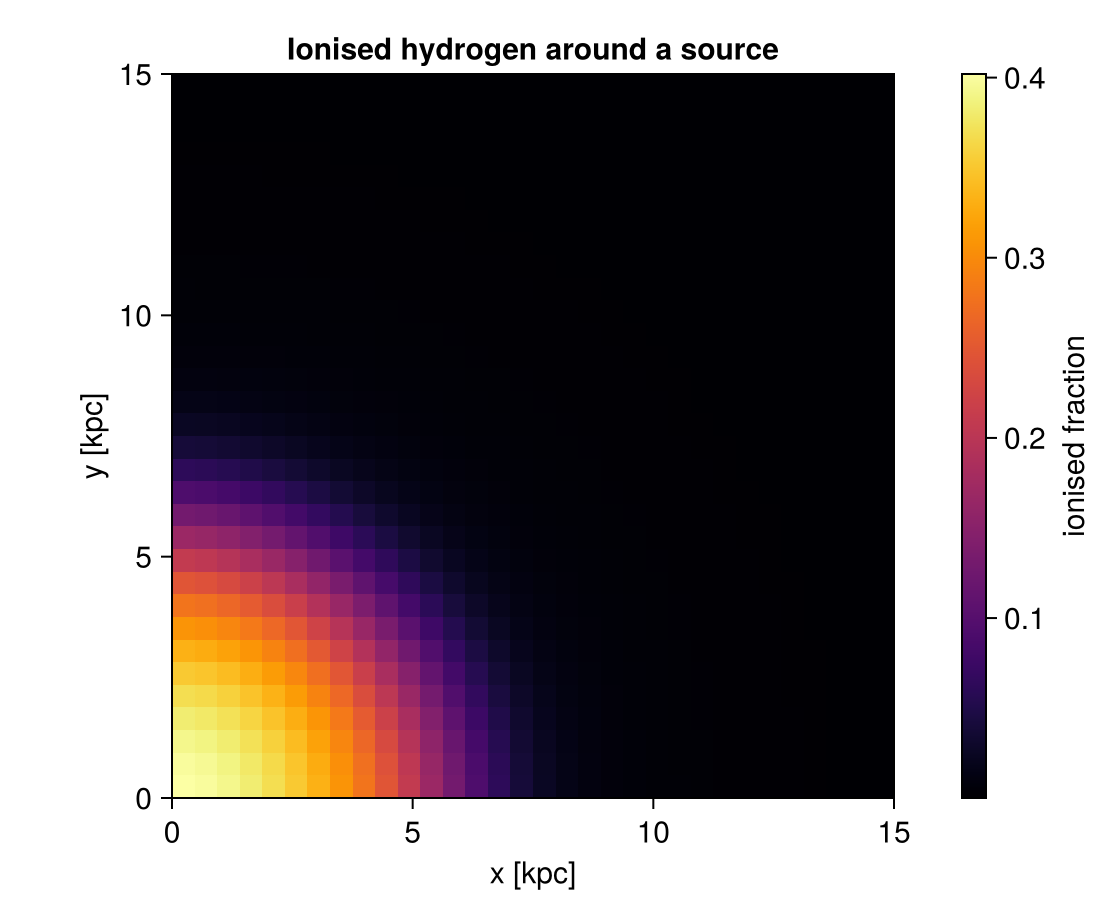
`projection` returns an object rather than a picture: the map is `p.maps[:xHII]` and its edges are
`p.extent`, in kpc here, so you can draw it with any plotting package. Mera draws nothing itself.
The source sits at a corner of the box and ionises outward, so the run follows one octant of the
sphere at eight times the effective resolution. Its answer is known: the ionisation front should
follow the Strömgren law, which is what Mera's own test suite checks it against.
With a simulation of your own, point `getinfo` at the output folder and continue the same way:
```julia
info = getinfo(300, "/path/to/simulation") # reads output_00300
gas = gethydro(info)
```
Loading several components means writing the same selection on each call. One call does all of
it, and the same line works on a converted MERA file:
```julia
(; hydro, particles, info) = loadall("/path/to/simulation", 300;
lmax=10, xrange=[-10., 10.],
center=[:bc], range_unit=:kpc)
```
See [Pipelines](pipelines.md) for that, for the matching projection shorthand, and for keeping
one selection in step across a whole script.
Once you are past the tutorials, the [Gallery](gallery.md) holds complete workflows you can point
at your own simulation, and is where to share the analysis behind a paper.
If you are working with an AI assistant, [Using an AI Assistant](assistant.md) has a short file to
give it so that it writes Mera that runs, and the three checks worth keeping in any script it
produces. It is an experiment rather than a policy.
[Where to start](where_to_start.md) is the other way in: one table from "I want to …" to the
function that does it, for the twenty things people reach for first.
**Next: [First Look](first_look.md).** It shows what one command tells you about an unfamiliar
output, and what it costs on a large one. From there the sidebar follows the order you will
actually work in: inspect, load, select, compute, project.
## Installing the plotting packages
Mera itself draws nothing. The tutorials plot with **CairoMakie**, and a few of the older
projection pages use **PyPlot**. Neither is a Mera dependency, so add whichever you need before
running a page that plots:
```julia
Pkg.add("CairoMakie") # what most tutorial figures use
Pkg.add("PyPlot") # only the projection pages that import it
```
Mera's Makie support ships as a package extension: it activates by itself once a Makie backend
such as CairoMakie is loaded, with nothing further to install.
For the wider ecosystem around a Mera workflow, tables, units, statistics and IO, see
[Recommended Packages](recommended_packages.md).
**Requirements**: Julia 1.10 or newer, **1.12+ recommended**, and 8GB+ RAM
**Platforms**: macOS (including Apple Silicon), Linux, Windows
**Tested on every push**: Julia 1.10 / 1.11 / 1.12 / 1.13 × Linux, macOS and Windows, twelve jobs
Julia 1.10 is the minimum the package supports (`julia = "1.10"` in `Project.toml`) and stays in
CI so it keeps working. 1.12 is what we recommend running: the compiler is faster and the garbage
collector handles the large allocations of AMR and particle analysis better, which is most of what
Mera does. CI runners have no simulation data, so they exercise the data-free tiers: the
synthetic-HDF5 reader contracts, the reader registry, the IO layer and the mera-file round-trips,
while the full suite runs against real snapshots locally, on one configuration: **Julia 1.12 on
macOS (Apple Silicon)**. The data-backed tier is therefore verified on a single platform, not
across the whole matrix.
## What Mera gives you
**One API across data types.** Mera reads six: hydro, particles, gravity, clumps, sinks and
radiative transfer. MHD is not a seventh, the magnetic field arrives as extra columns on hydro.
The same function name works on each, and Julia's multiple dispatch selects the right method, so
you write the analysis once:
```julia
getvar(gas, :mass) # cell mass, density times volume
getvar(particles, :mass) # particle mass, discrete values
getvar(clumps, :mass) # clump mass, one row per clump
getvar(sinks, :mass) # sink mass, the column RAMSES calls msink
getvar(gravity, :epot) # gravity carries a potential, not a mass
getvar(rt, :Np1) # photon density of group 1
getvar(gas, :bx) # MHD, as a field on the hydro cells
projection(gas, :rho) # gas density
projection(particles, :age) # stellar age distribution
projection(rt, :Np1) # photon density, through the same engine
```
Dispatch picks the method, it does not invent physics: a quantity exists where it means
something. `:mass` is defined for gas, particles, clumps and sinks, while gravity and RT carry
fields instead. Projection covers the types laid out on the AMR grid and the particles, so clumps
and sinks, which are catalogues of points, are analysed through regions and `getvar` rather than
projected.
**AMR handled correctly.** Multi-resolution grids are read natively from the RAMSES binary
format, with Hilbert space-filling curve support, correct level weighting, and projections that
conserve mass across refinement boundaries.
**One table, one row per cell.** Mera holds a snapshot as a table: one contiguous column per
quantity, sorted on the cell's grid address `(level, cx, cy, cz)`. Three things follow, and they
are why the rest of this page is possible.
The **refinement level travels with every cell**, so nothing has to be resampled onto a uniform
grid first. A projection deposits each cell at its own size in a single pass over all levels, and
`:level` can be selected on like any physical quantity.
**Selecting is cheap.** A mask picks rows as views rather than copying columns, so a cut costs the
columns you actually read and not the whole table. You can select in value space on anything
`getvar` computes, in any unit, and combine those conditions:
`filterdata(gas, Above(:T, 1e4, :K) & Below(:rho, 1e3, :nH))`.
**Results stay the same kind of thing.** A region or a filter hands back an object of the original
type, so `subregion` into `filterdata` into `projection` into `getvar` chains without adapters or
conversions.
**Built for large outputs on ordinary machines.** Selective loading keeps memory in hand, and the
numbers are measured rather than assumed. Convert a snapshot once with `savedata` and reading it
back is the same data, far cheaper:
| reading one snapshot, all components | from the RAMSES output | from the MERA file |
|---|---:|---:|
| time | 514.9 s | **22.7 s** |
| memory allocated | 665.4 GB | **47.4 GB** |
| size on disk | 53.18 GB | **12.73 GB** |
A production run with 5120 CPU files and 20489 files on disk, read at full resolution. The
gain comes from not re-parsing every Fortran file and not storing the AMR hierarchy, so it
grows with the file count and depends on your simulation. [Performance](benchmarks/performance.md)
has the method, the limits, and the raw reports.
**Physics on demand.** Nothing is precomputed and nothing is stored twice: ask for a quantity by
name and Mera derives it from what the snapshot actually holds, in the unit you ask for.
| | |
|---|---|
| thermodynamics | temperature, sound speed, mean molecular weight, five entropy measures, cooling time and length |
| kinematics | velocities and Mach numbers in Cartesian, cylindrical and spherical frames, and the squared components the dispersions build on |
| magnetic fields | components in three coordinate systems, magnitude, magnetic pressure, plasma beta, Alfvén speed, and Alfvén, fast and slow magnetosonic Mach numbers |
| gravity | potential, accelerations and forces in three coordinate systems, specific and total binding energy |
| stability and star formation | Jeans length, mass and number, local virial parameter, free-fall time |
| angular momentum | specific and total, Cartesian, cylindrical and spherical components |
| radiative transfer | ionisation fractions, number densities, photoionisation and photoheating rates, recombination |
| geometry | cell size and volume, cylindrical and spherical radii, and their minimum-image forms for a periodic box |
| cosmology | overdensity, formation redshift and time, physical age from conformal birth time |
A quantity exists where the data supports it: the magnetosonic Mach numbers need a magnetic field,
the ionisation states need radiative transfer. `getvar()` prints the current list, and
[`add_field`](derived_fields.md) adds your own on the same footing.
**Cells are split, not counted.** Say you want the mass inside a sphere of 10 kpc. The sphere is
round. The cells are boxes. Some cells lie half in and half out, and you have to decide what to do
with them.
The usual rule looks at the centre of each cell and takes the whole cell or nothing. Mera can keep
the part that is really inside:
```julia
sph = subregion(gas, sphere(10.)) # 10 kpc around the box centre
msum(sph, :Msol) # the mass inside 10 kpc
```
Every cell on the edge gets a `:fraction`, a number between 0 and 1, saying how much of it lies
inside. `getvar(:mass)` and `getvar(:volume)` both use it. This gives you one thing you can rely
on: **the parts add up to the whole.** A sphere of 10 kpc is exactly the 5 kpc sphere plus the
shell from 5 to 10 kpc.
How much this changes a number depends on what the edge passes through. Around a large region in
ordinary gas the two mistakes, gas wrongly added and gas wrongly dropped, cancel to well under a
percent. They stop cancelling when the edge cuts something heavy: in the `mw_L10` test galaxy a
thin shell with its edge on the densest cell comes out **14 % too heavy**. Splitting removes the
question, so you do not need to know which case you are in.
That is the arithmetic. The **picture** is a separate question: a projection spreads each edge
cell's fraction-weighted mass over its whole footprint, so a boundary drawn on a coarse patch looks
soft. `subregion(..., refine_to=[0.05, :kpc])` subdivides the straddling cells until their children
are no larger than that, and the rendered edge sharpens to the scale you set. It changes no total,
because `:fraction` already made the totals exact; it is a rendering tool, not an accuracy one.
Only the region values do this, `sphere(10.)` and the other shapes, and `projection` with
`split=true` on its `depth` or `fov` cut. The `xrange`/`yrange`/`zrange`
options when loading, the older style with symbols, and `covering_grid` all count whole cells.
Stars, dark matter and clumps are points, so there is nothing to split. See
[Subregions](api/subregions.md).
**Results you can defend.** Pin versions with a `Project.toml` and `Manifest.toml` in your own
analysis project, and record what produced each number with [`provenance`](provenance.md). See
[Reproducibility](reproducibility.md) for how the pieces fit together. VTK
export preserves AMR structure for ParaView and VisIt.
Mera supports RAMSES stable-17.09 through stable-19.10, and the 2025.05 and 2026.05 releases. The
public test simulations are produced with RAMSES 2026.05 and checked against its own reference
solutions on every release, so that support is exercised rather than assumed. Mera is in active use
and active development.
## About the data in these tutorials
The tutorial pages analyse research-scale RAMSES simulations, several gigabytes each. They are
worked examples: read them to see what an analysis of real data looks like, and adapt the code to
your own outputs. Those particular simulations are not distributed, so point the examples at a
snapshot of your own, or at one of the test simulations below.
To run code as you read, Mera publishes a small set of test simulations, fifteen of them, most a
few megabytes (about 300 MB together). Every one carries either an analytic oracle, a law that
follows from its own setup, or is checked against reference values published by the RAMSES
developers. Mera's own test suite verifies the package against them, so you can confirm an
installation behaves correctly. Fetch them all with `download_testdata()`, or one at a time by name
(`download_testdata("sedov3d_amr")` is 2.3 MB).
Two tutorial pages already use data you can obtain: the radiative-transfer page runs on one of the
published test simulations, and the cosmology page carries download instructions for the yt
project's public sample dataset.
Three pages need no download at all. [Clump Finding: Synthetic Example](clumpfind_synthetic.md),
[Statistics (PDFs)](statistics.md) and [Uniform Grid / Resampling](covering_grid.md) build their
data in memory as they run, and the clump-finding page scores the finder against known positions
rather than eyeballing the result.
Every tutorial builds its paths from one variable, so you do not have to edit the cells. Point it
at your own simulations and the examples run against them:
```julia
ENV["MERA_EXAMPLES"] = "/path/to/your/simulations" # before `using Mera`
```
## Where to go next
If you already know what you want to compute:
| you want to | go to |
|---|---|
| see what is in an unfamiliar output | [First Look](first_look.md) |
| learn the objects and the units | [First Steps](00_multi_FirstSteps.md) |
| make a density map | [Projections](06_hydro_Projection.md) |
| load only part of a large output | [Load by Selection](02_hydro_Load_Selections.md) |
| cut out a spatial region | [Get Subregions](03_hydro_Get_Subregions.md) |
| compute masses and other quantities | [Basic Calculations](04_multi_Basic_Calculations.md) |
| store or share a snapshot | [MERA Files](07_multi_Mera_Files.md) |
| make it faster | [Multi-Threading](multi-threading/multi-threading_intro.md) |
| know what it costs before you run it | [Performance](benchmarks/performance.md) |
| look up a function | [Complete API](api.md) |
Coming from another analysis tool, or new to Julia:
- [Coming from Other Tools](switching_to_mera.md), a concept-to-verb mapping, one complete
worked workflow, and the differences to expect, stated honestly
- [Julia for Simulation Analysis](julia_for_simulation_analysis.md), environments, compile
latency, memory and threads, scoped to this kind of work
- [Troubleshooting](troubleshooting.md), the first-hour errors, listed under the message Mera
actually prints
## Citation
If you use MERA in your research, please cite it using the DOI badge above. This supports
continued development and helps other researchers discover the tool. Click the badge for BibTeX
format. Please also star the [GitHub repository](https://github.com/ManuelBehrendt/Mera.jl).
## Community and support
- [GitHub Discussions](https://github.com/ManuelBehrendt/Mera.jl/discussions): ask questions,
share tips, get help
- [Show and Tell](https://github.com/ManuelBehrendt/Mera.jl/discussions/categories/show-and-tell):
share your scientific results and visualizations
- [Report Issues](https://github.com/ManuelBehrendt/Mera.jl/issues): bug reports and feature
requests
- In the REPL: `?getinfo` for function docs, `methods(getinfo)` for available methods
- [Jupyter notebooks](https://github.com/ManuelBehrendt/Notebooks/tree/master/Mera-Docs/version_1.1)
## Ambient Study Music
**Ambient Study Music**: by MERA, inspired by astrophysics. Eighteen tracks, each named after an
astronomical object. Written alongside the package, and meant for long sessions with data.
```@raw html

Spotify
·
Apple Music
·
YouTube
```
## License
MIT License, Copyright (c) 2019 Manuel Behrendt.
Permission is hereby granted, free of charge, to any person obtaining a copy
of this software and associated documentation files (the "Software"), to deal
in the Software without restriction, including without limitation the rights
to use, copy, modify, merge, publish, distribute, sublicense, and/or sell
copies of the Software, and to permit persons to whom the Software is
furnished to do so, subject to the following conditions:
The above copyright notice and this permission notice shall be included in all
copies or substantial portions of the Software.
THE SOFTWARE IS PROVIDED "AS IS", WITHOUT WARRANTY OF ANY KIND, EXPRESS OR
IMPLIED, INCLUDING BUT NOT LIMITED TO THE WARRANTIES OF MERCHANTABILITY,
FITNESS FOR A PARTICULAR PURPOSE AND NONINFRINGEMENT. IN NO EVENT SHALL THE
AUTHORS OR COPYRIGHT HOLDERS BE LIABLE FOR ANY CLAIM, DAMAGES OR OTHER
LIABILITY, WHETHER IN AN ACTION OF CONTRACT, TORT OR OTHERWISE, ARISING FROM,
OUT OF OR IN CONNECTION WITH THE SOFTWARE OR THE USE OR OTHER DEALINGS IN THE
SOFTWARE.
# Where to start
The rest of this site is organised by what Mera has. This page is organised by what you want to do.
Nothing here is a tutorial. Each row names the one or two functions that do the job and points at
the page that explains them properly. Find your row, run the call, read the page when the call
raises a question.
!!! tip "If you have a snapshot and no idea what is in it"
```julia
using Mera
quicklook(400, path="/path/to/simulation")
```
One call. It reads within a budget, maps the box along all three axes, draws a density and
temperature diagram, and reports masses, densities and temperatures. See
[First Look](first_look.md). New to Mera? [First Steps](00_multi_FirstSteps.md) is a guided
first session, and [Coming from Other Tools](switching_to_mera.md) translates habits you bring.
## Getting data in
| I want to … | start with | read |
|:---|:---|:---|
| see what is in an output I have never opened | `quicklook` | [First Look](first_look.md) |
| a first-look summary with the panels I choose, and its cost before it runs | `report` | [Composable Reports](report.md) |
| know which outputs exist and are complete | `checkoutputs`, `checksimulations`, `gettime` | [Data Inspection](api/data_inspection.md) |
| read the gas | `getinfo` then `gethydro` | [Load by Selection](02_hydro_Load_Selections.md) |
| read stars, dark matter, gravity, clumps, sinks or radiative transfer | `getparticles`, `getgravity`, `getclumps`, `getsinks`, `getrt` | [Particles](01_particles_First_Inspection.md), [Gravity](01_gravity_First_Inspection.md) |
| read everything the snapshot holds, in one call | `loadall` | [Pipelines](pipelines.md) |
| read only part of the box | `xrange`, `yrange`, `zrange` with `center=[:bc]`, `range_unit=:kpc` | [Load by Selection](02_hydro_Load_Selections.md) |
| stop waiting for the same read every time | `savedata`, `loaddata`, `convertdata` | [Mera Files](07_multi_Mera_Files.md), [Converter](07_1_multi_Mera_Files_Converter.md) |
| restart RAMSES on a different number of CPUs | `repartition`, then `compareramses` to check; `writeramses` from Mera data or a mera file | [RAMSES restart, any CPUs](07_2_multi_RAMSES_Restart.md) |
| practise on data with a known answer | `download_testdata` (fifteen small RAMSES runs) | [Test simulations](api/data_loading.md#Test-simulations) |
## Asking for numbers
| I want to … | start with | read |
|:---|:---|:---|
| a total mass, or any total | `msum` | [Basic Calculations](04_multi_Basic_Calculations.md) |
| a centre or a bulk velocity | `center_of_mass`, `bulk_velocity` | [Basic Calculations](04_multi_Basic_Calculations.md) |
| a derived quantity: temperature, sound speed, Mach | `getvar(obj, :T, :K)` | [Basic Calculations](04_multi_Basic_Calculations.md) |
| to see every quantity available | `getvar()`, `list_fields(obj)`, `list_units()` | [Derived Fields](derived_fields.md), [Units & Constants](units_and_constants.md) |
| mean, median, spread, weighted or masked | `wstat` | [Basic Calculations](04_multi_Basic_Calculations.md) |
| a quantity of my own, usable everywhere | `add_field` | [Derived Fields & add_field](derived_fields.md) |
| to check that my run resolves the Jeans length | `getvar(gas, :jeansnumber_iso)` | [How Quantities Are Computed](computation_reference.md#Jeans-and-collapse) |
| a centre or a radius in a periodic box | `center_of_mass(...; periodic=true)`, `getvar(gas, :r_sphere_periodic)` | [Periodic Boxes](periodic_boxes.md) |
**Say the unit.** `getvar(gas, :T)` gives code units, which mean something different in the next
simulation. `getvar(gas, :T, :K)` is a statement about physics.
## Choosing what to look at
| I want to … | start with | read |
|:---|:---|:---|
| a sphere, a box, a cylinder, a shell | `subregion` with `sphere`, `cuboid`, `cylinder`, `sphericalshell`, `cylindricalshell` | [Get Subregions](03_hydro_Get_Subregions.md) |
| a ring, or one region minus another | `∩` `∪` `\` `!` between regions | [Get Subregions §5](03_hydro_Get_Subregions.md#5.-Region-Algebra:-Composing-Regions) |
| everything above 10⁴ K, or between two densities | `filterdata` with `Above`, `Below`, `InRange` | [Masking & Filtering](05_multi_Masking_Filtering.md) |
| to keep the whole object but mark rows | `getmask`, then pass `mask=` | [Masking & Filtering](05_multi_Masking_Filtering.md) |
| to reuse one selection across a whole script | `ArgumentsType`, passed as `myargs=`; `withargs` | [Bundling Arguments](bundled_arguments.md) |
| a region boundary that looks sharp in a figure | `subregion(..., refine_to=[px, :kpc])` | [Get Subregions §7](03_hydro_Get_Subregions.md#7.-How-Exact-Is-Exact?) |
The operators are set **intersection**, **union**, **difference** and **complement**. Type `∩` as
`\cap` then TAB and `∪` as `\cup` then TAB, or avoid Unicode entirely: `A & B`, `A | B`,
`intersect(A, B)`, `union(A, B)`, `setdiff(A, B)` and `!A` all mean the same.
With region values (`sphere(...)`, `cuboid(...)` and the others), boundary cells are split by
default, so a region and its complement add up to the parent exactly. That is worth checking once
in any new script:
`msum(subregion(gas, reg), :Msol) + msum(subregion(gas, !reg), :Msol)`.
## Making pictures
| I want to … | start with | read |
|:---|:---|:---|
| a surface-density map | `projection(gas, :sd, :Msol_pc2, pxsize=[50.0, :pc])` | [Projection](06_hydro_Projection.md) |
| a map of the stars or the dark matter | `projection(part, :sd, :Msol_pc2, pxsize=[100.0, :pc])` | [Projection: Particles](06_particles_Projection.md) |
| the galaxy seen from any angle | `projection(...; inclination, azimuth)` | [Off-axis Projection](06_offaxis_Projection.md), [Cheatsheet](offaxis_cheatsheet.md) |
| the galaxy centre and a face-on or edge-on view, found from the data | `center_of`, `face_on`, `edge_on`, `angmom` | [Auto-Frame](galaxyframe.md) |
| values in one plane instead of summed along the line of sight | `slice` | [Which tool?](projection_which_tool.md#A-cutting-plane) |
| to know which projection tool fits my case | (reading only) | [Which tool?](projection_which_tool.md) |
| a 3-D picture in which dense gas hides what is behind it | `volumerender`; `volumeorbit` or `volumepath` for a movie | [Volume Rendering](17_multi_Volume_Rendering.md) |
| a radial or vertical profile | `profile` | [Profiles & Phase Diagrams](15_multi_Profiles_Phase.md) |
| a density-temperature diagram | `phase` | [Profiles & Phase Diagrams](15_multi_Profiles_Phase.md) |
| profiles over many snapshots, or binned in three quantities | `profiletimeseries`, `profile3d` | [Profiles & Phase Diagrams](15_multi_Profiles_Phase.md) |
| a velocity-dispersion profile, with or without the thermal part | `velocitydispersion`, `localdispersion` | [Profiles & Phase](profiles_phase.md#Velocity-dispersion) |
| a density PDF, mass- or volume-weighted | `pdf` | [Statistics](statistics.md) |
| a uniform grid for an FFT or a power spectrum | `covering_grid`, `covering_grid_memory` | [Covering Grid](covering_grid.md) |
| to open it in ParaView | `export_vtk` | [ParaView](paraview/paraview_intro.md) |
Use `pxsize=[value, :unit]` rather than `res=`: it says how large a pixel is in physical units,
not how many pixels there are.
## Bigger jobs
| I want to … | start with | read |
|:---|:---|:---|
| find clumps or cores | `clumpfind` | [Clump Finding](clumpfind.md) |
| a star-formation rate or history | `sfr`, `sfr_snapshot`, `depletion_time` | [Star-Formation Rate](sfr.md) |
| the same analysis over fifty outputs | `timeseries` | [Time Series](timeseries.md) |
| a movie | `getmovie`, `savemovie`, `rotation_sequence` | [Movies](movie.md), [Which tool?](projection_which_tool.md#A-movie) |
| ages and redshifts on a cosmological run | `cosmic_time`, `lookback_time`, `iscosmological` | [Cosmological Runs](09_multi_Cosmology.md) |
| magnetic fields, or radiative-transfer data | `getvar(gas, :bmag)`, `getrt` | [Magnetic Fields](magnetic_fields.md), [Radiative Transfer](10_multi_RadiativeTransfer.md) |
| to use all my cores | start Julia with `-t 8`; `max_threads` where it matters | [Multi-Threading](multi-threading/multi-threading_intro.md) |
| quieter output, or no progress bars | `output_mode(false)` | [Verbose & Progress Switches](verbose_progress_switches.md) |
| to be told when a long run finishes | `notifyme`, `bell` | [Notifications](notifications/index.md) |
## Making the result defensible
| I want to … | start with | read |
|:---|:---|:---|
| to record what produced a number | `provenance(obj)`, `provenance_string`, `mera_build` | [Provenance](provenance.md) |
| someone else to reproduce it | a `Project.toml` beside the script, and its `Manifest.toml` | [Reproducibility](reproducibility.md) |
| to check I did not invert a condition | the partition check above | [Masking & Filtering](05_multi_Masking_Filtering.md) |
| to know how a number is computed before I quote it | (reading only) | [How Quantities Are Computed](computation_reference.md) |
## When the row you want is not here
A [gallery recipe](gallery.md) is a whole workflow rather than one function: download it, change the
path, run it. If you are working with an AI assistant, [Using an AI Assistant](assistant.md) has a
file to give it so that what it writes runs, and the checks worth keeping.
And when something goes wrong, the error messages are written to be read: they suggest near
matches, list what the object actually holds, and name the function that reports the details.
[Troubleshooting](troubleshooting.md) covers common first-hour errors.
```@raw html
```
# First Look: `quicklook` and `report`
!!! tip "Run it yourself"
This page is also an executable **Jupyter notebook**: [open / download `first_look.ipynb`](https://github.com/ManuelBehrendt/Notebooks/blob/master/Mera-Docs/version_1.1/first_look.ipynb). The notebooks run end-to-end and double as part of Mera's test suite.
You have a simulation output and no idea what is in it. This page is about the first two minutes.
Mera has two entry points for that, and the difference between them is the first thing to get
straight:
| | `quicklook` | `report` |
|---|---|---|
| what it is | one fixed dashboard | a set of cards you choose |
| how you call it | one function, a few switches | build a plan, then run it |
| what you get | Σ maps, a ρ-T phase diagram, a census | whatever cards you put in the plan |
| cost control | `budget`, `lmax`, `datatypes` | a cost model: `estimate`, `preview`, `downsample` |
| use it when | you do not yet know what you are looking at | you know what you want to see |
Start with `quicklook`. Move to `report` when you find yourself wanting a panel it does not have.
Everything below runs on a real Milky-Way-like RAMSES run: **640 CPU domains, 2569 files, 5.7 GB
on disk**. That matters, because the honest answer to "how long does a first look take" depends
almost entirely on how many files there are.
## Setup
Point `MERA_EXAMPLES` at your own simulation folder, or edit the path below.
```julia
using Mera
MERA_EXAMPLES = get(ENV, "MERA_EXAMPLES", "/Volumes/FASTStorage/Simulations/Mera-Tests")
path = "$MERA_EXAMPLES/RAMSES/mw_L10"
output = 300;
```
```
*__ __ _______ ______ _______
| |_| | | _ | | _ |
| | ___| | || | |_| |
| | |___| |_||_| |
| | ___| __ | |
| ||_|| | |___| | | | _ |
|_| |_|_______|___| |_|__| |__|
Mera v1.8.0 | Julia 1.12.7 | 8 threads
```
## Step 1: what you get for free
`read=false` reads only the header. No cell is touched, no particle is read, and it returns
immediately whatever the size of the run. This is the cheapest thing Mera can tell you, and it is
often enough to decide what to do next.
```julia
q0 = quicklook(output; path=path, read=false);
```
```
┌─ Mera quicklook ── output 300 (RAMSES) ───────────────
│ box : 48.0 kpc levels 6–10 (finest 46.88 pc)
│ grid : ndim 3 · ncpu 640 · nvarh 7
│ time : 445.9 Myr (non-cosmological)
│ particles : 544515 total — stars 544515 · DM 0
│ (header only — call quicklook(output) to read a sample)
└─ 0.15 s ──────────────────────────────────
```
Note what is already known: the box size, the AMR level range and therefore the finest cell, the
time or redshift, the number of CPU domains, and the particle census by family. The cell count is
*not* there, because RAMSES does not record a leaf-cell total in the header; `grid_info.ngrid_current`
is not it. Cells are reported only after a read.
The `ncpu` line is the number to look at before a big read. It is the count of per-CPU files Mera
will have to open, and on large runs it dominates everything else.
## Step 2: the actual first look
Now the real call. On a run this size it is not instant, so Mera says what it is doing:
- a timestamped line before each read, naming the file count and the level range
- the reader's own progress bar, with a file rate and an ETA
- a line before the projections
- the dashboard, with the elapsed time in its footer
- a closing timestamp
If your terminal is silent, the call is not running.
```julia
q = quicklook(output; path=path);
```
```
[Mera]: quicklook output 300, reading gas: 2026-09-09T18:46:06.212
640 CPU file(s), levels 6-8 of 10 (budgeted to ~2000000 cells)
Processing files: 100%|██████████████████████████████████████████████████| Time: 0:00:12 (19.00 ms/it)
✓ File processing complete! Combining results...
projecting 3 gas map(s) [z, x, y] and the phase diagram from 9959076 cells
[Mera]: quicklook output 300, reading particles: 2026-09-09T18:46:25.464
[ Info: sfr_snapshot: using eta_sn=0.2 from the run's namelist to rebuild birth masses from the current :mass. Stars older than 5.0 Myr are scaled by 1/(1-eta_sn), which RAISES the rate. Pass eta_sn=0 to switch this off, or eta_sn= to set it.
┌─ Mera quicklook ── output 300 (RAMSES) ───────────────
│ box : 48.0 kpc levels 6–10 (finest 46.88 pc)
│ grid : ndim 3 · ncpu 640 · nvarh 7
│ time : 445.9 Myr (non-cosmological)
│ particles : 544515 total — stars 544515 · DM 0
│ read : 9959076 cells ⚠ coarse levels ≤ 8 of 10
│ gas mass : 7.061e9 M⊙ (mass-conserving)
│ nH range : 8.112e-8 … 19.47 cm⁻³ ⚠ peaks smoothed (lower bound)
│ T range : 30.22 … 2.41e7 K ⚠ peaks smoothed (lower bound)
│ star mass : 4.385e8 M⊙ DM mass : 0.0 M⊙
│ current SFR: 1.55 (10 Myr) · 1.418 (100 Myr) M⊙/yr
└─ 26.14 s ──────────────────────────────────
[Mera]: quicklook output 300 finished: 2026-09-09T18:46:32.349
```
### What came back
The printed dashboard is a side effect. The return value is a normal Julia object you can compute
with.
```julia
propertynames(q)
```
```
(:info, :levelmin, :levelmax, :lmax_used, :ncells, :sampled, :maps, :phase, :budget, :summary)
```
```julia
# the header facts and the read-derived estimates
q.summary
```
```
(output = 300, simcode = "RAMSES", box_kpc = 48.00000000003111, levelmin = 6, levelmax = 10, finest_cell_pc = 46.87500000003038, ncpu = 640, ndim = 3, nvarh = 7, time_Myr = 445.8861174695, redshift = nothing, npart = 544515, nstars = 544515, ndm = 0, nsinks = 0, ncells = 9959076, lmax_used = 8, sampled = true, gas_mass_Msol = 7.060719565110762e9, particle_subsample = 1.0, stellar_mass_Msol = 4.38466e8, dm_mass_Msol = 0.0, sfr10 = 1.54955, sfr100 = 1.417555, nH_range = (8.111842617338044e-8, 19.474166141696692), T_range_K = (30.216649542865262, 2.4096147641221385e7), bmag_range_muG = nothing, beta_range = nothing, seconds = 26.127853870391846)
```
```julia
# each map is a full projection result, not just a matrix
keys(q.maps)
```
```
(:z, :x, :y, :stars, :stars_x, :stars_y)
```
```julia
# the global snapshot budget: masses and the current star-formation rate
q.budget
```
```
(gas_mass_Msol = 7.060719565110762e9, stellar_mass_Msol = 4.38466e8, dm_mass_Msol = 0.0, n_stars = 544515, n_dm = 0, sfr10 = 1.54955, sfr100 = 1.417555, sfr_mean = 1.2292556033118338, has_particles = true)
```
### Plotting it
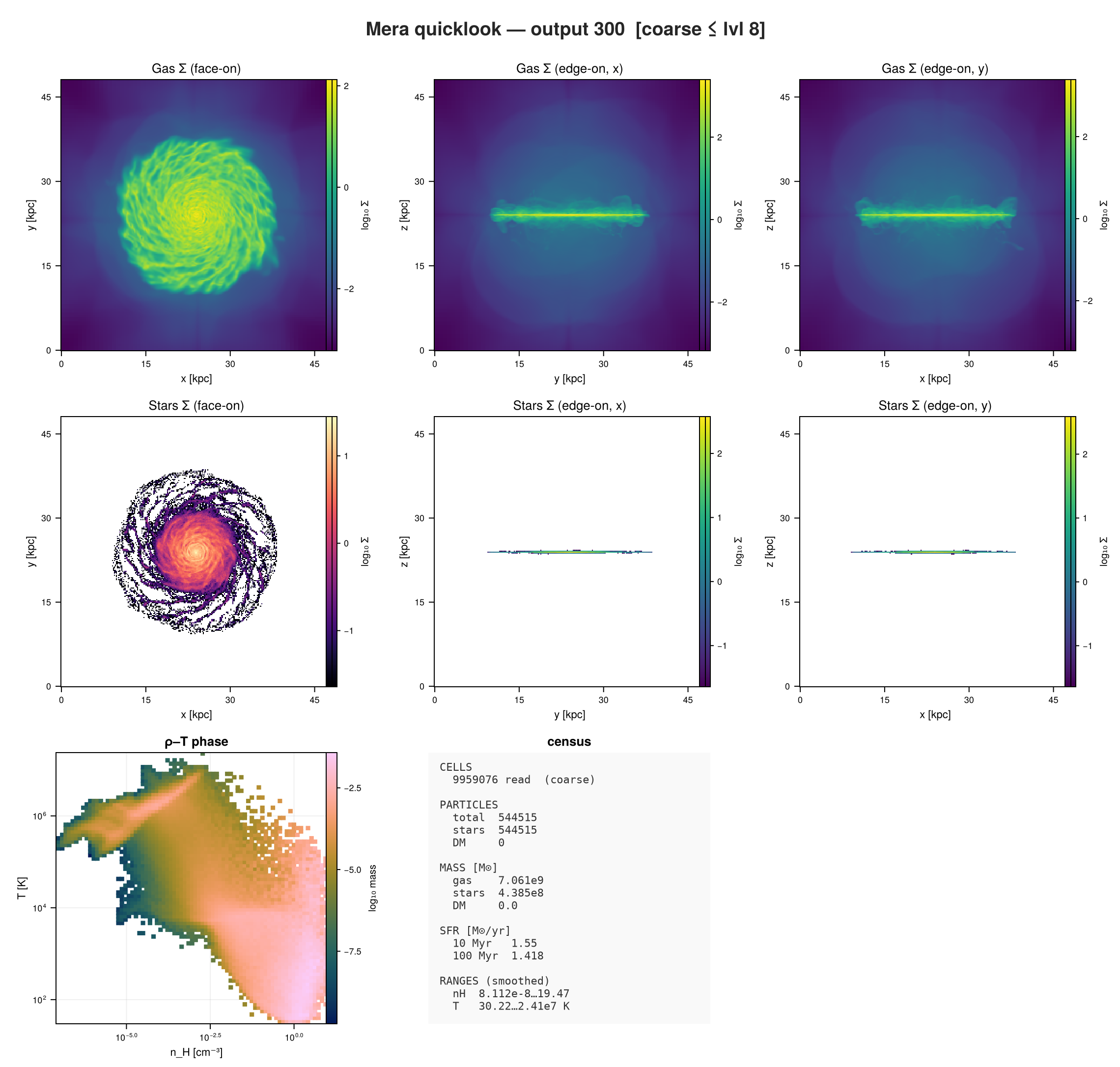
`quicklookplot` renders the whole dashboard. It lives in a package extension, so it becomes
available once a Makie backend is loaded.
```julia
using CairoMakie
quicklookplot(q)
```
## Step 3: choosing what to read
Three switches control what the call costs. They do **not** all work the same way, and the
difference matters on a run with thousands of files.
### `datatypes`: which components
`[:hydro]` skips the particle read entirely; `[:stars]` or `[:dm]` skip the gas read. On a run
where one of the two dominates, this is the cheapest saving available.
```julia
q_gas = quicklook(output; path=path, datatypes=[:hydro], verbose=false)
keys(q_gas.maps)
```
```
(:z, :x, :y)
```
### `directions`: which projection axes
`:z` is face-on for a disk in the xy-plane; `:x` and `:y` are the two edge-on views. It applies to
the gas maps and to the stellar and dark-matter maps alike.
The face-on map keeps the plain key, and edge-on views arrive as `stars_x` / `stars_y` (and
`dm_x` / `dm_y`), so a call asking for two axes of stars returns two stellar maps:
```julia
q_stars = quicklook(output; path=path, datatypes=[:stars], directions=[:z, :x], verbose=false)
keys(q_stars.maps)
```
```
(:stars, :stars_x)
```
### `budget` and `lmax`: how much of the AMR hierarchy
`budget` is a target leaf-cell count. If reading every level would exceed it, Mera reads only the
coarse levels, and says so in the dashboard. `lmax` sets that level directly.
Coarsening is **volume-conserving**, so extensive totals stay exact: the gas mass from a budgeted
read is the same number you would get from the full one. Peak quantities are not: the densest and
hottest gas lives in the finest cells, so `nH` and `T` extrema from a coarse read are lower bounds.
The dashboard marks them when that is the case.
```julia
q_coarse = quicklook(output; path=path, lmax=8, datatypes=[:hydro], verbose=false)
(cells = q_coarse.ncells, level = q_coarse.lmax_used, gas_mass = q_coarse.budget.gas_mass_Msol)
```
```
(cells = 9959076, level = 8, gas_mass = 7.060719565110762e9)
```
### Gas and particles are read differently
`budget` caps the **gas** read only. Particles are read in full by default, because a particle file
is small next to the AMR hydro, and that is deliberate: it keeps the stellar and dark-matter masses
and the SFR **exact** even when the gas read is coarse.
For runs where reading every particle is itself the cost, `particle_subsample` reads only that
fraction of the particle CPU files, skipping whole files, which cuts I/O and peak memory together.
RAMSES load-balances its domains to roughly equal particle counts, so this reads about that
fraction of the particles; the census, masses and SFR are then scaled by `1/fraction` and flagged
as approximate. The same `subsample` keyword exists on `getparticles`.
```julia
q_sub = quicklook(output; path=path, datatypes=[:stars], particle_subsample=0.25, verbose=false)
q_sub.budget
```
```
(gas_mass_Msol = nothing, stellar_mass_Msol = 4.7834e8, dm_mass_Msol = 0.0, n_stars = 594020, n_dm = 0, sfr10 = 1.6883, sfr100 = 1.55615, sfr_mean = 1.3437966627699716, has_particles = true)
```
### How far to trust a coarse read
The distinction that matters is **extensive totals versus peaks**, and it is easy to check rather
than take on trust. Reading the same output at three levels:
```julia
using Printf
info = getinfo(output, path, verbose=false) # header only; the reads happen in the loop
ref = nothing
for l in (8, 7, 6)
g = gethydro(info, lmax=l, verbose=false, show_progress=false)
m = sum(getvar(g, :mass, :Msol))
nh = maximum(getvar(g, :rho, :nH))
T = maximum(getvar(g, :T, :K))
global ref = ref === nothing ? (m, nh, T) : ref
@printf("level %d: %9d cells gas mass %.6e Msol (%+.4f%%) nH max %7.3f (%+.1f%%) T max %.3e (%+.1f%%)\n",
l, length(g.data), m, 100*(m-ref[1])/ref[1], nh, 100*(nh-ref[2])/ref[2], T, 100*(T-ref[3])/ref[3])
g = nothing; GC.gc()
end
```
```
level 8: 9959076 cells gas mass 7.060720e+09 Msol (+0.0000%) nH max 19.474 (+0.0%) T max 2.410e+07 (+0.0%)
level 7: 1631176 cells gas mass 7.060720e+09 Msol (+0.0000%) nH max 8.024 (-58.8%) T max 9.283e+06 (-61.5%)
level 6: 262144 cells gas mass 7.060720e+09 Msol (+0.0000%) nH max 2.804 (-85.6%) T max 7.540e+06 (-68.7%)
```
Read that table as two different stories.
**Gas mass does not move.** Not approximately: the error is zero to every digit printed, at every
level. De-refinement is mass- and volume-conserving, so an extensive total is the same number
whether you read two hundred thousand cells or ten million. The same holds for any sum over cells.
**The peaks collapse.** The densest and hottest gas lives in the finest cells, and coarsening
averages it away. One level down already loses most of the density peak, and further down it is
gone by an order of magnitude. So `nH` and `T` extrema from a budgeted read are **lower bounds**,
not estimates. Read at full resolution when you need the true extremes.
Particle quantities behave like the mass rather than like the peaks, because particles are read in
full. They only become approximate under `particle_subsample`, and then by roughly the sampling
noise: the quarter-sample above estimated the star count about 9% high.
The dashboard marks all of this: the read is flagged coarse, the gas mass is labelled
mass-conserving, and the ranges say *peaks smoothed*. Each printed number carries how far to trust
it, which is the point.
## Step 4: the thing that actually costs time on a big run
Here is the part worth understanding before you wait ten minutes for something.
A budgeted read cuts how many **cells** come out of each file. It does not cut how many **files**
get opened. Mera still walks every CPU domain, and on a run with thousands of them that fixed
per-file cost is most of the wall clock.
What does cut the file count is a **spatial range**. RAMSES orders its domains along a Hilbert
curve, so a sub-box maps to a contiguous set of CPU files and Mera opens only those. It reports
how many it skipped:
```
📍 Spatial filtering active: 512 files skipped
```
So on a large run:
- want a cheaper *overview*: lower `budget` or `lmax`, same number of files, fewer cells each
- want a cheaper *region*: give `xrange`/`yrange`/`zrange`, fewer files opened
`quicklook` itself always looks at the whole box. When you want a region, that is a `gethydro`
call with ranges, or a `report` plan.
A related question: can gas cells be subsampled the way particles can? Particles have a
`subsample` keyword that skips whole CPU files, which is unbiased because RAMSES balances roughly
equal particle counts per domain. Gas has no such switch, deliberately. Skipping files would make
a map spatially incomplete, with holes where the skipped domains were. Coarsening the level
instead keeps every part of the box and conserves mass. For gas, level is the right lever.
## Step 5: when `quicklook` is not enough
`quicklook` is deliberately fixed. When you want a different set of panels, `report` lets you
choose them, and it comes with a cost model.
```julia
plan = ReportPlan(output; path=path,
cards = [ProjectionCard(:hydro, :sd; unit=:Msol_pc2, direction=:z),
PhaseCard(:hydro, :rho, :T; weight=:mass, xunit=:nH, yunit=:K)])
preview(plan)
```
```
┌─ Mera report PLAN ── output 300 (RAMSES) ── 2 cards ── (uncalibrated ±2×)
│ level 8 of 10 ⚠ APPROXIMATE (coarse, budget 2000000 cells) ~1.36e6 hydro cells
├─ card kind datatype cells est.t
│ hydro_sd_map map hydro 1.36e6 0.08 s
│ rho_T_phase phase hydro 1.36e6 0.01 s
├─ TOTAL read 4.02 s + compute 0.09 s = 4.1 s (uncalibrated ±2×)
└─ run: report(plan; output=:ascii|:jld2|:file [, budget_s=…]) ───────
```
```
ReportPlan(300, "/Volumes/FASTStorage/Simulations/Mera-Tests/RAMSES/mw_L10", ReportCard[ProjectionCard(:hydro, :sd, :Msol_pc2, :mass, 256, :z, Any[:bc], :standard, "hydro_sd_map", nothing), PhaseCard(:hydro, :rho, :T, :mass, (80, 80), :log, :log, :nH, :K, "rho_T_phase")], -1, 2000000)
```
`preview` prints what the plan will do and what it is expected to cost. The estimate comes from a
model of the form
```
read_time ≈ β_open · ncpu + β_io · ncells · nvars
```
The first term is the per-file cost, scaled by the number of CPU domains, which is why the
estimate reacts to a run with thousands of files rather than only to its cell count.
Those coefficients start from defaults measured on another machine, so treat an uncalibrated
estimate as within a factor of two. `calibrate!` runs one tiny report and fits them to *your*
disk:
```julia
calibrate!(output; path=path)
```
```
CostModel(0.005, 3.0e-7, 1.0e-6, 1.0e-8, 5.0e-9, 5.0e-8, 1.0e-6, Dict(:map => 19.392021885441416, :phase => 14.540485944328022, :read => 0.6238442032603373, :profile => 64.4918934967661, :scalar => 1.3610936986940925), true)
```
```julia
# same plan, now with coefficients measured on this machine
estimate(plan)
```
```
(per_card = [("hydro_sd_map", :map, :hydro, 1.36352e6, 1.5352896430966594), ("rho_T_phase", :phase, :hydro, 1.36352e6, 0.1037841724762357)], read_s = 2.5066758792508006, compute_s = 1.639073815572895, total_s = 4.145749694823696, level = 8, cells = 1363520, sampled = true, calibrated = true)
```
If the estimate is larger than you want to wait, `downsample` reduces the plan to fit a target
time, and tells you what it gave up.
```julia
downsample(plan, 20.0)
```
```
ReportPlan(300, "/Volumes/FASTStorage/Simulations/Mera-Tests/RAMSES/mw_L10", ReportCard[ProjectionCard(:hydro, :sd, :Msol_pc2, :mass, 256, :z, Any[:bc], :standard, "hydro_sd_map", nothing), PhaseCard(:hydro, :rho, :T, :mass, (80, 80), :log, :log, :nH, :K, "rho_T_phase")], -1, 2000000)
```
## Which one do I want?
- **Just tell me what this is** → `quicklook(output; path=path)`
- **Only the header, right now** → `quicklook(output; path=path, read=false)`
- **Only the gas, or only the stars** → `datatypes=[:hydro]` / `[:stars]`
- **Edge-on as well as face-on** → `directions=[:z, :x]`
- **It is too slow** → lower `budget` or `lmax` for the whole box; use a spatial range for a region
- **I want specific panels** → `report` with a plan
- **How long will that take?** → `calibrate!` once, then `preview` or `estimate`
## Next steps
- [Hydro: First Inspection](01_hydro_First_Inspection.md), the manual version of what `quicklook`
automates
- [Bundling Arguments](bundled_arguments.md), for reusing the same window across calls
- [Pipelines](pipelines.md), for loading every component in one call and keeping one
selection across loading and projection
- [Multi-Threading](multi-threading/multi-threading_intro.md), since the reader threads over CPU
files and this is where that pays off
# How Quantities Are Computed
This page documents the **exact formulas** behind Mera's derived quantities and aggregate
statistics, for transparency and reproducibility. Every formula here is transcribed directly from
the implementation; the code lives in `src/functions/getvar/getvar_hydro.jl`,
`getvar_gravity.jl` and `src/functions/basic_calc.jl`. For the *machine-readable* dependency graph
(which raw variables each derived field needs) and the `add_field` extension API, see
[Derived Fields & `add_field`](derived_fields.md).
!!! note "Code units in, physical units out"
Each derived quantity is computed in **code units** and then multiplied by a single
`selected_unit` scale factor (`info.scale.`) when you request a unit, e.g.
`getvar(gas, :T, :K)`. The formulas below are written in the natural variables (ρ, p, …);
the unit conversion is the final multiply.
## Which data to load
Each section is marked with the data object(s) the quantity is defined on: load that type from the
same `info` (`getinfo`) and call `getvar` on it:
| Loader | Object | Provides |
|---|---|---|
| `gethydro(info)` | gas cells | density/pressure/velocity (+ magnetic, passive scalars) → thermodynamics, Mach, Jeans, RT ionization |
| `getgravity(info)` | gravity cells | potential ``\phi`` and acceleration ``\mathbf a`` → gravity quantities |
| `getparticles(info)` | particles (stars/DM) | particle mass/velocity/age → velocities, angular momentum, SFR |
| `getclumps(info)` | clump catalogue | clump positions/mass/velocity |
| `getrt(info)` | RT photon fields | photon density & flux per group (`:Np`, `:Fx…`, `:Gamma_HI`, …) |
**Multi-type names.** Geometry (`:x/:y/:z`, `:r_cylinder`, `:r_sphere`, `:ϕ`), velocities
(`:v`, `:vr_cylinder`, …), angular momentum (`:hx`, `:lz`, …) and `:ekin` share one name across
**hydro, particles and clumps** (Julia dispatches on the object). `:cellsize` is AMR-only
(hydro/gravity/RT). `:volume` is defined for those too, and additionally on **GADGET/AREPO gas
particles**, where the reader stores ``V = m/\rho`` per particle, so volume weighting works on
that family as well. The **RT ionization** quantities
(`:xHII`, `:mu`, `:T_rt`, `:n_*`, …) are passive **hydro** scalars: request them on `gethydro` of an
RT run, whereas the photon-group fields live on the `getrt` object.
## Thermodynamics
*Data: **hydro** (`gethydro`), needs `:rho`, `:p`. (`:ekin`/`:mass` are also defined on particles
and clumps. GADGET/AREPO gas particles carry their own thermodynamics from `:u`, see
[below](#Gas-particle-thermodynamics-(GADGET/AREPO-family)).)*
| Quantity | Symbol | Formula |
|---|---|---|
| Temperature | `:T` | ``T = (p/\rho)\cdot\texttt{scale.T\_mu}\cdot\mu`` (constant ``\mu = 1/X \approx 1.32``) |
| Sound speed | `:cs` | ``c_s = \sqrt{\gamma\, p/\rho}`` |
| Kinetic energy | `:ekin` | ``E_\mathrm{kin} = \tfrac12\, m\, v^2`` |
| Thermal energy | `:etherm` | ``E_\mathrm{therm} = p\, V`` |
- **Temperature** `:T` ``= (p/\rho)\cdot s_K``. The `:K` unit scale already folds in a **constant
mean molecular weight**: ``s_K = \tfrac{m_H}{k_B}\big(\tfrac{\mathrm{unit}_l}{\mathrm{unit}_t}\big)^2\,\mu``
with ``\mu = 1/X = 1/0.76 \approx 1.32``, the neutral-primordial value from RAMSES
`cooling_module.f90` (hydrogen mass fraction ``X=0.76``). So `:T` *is* a physical temperature, but
it assumes **neutral** gas everywhere. The raw "temperature per μ" (RAMSES ``T/\mu``) is the
separate scale `scale.T_mu` ``= \tfrac{m_H}{k_B}(\mathrm{unit}_l/\mathrm{unit}_t)^2``, i.e. the
assumed ``\mu`` is exactly `scale.K/scale.T_mu`. In ionized gas the true ``\mu`` falls to
``\approx 0.6``, so `:T` overestimates ``T`` by up to ``\sim\!2\times`` there; use the
ionization-aware **`:T_rt`** (see the **Radiative-transfer (RT) quantities** section below) in RT runs.
- **Sound speed** `:cs` is adiabatic, with ``\gamma`` taken from `info.gamma` (typically 5/3).
- **Kinetic energy** `:ekin` is *bulk* motion only, with ``v^2 = v_x^2+v_y^2+v_z^2``; it does
**not** include thermal/random energy (that is `:etherm`).
- **Thermal energy** `:etherm` is ``p\,V`` over the cell volume ``V`` (equivalently
``E_\mathrm{therm} = \tfrac{p}{\gamma-1}V`` up to the EOS constant, in the RAMSES convention
``p=(\gamma-1)\rho e``).
!!! note "The adiabatic index γ is a single global value"
``\gamma`` is read **once** from the RAMSES output header (the `gamma` of the `&hydro_params`
namelist, usually ``5/3``) and stored as the scalar `info.gamma`. Every quantity that uses it,
`:cs` and the whole entropy family, applies that **same** ``\gamma`` to **every cell**. It is
*not* varied per cell or per gas phase, and RT does not change it: this mirrors RAMSES's own data
model, where one global adiabatic index is carried and the thermal/ionization state lives in the
pressure and the cooling, not in a spatially varying ``\gamma``. (A polytropic star-formation
pressure floor, if the run uses one, is already baked into the stored pressure ``p``: it does not
make ``\gamma`` a per-cell field.) So `:cs` and entropy are exact for a constant-``\gamma`` run and
assume that single value otherwise.
### Entropy family
With ``k_B`` Boltzmann's constant, ``m_u`` the atomic mass unit and ``\gamma`` the adiabatic index:
| Quantity | Formula |
|---|---|
| Specific entropy `:entropy_specific` | ``s = \dfrac{k_B}{m_u\,(\gamma-1)}\,\ln\!\big(p/\rho^{\gamma}\big)`` |
| Entropy index `:entropy_index` | ``K = p/\rho^{\gamma}`` (dimensionless) |
| Entropy density `:entropy_density` | ``s_V = \rho\, s`` |
| Entropy per particle `:entropy_per_particle` | ``s_p = s\, m_u`` |
| Total entropy `:entropy_total` | ``S = s\, m`` |
### Gas particle thermodynamics (GADGET/AREPO family)
*Data: **particles** (`getparticles`) on a GADGET or AREPO gas snapshot, needs the
specific internal energy `:u`. Requesting these without `:u` raises an `ArgumentError`.*
!!! note "The physics ships, the reader does not"
These quantities are part of every release, because Mera's analysis layer is code-blind. What
is not in a 1.x release is the **reader** for those snapshots: that is on the `multicode`
branch. See [Other Simulation Codes](other_codes.md).
These codes store gas as particles rather than AMR cells, so the thermodynamics is computed
from ``u`` instead of ``p/\rho``, with ``\gamma = 5/3``. The formulas differ from the hydro
table above, in particular ``\mu`` is **not** the constant 1.32 used for RAMSES:
| Quantity | Symbol | Formula |
|---|---|---|
| Temperature | `:T` | ``T = (\gamma-1)\,u\,\mu\,m_H/k_B``, with ``\mu = \dfrac{4}{1+3X_H+4X_H\,n_e}`` |
| Pressure | `:p` | ``p = (\gamma-1)\,\rho\,u`` |
| Sound speed | `:cs` | ``c_s = \sqrt{\gamma(\gamma-1)\,u}`` |
| Volume | `:volume` | ``V = m/\rho`` (stored per particle by the reader) |
``X_H = 0.76``. The electron abundance ``n_e`` comes from the `:ne` column when the snapshot
carries one; without it Mera falls back to neutral primordial gas, ``\mu = 4/(1+3X_H) \approx
1.22``. **If you are writing a methods section for an AREPO analysis, cite
this ``\mu``, not the RAMSES constant above.**
The magnetic quantities in [Magnetic quantities](#Magnetic-quantities) apply unchanged to
these gas particles when the snapshot carries `:bx`/`:by`/`:bz` (AREPO/TNG MHD): the columns
follow the same code convention as RAMSES-MHD, so the formulas carry over verbatim.
## The two `center` arguments
Everything with a radius, an azimuth or an axis in it is measured **about an origin**, and Mera
has two separate `center` keywords that are easy to confuse.
| | what it does | where it appears |
|---|---|---|
| **Region `center`** | *places a shape*: where the sphere sits, where the cylinder's axis runs | `sphere(10; center=…)`, `subregion(gas, :sphere; center=…)`, `shellregion` |
| **`getvar` `center`** | *sets the coordinate origin* the derived quantity is measured about | `getvar(gas, :vϕ_cylinder; center=…)`, and `projection`, which passes its own `center` through to `getvar` |
They are independent arguments, a region placed at one point can perfectly well be asked for
quantities measured about another, and **they default differently**, for historical reasons:
| Default `center` | Functions |
|---|---|
| **box corner**, `[0., 0., 0.]` | `getvar`, `projection`, the classic symbol `subregion`/`shellregion`, `covering_grid` |
| **box centre**, `[:bc]` | the value-type regions (`Sphere`, `Cuboid`, `Cylinder`, the shells), `profile` and its family, `flux` and its family, `gridoverlay`, `movie` |
The rule of thumb: **pass `center` explicitly whenever a quantity's name contains a geometry**,
and pass the same origin you gave the region.
**Why the corner default is kept.** For absolute positions, `:x`, `:y`, `:z`, the corner is the
*right* origin: it returns the simulation's own coordinates. Changing that default would silently
shift every existing script's positions by half a box. The same argument applies to `:cuboid`,
whose ranges are absolute box coordinates.
**What happens if you forget.** Nothing is refused, because every origin is a well-defined one,
you get a plausible number rather than an error. Mera therefore *says so*, once per session:
- asking for a frame-relative quantity (`:r_sphere`, `:r_cylinder`, `:ϕ`, and the
`v*`/`a*`/`l*`/`mach_*` sphere- and cylinder-frame families) about the corner prints a
`[Mera] Hint:` once per quantity;
- placing a distance-based region (`:sphere`, `:cylinder`, either shell) at the corner prints one
once per shape: that region is valid, but only the part inside the box is kept, so a
corner-placed sphere keeps an octant.
Absolute positions and `:cuboid` never trigger it. `verbose(false)` silences the reminders along with
every other Mera message.
## Velocities & geometry
*Data: **hydro** or **particles** (velocities); the geometry names `:r_cylinder`, `:r_sphere`, `:ϕ`, `:x/:y/:z` also work on gravity, RT and clumps.*
Positions ``x,y,z`` are **relative to `center`** (pass `center=[:bc]` for the box centre; see
[The two `center` arguments](#The-two-center-arguments) above for why the default is the corner).
Components that divide by a radius are set to **0** where that radius is zero (on axis / at the
centre), rather than returning `NaN`.
| Quantity | Formula |
|---|---|
| Speed `:v` | ``v = \sqrt{v_x^2+v_y^2+v_z^2}`` |
| Cyl. radius `:r_cylinder` | ``r_\mathrm{cyl} = \sqrt{x^2+y^2}`` |
| Sph. radius `:r_sphere` | ``r_\mathrm{sph} = \sqrt{x^2+y^2+z^2}`` |
| Azimuth `:ϕ` | ``\phi = \operatorname{atan}(y,x)`` |
| Cyl. radial velocity `:vr_cylinder` | ``v_{r,\mathrm{cyl}} = \dfrac{x\,v_x + y\,v_y}{\sqrt{x^2+y^2}}`` |
| Cyl. azimuthal velocity `:vϕ_cylinder` | ``v_{\phi,\mathrm{cyl}} = \dfrac{x\,v_y - y\,v_x}{\sqrt{x^2+y^2}}`` |
| Sph. radial velocity `:vr_sphere` | ``v_{r,\mathrm{sph}} = \dfrac{x\,v_x + y\,v_y + z\,v_z}{\sqrt{x^2+y^2+z^2}}`` |
| Sph. polar velocity `:vθ_sphere` | ``v_{\theta,\mathrm{sph}} = \dfrac{z\,(x\,v_x + y\,v_y) - (x^2+y^2)\,v_z}{\sqrt{x^2+y^2+z^2}\,\sqrt{x^2+y^2}}`` |
| Sph. azimuthal velocity `:vϕ_sphere` | ``v_{\phi,\mathrm{sph}} = \dfrac{x\,v_y - y\,v_x}{\sqrt{x^2+y^2}}`` |
(The acceleration components `:ar_cylinder`, `:aϕ_cylinder`, `:ar_sphere`, `:aθ_sphere`,
`:aϕ_sphere` and the magnitude `:a_magnitude` use the identical projections with ``\mathbf a``
in place of ``\mathbf v``; see the **Gravity** section below.)
## Angular momentum
*Data: **hydro** or **particles**, needs mass + velocity + position.*
Specific angular momentum ``\mathbf h = \mathbf r \times \mathbf v`` (per unit mass), and the
total ``\mathbf L = m\,\mathbf h``:
| Quantity | Formula |
|---|---|
| `:hx` | ``h_x = y\,v_z - z\,v_y`` |
| `:hy` | ``h_y = z\,v_x - x\,v_z`` |
| `:hz` | ``h_z = x\,v_y - y\,v_x`` |
| `:h` | ``h = \sqrt{h_x^2+h_y^2+h_z^2}`` |
| `:lx`, `:ly`, `:lz` | ``L_i = m\,h_i`` |
| `:l` | ``L = m\,h`` |
The cylindrical/spherical angular-momentum components follow the same pattern (mass × the
corresponding specific component).
## Mach numbers
*Data: **hydro**. The magnetosonic Mach numbers (`:mach_alfven`, `:mach_fast`, `:mach_slow`) need an
**MHD run**. RAMSES stores the field as 6 constrained-transport faces (`:b{x,y,z}_left/right`); Mera
detects MHD from the `hydro_file_descriptor` (any descriptor version), names the variables canonically
(`:rho/:vx/:vy/:vz/:p` at their true indices), and derives the cell-centred components
`:bx,:by,:bz = ½(B_left + B_right)`. The Alfvén speed is `vₐ = |B|/√(4πρ)` (Gaussian-CGS).*
| Quantity | Formula |
|---|---|
| Thermal Mach `:mach` | ``\mathcal{M} = v/c_s`` (components `:machx,:machy,:machz` use ``v_i/c_s``) |
| Alfvén Mach `:mach_alfven` | ``\mathcal{M}_A = v/v_A``, with ``v_A = \dfrac{|\mathbf B|}{\sqrt{4\pi\rho}}`` |
| Fast magnetosonic `:mach_fast` | ``\mathcal{M}_f = v/v_f``, with ``v_f = \sqrt{c_s^2 + v_A^2}`` |
| Slow magnetosonic `:mach_slow` | ``\mathcal{M}_s = v/v_s``, with ``v_s = \dfrac{c_s\,v_A}{\sqrt{c_s^2 + v_A^2}}`` (isotropic approximation) |
The magnetosonic numbers require an MHD run with `:bx,:by,:bz`; the magnetic field is taken in
RAMSES code units and converted to Gaussian-CGS internally (hence the ``4\pi``). They error if the
field components are absent.
## Magnetic quantities
*Data: **hydro** (MHD). Built from the cell-centred field ``\mathbf B = (B_x,B_y,B_z)``. **Code-unit
convention:** RAMSES-MHD absorbs the Gaussian ``4\pi`` into the field, so in code units the magnetic
pressure is ``P_\mathrm{mag} = B^2/2`` and the Alfvén speed is ``v_A = |\mathbf B|/\sqrt{\rho}``; the
factor reappears only in the physical-unit conversion ``B_\mathrm{phys}[\mathrm{G}] = B_\mathrm{code}\cdot\texttt{scale.Gauss}``,
``\texttt{scale.Gauss} = \sqrt{4\pi\,\rho_0 v_0^2}``. No new unit type is required.*
| Quantity | Formula | Units |
|---|---|---|
| Field magnitude `:bmag` | ``|\mathbf B| = \sqrt{B_x^2+B_y^2+B_z^2}`` | `:Gauss`, `:muG`, `:microG`, `:nG`, `:Tesla` |
| Magnetic pressure `:pmag` | ``P_\mathrm{mag} = \dfrac{B^2}{8\pi}`` (``=B^2/2`` in code units) | `:Ba`, `:g_cm_s2` |
| Plasma beta `:beta` | ``\beta = \dfrac{P_\mathrm{thermal}}{P_\mathrm{mag}}`` | dimensionless |
| Alfvén speed `:v_alfven` | ``v_A = \dfrac{|\mathbf B|}{\sqrt{4\pi\rho}}`` (``=|\mathbf B|/\sqrt{\rho}`` in code units) | `:km_s`, `:cm_s` |
| Magnetic energy `:e_magnetic` | ``E_\mathrm{mag} = P_\mathrm{mag}\cdot V_\mathrm{cell}`` | `:erg` |
All five reuse existing unit scales, magnetic-field strengths (`:Gauss`/`:muG`/`:microG`/`:nG`/`:Tesla`),
pressure (`:Ba`/`:g_cm_s2`), velocity (`:km_s`/`:cm_s`) and energy (`:erg`), so introducing MHD
analysis needed essentially **no new units**. The quantities require an MHD run and error if the field
components are absent. (`:nG`, nanogauss = `scale.Gauss·10⁹`, is the one unit added, via a versioned
`ScalesType003` so pre-existing mera files still load.)
## Jeans & collapse
*Data: **hydro**, needs `:cs` (`:p`) and `:rho`.*
With ``G`` the gravitational constant (`info.constants.G`), ``\Delta x`` the cell size and ``m``
the cell mass:
| Quantity | Formula |
|---|---|
| Jeans length `:jeanslength` | ``\lambda_J = c_s\,\sqrt{\dfrac{3\pi}{32\,G\,\rho}}`` |
| Jeans mass `:jeansmass` | ``M_J = \dfrac{4\pi}{3}\,\Big(\dfrac{\lambda_J}{2}\Big)^3\,\rho`` |
| Jeans number `:jeansnumber` | ``N_J = \lambda_J/\Delta x`` |
| Isothermal Jeans length `:jeanslength_iso` | ``\lambda_{J,\mathrm{iso}} = \sqrt{\dfrac{\pi\,c_\mathrm{iso}^2}{G\,\rho}}``, ``c_\mathrm{iso}^2 = P/\rho`` |
| Adiabatic Jeans length `:jeanslength_ad` | ``\lambda_{J,\mathrm{ad}} = \sqrt{\dfrac{\pi\,\gamma P/\rho}{G\,\rho}} = \sqrt{\gamma}\,\lambda_{J,\mathrm{iso}}`` |
| Cells per Jeans length `:jeansnumber_iso`, `:jeansnumber_ad` | ``N_J = \lambda_{J,\mathrm{iso}}/\Delta x``, ``\lambda_{J,\mathrm{ad}}/\Delta x`` |
| Truelove Jeans number `:jeansnumber_truelove` | ``J = \Delta x/\lambda_{J,\mathrm{iso}}`` (Truelove et al. 1997: ``J \le 1/4``) |
| Free-fall time `:freefall_time` | ``t_\mathrm{ff} = \sqrt{\dfrac{3\pi}{32\,G\,\rho}}`` (any time unit: `getvar(gas,:freefall_time,:Myr)`) |
| Local virial parameter `:virial_parameter_local` | ``\alpha_\mathrm{vir} = \dfrac{5\,c_s^2\,\Delta x}{G\,m}`` |
!!! note "Jeans convention"
``\lambda_J`` is one of several Jeans-length conventions in the literature; factors of order
unity differ between them. `:jeansmass` and `:jeansnumber` are derived from this ``\lambda_J``.
It equals the sound-crossing distance in one free-fall time and is ``\sqrt{3\gamma/32}``
(≈ 0.40 for ``\gamma = 5/3``) times ``\lambda_{J,\mathrm{iso}}``.
For refinement studies use `:jeanslength_iso` / `:jeansnumber_iso`, which match the
RAMSES `jeans_refine` criterion (refine where ``N_J\,\Delta x \ge \lambda_{J,\mathrm{iso}}``),
and `:jeansnumber_truelove`, which is the *inverse* quantity ``J = 1/N_J``.
In a cosmological run RAMSES evaluates the same ``\lambda_{J,\mathrm{iso}}`` in its code units, with
``G`` fixed by its cosmological unit system; Mera uses the physical ``G``. The two differ by a
constant factor close to one (1.0014 on the `yt_cosmo` test run), the same for every cell.
The local virial parameter uses ``R\approx\Delta x`` (a cell-scale stability estimate).
!!! tip "Star-formation efficiency"
[`depletion_time`](@ref) combines the gas mass with a star-formation rate to give the depletion
time ``t_\mathrm{depl}=M_\mathrm{gas}/\mathrm{SFR}``, the mass-weighted ``\langle t_\mathrm{ff}\rangle``,
and the efficiency per free-fall time ``\varepsilon_\mathrm{ff}=\mathrm{SFR}\cdot\langle t_\mathrm{ff}\rangle/M_\mathrm{gas}``.
The SFR itself comes from [`sfr`](@ref)/[`sfr_snapshot`](@ref) (with an optional `eta_sn` SN
mass-loss correction). See [Star-Formation Rate](sfr.md).
## Gravity
*Data: **gravity** (`getgravity`), which stores the potential ``\phi`` (`:epot`) and the
acceleration ``\mathbf a`` (`:ax, :ay, :az`).*
### What the field contains
RAMSES solves Poisson once, for all the mass on the grid. So ``\phi`` is the **total**
potential: gas, stars, dark matter, sinks, and any analytic density the run adds. It is not the
potential of the gas alone.
The acceleration can contain more. An analytic external **force**, or sinks with a direct force
(`mass_sink_direct_force` ≥ 0), are added to ``\mathbf a`` only, never to ``\phi``. The namelist
says which case a run is:
```julia
info.namelist_content["&POISSON_PARAMS"]
```
| setting | ``\phi`` contains |
|---|---|
| default (`self_gravity=.true.`, or `gravity_type=0`) | all mass on the grid |
| `gravity_rho_ana_type > 0` (or `gravity_type < 0`) | all mass on the grid plus an analytic density, e.g. an external halo |
| `gravity_force_ana_type > 0` | the mass on the grid; the analytic force is in ``\mathbf a`` only |
| `gravity_type > 0` (older namelists) | nothing, `:epot` is zero; the analytic force is in ``\mathbf a`` only |
The tutorial galaxies use `gravity_type = -3`, so their ``\phi`` includes an external halo.
### Units
RAMSES writes ``\phi`` too small by a factor `boxlen`, because its solver works on a box of
size 1. The acceleration is written correctly. Mera multiplies ``\phi`` by `boxlen` whenever it
reads it: in `getvar`, the energies, projections and `dataoverview`. The raw column in
`gravity.data` keeps RAMSES's value, so if you read it directly, multiply by `gravity.boxlen`
yourself.
| | code units | physical unit |
|---|---|---|
| potential `:epot` | ``\phi_\mathrm{file}\cdot\mathrm{boxlen}`` | × ``(\mathrm{unit\_l}/\mathrm{unit\_t})^2`` for `:erg_g`, also `:km2_s2`, `:J_kg` |
| acceleration `:ax`, `:ay`, `:az` | as stored | × ``\mathrm{unit\_l}/\mathrm{unit\_t}^2`` for `:cm_s2`, also `:km_s2`, `:m_s2` |
**Cosmological runs** need nothing extra. The snapshot's units already contain the scale
factor, so both fields come out in the proper frame at that redshift. Note that ``\phi`` is then
the **peculiar** potential (its source is ``\rho - \bar\rho``), and ``\mathbf a`` does not include
the slowing of peculiar velocities by the expansion (``-H\mathbf v``).
These values are checked against Poisson's equation in physical units, for `boxlen` 1 and 250
and for a cosmological run.
### Three things to keep in mind
1. **The zero point of ``\phi`` is arbitrary.** A periodic box fixes ``\phi`` only up to a
constant, and an isolated box sets it from the mass inside the box only. Compare differences
of ``\phi`` between places, not single values.
2. **The field in an output is one step old.** RAMSES writes an output before that step's
Poisson solve, so ``\phi`` and ``\mathbf a`` lag the gas and particles by one step. This is
small where things change slowly (about 1 % in a cosmological run at ``a = 0.1``), but large
around fast changes, such as a quickly accreting sink. The first output of a run has
``\phi = 0`` and ``\mathbf a = 0``.
3. **A snapshot cannot split the field by source.** ``m\,\phi`` is the energy of a gas cell in the
*total* field. So the sum of ``m\,\phi`` over a clump is its binding to everything, not its
self-binding, and it is not the self-energy ``W = \tfrac12\int\rho\,\phi\,dV`` either. Particles
have no potential column, and Mera does not interpolate the field onto them.
### From gravity alone
These need only the gravity object. Components about an axis or a centre depend on `center`, as
for velocities.
| Quantity | Formula |
|---|---|
| Accel. magnitude `:a_magnitude` | ``|\mathbf a| = \sqrt{a_x^2+a_y^2+a_z^2}`` |
| In-plane accel. magnitude `:a_magnitude_cylinder` | ``\sqrt{a_{r,\mathrm{cyl}}^2 + a_{\varphi,\mathrm{cyl}}^2}`` |
| Cyl. radial accel. `:ar_cylinder` | ``a_{r,\mathrm{cyl}} = \dfrac{x\,a_x + y\,a_y}{\sqrt{x^2+y^2}}`` |
| Cyl. azimuthal accel. `:aphi_cylinder` | ``a_{\varphi,\mathrm{cyl}} = \dfrac{x\,a_y - y\,a_x}{\sqrt{x^2+y^2}}`` |
| Sph. radial accel. `:ar_sphere` | ``a_{r,\mathrm{sph}} = \dfrac{x\,a_x + y\,a_y + z\,a_z}{\sqrt{x^2+y^2+z^2}}`` |
| Sph. polar accel. `:atheta_sphere` | polar component about the chosen centre |
| Sph. azimuthal accel. `:aphi_sphere` | azimuthal component about the chosen centre |
| Specific energy `:specific_gravitational_energy` | ``\phi`` itself, energy per unit mass |
For `profile`, `pdf` and `phase` on a gravity object, weight by `:volume`: gravity has no mass,
and these weight by mass unless told otherwise.
```julia
profile(gravity, :r_cylinder, :epot; center=[:bc], weight=:volume)
pdf(gravity, :epot; weight=:volume, logbins=false) # phi is negative, so no log bins
```
### Energy and force, which need the cell mass
The mass lives on the hydro object, so pass both, in either order:
```julia
getvar(gravity, hydro, :Fg, :dyne) # per cell
projection(gravity, hydro, :Fg, :dyne) # as a map
```
Load both over the same cells (same `lmax` and ranges); Mera checks the cell indices and refuses
a mismatch. For a subregion, cut both with the same region, because the boundary-cell fraction
comes from the hydro object:
```julia
R = sphere(10.)
getvar(subregion(gravity, R), subregion(hydro, R), :total_binding_energy, :erg)
```
| Quantity | Formula | Unit |
|---|---|---|
| Potential energy `:gravitational_energy` | ``E = m\,\phi`` (negative where bound) | `:erg` |
| Binding energy `:total_binding_energy` | ``E_\mathrm{b} = -m\,\phi`` (positive where bound) | `:erg` |
| Force magnitude `:Fg` | ``F = m\,|\mathbf a|`` | `:dyne` |
| Force components `:Fx, :Fy, :Fz` | ``F_i = m\,a_i`` | `:dyne` |
| Cyl. radial force `:Fr_cylinder` | ``m\,a_{r,\mathrm{cyl}}`` | `:dyne` |
| Cyl. azimuthal force `:Fϕ_cylinder` (or `:Fphi_cylinder`) | ``m\,a_{\varphi,\mathrm{cyl}}`` | `:dyne` |
| In-plane force magnitude `:F_magnitude_cylinder` | ``m\,\sqrt{a_{r,\mathrm{cyl}}^2+a_{\varphi,\mathrm{cyl}}^2}`` | `:dyne` |
| Sph. radial force `:Fr_sphere` | ``m\,a_{r,\mathrm{sph}}`` | `:dyne` |
| Sph. polar force `:Fθ_sphere` | ``m\,a_{\theta,\mathrm{sph}}`` | `:dyne` |
| Sph. azimuthal force `:Fϕ_sphere` | ``m\,a_{\varphi,\mathrm{sph}}`` | `:dyne` |
"Total" in `:total_binding_energy` means energy rather than energy per mass. It is not the total
of the system.
### Projecting a gravity field
Gravity has no mass to weight a line-of-sight average, so the hydro object supplies it:
```julia
projection(hydro, gravity, :epot) # mass-weighted mean along each ray
projection(hydro, gravity, :epot; weighting=[:volume]) # volume-weighted mean
```
The result is a weighted **mean**, not a column integral, which is right for a field like
``\phi``. Mass and volume weighting give different numbers, so say which one you used.
!!! note "Removed in 1.8: `:escape_speed` and `:gravitational_redshift`"
Both need ``\phi \to 0`` far away, and RAMSES does not fix the zero point (point 1 above).
They gave numbers that meant nothing without a reference level.
## Velocity dispersion and frames
*Data: **hydro** or **particles**. The dispersions are map quantities: they are computed per pixel
from the spread of velocities along the ray, so they exist in `projection`, not per cell.*
| Quantity | Meaning |
|---|---|
| `:σx, :σy, :σz, :σ` | bulk spread along a box axis, and of the speed |
| `:σr_cylinder, :σϕ_cylinder` | cylindrical components |
| `:σr_sphere, :σθ_sphere, :σϕ_sphere` | spherical components |
| `:σlos` | along an arbitrary line of sight, off-axis only |
Each is ``\sqrt{\langle v^2\rangle - \langle v\rangle^2}`` over the mass in a pixel.
### Thermal broadening
`:σ_thermal` is a per-cell quantity, the 1D thermal width of the mean gas particle:
```math
\sigma_\mathrm{thermal} = \sqrt{\frac{k_B T}{\mu m_H}} = \sqrt{P/\rho} = \frac{c_s}{\sqrt{\gamma}}
```
The middle form is what Mera computes, and it needs no μ: ``P/\rho`` **is** ``k_B T/(\mu m_H)`` by
the ideal gas law, whatever the ionization state. That matters on an RT run, where μ varies per cell
and the constant μ behind plain `:T` is wrong by a large factor. Use `:T_rt` and `:mu` there.
It is **isotropic**, so there is no directional version. Combine it with a directional bulk
dispersion by adding the **variances**, because a line profile is a convolution:
```math
\sigma_\mathrm{total}^2 = \sigma_\mathrm{bulk}^2 + \sigma_\mathrm{thermal}^2
```
This is the width for a particle of the mean mass ``\mu m_H``. A line is broadened by the mass of
the *emitting* species, so for a species of mass ``m_X`` scale it by ``\sqrt{\mu m_H/m_X}``.
Watch which baseline you are scaling from, because two are in circulation and they differ by more
than a factor of two. Plain `:T` bakes in ``\mu \approx 1.32``, so with that value CO, at 28 times
the mass of hydrogen, comes out **4.6 times narrower**. Scaling instead from a single hydrogen atom
(``\mu = 1``) gives ``\sqrt{28} = 5.3``, and from ionized gas (``\mu = 0.6``) gives 6.8. Only the
first is consistent with the width Mera actually returns. State the ``\mu`` you used whenever you
quote such a factor.
### Subtracting an ordered flow
A dispersion already subtracts the mean **inside each pixel**, so a constant boost cannot change it.
What it cannot see is an ordered gradient **along the ray**: an edge-on sightline crosses many radii
rotating at different speeds, so `:σlos` measures the rotation curve rather than turbulence.
`restframe` returns an object with a velocity frame subtracted, which is how a frame reaches
`projection` (that function has no `vcenter` keyword; `getvar` does).
```julia
f = rotation_frame(gas; center=:bc) # curve measured from the data itself
gas_rot = restframe(gas; vcenter=f, center=:bc)
projection(gas_rot, :σlos, :km_s; direction=:edgeon, center=:bc)
```
`vcenter` accepts a 3-vector, `:auto` for the mass-weighted bulk velocity, or a function
`f(x, y, z)` returning an ordered velocity field. `rotation_frame` builds that function by binning
cells in cylindrical radius and taking the mass-weighted mean ``v_\varphi`` per bin.
!!! note "Comparing frames"
`direction=:faceon` and `:edgeon` derive their orientation from the angular momentum, and
changing velocities changes ``\mathbf L``, so the camera moves between two frames. For a
controlled before-and-after comparison use `direction=:x/:y/:z`.
## Magnetic field
*Data: **hydro** of an MHD run. RAMSES stores the field on cell faces as `:bx_left`/`:bx_right`
and so on; Mera averages the two faces to the cell centre for `:bx, :by, :bz`.*
| Quantity | Formula |
|---|---|
| Field magnitude `:bmag` | ``|\mathbf B| = \sqrt{B_x^2+B_y^2+B_z^2}`` |
| Magnetic pressure `:pmag` | ``B^2/2`` |
| Plasma beta `:beta` | ``P_\mathrm{thermal} / (B^2/2)`` |
| Alfven speed `:v_alfven` | ``|\mathbf B|/\sqrt{\rho}`` |
| Magnetic energy `:e_magnetic` | ``(B^2/2)\,V`` per cell |
`B` is a vector, so it decomposes into cylindrical and spherical components the same way velocity
and acceleration do. These are measured about `center`, and warn if none is given.
| Quantity | Formula |
|---|---|
| Cyl. radial `:br_cylinder` | ``(x B_x + y B_y)/\sqrt{x^2+y^2}`` |
| Cyl. azimuthal `:bϕ_cylinder` | ``(x B_y - y B_x)/\sqrt{x^2+y^2}`` |
| In-plane magnitude `:b_magnitude_cylinder` | ``\sqrt{B_{r,\mathrm{cyl}}^2 + B_{\varphi,\mathrm{cyl}}^2}`` |
| Sph. radial `:br_sphere` | ``(x B_x + y B_y + z B_z)/\sqrt{x^2+y^2+z^2}`` |
| Sph. polar `:bθ_sphere` | ``\big(z(xB_x+yB_y) - (x^2+y^2)B_z\big) / (r_\mathrm{sph}\,r_\mathrm{cyl})`` |
| Sph. azimuthal `:bϕ_sphere` | same as the cylindrical azimuthal component |
ASCII spellings (`:bphi_cylinder`, `:btheta_sphere`, `:bphi_sphere`) resolve to the same
quantities. A cell at ``r=0`` has no defined direction, so those entries come back as `0`.
## Radiative-transfer (RT) quantities
*Data: **hydro** of an RT run (`gethydro`): the ionization fractions are passive hydro scalars. The photon-group fields (`:Np`, fluxes, `:Gamma_HI`, …) live on the `getrt` object.*
These need an **RT run**: the ionization fractions are passive hydro scalars located via the RT
descriptor (`info.descriptor.rt`, key `:iIons`), and each quantity errors with a clear message on a
non-RT run. RAMSES-RT stores them in a fixed order, ``[x_\mathrm{HI}`` *(only with H₂ chemistry)*
``, x_\mathrm{HII}, x_\mathrm{HeII}, x_\mathrm{HeIII}`` *(only with He)* ``]``, but writes no
`isH2` flag, so Mera infers the layout from the species **count**:
``n_\mathrm{Ions} = 1 + \mathtt{isH2} + 2\,\mathtt{isHe}`` ⇒ ``\mathtt{isH2} = \mathrm{iseven}(n_\mathrm{Ions})``
(``\in\{2,4\}``) and ``\mathtt{isHe} = n_\mathrm{Ions}\ge 3``, and remaps every species accordingly.
The hydrogen number density used throughout is
```math
n_H = \rho\,\cdot\,\texttt{scale.nH}\,\cdot\,\frac{X}{0.76},
```
i.e. `scale.nH` ``= (0.76/m_H)\,\mathrm{unit}_d`` rescaled by the run's **actual** hydrogen mass
fraction ``X`` from the descriptor (so a pure-hydrogen ``X=1`` Strömgren test is correct; the factor
is 1 for the default ``X=0.76``).
### Mean molecular weight & RT temperature
| Quantity | Formula |
|---|---|
| Mean molecular weight `:mu` | ``\mu = \Big[\,X_H\,h_p + \tfrac{X_\mathrm{He}}{4}(1+x_\mathrm{HeII}+2x_\mathrm{HeIII}) + \tfrac{Z}{A_Z}\,\Big]^{-1}`` |
| RT-aware temperature `:T_rt` | ``T_\mathrm{rt} = (p/\rho)\cdot\texttt{scale.T\_mu}\cdot\mu`` |
where the hydrogen particle count per H nucleus is ``h_p = 1 + x_\mathrm{HII}`` without H₂ chemistry,
or ``h_p = x_\mathrm{HI} + 2x_\mathrm{HII} + x_{\mathrm{H_2}}`` with it (``h_p \to 1,\,0.5,\,2`` for
neutral-atomic, fully-ionized, fully-molecular pure H). ``X_H = X(1-Z)/(X+Y)`` and ``X_\mathrm{He} =
Y(1-Z)/(X+Y)`` (so ``X_H+X_\mathrm{He}+Z = 1`` per cell), with ``X,Y`` the primordial fractions, ``Z``
the local metal mass fraction (`:metallicity`; ``0`` if absent), and ``A_Z \approx 16``. He is taken
neutral when not tracked; metal free electrons are neglected (sub-percent). So ``\mu`` runs from
``\approx 2`` (fully molecular) through ``\approx 1.32`` (neutral atomic) to ``\approx 0.5\text{–}0.6``
(ionized). On a **non-RT** run, `:mu` returns the constant `scale.K/scale.T_mu` and `:T_rt` reduces
exactly to `:T`.
### Ionization & molecular fractions, number densities
| Quantity | Formula |
|---|---|
| Ionized fractions `:xHII`, `:xHeII`, `:xHeIII` | stored passive scalars (positions from the H₂-aware layout above) |
| Neutral atomic-H fraction `:xHI` | a stored scalar with H₂ chemistry, else the closure ``1 - x_\mathrm{HII}`` |
| Molecular-H fraction `:xH2` *(H₂ runs)* | ``x_{\mathrm{H_2}} = (1 - x_\mathrm{HI} - x_\mathrm{HII})/2`` |
| Ionized-H density `:n_HII` | ``n_\mathrm{HII} = n_H\,x_\mathrm{HII}`` |
| Neutral-H density `:n_HI` | ``n_\mathrm{HI} = n_H\,x_\mathrm{HI}`` |
| Molecular-H density `:n_H2` *(H₂ runs)* | ``n_{\mathrm{H_2}} = n_H\,x_{\mathrm{H_2}}`` |
| Free-electron density `:n_e` | ``n_e = n_H\,x_\mathrm{HII} + n_\mathrm{He}\,(x_\mathrm{HeII} + 2x_\mathrm{HeIII})`` |
with ``n_\mathrm{He} = n_H\,Y/(4X)`` (the He term in ``n_e`` enters only when He is tracked; H₂ is
neutral and contributes no electrons). `:xH2`/`:n_H2` require an H₂-chemistry run (even
``n_\mathrm{Ions}``) and error otherwise.
### Recombination
| Quantity | Formula |
|---|---|
| Emissivity proxy `:em_recomb` | ``\propto n_e\,n_\mathrm{HII} \approx (n_H\,x_\mathrm{HII})^2`` ``[\mathrm{cm}^{-6}]`` |
| Case-B rate `:recomb_rate` | ``\alpha_B(T)\,n_e\,n_\mathrm{HII}``, with ``\alpha_B(T) = 2.59\times10^{-13}\,(T/10^4\,\mathrm{K})^{-0.7}\ \mathrm{cm^3\,s^{-1}}`` |
`:em_recomb` projected with `mode=:sum` is a mock recombination-line (e.g. Hα) emission map of an
HII region. `:recomb_rate` uses the RT-aware temperature `:T_rt` (clamped to ``\ge 1\,\mathrm{K}`` in
the ``\alpha_B`` power law) and pairs with the RT photoionization rate for ionization-balance checks.
## Cell size & volume
*Data: any **AMR cell** type, hydro, gravity or RT. `:cellsize` is AMR-only; `:volume` is
also available on GADGET/AREPO gas particles, by a different route (below).*
Every position Mera reports is a cell **centre**, not a corner. For integer cell indices
``(c_x, c_y, c_z)`` at refinement `level`:
```math
x = (c_x - \tfrac12)\,\Delta x , \qquad \Delta x = \frac{L_\mathrm{box}}{2^{\text{level}}} .
```
The half-cell offset matters whenever you compare a Mera position against something computed
from raw indices, or against another tool's convention, a whole-cell error at the finest
level is small, but it is systematic.
For an AMR cell at refinement `level` (uniform-grid runs use `lmax`), with box length
``L_\mathrm{box}``:
```math
\Delta x = \frac{L_\mathrm{box}}{2^{\text{level}}}, \qquad V = (\Delta x)^3 .
```
For **GADGET/AREPO gas particles** there is no refinement level, so the reader stores a
per-particle volume from the density instead:
```math
V = m/\rho .
```
It is `NaN` where ``\rho`` is absent or zero, non-gas particle types, and empty cells, so
mask those out before using it as a projection weight.
## Aggregate statistics
*Data: any loaded type (hydro / particles / gravity / clumps), depending on the field requested.*
These operate over a whole data object (with optional `mask`), and live in `basic_calc.jl`.
### Total mass: `msum`
```math
M_\mathrm{total} = \sum_i m_i .
```
!!! note "On a split sub-region, `mᵢ` is the mass *inside the region*"
`msum` sums whatever `getvar(obj, :mass)` returns, and that is boundary-aware. A sub-region
built from a **value-type region** (`subregion(gas, sphere(10))`, `split=true` by default)
carries a per-cell `:fraction ∈ (0,1]`, the volume fraction of that cell lying inside the
region, and `getvar` applies it:
```math
m_i = f_i\,\rho_i V_i, \qquad V_i^{(\mathrm{eff})} = f_i V_i .
```
So `msum` over a split region is the mass **inside the boundary**, not the mass of every cell
the boundary touches, and adjacent regions add up exactly. Interior cells have ``f_i = 1``, so
nothing changes away from the edge.
This propagates to everything built on those two quantities: `center_of_mass`/`com`,
`bulk_velocity`, `wstat`, and `projection` (which weights by mass). It does **not** apply to
cuts made any other way, the loaders' `xrange/yrange/zrange`, the classic symbol
`subregion`/`shellregion`, or `covering_grid` attach no `:fraction`, so there `mᵢ` is the whole
cell. Particles and clumps are points and have no fraction by construction.
The one assumption: ``f_i \rho_i V_i`` treats the density as uniform within the cell, which is
exactly the piecewise-constant data model of the AMR grid.
!!! note "How accurate is each boundary treatment?"
The numbers below are measured against **analytic** volumes (a cuboid and a sphere), so they
are absolute accuracies rather than comparisons between methods.
| Treatment | How the boundary is handled | Measured error |
|---|---|---|
| **split, axis-aligned `Cuboid`** | analytic per-axis overlap, no sampling | ``\sim\!10^{-14}`` % (floating point) |
| **split, curved boundary** (`Sphere`, `Cylinder`, shells, composites) | sub-sampled, `nsub` per axis (default 8) | ``-0.0015`` % on a 10 kpc sphere |
| **centre test** (`split=false`, or classic `cell=false`) | keep a cell if its centre is inside | ``+0.18`` % on the same sphere, **no guaranteed sign** |
| **whole cells** (classic API default) | keep every cell the region touches | ``+12`` % on the same sphere, a strict **upper** bound |
So the split path is not "a bit better": it is accurate to the sub-sampling, and for an
axis-aligned box to machine precision. That is what makes adjacent regions add up and a mass
budget balance.
**What the whole-cell error depends on.** Not the size of the region, but the size of the cells
*at its boundary*, roughly as ``\Delta_\mathrm{edge}/R``. The same sphere measured on a
deliberately coarse ``32^3`` grid costs ``+36`` % instead of ``+12`` %. On AMR the edge cells can
be far coarser than the average cell, that 10 kpc sphere has millions of small cells inside the
refined disc, but its rim sits out in the coarse envelope, which is why it still costs 12 %.
Raising `nsub` sharpens the split path; nothing sharpens the whole-cell path except a finer grid
where the boundary happens to fall.
### Centre of mass: `center_of_mass` / `com`
Mass-weighted mean position (returned as a 3-tuple):
```math
\mathbf r_\mathrm{cm} = \frac{\sum_i m_i\,\mathbf r_i}{\sum_i m_i} .
```
### Bulk velocity: `bulk_velocity`
Mass-weighted by default; volume-weighted (hydro only) or unweighted on request:
```math
\mathbf v_\mathrm{bulk}^{\text{(mass)}} = \frac{\sum_i m_i\,\mathbf v_i}{\sum_i m_i},
\qquad
\mathbf v_\mathrm{bulk}^{\text{(vol)}} = \frac{\sum_i V_i\,\mathbf v_i}{\sum_i V_i},
\qquad
\mathbf v_\mathrm{bulk}^{\text{(none)}} = \operatorname{mean}(\mathbf v) .
```
### Weighted statistics: `wstat`
`wstat` returns a `WStatType` with the weighted mean, median, standard deviation, skewness,
kurtosis, and extrema:
```math
\bar{x} = \frac{\sum_i w_i x_i}{\sum_i w_i},
\qquad
\sigma = \sqrt{\frac{\sum_i w_i (x_i-\bar{x})^2}{\sum_i w_i}} .
```
- The standard deviation is the **population** form (`corrected=false`: no Bessel
``n/(n-1)`` correction).
- The **weighted median** uses `StatsBase.median(x, Weights(w))`; **skewness** and **kurtosis**
use `StatsBase` evaluated at the weighted mean.
- Without weights it reduces to the ordinary `mean`/`median`/population-`std`.
## Binned reductions: `profile`, `phase`, `profile3d`
*Data: any 3-D data: hydro, particles, gravity or clumps.*
`profile` (1-D), `phase` (2-D) and `profile3d` (3-D) bin cells/particles by one/two/three axis
fields and reduce a target field ``y`` in each bin (weighted: mass by default, or `:volume`, a
field, or unweighted). Per bin, with members ``i``, weights ``w_i``, values ``y_i`` and
``S_w=\sum_i w_i``:
| Statistic | Formula |
|---|---|
| Weighted mean | ``\bar y = \tfrac{1}{S_w}\sum_i w_i y_i`` |
| Weighted std / var | ``\sigma = \sqrt{m_2/S_w}``, ``\sigma^2``, with ``m_2 = \sum_i w_i (y_i-\bar y)^2`` |
| Effective N (Kish) | ``n_\mathrm{eff} = S_w^2 / \sum_i w_i^2`` |
| Std. error of the mean | ``\mathrm{sem} = \sigma/\sqrt{n_\mathrm{eff}}`` |
| Skewness | ``(m_3/S_w)/\sigma^3``, ``m_3 = \sum_i w_i (y_i-\bar y)^3`` |
| Excess kurtosis | ``(m_4/S_w)/\sigma^4 - 3``, ``m_4 = \sum_i w_i (y_i-\bar y)^4`` |
| Weighted median / quantiles | value where the cumulative weight first reaches ``q\,S_w`` (lower convention) |
| min / max / count / ``S_w`` | extrema, member count, summed weight (the mass/volume profile itself) |
Also available: `var`, `neff`, optional bootstrap `mean_ci`/`median_ci` + `median_se` (`nboot>0`);
bins `:linear` / `:log` (base 10, so a `binsize` is a dex step) / `:equal` (quantile-spaced,
equal-population); `geometry=:spherical`/`:cylindrical`
adds `density = S_w/\text{shell volume}`; `cumulative` adds `cumsum` (e.g. enclosed mass ``M(
# Projections: which tool
Mera has more than one way to turn a simulation into a picture, and the names do not say which is
which. This page is a router: find the sentence that matches what you want, and follow it.
Everything here works the same on hydro and, unless noted, on particles.
## A single map
| I want | Use |
|---|---|
| a map along a box axis | `projection(gas, :sd; direction=:z)`, see [Hydro](06_hydro_Projection.md) / [Particles](06_particles_Projection.md) |
| a galaxy face-on or edge-on | `projection(gas, :sd; direction=:faceon)`, which derives the orientation from the data's own angular momentum. Restrict that sum with `angmom_radius`, or a whole-box `L` can tilt a "face-on" disc by tens of degrees |
| any other viewing angle | `inclination`/`azimuth` about a reference `axis`, or an explicit `los=[x,y,z]`, see [Off-axis](06_offaxis_Projection.md) |
| the disc's axis as a bare 3-vector | [`angmom`](@ref)`(gas; center=[:bc], radius=[10,:kpc])`, and `angmom([gas, stars, dm])` to set it from several components at once |
| the disc's axis as a ready-made frame | [`face_on`](@ref) / [`edge_on`](@ref), which return a frame whose `los`/`up`/`center` splat into any later call |
| the same window at every angle | `fov`/`fov_unit` with `aperture=:circle|:square`. Without it an off-axis projection fits its window to the rotated data, so the object appears to zoom between angles |
## Selecting a region first
`subregion` and `shellregion` work on **all six** data types, including RT and sinks, which have no
tutorial page of their own. One trap, documented in the
[Subregions API](api/subregions.md): neither function wraps at a periodic boundary, so a region
near a box face is silently clipped rather than wrapped.
## A cutting plane
A plane, not a column: values *at* a depth rather than integrated through it.
| I want | Use |
|---|---|
| a plane along a box axis | `slice(gas, :rho; slice_axis=:z, slice_pos=0.5)`, see [Covering grid](covering_grid.md) |
| a tilted plane | `slice(gas, :rho; inclination=…)`, the same view keywords as `projection` |
| the plane to travel through the object | `offset`/`offset_unit`, which slides it along the line of sight |
| the same for particles | you want `thickness`, not a plane, see below |
**Particles have no cutting plane, and that is not an omission.** A particle is a point, so a
zero-thickness plane through a particle cloud is empty by construction. The useful analogue is a
projection of finite depth: `projection(part, :sd; thickness=2, thickness_unit=:kpc)` integrates a
slab instead of the whole column, and `offset` moves the slab. Asking for zero thickness is
refused rather than returning an empty map.
## A movie
Three different movies, and the difference is what changes between frames.
| Between frames, what changes? | Use |
|---|---|
| **time**, one frame per snapshot | [`getmovie`](@ref)`(path, :sd)` |
| **angle**, one snapshot seen from many sides | [`rotation_sequence`](@ref), which fixes the frame so the object cannot drift |
| **both**: a full turn at each snapshot | `getmovie(…; angles=0:5:355)`, giving `outputs × angles` frames |
| **both**: turning while the run evolves | `getmovie(…; sweep=(0, 180))`, one frame per snapshot at a moving angle |
No frame is ever interpolated: each is a real projection from a real viewpoint.
Two things worth knowing before a long render. Pass `fov` for any off-axis movie, or the frame
refits per snapshot and the movie breathes. And `angles` keeps a snapshot in memory while its
viewpoints render, which is the one place `getmovie` gives up its one-snapshot-at-a-time frugality;
`sweep` does not.
Particle movies work: `getmovie(path, :sd; datatype=:particles)`. Gravity and clumps cannot be
projected on their own, and say so.
## Why there are two engines
`direction=:x/:y/:z` and the off-axis path are separate implementations, and the reason is
geometric rather than historical.
Seen down a box axis, a cell's shadow on the image plane is an axis-aligned **rectangle**, and the
overlap with a pixel is a product of two independent 1-D overlaps. That is what the axis-aligned
engine exploits: it bins in integer grid-index space, per refinement level, which is both exact and
fast.
Rotate the camera and the same cube casts a **hexagon**, because you now see three of its faces.
The overlap stops being separable and becomes an integral over a piecewise-linear height field, and
that is a different algorithm, the one `binning=:overlap`/`:exact` implement. It degenerates
correctly to the axis-aligned case when the line of sight is parallel to a box axis.
The hexagon is also what the choice of `binning` turns on, so
[the off-axis page](06_offaxis_Projection.md) works through it in more detail and measures what
each setting costs.
The practical consequences:
* the axis-aligned path does less work per cell, two 1-D clips rather than a polygon integral, so
it should be the cheaper of the two. No measurement is published here, so treat that as the
shape of the algorithm rather than a number
* the radius and angle maps (`:r_cylinder`, `:r_sphere`, `:ϕ`) exist only there, because they
describe a pixel's own geometry and an off-axis pixel is a slanted column with no single
value; an off-axis call asking for one is rejected rather than answered wrongly. Velocity
dispersions are **not** in that group: the box-frame set (`:σx`, `:σy`, `:σz`, `:σ` and the
cylindrical and spherical ones) works on both paths
* the off-axis path adds camera-frame kinematics the axis-aligned one cannot have: `:vlos` and
`:σlos` along the line of sight, `:vcamx`/`:σcamx` and `:vcamy`/`:σcamy` along the image axes,
and the `:ncell`/`:npart` counters
* the off-axis path has `fov`/`aperture` framing, which the axis-aligned one does not need
Particles have two paths as well, and they differ in more than speed: the axis-aligned one is a
plain histogram (so `binning` is not read, and empty pixels are `NaN`), while the off-axis one
deposits through the camera basis (empty pixels are `0.0`, `:overlap`/`:exact` fall back to
`:cic`, and `:npart` exists only there).
## Where the detail lives
* [Off-axis Projection](06_offaxis_Projection.md), the full treatment: camera, framing, accuracy,
kinematics, slices, orbit movies, and what works on which data type
* [Hydro](06_hydro_Projection.md) and [Particles](06_particles_Projection.md), the axis-aligned
tutorials
* [Pipelines](pipelines.md), projecting several quantities in one line and reusing one
selection across loading and projection
* [Auto-Frame](galaxyframe.md), finding an object's own orientation
* [Movies](movie.md), assembling and writing them
* `projection()` with no arguments prints the whole keyword surface, which is the fastest way to
find a keyword whose name you do not yet know
# Off-axis cheatsheet
Everything an off-axis projection can do, on one page. The
[Off-axis tutorial](06_offaxis_Projection.md) shows each item working, chapter by chapter.
Works the same on hydro and on particles unless a row says otherwise.
**A word used everywhere below: `los`, the line of sight.** It names the line through the object
that the camera looks along. The vector points from the object **toward the camera**: the camera
sits on the `+los` side and looks along `-los`, so `los=[0,0,1]` looks down from `+z`, like
`direction=:z`. A projection adds up everything along that line, so each pixel is the total (or
average) of one straight column through the data. "Off-axis" means the line of sight is not one of
the box axes x, y or z.
## Am I off-axis at all?
| call | path |
|---|---|
| `direction=:x`, `:y`, `:z` | **axis-aligned.** No camera is built. `m.los` is empty |
| `direction=:faceon`, `:edgeon` | off-axis |
| `los=`, `inclination=`, `azimuth=`, `theta=`/`phi=`, `position_angle=` | off-axis |
Some variables exist only on one path, so a call that silently took the other one gives a
confusing error. Check `m.los`: if it is empty, the camera was never built.
## Pointing the camera
Give **exactly one** line-of-sight specifier. If you give two, Mera raises an error.
| keyword | means |
|---|---|
| `los=[x,y,z]` | the line of sight, pointing toward the camera. Need not be a unit vector |
| `direction=:faceon` / `:edgeon` | derive the axis from the data's own angular momentum |
| `inclination=`, `azimuth=` | tilt away from a reference `axis` |
| `theta=`, `phi=` | deprecated since 1.8. Use `inclination`/`azimuth`; for `axis=:z`, `azimuth = phi + 90` |
And these modify whichever you chose:
| keyword | means |
|---|---|
| `up=[x,y,z]` | which way is up in the image |
| `position_angle=` | roll the image about the line of sight |
| `axis=` | the reference that `inclination`/`azimuth` tilt away from. Default `:z` |
| `angle_unit=:deg` (default) or `:rad` | how the angles are read |
### `axis=` takes
`:x`, `:y`, `:z`, a 3-vector `[ax,ay,az]`, or `:angmom` (alias `:L`) for the data's own angular
momentum. Combining `axis=` with `direction=:faceon`/`:edgeon` is an error, because those presets
already use `L`.
### How `los` becomes an image
Mera builds a right-handed orthonormal basis from `los`:
| returned on the map | is |
|---|---|
| `m.los` | the line of sight, normalised, pointing toward the camera |
| `m.cam_right` | image x, the map's first index |
| `m.up` | image y, the map's second index |
with `cam_right × up = los`, so `los` points out of the image toward you.
Without `up=`, the camera uses world **+z** as its up hint, falling back to +y when the line of
sight is within 3 degrees of the z axis. Along the six box directions this gives:
| `los` | image x | image y | compared with the axis-aligned map |
|---|---|---|---|
| `[0,0,1]` | `+x` | `+y` | the same orientation as `direction=:z` |
| `[0,0,-1]` | `-x` | `+y` | `direction=:z` mirrored left to right: seen from the other side |
| `[1,0,0]` | `+y` | `+z` | the same orientation as `direction=:x` |
| `[-1,0,0]` | `-y` | `+z` | `direction=:x` mirrored |
| `[0,-1,0]` | `+x` | `+z` | the same orientation as `direction=:y` |
| `[0,1,0]` | `-x` | `+z` | `direction=:y` mirrored |
| `[1,1,1]` | `(-x+y)/√2` | `(-x-y+2z)/√6` | no counterpart. Up is +z as seen across the line of sight |
"The same orientation" means the image axes agree. The pixel grids still differ slightly, because
the two paths place pixel edges differently, so do not subtract one map from the other.
Pass `up=` yourself whenever the default is not what you want. `position_angle` then rolls the
result about the line of sight without changing `m.los`.
**One rule, every spelling.** The same up rule is the reference for `inclination`/`azimuth` and
for `face_on`/`edge_on`, so these are identical views, not merely the same line of sight:
| | is exactly |
|---|---|
| `direction=:faceon` | `inclination=0, axis=:angmom` |
| `direction=:edgeon` | `inclination=90, azimuth=0, axis=:angmom` |
[`face_on`](@ref) and [`edge_on`](@ref) use the same camera rule, so their frames match the presets
when the angular momentum matches. They measure it about the centre of mass of the whole object
unless you give `center` or `aperture`, while the presets measure it about `center`, inside `fov`
and after `mask`. Pass a frame on as `los=fr.los, up=fr.up`.
Near the pole the up rule uses `+y` inside a 3 degree cone, so a face-on galaxy whose spin axis
wobbles by a hundredth of a degree keeps its roll. A spin axis that crosses the edge of the cone
between two snapshots still makes the image jump, so for a time series pass one fixed `axis=L` or
`up=`.
## Framing
| keyword | does |
|---|---|
| `fov=16`, `fov_unit=:kpc` | a fixed camera-plane window, the same at every angle. `fov_unit` defaults to `:standard`, a box fraction, so always give it |
| `fov=[wx, wy]` | a **rectangular** frame. Needs `aperture=:square` |
| `aperture=:circle` (default) / `:square` | `fov` is the radius of a disc, or the half-width of a square |
| `xrange`/`yrange`/`zrange`, `range_unit` | a world-space box. **Not** rotation invariant: tilting grows the frame and its faces show up as straight edges |
| `center` | what the window is about. With `fov` it is read in `fov_unit` and `range_unit` is ignored; without `fov` it is read in `range_unit` |
| `res=` or `pxsize=[v,:unit]` | how fine the pixels are. Prefer `pxsize` |
!!! warning "`center` defaults to the box corner"
`projection` measures from `[0, 0, 0]`, not from the box centre. Always pass `center` with
`fov`, `:faceon`, `:edgeon` or `axis=:angmom`, usually `center=[:bc]`; otherwise the `fov`
sphere is an octant at the corner and the axis is measured about the corner. A centre taken
from a map (`m.center`) or a `face_on` frame (`fr.center`) is a box fraction: do not pass it
together with `fov_unit=:kpc`.
Without `fov`, an off-axis frame auto-fits the data it was given, so an object appears to zoom as
you rotate. `fov` is what stops that: the frame is then fixed by `fov`, symmetric about `center`
and the same at every angle, whether the data fills it or not. That holds for sparse data too, such
as a star disc, a masked selection or a thin `depth` slab. With `:circle`, a grid frame is one
coarse cell wider than `fov`, so a gas map and a star map share a pixel grid only with
`aperture=:square`.
`fov` is silently capped at `0.49·boxlen` for `:circle` and `0.49/√2·boxlen` for `:square`.
!!! note "A mask changes the frame"
The camera extent is fitted to the cells that survive selection, so a masked map and an
unmasked one do not share a pixel grid and cannot be divided one by the other. Pass `fov` to
pin the window if you need to compare them.
## Cutting along the line of sight
| keyword | does |
|---|---|
| `depth=2`, `depth_unit=:kpc` | keep a slab of half-thickness 2 about `center`, measured **along the view** |
| `depth=[-2, 6]` | an explicit window, foreground and background need not match |
| particles: `thickness=2, thickness_unit=:kpc` | a slab of that depth along the view, moved with `offset`, `offset_unit`. The only line-of-sight cut on points |
`zrange` is world space and does not follow the camera; `depth` does. On an axis-aligned call the
line of sight **is** a box axis, so `zrange` already cuts this slab and `depth` is refused.
`fov` gives an uneven depth on its own: the sphere it selects is deepest on axis and reaches zero
at the frame boundary. `depth` is what makes the column the same length everywhere.
## Whole cells or partial ones
| | `split=false` (default) | `split=true` |
|---|---|---|
| `depth` slab | a cell is kept whole if its centre is inside | weighted by the fraction of its volume inside |
| `fov` sphere | a cell reaching the sphere is kept whole | weighted by its overlap fraction |
Use `split=true` when the edge matters: a small aperture, a thin slab, or **any time you stack
slabs and expect them to re-sum**. With whole cells, a cell on a cut is counted by both pieces. On
a regular grid a tilted line of sight can put many cell centres exactly on a cut, so the pieces add
up to more than the whole.
**`split=true` re-sums exactly: the pieces add up, and the map holds the mass of the split region.**
How wrong whole cells are depends entirely on your data. Both checks below come out at 0.0 percent
with `split=true`. Without it:
| check | Mera's test galaxy | the tutorial's 51.5 M cell snapshot |
|---|---|---|
| re-summing a partitioned slab | +4 % | +0.006 % |
| a small circular aperture | +7 % at 5 kpc | +0.45 % at 3 kpc |
The two differ by three orders of magnitude. The coarse test grid puts many cell centres exactly
on a face. The refined snapshot puts almost none there. And a 5 kpc aperture is a handful of coarse
cells across, but hundreds of fine ones. **Do not carry either number to your own run**: measure
it, as Chapter 5 of the [tutorial](06_offaxis_Projection.md) does.
!!! warning "`split`, `depth`, `refine` and `nmax` are grid-only"
They are not keywords of the particle projection at all, so passing one is a
`MethodError`, not a no-op. A point has no volume to split and no footprint to refine.
### Getting the mass right, and getting the edge sharp
These are two different jobs and they need two different keywords.
| | fixes | how |
|---|---|---|
| `split=true` | the **total** | a boundary cell contributes the fraction of its volume that is inside |
| `refine=N` / `refine_to=[l,:unit]` | **where the edge appears** | the boundary cells are octree-subdivided, so the boundary localises to `cellsize/2^N` and the rendered edge gets sharper |
`split` alone gives the right number with a staircase edge, because a half-in cell still deposits
its (reduced) mass over its whole footprint. `refine` cuts that cell into children so the mass
sits where it belongs. Both conserve: the total is unchanged by refining, it just moves.
```julia
projection(gas, :sd; center=[:bc], fov=5, fov_unit=:kpc, split=true, refine=2, los=[1,2,3])
```
`refine` needs `fov` and `split=true`, because it subdivides the cells the **sphere** crosses; it
raises otherwise. It does not apply to the `depth` slab, which is not a region.
Cost grows with the boundary area, at most `8^N` per boundary cell, so `refine=2` is usually
plenty and `refine_to` is the safer knob when the AMR level varies across the boundary.
The same two keywords exist on [`subregion`](@ref) for a region you select yourself, and that
`:fraction` column flows into off-axis maps too:
```julia
subregion(gas, sphere(10; center=[:bc], range_unit=:kpc); split=true, refine=2)
```
!!! note "The region constructors are lowercase"
`sphere`, `cylinder`, `cuboid`, `sphericalshell`, `cylindricalshell`. Makie exports a
`Sphere` and a `Cylinder` too, and a name exported by two loaded packages binds to neither,
so the capitalized types are no longer exported. They are still there as `Mera.Sphere` and
so on if you need to dispatch on one.
## Choosing the axis from the data
| | |
|---|---|
| `angmom_radius=[10,:kpc]` | restrict the orientation sum to a sphere about `center` |
| [`angmom`](@ref)`(gas; center=[:bc], radius=[10,:kpc])` | the vector itself, to reuse |
| `angmom([gas, stars, dm]; ...)` | one axis from several components, momenta added |
| `angmom(gas; mask=cold)` | orient on part of the data (combines with `radius`) |
| [`face_on`](@ref) / [`edge_on`](@ref) | a frame; pass `los=fr.los, up=fr.up` to any call |
**What the presets measure.** `direction=:faceon`, `:edgeon` and `axis=:angmom` compute the axis
from **the data that gets drawn**, about `center`:
- These narrow the sum: `mask`, `parttypes`, the `fov` sphere (radius `fov`, or `√2·fov` for
`aperture=:square`) and `angmom_radius`.
- These do not: `xrange`/`yrange`/`zrange` and `depth`. `depth` cannot, because it is measured
along the axis being computed.
- Without `fov` or `angmom_radius` the sum runs over every cell or particle in the object. The
outer material has the longest lever arm and can tilt a "face-on galaxy" by the halo. On
particles that includes the dark matter, which usually dominates: pass `parttypes=[:stars]` or a
mask to orient on the stars.
To orient on something other than what you draw, such as all components together, a selection
you do not want in the picture, or a fixed axis for a time series, compute the vector yourself and
pass it in. `projection` then uses it as given:
```julia
L = angmom([gas, stars, dm]; center=[:bc], range_unit=:kpc, radius=[15, :kpc])
projection(gas, :sd; axis=L, inclination=0, center=[:bc], range_unit=:kpc, mask=cold)
```
**The vector is per object.** Gas and stars each have their own, so `:faceon` on one is a
different camera from `:faceon` on the other. To compare them, compute one vector and pass it to
both:
```julia
L = angmom([gas, stars]; center=[:bc], range_unit=:kpc, radius=[15, :kpc])
projection(gas, :sd; axis=L, inclination=0, center=[:bc], range_unit=:kpc)
projection(stars, :sd; axis=L, inclination=0, center=[:bc], range_unit=:kpc)
```
The orientation is measured in the **box** velocity frame. For an object streaming through the
box, measuring about its own centre of mass largely cancels that, and `angmom(...; vcenter=:auto)`
removes the bulk motion outright.
## How a cell lands on the pixels
| `binning=` | what it does | cost |
|---|---|---|
| `:ngp` | the cell's centre picks one pixel | cheapest, blockiest |
| `:cic` | bilinear over a 2x2 stencil | cheap |
| `:overlap` (**grid default**) | splits the cell into `n³` sub-points, `n = ⌈cell/pixel⌉`, capped by `nmax=64` | accurate |
| `:exact` | analytic footprint | accurate, slowest |
Each kernel hands out the whole of every cell: the shares it gives to the pixels add up to one.
So all four keep the map total equal to the object's total, to rounding error. In tests the
difference is a few units of the last digit (`eps`), and at most about one part in 10¹² for
`:exact` with pixels much finer than the cells. The kernels differ in **where** the mass goes, not
in how much there is. This holds for extensive maps, the ones that add up: `:mass` and `:sd` on
cells, `:ekin`, `:etherm` and `:volume` with `mode=:sum`, `:sd` times the pixel area on particles,
and any particle quantity with `mode=:sum`. A mean such as `:T` does not sum to anything.
!!! warning "Two conditions, or the total is not the total"
Every share must land on the grid, which the auto-fitted frame guarantees, and nothing
may be cropped afterwards. `fov` with `aperture=:square` **does** crop, and how much it
removes depends on the viewing angle, so never read a total off such a map. Check it:
after `m = projection(obj, :sd, :Msol_pc2; ...)`, compare
`sum(m.maps[:sd]) * (m.pixsize * m.scale.pc)^2` with `msum(obj, :Msol)`.
**On particles the default is `:cic`,** not `:overlap`. Points have no footprint, so `:overlap`
and `:exact` fall back to `:cic` and say so once. `nmax` does not exist there.
## Variables
### Available on any path
Almost everything `getvar` can produce: `:sd`, `:mass`, `:rho`, `:T`, `:vx`, the velocity
dispersions, and so on. The three exceptions are listed under **Axis-aligned only** below.
### Off-axis only
| | |
|---|---|
| `:vlos`, `:σlos` | along the line of sight. What a spectrum measures. Positive `:vlos` means moving away from the camera (redshift) |
| `:vcamx`, `:σcamx` | along image x |
| `:vcamy`, `:σcamy` | along image y |
| `:ncell` (hydro), `:npart` (particles) | how many fed each pixel |
Asked for on an axis-aligned call, these raise. The velocity ones name the box-frame equivalent.
### Axis-aligned only
`:r_cylinder`, `:r_sphere`, `:ϕ`. These describe the pixel's own geometry, and an off-axis pixel
is a slanted column with no single radius.
### σ against σ_LOS, v against v_LOS
This distinction is the reason there are two sets.
| | frame | meaning |
|---|---|---|
| `:vz`, `:σz` | **box** axes. `:σz` is the spread along the simulation z | unchanged by where you put the camera |
| `:vlos`, `:σlos` | **camera**. Along the line of sight | changes when you move the camera |
Both work off-axis. `:σz` on a face-on view is still the simulation z, which is almost never what
a face-on view is asking about. The line-of-sight pair is the observable one: `:σlos` is the width
of the line a spectrograph would record. Edge-on, much of that width is rotation. `projection` has
no `vcenter`; to take the rotation out first, use `rotation_frame` and `restframe` (see
[How Quantities Are Computed](computation_reference.md)).
The full box-frame set is `:σx :σy :σz :σ :σr_cylinder :σϕ_cylinder :σr_sphere :σθ_sphere
:σϕ_sphere`, each built from its own `v` and `v²`.
!!! warning "`:σ` is not the tensor trace"
`:σ` is the spread of the **speed**, `√(⟨|v|²⟩ − ⟨|v|⟩²)`. The trace of the dispersion tensor
is `σx² + σy² + σz² = ⟨|v|²⟩ − |⟨v⟩|²`. They are different numbers, and `:σ` is the smaller
one.
The camera triple and the box triple describe one tensor in two frames, so
`σcamx² + σcamy² + σlos² = σx² + σy² + σz²`, pixel by pixel.
### Counting what fed a pixel
`:ncell` and `:npart` ride along with any other variable and are filled by the same deposit.
What the number means depends on the kernel:
| `binning=` | the count is |
|---|---|
| `:ngp` | one per cell or particle. The map sums to exactly how many there were |
| `:cic` | one per pixel of the 2x2 stencil |
| `:overlap` | one per pixel each sub-point touches, so sampling density rather than an object tally |
| `:exact` | one per pixel the footprint covers |
Use it to find the pixels you cannot quote: a pixel holding one object has a dispersion of exactly
zero, and a mean that is just that one object.
## Weighting and totals
| keyword | values |
|---|---|
| `weighting=` (hydro) | `[:mass, unit]` (default), `[:volume, unit]`, or any getvar quantity |
| `weighting=` (particles) | `:mass` (default), `:volume`, `:sph`, `:voronoi` (see the note below) |
| `mode=` | `:standard`, a weighted mean Σq·w/Σw, or `:sum`: Σq·w on cells (a plain Σq only for `:ekin`, `:etherm`, `:volume`), a plain Σq on particles |
`:sd` and `:mass` on hydro are always summed; `mode` changes the other variables.
On particles `projection(part, :mass)` is the mass-weighted **mean particle mass**, because a
particle has no volume. For the mass in each pixel use `mode=:sum`, or `:sd` times the pixel area.
Dispersions are always built from weighted means, whatever `mode` says: a width is not a sum.
With `mode=:sum` the velocity components themselves (`:vx` and so on) are still sums.
!!! note "`:sph` and `:voronoi` need a size for each particle"
`:sph` spreads each particle over a kernel set by its smoothing length, and `:voronoi` gives
each pixel to the nearest particle, sized by its volume. `:voronoi` needs a `:volume` column,
`:sph` a `:volume` column or a smoothing length (`:subfind_hsml`). RAMSES star and dark matter particles have neither, so on RAMSES data these
two raise an error and `:mass` is the choice. They exist for moving-mesh and SPH gas (AREPO,
GADGET), whose readers live on the `multicode` branch, where they are also illustrated.
## Masking
`mask=` takes one boolean per row of the object you pass.
```julia
cold = getvar(gas, :T, :K) .< 1e4
projection(gas, :sd; los=[1,2,3], mask=cold, center=[:bc], fov=16, fov_unit=:kpc)
```
It composes with `fov` everywhere, with `depth` and `split` on grid data, and with
`parttypes` on particles. It also sets the camera for `:faceon`, `:edgeon` and `axis=:angmom`:
`mask=cold` orients on the cold gas, and `parttypes=[:dm], direction=:faceon` on the dark matter
alone. Pass `axis=L` if the axis should come from other data.
For value-space selection, [`filterdata`](@ref) and [`getmask`](@ref) build masks from any getvar
quantity.
## Slices
A slice is not a projection. It is a nearest-cell painter on a plane: cells tile space, one owns
each pixel, and nothing is integrated or conserved.
```julia
sl = slice(gas, :rho, :g_cm3; los=[1,2,3], center=[:bc], pxsize=[0.5,:kpc])
```
| field | is |
|---|---|
| `sl.map` | the value, `NaN` where the plane painted nothing |
| `sl.coverage` | which pixels were painted |
| `sl.cellsize` | the size of the cell that won each pixel |
| `sl.depth` | how far the centre of that cell sits from the plane (`Inf` where nothing was painted) |
Slices work on cell data only (not particles), one variable at a time. `offset`/`offset_unit`
moves the plane along the view, and `xrange`/`yrange` set the window in the camera plane. There is
no `fov` and no `binning`. There is no cell count, because it would read 1 everywhere. `cellsize` against `pixsize` is the
useful diagnostic: where the cell is larger than the pixel, the extra pixels carry no extra
information.
## What comes back
| field | is |
|---|---|
| `m.maps[:var]` | the map |
| `m.maps_unit`, `m.maps_mode` | what each map is in, and how it was made |
| `m.maps_weight` | **grid maps only**; particle maps have no such field |
| `m.maps_lmax` | **always empty**, on every path. A leftover field, not a record |
| `m.center` | a **box fraction**, not a length. On grid maps your `center`, on particle maps the frame centre, empty on axis-aligned maps (a `slice` result's `.center` is code units) |
| `m.los`, `m.up`, `m.cam_right` | the camera that made it |
| `m.extent`, `getextent(m, :kpc)` | the frame, relative to the frame centre: `center` with `fov` or ranges, otherwise the centre of the loaded data |
| `m.pixsize`, `m.ratio` | pixel size and aspect |
Empty off-axis pixels are `0.0`, not `NaN`: filter on `> 0` before taking a logarithm or a
minimum.
Off-axis, `getextent` is measured from the frame centre. On the axis-aligned path it is absolute
box coordinates.
## Reproducing a map
A map carries what you need to make it again. [`provenance`](@ref)`(m)` records the snapshot and
the Mera build (path, output, time, levels, version and commit). The camera is on the map itself:
`m.los`, `m.up`, `m.cam_right`, `m.center`, `m.pixsize` and `m.extent`. [`savemap`](@ref) stores
both, so a map reloaded with [`loadmap`](@ref) still says where it came from and how it was made.
The one input that is not on the map is the data behind a `:faceon`, `:edgeon` or `axis=:angmom`
view. That axis depends on what you loaded, `center`, the `mask`, `parttypes`, `fov` and
`angmom_radius`. To repeat a view
exactly, reuse the recorded vectors instead of the preset:
```julia
projection(gas2, :sd; los=m.los, up=m.up, center=[:bc], range_unit=:kpc, fov=16, fov_unit=:kpc)
```
For a time series, compute the axis once with [`angmom`](@ref) and pass it to every snapshot. See
also [Reproducibility](reproducibility.md).
## Movies, other data and periodic boxes
- **An orbit movie:** [`rotation_sequence`](@ref) sweeps `:azimuth`, `:inclination` or
`:position_angle`. It defaults to `axis=:angmom` and, without `fov`, fits the frame to the radius
that holds 99 % of the mass.
- **Gravity:** `projection(hydro, gravity, var)`. **Radiative transfer** has no velocities, so
`:faceon`, `:edgeon` and `axis=:angmom` fail on it: pass `axis=angmom(gas; center=[:bc])`.
- **Periodic boxes:** an off-axis map cannot be rolled across the box, and
[`periodic_recenter`](@ref) refuses it. Keep the object away from a box face (see
[Periodic Boxes](periodic_boxes.md)).
## Things that will surprise you
- **A mask changes the picture size.** Without `fov`, the frame is fitted around the data that is
left after the mask. Two maps with different masks then have different pixel grids. Give `fov`
to fix the frame.
- **`fov` alone does not give equal depth.** `fov` selects a sphere, so a ray through the centre of
the frame is long and a ray near the edge is short. Add `depth` if every pixel should look
through the same thickness.
- **`:σz` is always the simulation's z direction,** also in a face-on view. The spread you would
measure with a telescope is `:σlos`.
- **`:σ` is not the total spread.** It is the spread of the speed. For the total, take
`√(σx² + σy² + σz²)`.
- **Thin slabs with whole cells do not add up** to the thick slab they were cut from, because a
cell on a boundary is counted in both. Use `split=true`.
- **Gas and stars give different `:faceon` views,** because each rotates about its own axis.
Compute one axis with `angmom` and pass it to both.
- **`direction=:x`, `:y` and `:z` are not off-axis.** The camera-only variables such as `:vlos`
are refused there. Use `los=[0,0,1]` to get the camera path along a box axis.
# Subregions cheatsheet
Everything `subregion` and `shellregion` can do, on one page. The
[Get Subregions tutorial](03_hydro_Get_Subregions.md) shows each item working, step by step.
| function | cuts |
|---|---|
| `subregion` | a solid shape: box, cylinder or sphere. With a region value also a shell, and any combination of shapes |
| `shellregion` | a hollow shell: spherical, or cylindrical (a ring of finite height) |
Works the same on hydro, gravity and RT data. Particles, clumps and sinks are points; the rows
below say where that changes something.
## Two ways to write a region
| | region value | classic symbol |
|---|---|---|
| call | `subregion(gas, sphere(10.))` | `subregion(gas, :sphere; radius=10.)` |
| shells | `subregion(gas, sphericalshell(10., 20.))` | `shellregion(gas, :sphere; radius=[10., 20.])` |
| default centre | box centre, `[:bc]` | box **corner**, `[0., 0., 0.]` |
| default unit | `:kpc` | `:standard` (code units) |
| boundary cells | split, with a `:fraction` per cell | whole cells (`cell=true`) or centre test (`cell=false`) |
| combine with `∩ ∪ \ !` | yes | no |
| tilt (cylinder, cylindrical shell) | yes, `axis=[x, y, z]` | no, along z only |
| wrap at periodic faces | no | yes, `periodic=true` |
Use region values to measure. Use the classic form for quick looks, for periodic runs, and in
older scripts.
## `subregion` and `shellregion`
Both work on every data type and return the same type as their input. `shellregion` takes the
same classic keywords as `subregion`: `center`, `range_unit`, `cell`, `inverse`, `periodic`,
`verbose` and `myargs`. A shell can be cut three ways:
```julia
subregion(gas, sphericalshell(10., 20.)) # region value: boundary cells split
subregion(gas, sphere(20.) \ sphere(10.)) # the same shell as a difference, same sampling accuracy
shellregion(gas, :sphere; radius=[10., 20.], # classic: whole cells or centre test
center=[:bc], range_unit=:kpc)
```
The cylindrical shell in the same three forms:
```julia
subregion(gas, cylindricalshell(6., 10., 2.)) # inner radius, outer radius, half-height
subregion(gas, cylinder(10., 2.) \ cylinder(6., 2.))
shellregion(gas, :cylinder; radius=[6., 10.], height=2., center=[:bc], range_unit=:kpc)
```
### Shell rules
- `radius=[r_in, r_out]`: inner radius first. In `shellregion` both must be larger than zero;
for a full ball use a sphere.
- `height` of a cylindrical shell is the half-height, as for the cylinder. The classic
cylindrical shell runs along z only; `cylindricalshell(…; axis=[x, y, z])` tilts it.
- `shellregion(obj)` without a shape means `:cylinder`. Name the shape to be safe.
- `inverse=true` selects everything outside the shell: the inside of `r_in` together with the
outside of `r_out`.
- A shell has two surfaces. With `cell=true` the classic shell keeps every cell that touches
it, on both surfaces, like every other classic shape: its mass is an upper bound. With
`cell=false` the centre test applies on both surfaces. `sphericalshell` and
`cylindricalshell` split the cells of both surfaces.
- **Nested classic shells overlap with `cell=true`**: neighbours share the cells on their common
edge, so a radial profile from them counts those cells twice. Use `cell=false` (each cell goes
to one shell) or region values (each cell is split between the shells).
- A shell and the sphere (or cylinder) inside it share the inner surface. With region values
their masses add up exactly to the mass of the outer sphere.
- `periodic=true` works with `shellregion`, as with `subregion`.
## Shapes
| shape | region value | classic call | tilt |
|---|---|---|---|
| box | `cuboid(xrange=[a,b], yrange=[c,d], zrange=[e,f])` | `subregion(obj, :cuboid; xrange=, yrange=, zrange=)` | no, aligned with the axes |
| cylinder | `cylinder(r, h)` | `subregion(obj, :cylinder; radius=r, height=h)` | region value: `axis=[x, y, z]`; classic: along z only |
| sphere | `sphere(r)` | `subregion(obj, :sphere; radius=r)` | not needed |
| spherical shell | `sphericalshell(r_in, r_out)` | `shellregion(obj, :sphere; radius=[r_in, r_out])` | not needed |
| cylindrical shell | `cylindricalshell(r_in, r_out, h)` | `shellregion(obj, :cylinder; radius=[r_in, r_out], height=h)` | region value: `axis=[x, y, z]`; classic: along z only |
- **`h` is the half-height.** `cylinder(12., 2.)` spans z from −2 to +2, so it is 4 kpc thick.
The classic `height=` means the same.
- Box ranges are measured from `center`. In the classic `:cuboid`, a range left out (or
`[0, 0]`) means the full box along that axis.
- **Tilt.** `cylinder` and `cylindricalshell` take `axis=[x, y, z]`, any non-zero vector, and
then run along that direction: a disc tilted like the galaxy, a bar in the disc plane, a ring
seen at an angle. The axis also works inside combinations. A sphere and a spherical shell look
the same in every direction, and the box is always aligned with the axes. The classic
`:cylinder` and `shellregion(:cylinder)` run along z only; another `direction` is an error.
- The classic `:disc` is another name for `:cylinder`.
## Placing a region
| `center=` | means |
|---|---|
| `[:bc]` or `[:boxcenter]` | the box centre |
| `[x, y, z]` | a point, in `range_unit`, measured from the box corner |
| `[13., :bc, :bc]` | mixed: x = 13, box centre in y and z |
| `collect(center_of_mass(gas, :kpc))` | a point taken from the data |
`range_unit=` is the unit of the centre and of every size: `:kpc`, `:pc`, `:Mpc`, `:au`, … or
`:standard` for code units. `info.scale` lists them all.
A classic sphere, cylinder or shell without `center` sits on the box corner and keeps only the
part inside the box. Mera prints a note once per shape when this happens.
## Boundary cells
Only cell data (hydro, gravity, RT) have boundary cells. Particles, clumps and sinks are in or out.
| treatment | how to ask | the mass you get |
|---|---|---|
| split | region value, default `split=true` | exact, to the sampling accuracy of `nsub` |
| centre test | `split=false`, or classic `cell=false` | an estimate; can be too high or too low |
| whole cells | classic `cell=true` (the classic default) | always too high: an upper bound |
With `split=true` each kept cell carries `:fraction ∈ (0, 1]`, the part of its volume inside the
region.
| keyword (region values) | default | does |
|---|---|---|
| `nsub` | `8` | points per axis used to measure the fraction of a cell cut by a curved surface. A box aligned with the axes is computed exactly |
| `refine` | `0` | replace boundary cells by their children, down to `refine` levels. Sharper edge in maps, same numbers |
| `refine_to` | `nothing` | `[length, unit]`: each boundary cell picks its own depth so its children are no larger than this. Set it to the map's `pxsize`. Not together with `refine` |
The errors of whole cells and of the centre test grow with the size of the cells at the
boundary. A small region, or one far from the refined gas, can be off by a large factor.
### What the fraction scales
Quantities that say **how much**: `:mass`, `:volume`, and energies built from them. They are
multiplied by the fraction in `getvar`, `msum` and projections. Quantities that say **what the
gas is like** keep their value: density, temperature, velocity, potential. Details:
[Subregions API](api/subregions.md#What-the-fraction-is-applied-to).
## Inside and outside
| call | selects |
|---|---|
| `subregion(obj, region; inverse=true)` | everything outside |
| `shellregion(obj, :sphere; radius=[r_in, r_out], inverse=true)` | everything outside the shell |
| `subregion(obj, !region)` | the same, written into the region |
| classic `inverse=true` | the same, for classic calls |
The fractions flip (`1 − fraction`), so a region and its inverse add up to the whole box.
## Combining regions
| operator | ASCII form | function | selects |
|---|---|---|---|
| `A ∩ B` | `A & B` | `intersect(A, B)` | inside both |
| `A ∪ B` | `A \| B` | `union(A, B)` | inside at least one |
| `A \ B` | | `setdiff(A, B)` | inside A, not inside B |
| `!A` | | | outside A |
Each part can have its own centre, and combinations nest freely. Type `∪` as `\cup` TAB and `∩`
as `\cap` TAB.
```julia
shape = @region unit=:kpc center=[:bc] begin
disc = cylinder(12., 2.)
blister = sphere(2.5; center=[30., :bc, 26.]) # an explicit keyword wins
chimney = cylinder(1.2, 5.; center=[19., :bc, :bc])
(disc ∪ blister) \ chimney
end
subregion(gas, shape)
```
Inside `@region`, every constructor that does not set `center`/`range_unit` gets the block's
values. The result is an ordinary region.
**Cutting a cut.** `subregion` on an object that was already split multiplies the fractions.
That is exact unless one cell is cut by both surfaces; Mera then prints a hint. For the exact
result use `subregion(obj, region1 ∩ region2)`.
## Classic keywords
```julia
subregion(obj, :cuboid | :cylinder | :sphere;
xrange, yrange, zrange, # cuboid, measured from center
radius, height, # cylinder (half-height), sphere
center=[0., 0., 0.], range_unit=:standard,
cell=true, inverse=false, periodic=false, verbose=true, myargs)
shellregion(obj, :cylinder | :sphere;
radius=[r_in, r_out], height, # height for the cylinder
center=[0., 0., 0.], range_unit=:standard,
cell=true, inverse=false, periodic=false, verbose=true, myargs)
```
`myargs=ArgumentsType(...)` passes a bundle of keywords at once, see
[Bundled Arguments](bundled_arguments.md). Radii and heights must be larger than zero.
## Periodic boxes
| | |
|---|---|
| `periodic=true` | the classic region wraps around all box faces |
| `periodic=(x=true, y=true, z=false)` | wraps only some axes |
| cylinders | wrap in their two radial directions, never along the height |
| region values | never wrap; they are clipped at the faces |
| `info.boundaries` | `:periodic`, `:nonperiodic` or `:unknown`, read from the namelist |
Mera never wraps on its own: RAMSES does not store the boundary conditions in its output. See
[Periodic Boxes](periodic_boxes.md) for `:r_sphere_periodic`, `center_of_mass(…; periodic=true)`
and `periodic_recenter`.
## Data types
| data | region values | classic | boundary |
|---|---|---|---|
| hydro, gravity, RT | yes | yes | split, centre test, or whole cells |
| particles | yes | yes | point in or out |
| clumps | yes | yes | point at the clump's peak position |
| sinks | yes | yes | point in or out |
For points, `cell=` has no effect (`cell=false` prints a warning). `split=true` on RAMSES particles is an error:
particles have no volume to split.
!!! tip "Gravity energies: cut the hydro object the same way"
`getvar(grav, gas, :total_binding_energy)` and similar take their mass from the hydro object,
so cut both with the same region: `subregion(grav, R)` and `subregion(gas, R)`. Mera refuses
a hydro object that was cut differently.
## The result
- The same type as the input: `msum`, `getvar`, `projection`, `profile`, `savedata` and another
`subregion` work on it unchanged.
- `Mera.select(cut.data, :fraction)` reads the fractions of a split cut.
- `Mera.get_filtered_ranges(cut)` returns the bounding ranges of a classic cut, normalised to the
box, ready for `projection`.
- `savedata(cut, path)` stores a cut; `loaddata` reads it back. Cut before saving: `loaddata`
reads the whole file.
## Traps
1. **The cylinder height is a half-height.** `cylinder(r, 2.)` is 4 units thick.
2. **The classic default centre is the box corner**, and the classic default unit is code units.
3. **Region values do not wrap** at periodic faces. Use the classic call with `periodic=true`.
4. **The centre test is not a bound.** Only whole cells give a guaranteed upper limit, and only
the split cut gives the measurement.
5. **Whole-cell regions that touch overlap.** Neighbouring classic shells, or a classic sphere
and the shell around it, share the cells on their common surface. For a budget or a profile,
use region values or `cell=false`.
6. **A hole is hard to see** in a projection through the whole box: the line of sight still
passes the gas in front of and behind it. Limit the depth, e.g. `zrange=` of the region.
7. **A split edge looks soft in a map**, because each cut cell is drawn over its full size. The
numbers are right; use `refine` or `refine_to` for the picture.
8. **A cut of a cut** multiplies the fractions. Combine the regions with `∩` for the exact joint
fraction.
## Related
| you want to | see |
|---|---|
| select by value: density, temperature, any `getvar` field | [Masking & Filtering](05_multi_Masking_Filtering.md), `filterdata`, `getmask` |
| distances in a periodic box | `getvar(obj, :r_sphere_periodic; center=…)` |
| look along a tilted region's axis | [Off-axis projection](06_offaxis_Projection.md) |
| a uniform grid of a region | [Covering Grid](covering_grid.md) |
# Profiles & Phase Diagrams
!!! tip "Step-by-step tutorial"
For a runnable walk-through (radial/vertical profiles, per-bin statistics, mass vs volume
weighting, stars/gravity, profiles from 2-D maps, phase diagrams): see the
[Profiles & phase diagrams tutorial](15_multi_Profiles_Phase.md).
`profile` and `phase` are **general weighted reductions** over any `getvar` fields: they are not
tied to projection or to a line of sight. A *profile* bins the data by one field; a *phase
diagram* is a 2D weighted histogram of two fields. They work on
* **3D data**: hydro, gravity, particles and clumps, using each type's available fields. (Gravity
carries no `:mass`, so weight by `:volume`/`:none`; clumps expose only their stored columns,
`:mass`, `:peak_x/y/z`, `:rho_av`, …, not derived coordinates like `:r_cylinder`.)
* **projected 2D maps**: a [`projection`](@ref) result, via `profile(m::DataMapsType, …)` /
`phase(m::DataMapsType, …)` (the returns carry `source=:map`); see the tutorial.
Over the **full data range** (the default `xrange`) the binned weights sum to the grand total, e.g.
a radial mass profile sums to the total mass. Restricting `xrange`/`edges` instead sums only the
weight **inside that range**.
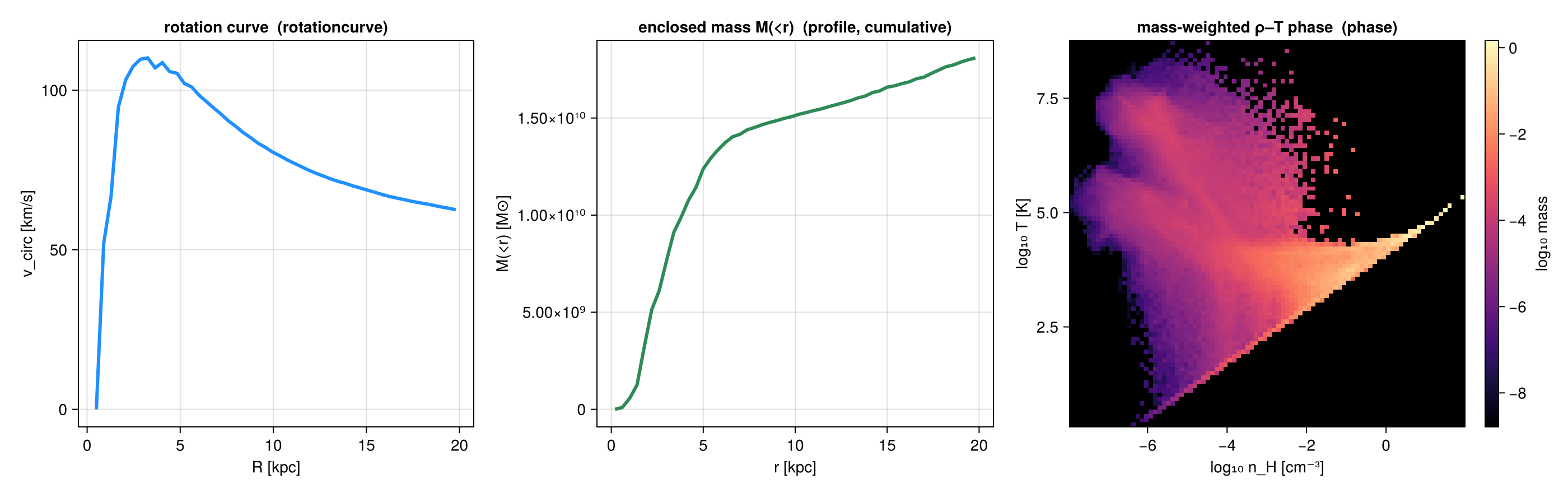
## What you can compute
A profile is configurable along a few **independent** axes: mix and match freely.
**Data source**: 3-D data (`profile(obj, …)`) or a projected 2-D map (`profile(m::DataMapsType, …)`).
**Per-bin reduction**: with a `yvar`, every bin returns *all* of these at once:
| reduction | field(s) | notes |
|---|---|---|
| count / summed weight | `count`, `sum`, `sumw2` | always returned; `sum` = Σweight (the mass/volume/… profile) |
| weighted mean | `mean` | |
| standard deviation | `std` | weight-weighted |
| standard error of the mean | `sem`, `neff` | `sem = std/√neff` (Kish effective sample size) |
| median & **percentiles** | `median`, `quantiles`, `qlevels` | weighted; set the levels via `quantiles=[…]` |
| **extrema** | `min`, `max` | |
| **shape moments** | `skewness`, `kurtosis` | weighted; `kurtosis` is **excess** (0 for a Gaussian) |
| custom | `custom` | `statistic = f(yview, wview)` (or `f(yview)`) |
**Weighting**: `weight = :mass` · `:volume` (grid only) · `:none` (equal cells) · any field. (Should
be non-negative.)
**Binning**: `nbins` + `xrange` + `scale=:linear`/`:log`/**`:equal`** (quantile-spaced *adaptive*
bins, ~equal count per bin, robust for sparse outer radii / noisy data), or explicit `edges=[…]`.
`:log` is **base 10**, not natural log: the edges are `10 .^ range(log10(lo), log10(hi), …)`, so a
`binsize` under `:log` is a dimensionless **dex** step (0.1 = ten bins per decade). The same holds
for `xscale`/`yscale`/`zscale` in `phase` and `profile3d`. Values ≤ 0 have no log bin and are
dropped with a warning.
**Reference point**: `center` in `center_unit` (e.g. `center=[24,24,24], center_unit=:kpc`); the
binning-axis unit is `xunit`, **not** `center_unit` (the axis can be any quantity). `range_unit` is
a back-compat alias of `center_unit`.
**One-line transforms** (opt-in):
| want | kwarg | adds |
|---|---|---|
| physical density ρ(r) / Σ(R) | `geometry=:spherical` / `:cylindrical` | `shell_volume`, `density` |
| **cumulative** / enclosed M(
```@raw html
```
# Derived Fields & `add_field`
!!! tip "Run it yourself"
This page is also an executable **Jupyter notebook**: [open / download `derived_fields.ipynb`](https://github.com/ManuelBehrendt/Notebooks/blob/master/Mera-Docs/version_1.1/derived_fields.ipynb). The notebooks run end-to-end and double as part of Mera's test suite.
Mera computes a large catalogue of **derived quantities** on demand through
[`getvar`](@ref), temperature, sound speed, Mach number, cylindrical/spherical velocities,
specific angular momentum, Jeans length, kinetic/thermal energy, and many more. You ask for
them by name and Mera builds them from the raw stored variables:
```julia
# Example-data root. Point this at your own simulation folder, or set the
# MERA_EXAMPLES environment variable; every path below is built from it.
MERA_EXAMPLES = get(ENV, "MERA_EXAMPLES", "/Volumes/FASTStorage/Simulations/Mera-Tests");
using Mera
info = getinfo(300, joinpath(MERA_EXAMPLES, "RAMSES/mw_L10"))
gas = gethydro(info, verbose=false);
```
```
*__ __ _______ ______ _______
| |_| | | _ | | _ |
| | ___| | || | |_| |
| | |___| |_||_| |
| | ___| __ | |
| ||_|| | |___| | | | _ |
|_| |_|_______|___| |_|__| |__|
Mera v1.8.0 | Julia 1.12.7 | 4 threads
[Mera]: 2026-08-31T14:13:55.676
Code: RAMSES
output [300] summary:
mtime: 2023-04-09T05:34:09
ctime: 2025-06-21T18:31:24.020
=======================================================
simulation time: 445.89 [Myr]
boxlen: 48.0 [kpc]
ncpu: 640
ndim: 3
cosmological: false
-------------------------------------------------------
amr: true
level(s): 6 - 10 --> cellsize(s): 750.0 [pc] - 46.88 [pc]
-------------------------------------------------------
hydro: true
hydro-variables: 7 --> (:rho, :vx, :vy, :vz, :p, :scalar_00, :scalar_01)
hydro-descriptor: (:density, :velocity_x, :velocity_y, :velocity_z, :pressure, :scalar_00, :scalar_01)
γ: 1.6667
-------------------------------------------------------
gravity: true
gravity-variables: (:epot, :ax, :ay, :az)
-------------------------------------------------------
particles: true
- Nstars: 5.445150e+05
particle-variables: 7 --> (:vx, :vy, :vz, :mass, :family, :tag, :birth)
particle-descriptor: (:position_x, :position_y, :position_z, :velocity_x, :velocity_y, :velocity_z, :mass, :identity, :levelp, :family, :tag, :birth_time)
-------------------------------------------------------
rt: false
clumps: false
-------------------------------------------------------
namelist-file: ("&COOLING_PARAMS", "&SF_PARAMS", "&AMR_PARAMS", "&BOUNDARY_PARAMS", "&OUTPUT_PARAMS", "&POISSON_PARAMS", "&RUN_PARAMS", "&FEEDBACK_PARAMS", "&HYDRO_PARAMS", "&INIT_PARAMS", "&REFINE_PARAMS")
-------------------------------------------------------
timer-file: true
compilation-file: false
makefile: true
patchfile: true
=======================================================
Processing files: 100%|██████████████████████████████████████████████████| Time: 0:00:19 (29.71 ms/it)
✓ File processing complete! Combining results...
```
These derived names also work everywhere `getvar` is used internally, in
[`projection`](@ref), [`profile`](@ref), [`phase`](@ref), and friends.
!!! tip "Exact formulas"
For the full set of formulas behind every derived quantity (thermodynamics, velocities,
angular momentum, Mach numbers, Jeans/collapse, gravity) and the aggregate statistics
(`msum`, `center_of_mass`, `bulk_velocity`, `wstat`), see
[How Quantities Are Computed](computation_reference.md).
## Conventions for selected quantities
A few derived quantities carry physical assumptions worth stating explicitly:
- **Jeans length** `:jeanslength` uses the standard form ``λ_J = c_s\,\sqrt{\dfrac{3π}{32\,G\,ρ}}`` (and
`:jeansmass`/`:jeansnumber` follow from it). This is one of several Jeans-length conventions in the
literature; factors of order unity differ between them. The classical ``λ_J = \sqrt{π c^2/(Gρ)}`` is
available with the isothermal (`:jeanslength_iso`, ``c^2=P/ρ``) or adiabatic (`:jeanslength_ad`,
``c^2=γP/ρ``) sound speed. The matching cells-per-Jeans-length are `:jeansnumber_iso`/`:jeansnumber_ad`,
and `:jeansnumber_truelove` gives Truelove et al.'s (1997) ``J = Δx/λ_{J,\mathrm{iso}}``. The `_iso`
variants are what RAMSES `jeans_refine` uses.
- **Magnetosonic Mach numbers** `:mach_alfven`, `:mach_fast`, `:mach_slow` require the magnetic-field
components `:bx,:by,:bz` (an MHD run) and error otherwise. The B field is taken in **RAMSES code
units** and converted to Gaussian-CGS internally (Alfvén speed ``v_A = B/\sqrt{4πρ}``); fast/slow use
``v_{f}=\sqrt{c_s^2+v_A^2}`` and the isotropic ``v_{s}=c_s v_A/\sqrt{c_s^2+v_A^2}``. All three are
dimensionless. (Because they need the field components, `getvar_requirements` lists `:bx,:by,:bz,:rho`
among their dependencies.)
- **Gravity energy and force** `:gravitational_energy`, `:total_binding_energy`, `:Fg` and the
`:F…` components are mass times a gravity field, so they need the hydro object for the cell
mass: `getvar(gravity, hydro, :Fg)`. On gravity alone they raise an error naming the fix.
- **Cosmological-only** quantities, `:overdensity`/`:delta` (hydro) and `:age`-relatives
`:formation_time`/`:formation_redshift`/`:zform` (particles), are defined only for cosmological runs
and error on non-cosmological output.
## The dependency registry
Each derived quantity knows which **raw** variables it is built from. That graph is queryable:
```julia
println("T [K] range : ", extrema(getvar(gas, :T, :K)))
println("Mach range : ", extrema(getvar(gas, :mach)))
println("ekin [erg] (sum) : ", sum(getvar(gas, :ekin, :erg)))
println("requirements :ekin : ", getvar_requirements(:hydro, :ekin))
println("requirements [:sd,:T] : ", getvar_requirements(:hydro, [:sd, :T]))
```
```
T [K] range : (10.195354771220304, 2.3032126579487386e8)
[Mera] Hint: getvar(:v) has no `vcenter` — velocities are in the BOX frame.
Pass vcenter=:auto for an object with bulk motion (`center=` sets the origin,
`vcenter=` the frame). On a halo streaming at ~200 km/s this shifted |J| by 34 %.
(shown once per session; verbose(false) silences Mera's messages)
Mach range : (0.0015019848658968961, 790.5001832586903)
ekin [erg] (sum) : 3.445146674042365e57
requirements :ekin : [:rho, :vx, :vy, :vz]
requirements [:sd,:T] : [:p, :rho]
```
This is what lets the one-call verbs read **only what they need** instead of the whole hydro
state. `project(info, :sd)` reads just `:rho`; `project(info, :sd; direction=:edgeon)` also
pulls the velocities required to orient the disk; [`quicklook`](@ref) reads only `:rho` and
`:p`. When a requirement cannot be resolved (e.g. a custom field whose dependency is not
stored in that output) the readers safely fall back to reading everything.
## Adding your own field: `add_field`
Register a custom derived field once and it behaves like any built-in quantity, including
inside `projection` and `profile`.
```julia
add_field(:vmag2, (obj, deps) -> deps[:vx].^2 .+ deps[:vy].^2 .+ deps[:vz].^2;
depends_on = [:vx, :vy, :vz])
println(":vmag2 via getvar : ", extrema(getvar(gas, :vmag2)))
m = projection(gas, :vmag2; verbose=false) # works in projection too
println(":vmag2 projection map : ", size(m.maps[:vmag2]))
```
```
:vmag2 via getvar : (9.736562820569741e-6, 371.6168616499286)
:vmag2 projection map : (1024, 1024)
```
### The compute kernel
`compute(dataobject, deps)`:
* `dataobject`, the data object the field is being evaluated on.
* `deps`, a `Dict{Symbol,Vector}` holding the arrays named in `depends_on`, already
evaluated with the **same** centering and masking as the outer `getvar` call.
* **Return** the field in **code units**; Mera applies the requested `unit` (or this field's
default `unit`) for you.
Dependencies may be raw variables, other built-in derived quantities, or even other user
fields, they are resolved recursively:
```julia
add_field(:mach_custom, (o, d) -> sqrt.(d[:vx].^2 .+ d[:vy].^2 .+ d[:vz].^2) ./ d[:cs];
depends_on = [:vx, :vy, :vz, :cs])
println(":mach_custom range : ", extrema(getvar(gas, :mach_custom)))
```
```
:mach_custom range : (0.0015019848658968961, 790.5001832586903)
```
A registered field is a first-class citizen: it flows through [`getvar`](@ref), [`projection`](@ref),
[`profile`](@ref) and the rest, with its dependencies read and resolved automatically. For example,
once `:mach_custom` is registered, `projection(gas, :mach_custom)` just works:
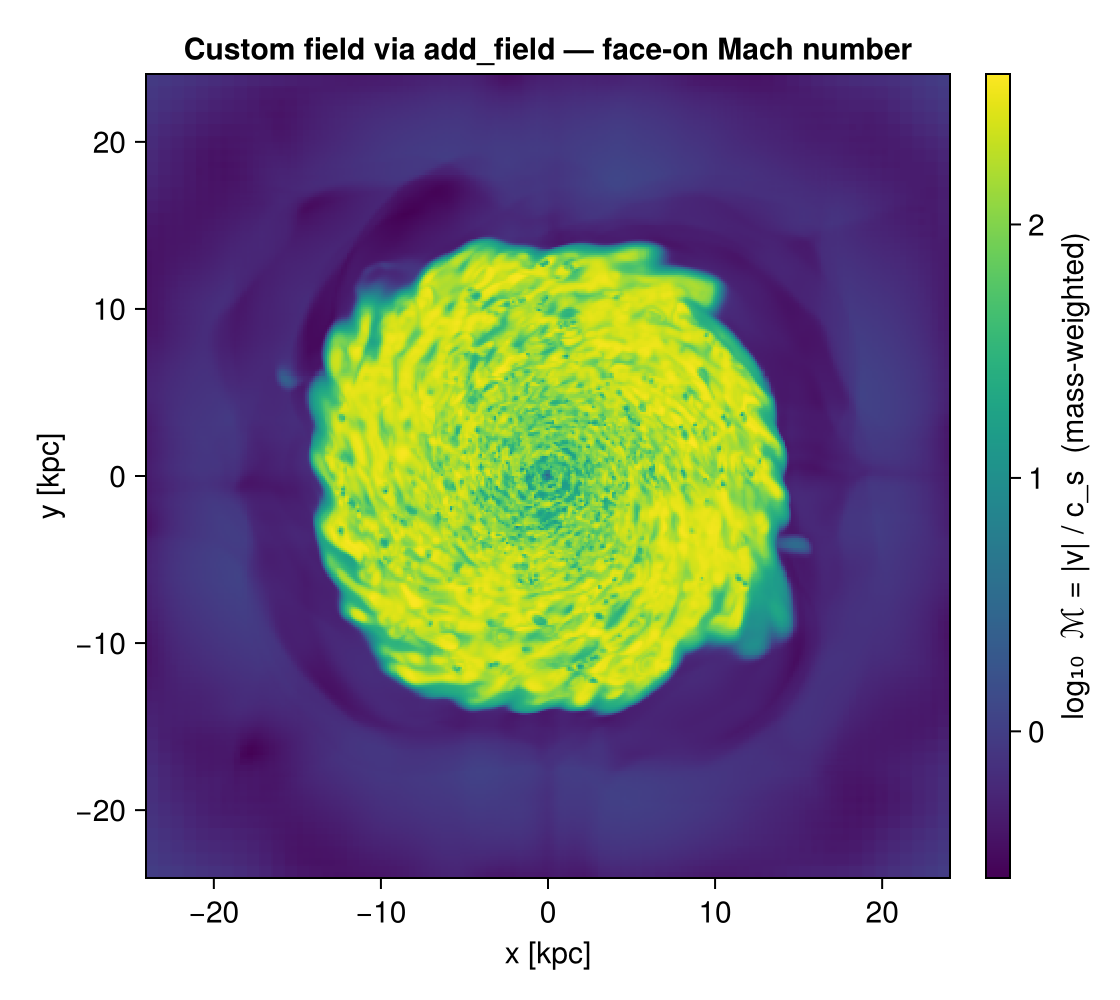
### Units
Give a field a default `unit` (it must be a field of `info.scale`, or `:standard` for code
units). A unit passed at call time overrides the default:
```julia
add_field(:rho_msun_pc3, (o, d) -> d[:rho]; depends_on = [:rho], unit = :Msol_pc3)
getvar(gas, :rho_msun_pc3) # returns code-unit ρ scaled by info.scale.Msol_pc3
getvar(gas, :rho_msun_pc3, :standard) # call-time unit override → code units
```
### Other data types
By default fields are registered for hydro. Register for other kinds (or several at once)
with `datatypes`:
```julia
add_field(:speed, (o, d) -> sqrt.(d[:vx].^2 .+ d[:vy].^2 .+ d[:vz].^2);
depends_on = [:vx, :vy, :vz], datatypes = [:hydro, :particle])
```
Valid kinds: `:hydro`, `:gravity`, `:rt`, `:particle`, `:clump`.
## Managing registered fields
```julia
list_fields(:hydro) # names you added for hydro (custom only)
list_fields(:hydro; builtin=true) # built-in derived fields ∪ your custom ones, sorted
field_info(:vmag2) # (; compute, depends_on, unit, description)
delete_field(:vmag2) # remove it (delete_field(name; datatypes=:all) by default)
```
`list_fields(kind; builtin=true)` is the quickest way to discover what you can ask `getvar` for on a
given data type, it returns the dependency-registry built-ins together with any fields you registered.
It covers most but not every built-in quantity (a few specialised fields are computed directly in
`getvar`); for the complete human-readable catalogue call `getvar()` with no arguments.
The **default** (`builtin=false`) lists only the fields *you* registered, so it starts empty and grows
as you `add_field` (and shrinks again on `delete_field`):
```@example listdefault
using Mera # hide
list_fields(:hydro) # builtin=false (default): custom fields only — none yet
```
```@example listdefault
add_field(:speed2, (o, d) -> d[:vx].^2 .+ d[:vy].^2 .+ d[:vz].^2; depends_on=[:vx, :vy, :vz])
list_fields(:hydro) # the field you just added now appears
```
```@example listdefault
delete_field(:speed2)
list_fields(:hydro) # removed again → back to empty
```
With `builtin=true` the same call instead returns the full catalogue. The lists below are generated
live from the registry at doc-build time, so they always match the installed version. **Hydro:**
```@example fields
using Mera # hide
list_fields(:hydro; builtin=true)
```
**Gravity, RT, particle, clump** (same call, different `kind`):
```@example fields
list_fields(:gravity; builtin=true)
```
```@example fields
list_fields(:particle; builtin=true)
```
```@example fields
(rt = list_fields(:rt; builtin=true), clump = list_fields(:clump; builtin=true))
```
!!! note "Registry scope"
Registered fields live for the current Julia session (they are not persisted to disk).
Put your `add_field` calls in a startup script or at the top of your analysis to make them
available every run.
Registered fields also work as quantities in [First-Look Reports](report.md) cards, the report reads
only the dependencies your field declares.
## Custom units
A field's `unit` can be an existing `info.scale` field, `:standard`, a plain **number** (a literal
code→display factor), or a **custom unit** you register with [`add_unit`](@ref). Registered units work
everywhere a unit is accepted, including `getvar(obj, var, unit)` for built-in quantities:
```julia
add_unit(:Msun_per_century, 1e-2) # 1 code-unit value × 1e-2
add_field(:mdot, (o,d) -> d[:rho]; depends_on=[:rho], unit=:Msun_per_century)
getvar(gas, :mass, :Msun_per_century) # also applies to built-in fields
list_units(); delete_unit(:Msun_per_century)
```
## Inspecting dependencies
```julia
field_dependencies(:hydro, :ekin) # (; direct=[:mass,:v], raw=[:rho,:vx,:vy,:vz])
field_tree(:hydro, :mach) # prints the dependency tree down to raw leaves
```
```
mach
├─ v
│ ├─ vx (raw)
│ ├─ vy (raw)
│ └─ vz (raw)
└─ cs
├─ p (raw)
└─ rho (raw)
```
## See also
Registered fields are used throughout Mera: [`getvar`](@ref) computes them, [`projection`](@ref) and
[`profile`](@ref) read only the dependencies they need (via [`getvar_requirements`](@ref)), and the
[First Look](report.md) (`quicklook` / `report`) verbs benefit from the same needs-based
reading. See also [Star-Formation Rate](sfr.md) and [Clump Finding](clumpfind.md) for fields used in
analysis.
## API
```@docs
add_field
delete_field
list_fields
field_info
field_dependencies
field_tree
add_unit
delete_unit
list_units
getvar_requirements
```
# Bundling Arguments (`myargs`)
Many Mera functions share the same arguments: a spatial region, a center, a resolution, the
verbose/progress switches. Repeating them on every `gethydro`, `getparticles`, `projection`,
`subregion`, … call is verbose and error-prone. [`ArgumentsType`](@ref) lets you fill them in
**once** and pass the whole bundle as the single keyword `myargs=…`.
## The idea
```julia
using Mera
info = getinfo(300, "/data/Mera-Tests/mw_L10", verbose=false)
# 1. make an (empty) argument bundle
myargs = ArgumentsType()
# 2. fill only the fields you need
myargs.pxsize = [100., :pc]
myargs.xrange = [-10., 10.]
myargs.yrange = [-10., 10.]
myargs.zrange = [-2., 2.]
myargs.center = [:boxcenter]
myargs.range_unit = :kpc
# 3. reuse it everywhere — no repetition
gas = gethydro(info, myargs=myargs)
part = getparticles(info, myargs=myargs)
p = projection(gas, :sd, :Msun_pc2, myargs=myargs)
```
`ArgumentsType` also takes the same fields as keywords, which is shorter when you know them
up front:
```julia
myargs = ArgumentsType(pxsize=[100., :pc], xrange=[-10., 10.], yrange=[-10., 10.],
zrange=[-2., 2.], center=[:boxcenter], range_unit=:kpc)
```
Every field left `missing` is ignored, so a bundle only overrides what you set. A value you
pass **explicitly** still wins over the bundle, so you can share a base bundle and tweak one
call:
```julia
projection(gas, :sd, :Msun_pc2, myargs=myargs, pxsize=[50., :pc]) # 50 pc, not the bundle's 100
```
Override with the *same* keyword the bundle sets. Passing a different one that
means the same thing does not work: the bundle above sets `pxsize`, and
`pxsize` takes precedence over `res`, so adding `res=512` to that call would be
ignored rather than overriding anything.
!!! note "One edge case"
Mera decides that you passed a value explicitly by seeing that it differs
from the function's own default. So passing a value that *equals* the
default, `verbose=true` where `true` is already the default, does not
override a bundle that sets it to `false`. Leave such a field out of the
bundle if you want to vary it per call.
See the current contents of a bundle with [`viewfields`](@ref):
```julia
viewfields(myargs)
```
## Deriving a variant: `withargs`
A bundle is mutable, so changing a field changes it for every later call. When you want a
variant, [`withargs`](@ref) returns a **copy** with some fields replaced and leaves the
original alone:
```julia
base = ArgumentsType(lmax=10, xrange=[-10., 10.], center=[:boxcenter], range_unit=:kpc)
coarse = withargs(base; lmax=7) # same region, fewer levels
zoom = withargs(base; xrange=[-2., 2.], yrange=[-2., 2.]) # same levels, smaller region
gas = gethydro(info, myargs=base)
gas_c = gethydro(info, myargs=coarse)
```
`base` is untouched in both cases. The copy is deep, so editing `zoom.xrange` in place cannot
reach back into `base`.
Without it you would write `deepcopy` and then an assignment, and a plain assignment
(`variant = base`) is the trap: it gives you the *same* bundle under a second name, and the
next field you set changes both.
```julia
variant = base # NOT a copy: variant and base are one object
variant = withargs(base) # a copy, safe to change
```
## What you can bundle
`ArgumentsType` collects the arguments shared across the loading, region, and projection
functions:
| group | fields |
|-------|--------|
| region | `xrange`, `yrange`, `zrange`, `center`, `range_unit`, `radius`, `height` |
| resolution / level | `pxsize`, `res`, `lmax` |
| projection view | `direction`, `los`, `up`, `theta`, `phi`, `inclination`, `azimuth`, `position_angle`, `axis`, `angle_unit` |
| slice / plane | `plane`, `plane_ranges`, `thickness`, `position`, `data_center`, `data_center_unit` |
| binning | `binning`, `nmax` |
| output | `verbose`, `show_progress`, `verbose_threads` |
!!! note
Any function that accepts these arguments accepts the `myargs` bundle: `getinfo`,
`gethydro`/`getparticles`/`getgravity`/`getclumps`/`getrt`, `subregion`/`shellregion`,
`projection`, [`loadall`](@ref), and the data converters. `getsinks` is the exception: a
sink catalogue has no spatial selection to apply, so it takes no bundle.
## A silent, reusable bundle
Because the bundle includes `verbose` and `show_progress`: you can make a "quiet" preset and
apply it to a batch of calls:
```julia
quiet = ArgumentsType()
quiet.verbose = false
quiet.show_progress = false
gas = gethydro(info, myargs=quiet)
part = getparticles(info, myargs=quiet)
```
For silencing **all** Mera calls at once (without threading a bundle through each): use the
global switch instead: see [Verbose & progress switches](verbose_progress_switches.md).
## Other ways to bundle: and when `myargs` is the right one
Julia itself has a first-class way to bundle keyword arguments: a `NamedTuple` **splatted**
with `;`. It works directly with Mera functions, no special type needed:
```julia
opts = (; xrange=[-10.,10.], yrange=[-10.,10.], center=[:boxcenter], range_unit=:kpc)
gas = gethydro(info; opts...) # splat the bundle as keywords
p = projection(gas, :sd; opts...)
gethydro(info; opts..., lmax=6) # an explicit keyword overrides the bundle
gethydro(info; merge(opts, (; lmax=6))...) # …or merge first, then splat
```
This is the idiomatic choice for a bundle of options shared by **one** function, or by
functions that all accept the **same** keywords.
There is one important difference. A splatted `NamedTuple` passes *every* key as a keyword,
so a key the target function does **not** accept is an error:
```julia
opts2 = (; xrange=[-10.,10.], los=[0.,0.,1.]) # los is a projection-only argument
gethydro(info; opts2...) # ERROR: gethydro has no `los` keyword
```
[`ArgumentsType`](@ref) (`myargs`) is built exactly for this case: it is a **tolerant,
heterogeneous** bundle. Each function reads only the fields it knows and ignores the rest, so
**one** bundle can carry arguments for several functions with *different* signatures:
```julia
ma = ArgumentsType()
ma.xrange = [-10.,10.]; ma.center = [:boxcenter]; ma.range_unit = :kpc
ma.los = [0.,0.,1.] # only projection uses this
gethydro(info, myargs=ma) # ignores `los`, uses the region
projection(gas, :sd, myargs=ma) # uses `los` and the region
```
Rule of thumb:
| you want | use |
|----------|-----|
| share options across calls of the **same** function (or same keywords) | a `NamedTuple` + `; opts...` (native Julia) |
| override a shared bundle for one call | `; opts..., key=val` or `merge(opts, (; key=val))...` |
| **one** bundle spanning functions with **different** signatures | `myargs=ArgumentsType()` (tolerant) |
| a preconfigured shorthand function | a closure, `myhydro(info; kw...) = gethydro(info; opts..., kw...)` |
You can also combine them: pass a `myargs` bundle *and* splat a `NamedTuple` of extra
keywords in the same call.
## See also
- [Verbose & progress switches](verbose_progress_switches.md): global master switch for messages and progress bars.
- [`gethydro`](@ref), [`projection`](@ref), [`subregion`](@ref): the functions that accept `myargs`.
- [`withargs`](@ref): derive a variant of a bundle without touching the original.
- [Pipelines](pipelines.md): bundles combined with `loadall` and the projection macros.
- [Gallery](gallery.md): complete workflows that use a bundle across a whole analysis.
```@raw html
```
# Pipelines: writing less of the same thing
!!! tip "Run it yourself"
This page is also an executable **Jupyter notebook**: [open / download `pipelines.ipynb`](https://github.com/ManuelBehrendt/Notebooks/blob/master/Mera-Docs/version_1.1/pipelines.ipynb). The notebooks run end-to-end and double as part of Mera's test suite.
Most analysis scripts open the same way. A `getinfo`, then one getter per component, each
repeating the selection you already decided on:
```julia
info = getinfo(300, path)
gas = gethydro(info, lmax=10, xrange=[-10., 10.], center=[:bc], range_unit=:kpc)
grav = getgravity(info, lmax=10, xrange=[-10., 10.], center=[:bc], range_unit=:kpc)
part = getparticles(info, lmax=10, xrange=[-10., 10.], center=[:bc], range_unit=:kpc)
```
Nothing there is wrong, but three quarters of it is repetition, and repetition is where a
selection quietly drifts between components. Mera gives you two independent ways to remove
it, and they compose.
## One bundle for the selection
[`ArgumentsType`](@ref), usually written `myargs`, holds the selection once and travels with
you. It is covered in full on [Bundled Arguments](bundled_arguments.md); the short version:
```julia
args = ArgumentsType(lmax=10, xrange=[-10., 10.], yrange=[-10., 10.],
center=[:bc], range_unit=:kpc)
gas = gethydro(info, myargs=args)
proj = projection(gas, :sd, myargs=args) # the same bundle, further down the pipeline
```
Change the region once and every step follows. Nothing can drift, because there is only one
copy of the numbers.
When you need a variant, [`withargs`](@ref) derives one and leaves the original alone:
```julia
coarse = withargs(args; lmax=7) # same region, fewer levels
zoom = withargs(args; xrange=[-2., 2.], yrange=[-2., 2.])
```
Without it that is a `deepcopy` and an assignment, with the original one slip away from
being edited in place.
```julia
using Mera, CairoMakie
CairoMakie.activate!()
# This page runs on mw_L10 output 300, a 48 kpc Milky-Way box with 640 CPU files.
# Point MW at any RAMSES output or converted MERA file of your own: every step below
# works the same either way.
MW = get(ENV, "MERA_MW", "/Volumes/FASTStorage/Simulations/Mera-Tests/RAMSES/mw_L10")
# the selection, written once
args = ArgumentsType(lmax=9,
xrange=[-12., 12.], yrange=[-12., 12.], zrange=[-2., 2.],
center=[:bc], range_unit=:kpc)
# a variant, without touching the original
zoom = withargs(args; xrange=[-4., 4.], yrange=[-4., 4.])
(args.xrange, zoom.xrange)
```
```
*__ __ _______ ______ _______
| |_| | | _ | | _ |
| | ___| | || | |_| |
| | |___| |_||_| |
| | ___| __ | |
| ||_|| | |___| | | | _ |
|_| |_|_______|___| |_|__| |__|
Mera v1.8.0 | Julia 1.12.7 | 8 threads
```
```
([-12.0, 12.0], [-4.0, 4.0])
```
## One call for the loading
[`loadall`](@ref) does the other half: `getinfo` and every getter in a single call, returning
the components named.
```julia
(; hydro, gravity, particles) = loadall(path, 300; myargs=args)
```
That is the four lines above. The names on the left are ordinary variables you wrote, so a
reader can see where each came from, and every tool that reads Julia can follow them.
It returns a `NamedTuple`, so `info` comes back too and nothing is lost:
```julia
d = loadall(path, 300; myargs=args)
d.info.levelmax
d.hydro
```
By default it reads **every component the snapshot has**. A run without gravity returns
fewer fields rather than failing, so the same line works across simulations that do not hold
the same things:
```julia
d = loadall(path, 300)
keys(d) # (:hydro, :gravity, :particles, :info), or fewer
```
**All six readers are covered**, not just the three above. Clump catalogues, sink particles
and radiative-transfer data come back the same way, and each reader is only attempted when
`info` says the snapshot holds it:
| component | reader |
|---|---|
| `:hydro`, `:gravity`, `:particles` | `gethydro`, `getgravity`, `getparticles` |
| `:clumps`, `:sinks`, `:rt` | `getclumps`, `getsinks`, `getrt` |
The keywords you pass are forwarded only to the readers that accept them. `getsinks`, for
instance, takes no `myargs`, and a sink catalogue has no spatial selection to apply anyway;
passing a bundle for the other components does not disturb it. If a component does fail to
read you get a warning and `nothing` in that field, never a silent gap.
### The same call on a converted snapshot
`loadall` looks for `output_NNNNN.jld2` in the folder and dispatches accordingly:
| | RAMSES output | converted MERA file |
|---|---|---|
| metadata | `getinfo` | `infodata` |
| components | `gethydro`, `getgravity`, … | `loaddata` |
You call neither directly, and **the call does not change**, so converting your data does
not mean rewriting your scripts:
```julia
(; hydro, gravity, particles) = loadall("/path/to/ramses", 300) # RAMSES output
(; hydro, gravity, particles) = loadall("/path/to/merafiles", 300) # converted, same line
```
Selection works on both. Measured on a 28.3M-cell snapshot, taking a 10 x 10 x 4 kpc slab
out of a MERA file:
```julia
d = loadall(merapath, 300; components=(:hydro,),
xrange=[-5., 5.], yrange=[-5., 5.], zrange=[-2., 2.],
center=[:bc], range_unit=:kpc)
# 2,777,683 cells of 28,320,979
```
The macros work the same way on both, and so do bundles:
```julia
args = ArgumentsType(xrange=[-4., 4.], yrange=[-4., 4.], zrange=[-1., 1.],
center=[:bc], range_unit=:kpc)
@loadall merapath 300 hydro gravity myargs=args
@project hydro sd=>:Msol_pc2 T=>:K
```
`info` comes back in the `NamedTuple` either way, so you never need to decide whether to
call `getinfo` or `infodata` yourself.
### Two differences to know about
**The spatial selection costs differently.** On a RAMSES output it is applied while reading,
so the rest is never touched. A MERA file is read whole and then cut. See
[Performance](benchmarks/performance.md) for why, and for when to save the subregion as its
own file instead.
**`lmax` does not apply to a MERA file.** A converted file holds the levels it was written
with, and `loaddata` has no level cap, so every stored level comes back. The same bundle
therefore gives different cell counts on the two routes. Measured on `mw_L10` output 300, a
24 x 24 x 4 kpc slab with `lmax=9`:
| | cells | gas mass |
|---|---:|---:|
| RAMSES output | 2,761,245 | 6.786e9 M⊙ |
| MERA file | 8,329,355 | 6.786e9 M⊙ |
The **mass is identical**, because capping the level coarsens cells without losing any of
them; only the cell count differs. `loadall` warns when you pass `lmax` on the MERA-file
route rather than quietly returning something else than you asked for. If you want a coarser
file, apply the cap when you convert.
Ask for a subset by name, with or without a bundle:
```julia
loadall(path, 300; components=(:hydro, :particles), myargs=args)
loadall(path, 300; components=(:hydro,), lmax=9) # keywords work inline too
```
```julia
# getinfo and every getter in one call, honouring the bundle
(; hydro, particles, info) = loadall(MW, 300; components=(:hydro, :particles), myargs=args)
(cells = length(hydro.data), particles = length(particles.data), levelmax = info.levelmax)
```
```
loadall: output 300 (RAMSES output), components: hydro, particles
Processing files: 100%|██████████████████████████████████████████████████| Time: 0:00:17 (27.54 ms/it)
✓ File processing complete! Combining results...
┌ Warning: getparticles: the `lmax` level cap is not yet supported for particles; loading the full level range (lmax=10). The `lmax` argument is currently ignored.
└ @ Mera ~/code-github/Mera.jl/src/read_data/RAMSES/getparticles.jl:246
```
```
(cells = 2761245, particles = 541797, levelmax = 10)
```
```julia
# a number from the same region
msum(hydro, :Msol)
```
```
6.7859604858483305e9
```
### More than gas, gravity and stars
Most snapshots hold hydro, gravity and particles, which is why the examples name those.
Nothing is limited to them. Ask for clumps, sinks or radiative transfer by name, in the
function or in the macro:
```julia
(; hydro, rt) = loadall(path, 7; components=(:hydro, :rt))
(; clumps, sinks) = loadall(path, 300; components=(:clumps, :sinks))
@loadall path 7 hydro rt # the macro takes them too
@loadall path 300 hydro clumps sinks
```
Left to itself `loadall` reads whatever `info` reports, so **one line covers snapshots that
hold different things**. Three public test simulations, the same call on each:
```julia
# three small public fixtures, each carrying something different
for (name, out) in (("stromgren3d", 7), ("clumps3d", 4), ("sinks3d", 2))
path = download_testdata(name, verbose=false)
d = loadall(path, out, verbose=false, show_progress=false)
println("$(rpad(name, 14)) output $out -> $(keys(d))")
end
```
```
stromgren3d output 7 -> (:hydro, :rt, :info)
clumps3d output 4 -> (:hydro, :gravity, :clumps, :info)
sinks3d output 2 -> (:hydro, :gravity, :particles, :sinks, :info)
```
## The macro, and when not to reach for it
[`@loadall`](@ref) is a thin wrapper that expands to exactly the destructuring above:
```julia
@loadall path 300 hydro gravity particles
```
It binds `hydro`, `gravity`, `particles` and `info` in your scope. That is a normal thing
for a Julia macro to do, in the same family as `@unpack`, `@variables` and `@parameters`,
and it is fine in scripts and notebooks alike: the line that produced the names is right
there above them.
Bundles work here too, so the macro loses nothing:
```julia
@loadall path 300 hydro gravity myargs=args
@loadall path 300 hydro particles lmax=10 range_unit=:kpc
@loadall path 300 hydro rt clumps sinks
```
The macro creates the variables as it expands, so there is no assignment to `hydro` or
`gravity` written anywhere in your file. In a script or a notebook that reads fine: the
`@loadall` line sits right above and names everything it creates.
**Inside a longer function, or in package code, prefer the explicit form.** Someone reading
it sees where `hydro` came from on the line itself, and editors, linters and "go to
definition" can follow a plain assignment, which they cannot always do through a macro. It
costs a few characters:
```julia
(; hydro, gravity, particles) = loadall(path, 300; myargs=args)
```
Both forms call the same function and return the same objects; pick whichever reads better
where you are.
```julia
# the macro form binds the names directly
@loadall MW 300 hydro myargs=args
length(hydro.data)
```
```
loadall: output 300 (RAMSES output), components: hydro
Processing files: 100%|██████████████████████████████████████████████████| Time: 0:00:21 (33.46 ms/it)
✓ File processing complete! Combining results...
```
```
2761245
```
## One call for the projection
`projection` returns a single object whose `maps` is a dictionary, so pulling several
quantities out of it is a line of lookups:
```julia
pj = projection(gas, [:sd, :T], myargs=args)
sd = pj.maps[:sd]; T = pj.maps[:T]
```
[`@project`](@ref) does that in one line, and asking for the quantities together is also the
form that lets the projection use its threads, see
[Performance](benchmarks/performance.md):
```julia
@project gas sd T myargs=args
```
`sd` and `T` are now the maps, and `proj` is the full object, so the extent and everything
else stay reachable:
```julia
heatmap(proj.extent[1:2], proj.extent[3:4], sd)
```
Units go with the quantity they belong to, so adding a third cannot silently misalign a
positional list:
```julia
@project gas sd=>:Msol_pc2 T=>:K myargs=args
@project gas sd=>:Msol_pc2 T # anything without a unit stays :standard
```
Keywords pass straight through, so **off-axis needs no separate macro**, and neither does
anything else `projection` accepts:
```julia
@project gas sd inclination=60 azimuth=30 binning=:exact
@project gas sd pxsize=[100., :pc] direction=:x
@project gas sd mask=my_mask xrange=[-5., 5.] center=[:bc] range_unit=:kpc
```
!!! note "One limit worth knowing"
Every `keyword=value` you write is handed straight to the underlying function, so any
keyword the getters or `projection` accept works here too, including ones added later.
What a macro cannot take is a ready-made collection of keywords. Use the function for
that:
```julia
projection(gas, [:sd]; kws...)
```
The macro says so if you try. A test checks that each macro gives the same result as
the call it stands for.
```julia
# maps in physical units, bound to names; `proj` carries the extent and the rest
@project hydro sd=>:Msol_pc2 T=>:K myargs=args
(sd = size(sd), T = size(T), extent_kpc = round.(proj.extent, digits=1))
```
```
[Mera]: 2026-09-09T17:33:44.255
center: [0.5, 0.5, 0.5] ==> [24.0 [kpc] :: 24.0 [kpc] :: 24.0 [kpc]]
domain:
xmin::xmax: 0.25 :: 0.75 ==> 12.0 [kpc] :: 36.0 [kpc]
ymin::ymax: 0.25 :: 0.75 ==> 12.0 [kpc] :: 36.0 [kpc]
zmin::zmax: 0.4583333 :: 0.5416667 ==> 22.0 [kpc] :: 26.0 [kpc]
Selected var(s)=(:sd, :T)
Weighting = :mass
Effective resolution: 512^2
Map size: 256 x 256
Pixel size: 93.75 [pc]
Simulation min.: 93.75 [pc]
Available threads: 8
Requested max_threads: 8
Variables: 2 (T, sd)
Processing mode: Variable-based parallel (2 threads)
```
```
(sd = (256, 256), T = (256, 256), extent_kpc = [12.0, 36.0, 12.0, 36.0])
```
```julia
fig = Figure(size=(950, 420))
for (i, (m, lab, cm)) in enumerate(((sd, "log Σ [M⊙/pc²]", :inferno),
(T, "log T [K]", :plasma)))
ax = Axis(fig[1, i], aspect=DataAspect(), xlabel="x [kpc]", ylabel="y [kpc]",
title = i == 1 ? "mw_L10 output 300, face-on" : "")
hm = heatmap!(ax, proj.extent[1:2], proj.extent[3:4], log10.(max.(m, eps())); colormap=cm)
Colorbar(fig[2, i], hm, label=lab, vertical=false)
end
fig
```
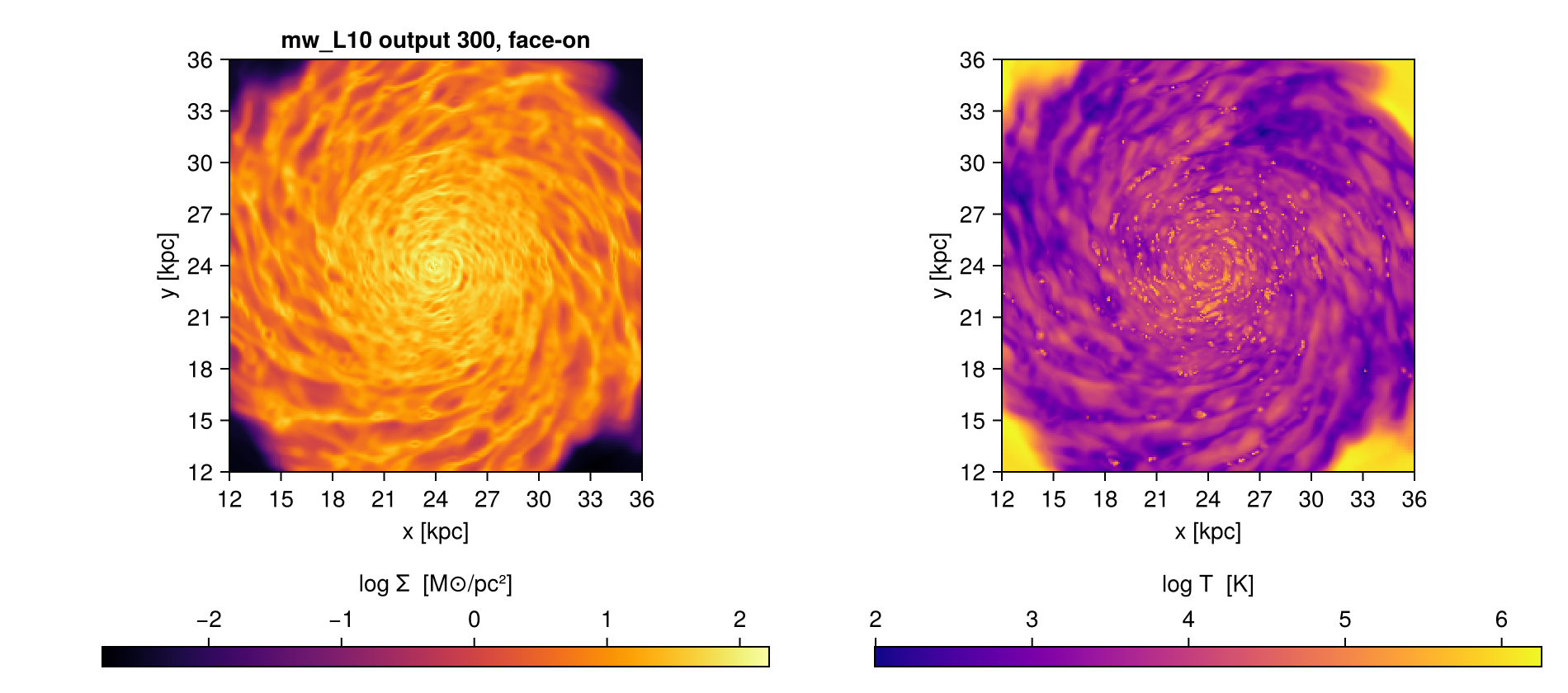
```julia
# off-axis needs no separate macro: the keywords pass straight through
@project hydro sd=>:Msol_pc2 inclination=60 azimuth=30 myargs=args
size(sd)
```
```
[Mera]: 2026-09-09T17:33:58.540
center: [0.5, 0.5, 0.5] ==> [24.0 [kpc] :: 24.0 [kpc] :: 24.0 [kpc]]
domain:
xmin::xmax: 0.25 :: 0.75 ==> 12.0 [kpc] :: 36.0 [kpc]
ymin::ymax: 0.25 :: 0.75 ==> 12.0 [kpc] :: 36.0 [kpc]
zmin::zmax: 0.4583333 :: 0.5416667 ==> 22.0 [kpc] :: 26.0 [kpc]
Selected var(s)=(:sd,)
Weighting = :mass
Off-axis LOS = [0.433, -0.75, 0.5] (binning=:overlap)
Effective resolution: 512^2 → map size: 353 x 215
```
```
(353, 215)
```
## A whole opening, in three lines
```julia
args = ArgumentsType(lmax=10, xrange=[-10., 10.], yrange=[-10., 10.],
center=[:bc], range_unit=:kpc)
(; hydro, particles) = loadall(path, 300; components=(:hydro, :particles), myargs=args)
@project hydro sd T myargs=args
```
The selection appears once, the loading appears once, and the projection reuses both. Three
lines that in full would be a `getinfo`, two getters repeating the same six keywords, a
`projection` repeating them again, and two dictionary lookups.
## Selecting inside the table
Two more macros work on a loaded object rather than on the loading. They are documented with
the features they belong to, and listed here so the pipeline story is in one place:
| | |
|---|---|
| [`@filter`](@ref), [`@where`](@ref), [`@apply`](@ref) | value-based selection on the table, see [Masking and Filtering](05_multi_Masking_Filtering.md) |
| [`@region`](@ref) | compose geometric regions, see [Get Subregions](03_hydro_Get_Subregions.md) |
## A complete workflow
From a path to a figure and a number, with every tool on this page doing its part.
```julia
using Mera, CairoMakie
path = "/path/to/simulation"
# 1. the selection, written once
args = ArgumentsType(lmax=10,
xrange=[-15., 15.], yrange=[-15., 15.], zrange=[-3., 3.],
center=[:bc], range_unit=:kpc)
# 2. everything the snapshot has, in one call, honouring that selection
(; hydro, particles, info) = loadall(path, 300; myargs=args)
# 3. a number: total gas mass in the region
mass = msum(hydro, :Msol)
println("gas mass in the slab: ", round(mass, sigdigits=4), " Msol")
# 4. maps in physical units, bound to names
@project hydro sd=>:Msol_pc2 T=>:K myargs=args
# 5. a figure, using the extent the projection recorded
fig = Figure(size=(900, 380))
for (i, (m, label)) in enumerate(((sd, "Σ [M⊙/pc²]"), (T, "T [K]")))
ax = Axis(fig[1, i], aspect=DataAspect(), xlabel="x [kpc]", ylabel="y [kpc]")
hm = heatmap!(ax, proj.extent[1:2], proj.extent[3:4], log10.(m); colormap=:inferno)
Colorbar(fig[2, i], hm, label="log10 " * label, vertical=false)
end
fig
```
Two things worth noticing. `args` is written once and reaches the loading **and** the
projection, so the map and the mass describe the same region by construction. And `proj`
carries the extent, so the axes are in kpc without you tracking the conversion yourself.
To narrow the region without touching the original bundle:
```julia
zoom = withargs(args; xrange=[-3., 3.], yrange=[-3., 3.])
(; hydro) = loadall(path, 300; components=(:hydro,), myargs=zoom)
@project hydro sd=>:Msol_pc2 myargs=zoom
```
And the same, in the explicit form, for a script or a package:
```julia
d = loadall(path, 300; myargs=args)
proj = projection(d.hydro, [:sd, :T], [:Msol_pc2, :K], myargs=args)
sd, T = proj.maps[:sd], proj.maps[:T]
```
## See also
- [Bundled Arguments](bundled_arguments.md), `myargs` in depth
- [Load by Selection](02_hydro_Load_Selections.md), what the selection keywords mean
- [Multi-threading](multi-threading/multi-threading_intro.md), for reading several snapshots at once
# Positions in a periodic box
Most analysis treats a simulation box as a room: it has an inside, an outside, and walls that
things do not cross. A periodic box is not a room. Its faces are glued together, so a structure can
sit on a face with half of it near `x = 0` and half near `x = boxlen`, and those two halves are
neighbours, not opposites.
Every routine that averages, measures or selects **positions** is affected by that. Routines that
work on values which do not wrap, densities, temperatures, masses, velocities, are not.
The distinction is worth stating plainly, because the failures are quiet.
## What actually goes wrong
Take a clump straddling the `x = 0` face of a box of length `L`, with half its mass at `x = 0.01`
and half at `x = L - 0.01`.
| quantity | naive answer | truth |
|---|---|---|
| centre of mass in x | `L/2` | `0` |
| distance between the halves | `L - 0.02` | `0.02` |
| radius of the clump | about `L/2` | about `0.01` |
The centre of mass is the worst of these. It does not error, does not warn, and lands at the point
**furthest** from the correct answer, in the middle of the box. Plotted, it looks entirely
reasonable.
## The rule
Whenever you take a difference between two positions, use the **minimum image**: of all the
periodic copies of a point, use the nearest one.
```math
d = x_2 - x_1, \qquad d \leftarrow d - L\,\mathrm{round}(d/L)
```
That single substitution fixes distances, radii and separations. Averaging positions needs one step
more, because there is no "nearest copy" of a *set* of points: `mean(0.01, L-0.01)` is ambiguous
until you choose an origin. The standard answer is the **circular mean**: map each coordinate onto a
circle, average there, and map back. It gives the same result no matter where the box is cut, which
is the property a plain mean lacks.
## What Mera does
Mera **detects and reports** periodicity, and **acts on it only when you ask**. `getinfo` prints:
```
boundaries: periodic in x, y, z
```
read from the namelist, since `info_*.txt` does not record boundary conditions. See
[Reproducibility](reproducibility.md#Periodic-boxes) for the details and the mixed case, where a run
wraps in some directions only.
Nothing wraps automatically. Wrapping a run with outflow or reflecting boundaries would produce
wrong physics with no warning, and the snapshot alone cannot tell the two apart.
### Where it is available
```julia
# distances and radii, measured with the minimum image
getvar(gas, :r_sphere_periodic, center=[0., 0., 0.])
getvar(gas, :r_cylinder_periodic, center=[0., 0., 0.])
# centre of mass, via the circular mean
center_of_mass(gas, mask=clump, periodic=true)
center_of_mass(gas, mask=clump, periodic=(x=true, y=true, z=false)) # mixed boundaries
# every region shape reaches around a face, on every data type
subregion(gas, :sphere; radius=0.1, center=[0., 0., 0.], periodic=true)
shellregion(gas, :sphere; radius=[0.05, 0.1], center=[0., 0., 0.], periodic=true)
subregion(gas, :cylinder; radius=0.1, height=0.5, center=[0., 0., 0.], periodic=true)
subregion(gas, :cuboid; xrange=[-0.05, 0.05], yrange=[-0.05, 0.05], zrange=[-0.05, 0.05],
center=[0., 0., 0.], periodic=true)
# a uniform grid that continues around a face instead of stopping at it
covering_grid(gas, [:rho], [:standard], lmax=6, center=[0., 0., 0.],
xrange=[-0.08, 0.08], yrange=[-0.08, 0.08], zrange=[-0.08, 0.08], periodic=true)
shellregion(gas, :cylinder; radius=[0.05, 0.1], height=0.5, center=[0., 0., 0.], periodic=true)
```
`periodic` accepts `true` for all axes, or a per-axis form, because a RAMSES run can close some
faces and leave others open.
### Where it is not, yet
These still assume a non-wrapping box. On a structure that touches a face they give an answer that
is wrong rather than an error:
| function | what happens |
|---|---|
| a cylinder's **height** cut | cylinders wrap in their two radial axes, never along their own axis |
| `projection` | still bins onto the box as stored; roll the finished map with `periodic_recenter` (axis-aligned only) |
| `clumpfind` | a structure crossing a face is found as two |
For projections, roll the finished map with `periodic_recenter`. A whole-pixel shift of an
axis-aligned map is exactly a translation of the box, so no value changes and no interpolation
happens; only the frame moves, and `extent` is relabelled to measure from the new centre.
```julia
p = projection(gas, :sd, :Msol_pc2)
q = periodic_recenter(p, center=[0., 0., 0.]) # direction=:z by default
heatmap(q.extent[1:2], q.extent[3:4], q.maps[:sd])
```
Pass the same `direction` you gave `projection`: a projection does not record which axis it looked
along, so it cannot be inferred. **Off-axis projections are refused**, because a tilted camera plane
has no pixel shift that corresponds to a periodic translation.
For the region shapes that do not yet wrap, place the centre away from a face where you can. Where
you cannot, build the mask
yourself from a periodic radius and pass it on; every routine that takes `mask=` will then respect
it:
```julia
r = getvar(gas, :r_sphere_periodic, center=[0., 0., 0.])
sel = r .< 0.1 # a Bool mask, wrapped correctly
msum(gas, mask=sel)
center_of_mass(gas, mask=sel, periodic=true)
```
### Radial profiles
`profile` bins on any `getvar` quantity, so a periodic radial profile needs nothing special:
bin on `:r_sphere_periodic` instead of `:r_sphere`.
```julia
profile(gas, :r_sphere_periodic, :rho, center=[0., 0., 0.], nbins=25)
```
On the Sedov test simulation, whose blast sits on the origin, that bins 419 cells against 211 for
the plain radius, and recovers the shell at its true density instead of a washed-out one.
On the Sedov test simulation, whose blast sits on the origin, that mask holds **862** cells. The
same cut on the plain `:r_sphere` holds **521**: it misses everything on the wrapped side.
## A checklist
Before trusting a number measured on a periodic run, ask:
- [ ] does the structure touch a face? If not, none of this matters
- [ ] does the quantity involve a **position** difference? Densities and velocities do not
- [ ] if it averages positions, is it using the circular mean?
- [ ] if it selects by radius, is it using the minimum image?
# Reproducibility
A number in a paper should be something you can produce again: next month, on another machine, or
by a referee who has your script. That needs four things, and Mera supports each one.
!!! note "What this page assumes"
That you can start Julia and install a package. If package mode (the `]` prompt) is new to you,
read [Julia for Simulation Analysis](julia_for_simulation_analysis.md) first: it introduces
environments in a few lines, and this page is the full treatment of the same idea.
Set this up **before** you start analysing, not after. Reconstructing which versions produced a
figure six months ago is difficult; recording it as you go costs nothing.
| what you need | how |
|---|---|
| the same package versions | a **Julia project**, described on this page |
| a record of what produced a number | [`provenance`](provenance.md) |
| the formula behind a derived quantity | [How Quantities Are Computed](computation_reference.md) |
| confidence the package itself is correct | [test simulations with known answers](index.md#About-the-data-in-these-tutorials) |
The first is the one people skip, so it comes first here.
## Use a Julia project
By default, packages you install go into a global environment shared by everything on your machine.
Installing an unrelated package for a different task can then change the versions used by your
analysis, without you touching it. A **project** avoids that: it is a directory with its own
package list, so each analysis has its own fixed set of versions.
Create one for your analysis:
```julia
julia> ] # press ] to enter package mode
(@v1.12) pkg> activate . # this directory is now the project
(my_analysis) pkg> add Mera CairoMakie
```
The prompt changes from `@v1.12` to `my_analysis`, which tells you the project is active. Two files
appear in the directory:
```
my_analysis/
├── Project.toml # what you asked for: Mera, CairoMakie
├── Manifest.toml # what you actually got: exact versions of those AND everything they depend on
└── analysis.jl
```
The difference between them matters:
- **`Project.toml`** lists your direct dependencies, with loose version bounds. It says "some Mera 1.x".
- **`Manifest.toml`** records the exact resolved version of every package in the tree, direct and
indirect, hundreds of them. It says "Mera 1.8.0, JLD2 0.6.2, and 300 more, exactly these".
**`Manifest.toml` is what makes a result reproducible.** Keep it next to your script and commit it
to version control.
## Start Julia in the project
The project is only used if you ask for it:
```bash
julia --project=. # from inside the project directory
julia --project=/path/to/my_analysis
```
Forgetting this is the most common mistake. Without it you are back in the global environment and
may get different versions than the ones you recorded. To check inside a session:
```julia
using Pkg
Pkg.status() # shows the active project path at the top
```
In VS Code, select the project folder as the Julia environment (bottom status bar). In a Jupyter
notebook, activate it in the first cell:
```julia
using Pkg; Pkg.activate(@__DIR__)
```
## Reproduce it later, or elsewhere
Given the directory with both TOML files, anyone rebuilds the identical stack:
```bash
git clone https://example.org/my_analysis && cd my_analysis
julia --project=. -e 'using Pkg; Pkg.instantiate()'
julia --project=. analysis.jl
```
`instantiate` reads `Manifest.toml` and downloads exactly those versions. It does not resolve
anything, so the result is the same package set you had, not merely a compatible one.
Two limits worth knowing:
- A `Manifest.toml` is tied to a Julia **minor** version. One written on 1.11 may not instantiate on
1.10. Record the Julia version too, `versioninfo()` prints it, and say it in your methods section.
- Packages with binary dependencies resolve per platform. The Julia packages match; the underlying
system libraries may differ between macOS and Linux.
## A complete example
```julia
# analysis.jl, run with: julia --project=. analysis.jl
using Mera
info = getinfo(300, "/data/sim/mw_L10")
gas = gethydro(info, lmax=10)
m = msum(gas, :Msol)
println("total gas mass: ", m, " Msol")
# record what produced that number, next to the number itself
p = provenance(gas)
println(p)
```
`provenance` returns the Mera version and build, the simulation code and output, the units in use
and a timestamp. Print it into your log, or save it beside the figure. Together with the committed
`Manifest.toml` it answers "what produced this?" completely. See
[Provenance](provenance.md) for the full record and how to store it.
### Maps and camera views
`provenance` describes the snapshot and the build, not the view. A projection map carries its view
itself: `m.los`, `m.up`, `m.center`, `m.pixsize` and `m.extent`, and [`savemap`](@ref) keeps them
together with the provenance. One thing is not recorded: `direction=:faceon`, `:edgeon` and
`axis=:angmom` compute the axis from the data that gets drawn (what you loaded, the `mask`, the
`fov` sphere), so a different load or selection gives a different camera. For a result you want to repeat, store the vector ([`angmom`](@ref), or `m.los` and `m.up`)
and pass it back in. The [off-axis cheatsheet](offaxis_cheatsheet.md#Reproducing-a-map) shows the
call.
## Checking Mera itself
The versions being pinned is only useful if the package is right. Mera publishes fifteen small test
simulations, each with a known answer, either a law that follows from its own setup or reference
values published by the RAMSES developers:
```julia
ENV["MERA_TEST_DATA"] = download_testdata()
ENV["MERA_SMOKE_ONLY"] = "1" # the tier the public simulations can back
using Pkg; Pkg.test("Mera")
```
`MERA_SMOKE_ONLY` matters here. Setting `MERA_TEST_DATA` alone tells the suite that simulation data
is present, and it then also reaches for runs that are not published, so it would fail on something
you never had. With the flag you get every test the public simulations can actually support.
What each tier of that suite proves, and which simulation backs which test, is set out in
the [Testing Framework](advanced_features/testing_guide.md).
That runs the suite against real RAMSES output on your machine, with your versions. Without the
data it still runs and passes, covering every analytic correctness check; see
[`test/README.md`](https://github.com/ManuelBehrendt/Mera.jl/blob/master/test/README.md).
## Checking a formula
Every derived quantity is written out in
[How Quantities Are Computed](computation_reference.md), transcribed from the source, so you can
confirm what a number means rather than trusting a name. If a definition there disagrees with the
one your field uses, you will see it immediately, which is the point.
## Periodic boxes
RAMSES does not record its boundary conditions in `info_*.txt`. When a namelist is present, Mera
infers them and says so in the `getinfo` summary:
```
boundaries: periodic in x, y, z
```
`info.boundaries` is `:periodic`, `:nonperiodic`, `:mixed`, or `:unknown` when there is no namelist
to read.
**`:mixed` is common, not exotic.** RAMSES closes individual *faces*, so a run can wrap in some
directions and not others: RAMSES's own `rad_beams.nml` closes x and y and leaves z periodic. Ask
which:
```julia
Mera.periodic_axes(info.namelist_content) # (x = false, y = false, z = true)
```
and the summary line says so too:
```
boundaries: periodic in z only (x, y closed by &BOUNDARY_PARAMS)
```
**Mera reports this and does nothing else with it.** No function wraps coordinates on your behalf,
because doing that to a run with outflow or reflecting boundaries would give wrong physics with no
warning, and the boundary type cannot be recovered from the snapshot alone. Where wrapping matters,
you ask for it:
```julia
getvar(gas, :r_sphere_periodic, center=[0., 0., 0.]) # minimum-image radius
```
Two places to watch on a periodic run, because neither wraps:
- a `subregion` touching a face is truncated, not wrapped around
- `center_of_mass` of a structure straddling a face lands in the middle of the box, which looks
plausible and is wrong
## A short checklist
- [ ] the analysis lives in its own directory with `Project.toml` and `Manifest.toml`
- [ ] both are committed
- [ ] Julia is started with `--project=`
- [ ] the Julia version is recorded
- [ ] `provenance` output is saved with each result
- [ ] for camera views, the viewing vectors (`m.los`, `m.up`, or the `angmom` axis) are saved too
- [ ] the simulation output and its path are named in the script, not typed by hand each run
# Composable Reports
`report` is the composable counterpart to `quicklook`: instead of one fixed dashboard, you choose
which cards go in, and you get a cost estimate before it runs.
If you have not met either yet, start with [First Look](first_look.md), which introduces both and
shows what each prints. This page is the detail on `report` itself.
---
## `report`: composable cards
`report` turns a simulation output into **one composable first-look summary**: you pick which
quantities and Mera functions to combine: projections, phase diagrams, profiles, star-formation
history, scalar totals or fractions, cross-datatype ratios, across **any** datatype (hydro,
particles, gravity, RT, clumps), and render the result as a text dashboard, a plot grid, or a
saved file. Before it runs you get a **cost/runtime estimate**, and an optional **budget** keeps it
within a wall-time target.
```julia
report(400; path="/sim") # default: Σ map + ρ–T phase + disk ρ(R) profile + SFR history (ascii)
```
The no-argument default is the `quicklook` figures (gas Σ map · ρ-T phase · cylindrical density
profile) **plus a star-formation-history card**, matching the star formation quicklook headlines in
its census; the SFR card skips gracefully on an output without star particles. To compose your own,
list **cards**:
```julia
report(400; path="/sim", output=:ascii, cards=[
ProjectionCard(:hydro, :sd; unit=:Msol_pc2, pxsize=[100., :pc]), # surface-density map
PhaseCard(:hydro, :rho, :T; weight=:mass, xunit=:nH, yunit=:K), # ρ–T phase diagram
ProfileCard(:hydro, :r_cylinder, :rho; weight=:mass, nbins=40, # disk radial density profile
geometry=:cylindrical, center=[:bc], range_unit=:kpc, xunit=:kpc, unit=:nH, yscale=:log),
ScalarCard(:hydro, :mass; reduce=:sum, unit=:Msol), # absolute gas mass
ScalarCard(:hydro, :mass; fraction=true, label="cold_frac", # cold-gas mass fraction
mask = o -> getvar(o, :T, :K) .< 1e4),
SFRCard(:particles; tbinsize=50.0), # star-formation history
])
```
`report` reads **each datatype once** (with only the variables the cards actually need, via
[`getvar_requirements`](@ref)), computes every card, and returns a [`QuickReport`](@ref), which you
can re-render or analyse further. With a Makie backend loaded, `render(rep, :plot)` lays the cards out
as a figure grid:
```julia
using CairoMakie
rep = report(300; path="/sim", output=:none, cards=[ … ])
fig = render(rep, :plot; ncols=2)
CairoMakie.save("report.png", fig)
```
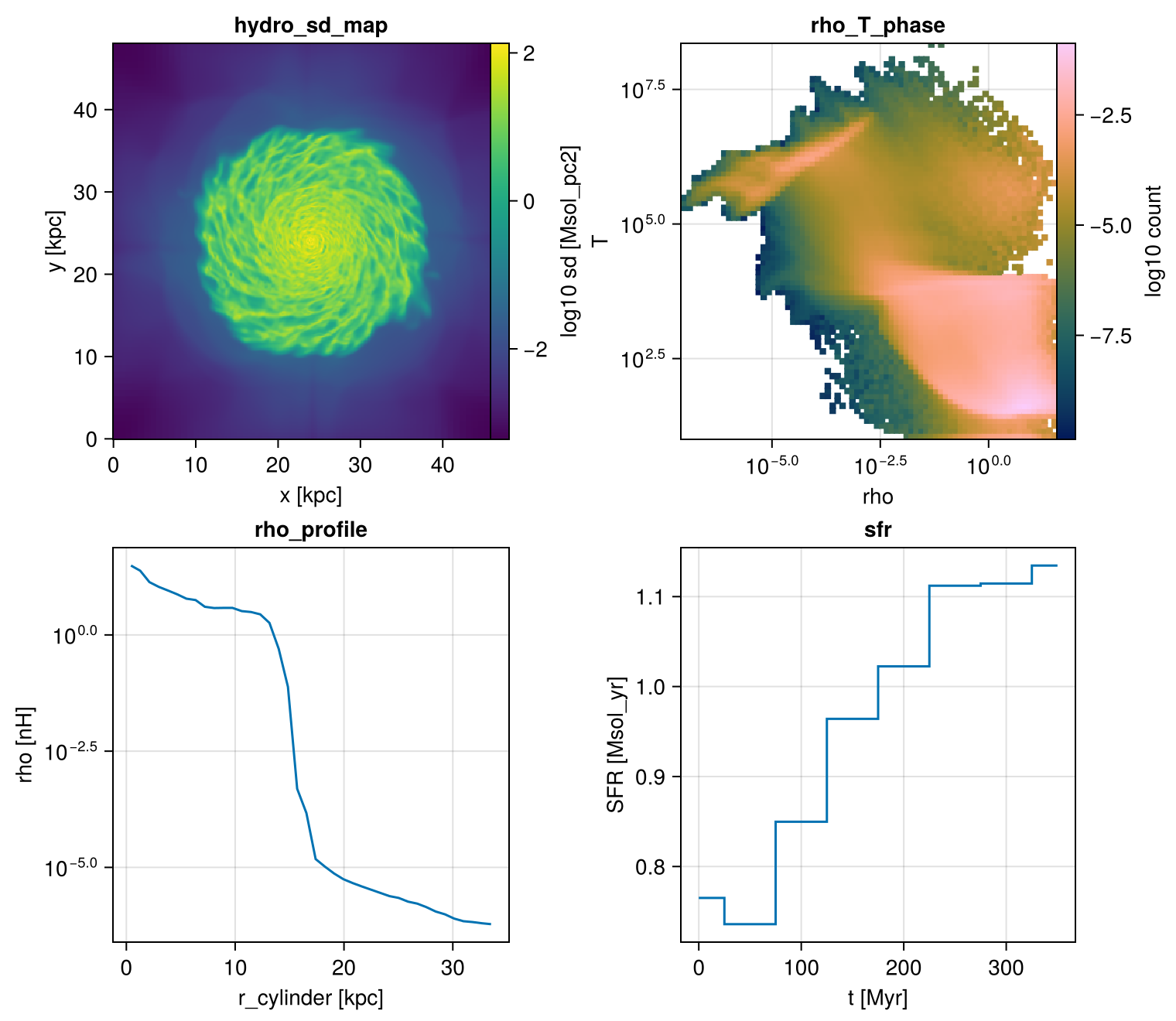
### The cards
Each card names a **datatype** (first argument), a **quantity**, optional **unit**, and card-specific
options. Any name `getvar` understands works, including your own [`add_field`](@ref) fields.
Resolution on a `ProjectionCard` is set either by `pxsize=[value, unit]` (physical size of a
pixel) or by `res` (pixels per side); `pxsize` wins when both are given. Budget mode scales
whichever you used, so `report(...; budget_s=...)` works the same either way.
| Card | Wraps | Example |
|------|-------|---------|
| [`ProjectionCard`](@ref) | [`projection`](@ref) | `ProjectionCard(:hydro, :sd; unit=:Msol_pc2, pxsize=[100., :pc], direction=:edgeon)` |
| [`PhaseCard`](@ref) | [`phase`](@ref) | `PhaseCard(:hydro, :rho, :T; weight=:mass, xunit=:nH, yunit=:K)` |
| [`ProfileCard`](@ref) | [`profile`](@ref) | `ProfileCard(:hydro, :r_sphere, :vz; weight=:mass, nbins=40)` |
| [`ScalarCard`](@ref) | a reduction | `ScalarCard(:particles, :mass; reduce=:sum, unit=:Msol)` |
| [`SFRCard`](@ref) | [`sfr`](@ref) | `SFRCard(:particles; tbinsize=50.0, mode=:probability)` |
| [`CombinedCard`](@ref) | cross-datatype | `baryon_fraction()` |
| [`ClumpCard`](@ref) | [`clumpfind`](@ref) | `ClumpCard(:hydro, :rho; threshold=1e2, threshold_unit=:nH, linking_length=0.2)` |
#### Absolute values vs fractions
Every aggregating card supports a fraction toggle. `ScalarCard(...; fraction=true)` divides by the
total of `relative_to` (or the same variable); `mask` restricts the rows:
```julia
ScalarCard(:hydro, :mass; reduce=:sum, unit=:Msol) # absolute [M⊙]
ScalarCard(:hydro, :mass; fraction=true, mask = o -> getvar(o,:T,:K).<1e4) # fraction of total
```
#### Profiles: geometry & axis scale
A `ProfileCard`'s `geometry` sets the radial coordinate. For a **disk galaxy** use
`xvar=:r_cylinder, geometry=:cylindrical`, radius in the disk plane, which is the default in the
quicklook trio; a **halo/spheroid** is better with `:r_sphere, geometry=:spherical`. `yscale` controls
the plotted y-axis: `:log` (log₁₀), `:identity` (linear), or `:auto` (log when the profile is positive
and spans ≳ 1.5 decades, e.g. density). So the default density profile is cylindrical with a log y-axis.
```julia
ProfileCard(:hydro, :r_cylinder, :rho; geometry=:cylindrical, weight=:mass, unit=:nH, yscale=:log) # disk
ProfileCard(:hydro, :r_sphere, :rho; geometry=:spherical, weight=:mass, unit=:nH) # halo
ProfileCard(:hydro, :r_cylinder, :vz; geometry=:cylindrical, weight=:mass, yscale=:identity) # signed → linear
```
#### Star formation
`SFRCard` (and the standalone [`sfr`](@ref)) build the star-formation history from the star particles
(`birth ≠ 0`): `mode=:none` gives M⊙/yr, `mode=:probability` the normalised SFH. For a single-number
**current SFR** from one snapshot use [`sfr_snapshot`](@ref), the stellar mass formed within a recent
window divided by that window (e.g. 5/10/100 Myr), plus the lifetime mean. Both prefer a stored
**initial-mass** field when present (`mass=:auto`), since the current particle mass underestimates the
formed mass after stellar mass loss. Outputs without stars yield zeros, not an error.
#### Cross-datatype cards
[`CombinedCard`](@ref) reads several datatypes and combines them. Two are built in:
```julia
baryon_fraction() # (gas + stars) / (gas + stars + dark matter) [hydro + particles]
clump_mass_fraction() # total clump mass / total gas mass [clumps + hydro]
# your own:
CombinedCard([:hydro, :particles]; label="gas_to_star") do d
sum(getvar(d[:hydro], :mass, :Msol)) / sum(getvar(d[:particles], :mass, :Msol))
end
```
#### Off-axis maps & custom fields
Projection cards take the same view controls as [`projection`](@ref), `direction=:faceon`/`:edgeon`
tilt the map to the disk (the report automatically reads the velocities needed to orient it):
```julia
ProjectionCard(:hydro, :sd; unit=:Msol_pc2, pxsize=[100., :pc], direction=:edgeon) # edge-on Σ map
```
See [Off-axis Projection](06_offaxis_Projection.md) for the full set of view options. Any field you
register with [`add_field`](@ref) (see [Derived Fields & add_field](derived_fields.md)) is usable as a
card quantity, and the report reads only its dependencies:
```julia
add_field(:vmag, (o,d) -> sqrt.(d[:vx].^2 .+ d[:vy].^2 .+ d[:vz].^2);
depends_on=[:vx,:vy,:vz], unit=:km_s)
ProfileCard(:hydro, :r_cylinder, :vmag; weight=:mass, nbins=40) # uses the custom field
```
### Datatypes & graceful skipping
Scalar and profile cards work on **hydro, particles, gravity, and clumps**; projection cards work on
**hydro and particles** (gravity/RT projection needs hydro pairing). A card is **skipped with a note**,
never an error, when its datatype is absent from the output, or when it needs a variable that
isn't stored (e.g. an RT `:xHII` card on a non-RT run). So a "kitchen-sink" plan runs unchanged on a
hydro-only output.
!!! note "Radiative-transfer (RT) outputs"
On an **RT** simulation the standard quantities are shown correctly: RAMSES stores the radiative-
transfer fields (photon densities, fluxes, ionization fractions) in *separate* files read by
[`getrt`](@ref), so they are **not** part of `nvarh`, `quicklook` and the hydro cards read the
usual gas variables (`:rho`, `:vx…`, `:p`) and derive `:sd`, `:T`, the ρ-T phase and the budget
exactly as on a non-RT run. The RT fields themselves are not in the `quicklook` dashboard, but a
`report` can include them directly with an **RT projection card**, the engine reads the RT data via
[`getrt`](@ref), and an `RtDataType` projects its photon fields (mass-weighting auto-falls back to
volume, since RT carries no mass):
```julia
report(output; path="/sim", cards=[ProjectionCard(:rt, :Np1; pxsize=[100., :pc])]) # photon density, group 1
```
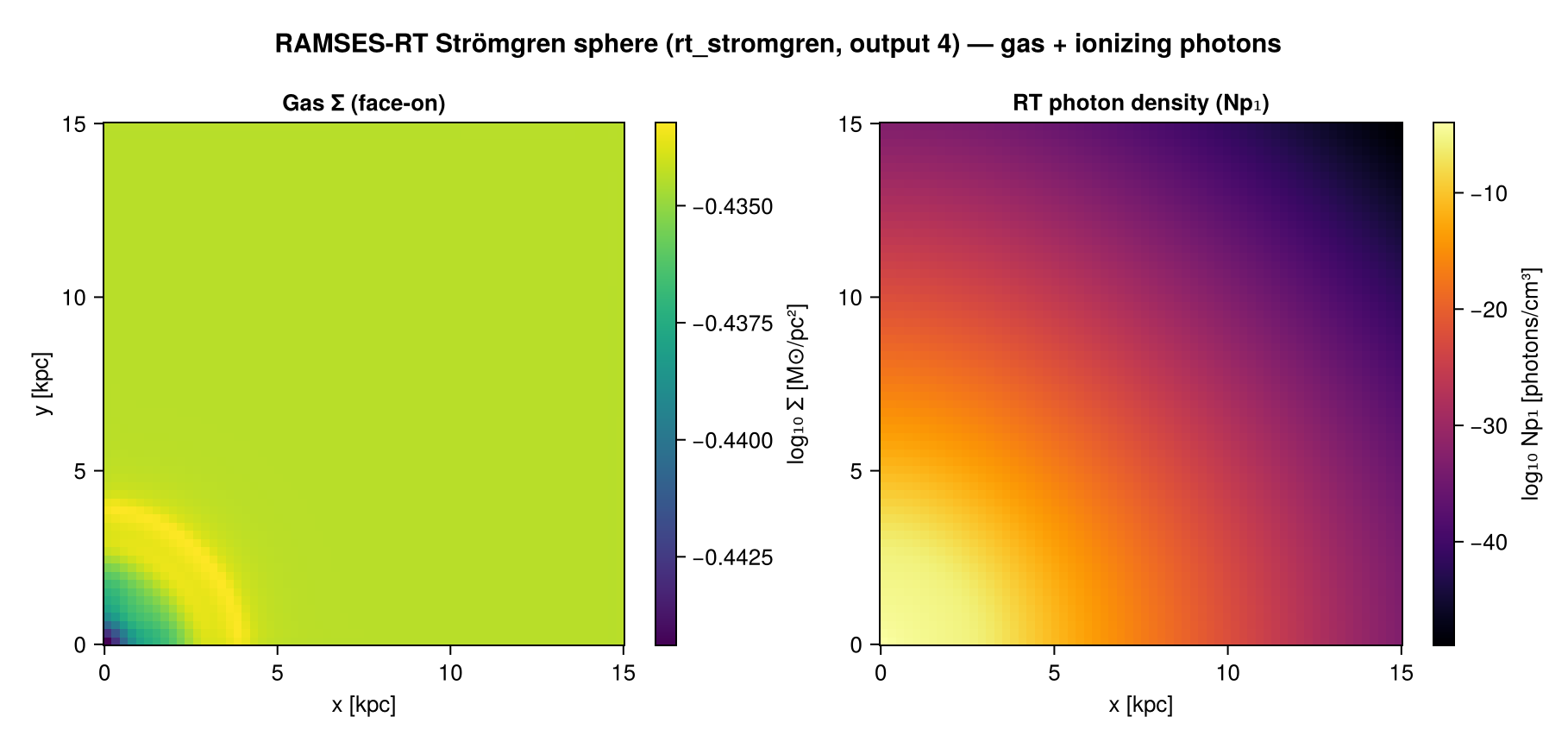
### Cost estimate & budget
Inspect a plan's predicted cost with **zero I/O** before running:
```julia
plan = ReportPlan(400; path="/sim", cards=[...])
preview(plan) # prints a per-card cells/time table + total
estimate(plan) # the same numbers as a NamedTuple
```
The model **self-calibrates**, every real `report` learns this machine's timing; `calibrate!(400; path="/sim")`
runs a quick active calibration. Keep a run within a wall-time target with the **budget**, which drops
the read level first, then shrinks resolution/bins:
```julia
report(plan; budget_s=10.0) # auto-fit ~10 s
downsample(plan, 10.0) # or get the trimmed plan explicitly
```
### Output backends
```julia
rep = report(plan; output=:none) # compute only, render later
render(rep, :ascii) # text dashboard (default)
render(rep, :plot; ncols=2) # Makie Figure grid (needs `using CairoMakie`)
render(rep, :jld2; filename="r.jld2") # full round-trip
render(rep, :file; mode=:dir, prefix="r") # report.jld2 + summary.txt + one PNG per card
loadreport("r.jld2") # reload a saved QuickReport
```
Plotting lives in a **package extension**: load any Makie backend (`using CairoMakie`) and `:plot`
/ `:file mode=:dir` activate. Without one, those backends print a clear "load CairoMakie" message;
everything else (ascii / jld2 / `:file mode=:bundle`) works with no extra dependencies.
### Working with the result
```julia
rep.cards # Vector{ReportResultCard}: each has .label .kind .datatype .data .meta
rep.cards[1].data.z # e.g. the raw projection matrix — re-analyzable / re-plottable
rep.cost.per_card # (label, seconds) per card
rep.summary # header facts (box, levels, time/redshift, sampled?)
rep.provenance # mera/julia version, timestamp, the plan
```
## API
!!! note "Types"
The result types ([`ReportPlan`](@ref), [`QuickReport`](@ref), [`ReportResultCard`](@ref),
[`QuickLookResult`](@ref)) and the card recipe types are documented in the
[Complete API Reference](api.md).
```@docs; canonical=false
report
preview
estimate
downsample
calibrate!
render
loadreport
sfr
ProjectionCard
PhaseCard
ProfileCard
ScalarCard
SFRCard
CombinedCard
baryon_fraction
clump_mass_fraction
```
## See also
* [Derived Fields & add_field](derived_fields.md): register custom quantities usable as cards.
* [Off-axis Projection](06_offaxis_Projection.md): `:faceon`/`:edgeon` and arbitrary lines of sight.
* [Profiles & Phase Diagrams](15_multi_Profiles_Phase.md): the profile/phase tools behind the cards.
* [Star-Formation Rate](sfr.md): the standalone `sfr` / `sfr_snapshot` and the cosmological handling.
# Troubleshooting
The errors people actually hit in their first hour, with the message Mera prints and what to
do about it. If something here is wrong or missing, please
[open an issue](https://github.com/ManuelBehrendt/Mera.jl/issues), that is the fastest way
to get it fixed for the next person.
## "File or folder does not exist"
```
[Mera]: File or folder does not exist: /no/such/path/output_00300/info_00300.txt !
```
Mera builds the filename from the output number and the path, so this message shows you
exactly what it looked for. Two things to check:
**Is the output number right?** `getinfo(300, path)` looks for `output_00300` inside `path`.
Use [`checkoutputs`](@ref) to list what is actually there:
```julia
checkoutputs("/path/to/simulation")
```
**Is the path the parent folder?** It should contain the `output_XXXXX` directories, not be
one of them.
**Are you pointing at non-RAMSES data?** Code detection falls back to RAMSES when it
recognises nothing, so a PLUTO/Athena++/FLASH/GADGET folder that isn't detected produces this
same RAMSES-shaped message about a missing `info_XXXXX.txt`, which is confusing, because your
data has no such file and never should. Name the code explicitly to find out:
```julia
info = getinfo(path, code=:pluto) # :pluto, :chombo, :athena, :flash, :gadget, :ramses
```
Those six are the whole list. `code=` names the reader, so an AREPO snapshot takes `code=:gadget`,
there is no `:arepo`. Mera still reports the real producer: `info.simcode` reads `"AREPO"`.
If that works, detection failed rather than the file being missing, please
[report it](https://github.com/ManuelBehrendt/Mera.jl/issues) with your directory listing,
since detection is meant to handle it. This release reads RAMSES; the frontends for other
codes are on the `multicode` branch, see [Other Simulation Codes](other_codes.md).
## The tutorials point at a folder I don't have
Every tutorial builds its paths from one variable, so you do not have to edit the cells:
```julia
ENV["MERA_EXAMPLES"] = "/path/to/your/simulations" # before `using Mera`
```
If you have no simulation output at all, several pages run on synthetic data with nothing
downloaded: see [Clump Finding](clumpfind_synthetic.md), [Statistics](statistics.md) and
[Uniform Grid](covering_grid.md). `synthetic_clumps()` builds real Mera objects in memory, so
everything downstream works exactly as on a real snapshot.
For a public snapshot to follow along with, the RAMSES samples linked from
[Cosmological Runs](09_multi_Cosmology.md) and [Magnetic Fields](magnetic_fields.md) are
freely downloadable.
## `UndefVarError: Figure not defined` (or `heatmap`, `Axis`, `plot`)
Mera draws nothing itself. The tutorials plot with **CairoMakie**, and a few older projection
pages use **PyPlot**; neither is a Mera dependency:
```julia
using Pkg
Pkg.add("CairoMakie") # what most tutorial figures use
```
Mera's Makie support is a package extension, it activates by itself once a backend is
loaded, with nothing else to install.
## `UndefVarError: Sphere not defined`
The region constructors are **lowercase**:
```julia
using Mera, CairoMakie
subregion(gas, sphere(10.; center=[:bc], range_unit=:kpc))
```
| shape | constructor |
|---|---|
| ball | `sphere(radius)` |
| cylinder | `cylinder(radius, height)` |
| box | `cuboid(; xrange, yrange, zrange)` |
| spherical shell | `sphericalshell(r_in, r_out)` |
| cylindrical shell | `cylindricalshell(r_in, r_out, height)` |
They are lowercase because Makie exports a `Sphere` and a `Cylinder` of its own, and a name
exported by two loaded packages binds to **neither**, so the capitalized spellings produced this
very error in any plotting session. The types still exist for dispatch, as `Mera.Sphere`,
`Mera.Cylinder` and so on; they are simply not exported.
Older scripts that used the capitalized names, or an `import Mera: Sphere, ...` line, need the
lowercase call instead. There is no deprecated alias, because keeping the old name exported
would bring the clash back.
## `FieldError: type ScalesType003 has no field ...`
```
FieldError: type ScalesType003 has no field `kpcc`, available fields: `Mpc`, `kpc`, `pc`, ...
```
A unit name that doesn't exist. The message lists the valid ones. See
[`getunit`](@ref) for how units are resolved, and `viewfields(info.scale)` for the full list
of a given simulation.
## `KeyError: key :something not found`
A quantity name `getvar` doesn't know. Call [`getvar`](@ref) with no arguments to print
everything available for your data type:
```julia
getvar() # lists every quantity, grouped by data type
```
## `TypeError: in keyword argument weighting, expected Vector, got Symbol`
Hydro, gravity and RT projections take the weighting as an **array**; only particle
projections take a bare symbol:
```julia
projection(gas, :T, weighting=[:volume]) # hydro / gravity / RT
projection(part, :sd, weighting=:mass) # particles
```
## My zoomed projection came back far smaller than `res`
`res` counts pixels across the **whole box** (`pixsize = boxlen/res`), not across the window you
asked for. Zoom into a small region of a big box and most of those pixels fall outside it, so
`res=512` on a ±1100 ckpc/h window of a large box returns a **16×16** map.
Set the pixel size directly instead, `pxsize` dominates over both `res` and `lmax`, and means
the same thing whatever the window:
```julia
projection(gas, :sd, :Msol_pc2, pxsize=[0.5, :kpc],
center=[:bc], range_unit=:kpc,
xrange=[-20,20], yrange=[-20,20], zrange=[-5,5])
```
Going finer than the data helps nothing: below the smallest cell you are upsampling, not
resolving.
## More threads didn't speed up my projection
The two backends split the work differently, so check which one you are on:
- **Cell projection (hydro/gravity) parallelises over variables**, not pixels. One variable
stays flat however many threads you give it; ask for several in one call to get the benefit.
- **Particle projection parallelises inside a single map**, so one variable does speed up. But
only `:voronoi` is compute-bound and scales well, `:mass`, `:volume` and `:sph` are limited
by memory bandwidth and typically gain 2 to 4×, not 8×.
```julia
projection(gas, [:sd, :T, :vx], :km_s) # cells: threads over the three variables
projection(part, :sd, max_threads=8) # particles: threads inside the one map
```
Also check you actually started Julia with threads (`Threads.nthreads()`), and that
`max_threads` is not capping you below that.
## Julia runs on one thread
At an interactive prompt Mera tells you on load:
```
Mera v1.8.0 | Julia 1.12.6 | 1 thread
start with `julia -t 8` (or JULIA_NUM_THREADS=8) to use more
```
or check it yourself:
```julia
Threads.nthreads() # 1 unless you asked for more
```
Threads are set when Julia starts, not from inside a session:
```bash
julia -t 8
# or
export JULIA_NUM_THREADS=8
```
See [Multi-Threading](multi-threading/multi-threading_intro.md). Note that more threads is
not automatically faster, a single light projection is serial-fraction dominated and stays
flat; the measured numbers are in
[Performance](benchmarks/performance.md).
## Out of memory on a large output
`gethydro(info)` loads the whole box. Read only what you need instead, the selection happens
during the read, so the memory is never allocated:
```julia
gas = gethydro(info, lmax=10) # cap the refinement level
gas = gethydro(info, xrange=[-10,10], yrange=[-10,10],
zrange=[-2,2], center=[:bc], range_unit=:kpc) # or a spatial window
```
[`usedmemory`](@ref) reports what an object costs, and
[Load by Selection](02_hydro_Load_Selections.md) covers the options in full.
## My `.jld2` file won't open in Python
It isn't meant to. [`savedata`](@ref) stores the Julia object and compresses with LZ4, so
`h5py` can open the container but cannot reconstruct the table. To hand data to Python, use
[`export_vtk`](@ref), write the columns out yourself, or call Mera from Python via JuliaCall.
## The first call is slow
Julia compiles as it runs, so expect several seconds on the first call in a session and
near-instant afterwards. This is normal and not a sign anything is wrong, see
[Julia for Simulation Analysis](julia_for_simulation_analysis.md).
## Mera's load message is in my way
At an interactive prompt Mera prints a banner with its version, Julia's version and the thread
count; in a script it logs a single `[ Info: Mera vX.Y.Z`. Silence both with:
```bash
export MERA_QUIET=1
```
## Something else
- [`viewfields`](@ref) on any Mera object shows what it actually contains.
- [`provenance`](@ref) reports the Mera version, output and simulation code behind a result,
which is the first thing to include in a bug report.
- Reader support differs by simulation code: see
the `multicode` branch before assuming a gap
is a bug.
# Recommended Julia Packages for Mera Workflows
Mera draws nothing itself. The tutorials plot with **CairoMakie**, and a few older
projection pages use **PyPlot**, neither is a Mera dependency:
```julia
using Pkg
Pkg.add("CairoMakie")
```
Mera's Makie support is a package extension: it activates once a backend is loaded.
This is the one package list in these docs. It starts with what you need on the first day and
ends with tools you reach for later. Nothing here is required, Mera works on its own. For how to
install and find packages, see [Finding and Installing Packages](quickreference/03_packages.md).
A package marked **(in Mera)** is already a dependency, so it is installed with Mera and you can
reach it as `Mera.JLD2` and so on. To call it by its own name, add it to your project as well.
## Start here
- **CairoMakie.jl**: static 2D figures for papers and for the tutorials here
- **DataFrames.jl**: tables with a pandas-like API, for the summary tables you build from results
- **IndexedTables.jl** (in Mera): the table type behind `gas.data`, if you work on it directly
- **Unitful.jl**: units on your own numbers, so a wrong conversion raises an error instead of
returning a plausible value
- **UnitfulAstro.jl**: pc, kpc, Msun, Myr and the other astronomical units, on top of Unitful
- **LinearAlgebra**, **Statistics**, **Random**: part of Julia, nothing to install
Mera returns quantities in the unit you ask for, so you only need Unitful for numbers of your own.
## More ways to look at the data
- **GLMakie.jl**: the same figures as CairoMakie in a window you can rotate and zoom
- **PyPlot.jl**: Matplotlib from Julia, used by the older projection pages here
- **PlotlyJS.jl**: plots in a browser, for a figure someone else can pan and zoom
- **AlgebraOfGraphics.jl**: builds Makie figures from a table and a formula, good for panel grids
## Files and formats
- **JLD2.jl** (in Mera): Julia's binary format, what `savedata` writes
- **HDF5.jl** (in Mera): the format most other simulation codes write
- **CSV.jl** (in Mera): reads and writes CSV, the format collaborators usually send
- **FITSIO.jl**: FITS images and tables, for comparing a map with observations
- **Arrow.jl**: column-oriented files that Python and R read without a converter
- **NPZ.jl**: NumPy `.npy` and `.npz` files
- **MAT.jl**: MATLAB `.mat` files
- **WriteVTK.jl** (in Mera): the VTK output behind the [ParaView pages](paraview/paraview_intro.md)
## Statistics and numerics
- **StatsBase.jl** (in Mera): histograms, weighted means, quantiles, sampling
- **Distributions.jl**: probability distributions to sample from or fit
- **Interpolations.jl**: interpolation on gridded data, for example resampling a projection
- **FFTW.jl**: Fourier transforms, for a power spectrum of a uniform grid
- **SpecialFunctions.jl**: gamma, Bessel, error and related functions
- **Roots.jl**: finds where a function crosses zero
- **LsqFit.jl**: fits a nonlinear model to data points
- **Optim.jl**: minimises a function of several parameters
- **HypothesisTests.jl**: the standard statistical tests
- **GLM.jl**: linear and generalised linear regression
- **Measurements.jl**: carries an uncertainty through arithmetic
- **DifferentialEquations.jl**: ODE and PDE solvers, for example orbit integration
## Astronomy and cosmology
- **Cosmology.jl**: distances, ages and lookback times for a given cosmology
- **AstroLib.jl**: small astronomy routines for coordinates, times and precession
- **SkyCoords.jl**: converts between equatorial, galactic and ecliptic coordinates
- **WCS.jl**: world coordinate system transforms, for giving a map sky coordinates
- **AstroImages.jl**: loads and displays FITS images together with their WCS
- **PhysicalConstants.jl**: physical constants as Unitful quantities, with uncertainties
- **DustExtinction.jl**: extinction laws, for reddening a synthetic image
- **Healpix.jl**: maps on the sphere in the HEALPix scheme, for all-sky output
- **DimensionalData.jl**: arrays whose axes carry names and coordinates, useful for a stack of maps
## Timing, profiling and development
- **BenchmarkTools.jl** (in Mera): `@btime`, which handles compilation and run-to-run noise
- **TimerOutputs.jl** (in Mera): named timers inside your own code, to see where the time goes
- **ProgressMeter.jl** (in Mera): progress bars for long loops
- **Revise.jl**: reloads edited code without restarting Julia
- **ProfileView.jl**: a flame graph of a profile
- **StatProfilerHTML.jl**: the same profile as an HTML page, which travels over ssh
- **Debugger.jl**: steps through code line by line
- **PackageCompiler.jl**: builds a system image, which cuts startup and first-call latency
## Python and other languages
- **PythonCall.jl**: calls Python from Julia, for astropy or an existing script
- **PythonPlot.jl**: Matplotlib through PythonCall, the newer alternative to PyPlot
- **RCall.jl**: calls R from Julia
## Quick install (pick what you need)
```julia
using Pkg
Pkg.add([
"CairoMakie", "DataFrames", "Unitful", "UnitfulAstro",
"FITSIO", "Interpolations", "Distributions", "FFTW",
"Cosmology", "AstroLib", "SkyCoords", "WCS"
])
```
!!! tip "Start small"
Begin with `CairoMakie` and `DataFrames`. Add the rest when an analysis asks for them.
Return to: [Home](index.md)
# Verbose & Progress Switches
Every Mera function takes `verbose=` and `show_progress=` keywords. To set them **globally**,
so you don't repeat them on every call, Mera has three switches. Each is *tri-state*:
| call | effect |
|------|--------|
| `switch(false)` | force **off** globally, the per-function argument is ignored |
| `switch(true)` | force **on** globally, the per-function argument is ignored |
| `switch(nothing)` | **neutral**, each function uses its own `verbose=`/`show_progress=` argument |
| `switch()` | print the current state |
The neutral state (`nothing`) is the default, and is how you hand control back to the
individual calls.
## One master switch: `output_mode`
Most often you just want Mera **quiet**, no messages *and* no progress bars. [`output_mode`](@ref)
sets both at once, so you don't toggle them separately:
```julia
using Mera
output_mode(false) # silence everything: messages AND progress bars, everywhere
gas = gethydro(info) # … runs silently, no need for verbose=false, show_progress=false
output_mode(true) # force both on
output_mode(nothing) # back to per-function control (the default)
output_mode() # show current state of both
```
## The individual switches
If you want to control them separately, e.g. keep the informative messages but drop the
progress bars in a log file, use [`verbose`](@ref) and [`showprogress`](@ref):
```julia
verbose(false) # no Mera text messages
showprogress(false) # no progress bars
verbose() # prints "verbose_mode: false"
showprogress() # prints "showprogress_mode: false"
verbose(nothing) # each function decides again (uses its verbose= argument)
showprogress(nothing)
```
`output_mode` is simply both of these together: `output_mode(x)` ≡ `verbose(x); showprogress(x)`.
## When to use which
- **Notebook / interactive**: leave it neutral (`nothing`) and pass `verbose=false` to the
odd call you want quiet.
- **Scripts / batch jobs / CI**: `output_mode(false)` once at the top silences the whole run.
- **Per-call, repeatedly**: bundle `verbose`/`show_progress` into an [`ArgumentsType`](@ref)
(see [Bundling arguments](bundled_arguments.md)) and pass `myargs=`.
## See also
- [Bundling arguments (`myargs`)](bundled_arguments.md): set shared arguments (including the
output switches) once and reuse them.
- [`verbose`](@ref), [`showprogress`](@ref), [`output_mode`](@ref): the switch functions.
# Gallery and shared workflows
Complete recipes that do one thing end to end, written so you can point them at your own simulation
and run them. They live beside the tutorial notebooks, in the
[Notebooks repository](https://github.com/ManuelBehrendt/Notebooks/tree/master/Mera-Docs/version_1.1/gallery).
The tutorial pages on this site teach one function at a time. A gallery recipe is the other shape:
a whole workflow, start to finish, with the reasoning written down. Download it, change two lines,
run it.
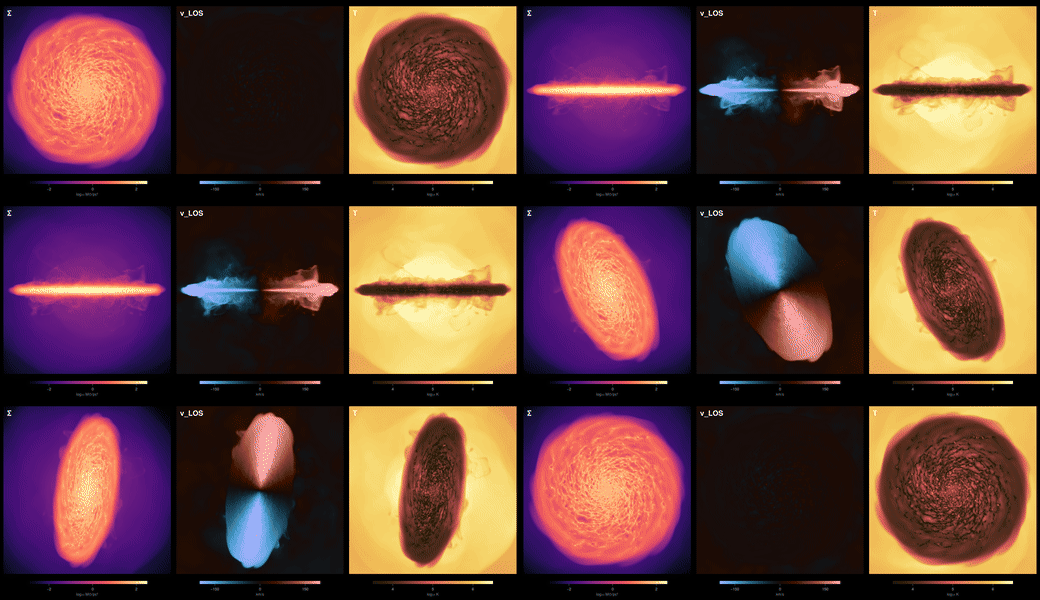
## What is there
```@raw html
A spun-coin movie of your own galaxy
RAMSES · three panels, surface density, line-of-sight velocity and
temperature, with the camera tipping from face-on onto its edge, turning in place, tumbling like
a spun coin and falling flat, as a seamless loop
Cutting a word out of a galaxy
RAMSES · region algebra as a stencil: letters built from cuboids,
unioned into one word, then subtracted from the disc and intersected with it, face-on, tilted to
60°, repeated on the stars, and turned into a movie that flips and zooms
A probe sphere through a galaxy
RAMSES · a sphere the thickness of the disc is carried once around the
galaxy, showing only the gas inside it, while the movie cycles through surface density,
line-of-sight velocity, dispersion, temperature, pressure and the stars
A temperature sweep through a galaxy
RAMSES · the camera holds still and the transfer function moves: a
window 0.12 dex wide slides from 30 K to 10⁷ K, volume rendered, so each phase of the gas lights
up where it lives, followed by the same window opening into fog and three phases nested
together
Rewriting a RAMSES output for any number of CPUs
RAMSES · a galaxy simulation of 197 million cells, written on 5120 ranks,
rewritten for 512, 5120 and 10240 from its RAMSES files and from its mera file alone, every value
checked against the original, with the time, memory and disk each route costs and how fast each
version reads back
Where is the grid refined?
RAMSES · where a 154-million-cell galaxy run spends its cells: cells,
volume and mass per level, the level along every line of sight, the refined zone from the side, the
cell edges over the gas, and every leaf cell of a cube in 3-D, with a movie of it turning
```
Each card links to a folder, not a bare notebook. A recipe is the notebook plus the environment it
ran in:
```
001_coin_flip_movie/
coin_flip_movie.ipynb
Project.toml which packages, and which versions are allowed
Manifest.toml the exact versions that ran, down to every dependency
media/ the figures, the animation, and the thumbnail on the card
```
The notebook's first cell activates that environment, so you run it against the versions the author
ran, not against whatever is installed on your machine. Add the provenance line in the notebook
header, which names the Mera build and the exact snapshot, and a reader has everything needed to get
the same numbers rather than a description of them. [Reproducibility](reproducibility.md) covers the
same idea for your own work.
The leading number is the order recipes arrived. It never changes, so it stays a stable way to refer
to one even if the title does.
The code named at the start of each card is the simulation code that recipe was written against.
Most of Mera's analysis is code-agnostic, so a RAMSES recipe usually transfers to another code with
no change beyond the path. Readers for codes other than RAMSES are in development on the `multicode`
branch and are not part of a 1.x release, so a recipe needing one should say so in its opening
paragraph. See
[Other Simulation Codes](other_codes.md).
## Why share the workflow behind your paper
The most useful recipes are the ones that already exist: the analysis you wrote for a publication.
Putting it here does three things at once.
**It gives your work a second life.** A figure in a paper shows the result. The workflow that made
it shows how, and it keeps being read long after the paper stops being new. Link it from the paper
and cite your own work in the notebook.
**It lets people reproduce you.** Someone who can take your notebook, point it at their own
simulation and get the same kind of figure can check your method against their data instead of
guessing at it from a caption. That does more for the result than another paragraph of method
description can.
**It teaches.** Most of what is hard in an analysis never reaches the paper: which quantity to
weight by, which limits to fix and which to let float, what you tried first that did not work. A
student reading your notebook learns in an afternoon what took you a month.
Nothing here has to be polished or general. A recipe that does one thing, on one kind of data, and
explains why it does it that way, is more useful than a framework nobody runs.
## How to contribute one
Recipes from users are welcome. Open a
[pull request](https://github.com/ManuelBehrendt/Notebooks) adding a folder to the `gallery`
folder, or post it in
[Discussions](https://github.com/ManuelBehrendt/Mera.jl/discussions) and it can be added for you.
### Every recipe says who wrote it
A gallery cannot promise that shared code is correct, and it would be dishonest to imply otherwise.
What it can do is make every recipe **attributable**, so a reader can judge it rather than trust it.
The template prints this block, and only the first two lines are typed:
```
Author Jane Doe, University of Somewhere
Contact jane.doe@somewhere.edu
Reads RAMSES
Mera 1.8.0, Julia 1.12 (or: 1.9.0-DEV (dev multicode @ 3a91f2c), Julia 1.12)
Provenance Mera v1.8.0 | AV05CD/output_00390 | 445.9 Myr | L=48.0 ndim=3 lmin=6 lmax=12
Status contributed 2026-09-11
```
The rest writes itself from the data: `info.simcode` gives **Reads**, [`mera_build`](@ref) gives
**Mera**, and [`provenance_string`](@ref) on what the recipe actually loaded gives **Provenance**.
The provenance line records the version, the snapshot and the grid, so it cannot be written without
having run the thing.
**The Mera line matters if you were running a development version.** `pkgversion` reports the same
"1.8.0" whether that came from the registry or from a checkout of a branch, so a recipe written
against `multicode`, or against your own fork, would look like it was written against the release.
[`mera_build`](@ref) detects a git checkout and records the branch and commit instead, and marks a
working tree with uncommitted changes, because then the commit alone does not identify what ran.
The same build appears in the provenance line, so one line is enough to tell the two apart.
A name makes someone accountable; a provenance line makes the claim concrete; a contact lets a
reader ask.
**Start from the template.** Copy the `TEMPLATE/` folder to `NNN_your_recipe/`, taking the next free
number. It has the skeleton, a `Project.toml` to fill in, and a cell that prints the block for you to
paste, so the only things you type are your name and how to reach you.
Recipes are marked **contributed** until someone else has run them, then **checked** with the date.
Neither is a guarantee; both beat an unsigned script.
### Every recipe shows a thumbnail
The card above is the thumbnail. Pick the one picture that says best what your recipe makes, and
let Mera size it. There is nothing to download: [`makethumb`](@ref) ships with Mera.
```julia
using Mera
makethumb("media/my_figure.png", "media/my_recipe_thumb.png")
```
The whole picture is kept and the spare space padded with your figure's own background colour, so
a wide multi-panel figure keeps its outer panels rather than losing them to a crop. Pass
`mode=:crop` if you would rather fill the card. Give it an animated gif and it takes a frame
part-way in, because an animation that opens on a static pose makes a dull preview from frame zero.
A movie is not read. Decoding video would add a large binary dependency to every Mera install for a
job done once, so save a frame from the code that made the movie, or point it at the preview gif. A
rendered frame is the better source anyway: sharper, and it compresses smaller than an upscaled gif.
From the gallery folder there is a wrapper that knows the layout, so it finds your recipe's `media/`
and names the file after your notebook:
```
julia make_thumb.jl 002_my_recipe
```
It runs in your recipe's own environment, which already pins Mera, so there is nothing extra to
install. Set `MERA_DIR` to a Mera.jl checkout and the thumbnail is copied into the documentation at
the same time, so nobody has to move it by hand.
What makes a recipe useful to someone else:
- **Two lines to change, at the top.** The path and the output number. If a reader has to hunt for
what is specific to your data, they will not run it.
- **Explain the decisions, not the syntax.** Anyone can read a function call. Nobody can guess why
a frame has to be held fixed until their own animation pulses.
- **Say what went wrong.** The traps you hit are the most valuable part of the write-up.
- **A short version at the end.** Once the choices are made, the argument bundles and the
projection macros carry most of the plumbing. Showing the explained form and then the compact one
teaches the concepts before the shorthand.
- **Runnable on data the reader can get**, their own simulation or one of the public test
simulations from `download_testdata()`. A recipe that only runs on unpublished data is a
showcase, and should say so.
- **State the cost**, memory and time, and how to try a cheap version first.
- **Ship the environment.** Commit the `Project.toml` with `[compat]` bounds, and the
`Manifest.toml` alongside it. Pkg's own words are that an independent project lets you check in a
`Project.toml` "and even a `Manifest.toml` if you wish", and that `instantiate` then installs
packages "in the same state that is given by that manifest". Gitignoring the manifest is a
convention for **packages**, which must work across a range of dependency versions; a recipe is an
application, and its job is to reproduce one result. Two limits to note in your notebook: a
manifest records the Julia version it was resolved on, and it pins Julia packages only, so say
what else has to be installed.
## See also
- [Pipelines](pipelines.md), the shorthands that make the compact version of a recipe short
- [Bundling Arguments](bundled_arguments.md), for reusing one selection across a whole workflow
- [The tutorial notebooks](https://github.com/ManuelBehrendt/Notebooks/tree/master/Mera-Docs/version_1.1)
behind every page on this site